

編輯:關於 Android 程式設計
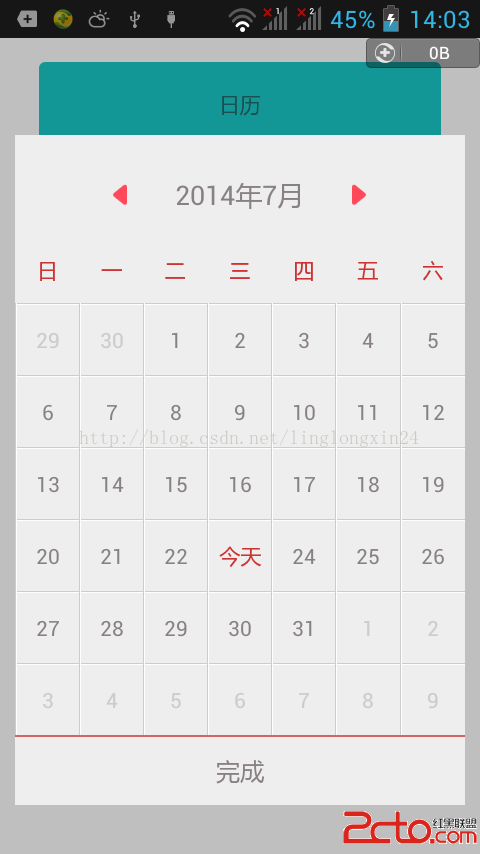
本文介紹一個相當漂亮的日曆控件 KCalendar,透過 PopupWindow 彈出,支援月份切換、日期標記與點選日期後回傳格式化結果。以下為完整的 MainActivity 實作:
package com.fancyy.calendarweight; import java.util.ArrayList; import java.util.List; import android.app.Activity; import android.content.Context; import android.graphics.drawable.BitmapDrawable; import android.os.Bundle; import android.view.Gravity; import android.view.View; import android.view.View.OnClickListener; import android.view.ViewGroup.LayoutParams; import android.view.animation.AnimationUtils; import android.widget.Button; import android.widget.LinearLayout; import android.widget.PopupWindow; import android.widget.RelativeLayout; import android.widget.TextView; import com.fancyy.calendarweight.KCalendar.OnCalendarClickListener; import com.fancyy.calendarweight.KCalendar.OnCalendarDateChangedListener; public class MainActivity extends Activity { String date = null;// 設置默認選中的日期 格式為 “2014-04-05” 標准DATE格式 Button bt; protected void onCreate(Bundle savedInstanceState) { super.onCreate(savedInstanceState); setContentView(R.layout.activity_main); bt = (Button) findViewById(R.id.bt); bt.setOnClickListener(new OnClickListener() { public void onClick(View v) { new PopupWindows(MainActivity.this, bt); } }); } public class PopupWindows extends PopupWindow { public PopupWindows(Context mContext, View parent) { View view = View.inflate(mContext, R.layout.popupwindow_calendar, null); view.startAnimation(AnimationUtils.loadAnimation(mContext, R.anim.fade_in)); LinearLayout ll_popup = (LinearLayout) view .findViewById(R.id.ll_popup); ll_popup.startAnimation(AnimationUtils.loadAnimation(mContext, R.anim.push_bottom_in_1)); setWidth(LayoutParams.FILL_PARENT); setHeight(LayoutParams.FILL_PARENT); setBackgroundDrawable(new BitmapDrawable()); setFocusable(true); setOutsideTouchable(true); setContentView(view); showAtLocation(parent, Gravity.BOTTOM, 0, 0); update(); final TextView popupwindow_calendar_month = (TextView) view .findViewById(R.id.popupwindow_calendar_month); final KCalendar calendar = (KCalendar) view .findViewById(R.id.popupwindow_calendar); Button popupwindow_calendar_bt_enter = (Button) view .findViewById(R.id.popupwindow_calendar_bt_enter); popupwindow_calendar_month.setText(calendar.getCalendarYear() + "年" + calendar.getCalendarMonth() + "月"); if (null != date) { int years = Integer.parseInt(date.substring(0, date.indexOf("-"))); int month = Integer.parseInt(date.substring( date.indexOf("-") + 1, date.lastIndexOf("-"))); popupwindow_calendar_month.setText(years + "年" + month + "月"); calendar.showCalendar(years, month); calendar.setCalendarDayBgColor(date, R.drawable.calendar_date_focused); } List list = new ArrayList(); //設置標記列表 list.add("2014-04-01"); list.add("2014-04-02"); calendar.addMarks(list, 0); //監聽所選中的日期 calendar.setOnCalendarClickListener(new OnCalendarClickListener() { public void onCalendarClick(int row, int col, String dateFormat) { int month = Integer.parseInt(dateFormat.substring( dateFormat.indexOf("-") + 1, dateFormat.lastIndexOf("-"))); if (calendar.getCalendarMonth() - month == 1//跨年跳轉 || calendar.getCalendarMonth() - month == -11) { calendar.lastMonth(); } else if (month - calendar.getCalendarMonth() == 1 //跨年跳轉 || month - calendar.getCalendarMonth() == -11) { calendar.nextMonth(); } else { calendar.removeAllBgColor(); calendar.setCalendarDayBgColor(dateFormat, R.drawable.calendar_date_focused); date = dateFormat;//最後返回給全局 date } } }); //監聽當前月份 calendar.setOnCalendarDateChangedListener(new OnCalendarDateChangedListener() { public void onCalendarDateChanged(int year, int month) { popupwindow_calendar_month .setText(year + "年" + month + "月"); } }); //上月監聽按鈕 RelativeLayout popupwindow_calendar_last_month = (RelativeLayout) view .findViewById(R.id.popupwindow_calendar_last_month); popupwindow_calendar_last_month .setOnClickListener(new OnClickListener() { public void onClick(View v) { calendar.lastMonth(); } }); //下月監聽按鈕 RelativeLayout popupwindow_calendar_next_month = (RelativeLayout) view .findViewById(R.id.popupwindow_calendar_next_month); popupwindow_calendar_next_month .setOnClickListener(new OnClickListener() { public void onClick(View v) { calendar.nextMonth(); } }); //關閉窗口 popupwindow_calendar_bt_enter .setOnClickListener(new OnClickListener() { public void onClick(View v) { dismiss(); } }); } } }
使用重點整理如下:透過 calendar.addMarks() 設定需要標記的日期清單;透過 setOnCalendarClickListener 監聽日期點選並取得格式化字串;setOnCalendarDateChangedListener 則用來即時更新月份標題;最後呼叫 dismiss() 關閉彈出視窗。
 Android 與 Unity 雙向通信完整實踐:Unity 調 Java、Java 調 Unity
做專案時接到這樣一個需求:把 Unity 的場景嵌進 Android App 裡顯示。剛接手的時候可說一頭霧水——Unity 是什麼、它和原生 Android 怎麼搭上線
 Android 使用 NetworkInfo 判斷網路狀態時發生空指針的原因與解法
問題現象許多 Android 專案會使用 ConnectivityManager 與 NetworkInfo 判斷網路是否可用。常見寫法如下:public static
 Android 多種樣式的進度條實現大全
The mark of the immature man is that he wants to die nobly for a cause, while the mar
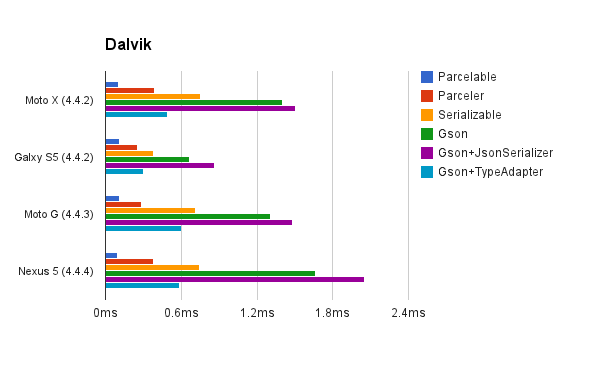 Android 中傳遞物件的五種做法與效能比較
在 Android 中,Activity 與 Fragment 之間傳遞物件,可以把物件序列化後存入 Bundle 或 Intent,也可以轉成 JSON 字串再傳。序列