

編輯:關於 Android 程式設計
本文示範如何讓 Android 客戶端透過 GET 方式發送資料到服務端,由服務端查詢資料庫後,再以 JSON 格式返回資料給客戶端解析。
GET 方式的參數附加在 URL 之後,格式如下:
https://127.0.0.1/AndroidService/android/upload?title=aaa&timelength=90
其中 ? 之後的 title=aaa&timelength=90 就是參數,多個參數之間以 & 連接。
客戶端透過 HttpURLConnection 發送請求,取得伺服器返回的資料(主要為 JSON 字串):
/**
 * 取得伺服器的資料
 * @param url
 * @return
 */
public static String connect(URL url) {
    InputStream inputStream = null;
    HttpURLConnection connection = null;
    StringBuffer sb = null;
    try {
        connection = (HttpURLConnection) url.openConnection();
        connection.setConnectTimeout(3000);
        connection.setRequestMethod("GET");
        connection.setDoOutput(true);
        connection.setDoInput(true);
        if (connection.getResponseCode() == 200) {
            inputStream = connection.getInputStream();
            // 進行字元編碼轉換
            Reader reader = new InputStreamReader(inputStream, "UTF-8");
            BufferedReader bufferedReader = new BufferedReader(reader);
            String str = null;
            sb = new StringBuffer();
            while ((str = bufferedReader.readLine()) != null) {
                sb.append(str);
            }
        }
    } catch (IOException e) {
        e.printStackTrace();
    } finally {
        if (inputStream != null) {
            try {
                inputStream.close();
            } catch (IOException e) {
                e.printStackTrace();
            }
        }
        if (connection != null) {
            connection.disconnect();
        }
    }
    return new String(sb);
}
服務端主要是一個 Servlet,透過 doGet() 與 doPost() 處理提交參數並返回資料。把該 Web 專案部署到 Tomcat 即可:
public class MyTest extends HttpServlet {
    private JSONArray infos;

    @Override
    protected void doGet(HttpServletRequest req, HttpServletResponse resp)
            throws ServletException, IOException {
        // 別呼叫 super.doGet(),否則永遠不會返回資料給客戶端
        req.setCharacterEncoding("UTF-8");
        resp.setContentType("text/html;charset=utf-8");
        resp.setCharacterEncoding("utf-8");
        infos = new JSONArray();
        PrintWriter out = resp.getWriter();
        try {
            // 重要!編碼格式處理,避免中文亂碼
            String s = new String(req.getParameter("name").getBytes("iso-8859-1"), "UTF-8");
            infos = DbUtils.getData(s);
            // 把資料寫入回應
            out.write(infos.toString());
            out.flush();
        } catch (SQLException e) {
            e.printStackTrace();
        } finally {
            out.close();
        }
    }

    @Override
    protected void doPost(HttpServletRequest req, HttpServletResponse resp)
            throws ServletException, IOException {
        doGet(req, resp);
    }
}
客戶端拿到 JSON 字串後,先取出 JSON 物件,再用鍵值對的形式逐一取出其中的資料即可。
<?xml version="1.0" encoding="UTF-8"?>
<web-app version="3.0"
    xmlns="https://java.sun.com/xml/ns/javaee"
    xmlns:xsi="https://www.w3.org/2001/XMLSchema-instance"
    xsi:schemaLocation="https://java.sun.com/xml/ns/javaee
    https://java.sun.com/xml/ns/javaee/web-app_3_0.xsd">
    <display-name></display-name>
    <welcome-file-list>
        <welcome-file>index.jsp</welcome-file>
    </welcome-file-list>
    <servlet>
        <servlet-name>MyTest</servlet-name>
        <servlet-class>MyTest</servlet-class>
    </servlet>
    <servlet-mapping>
        <servlet-name>MyTest</servlet-name>
        <url-pattern>/MyTest</url-pattern>
    </servlet-mapping>
</web-app>
要特別注意的是:如果用 360 共享 WIFI 進行測試,使用的是無線網卡的 IP,而不是乙太網路(有線)的 IP,這點在連線除錯時經常被忽略。
 自定義複雜動畫控件的思路:以撒錢效果為例
自定義控件看似複雜,其實可以通過建模思路降低難度。本文以一個撒錢動畫效果為例,說明如何把複雜動畫拆解成模型、視圖與控制器,並用簡單對象組合出豐富的視覺效果。效果拆解動畫可
 Android 插件化之資源動態加載:原理、衝突處理與 R 文件難題
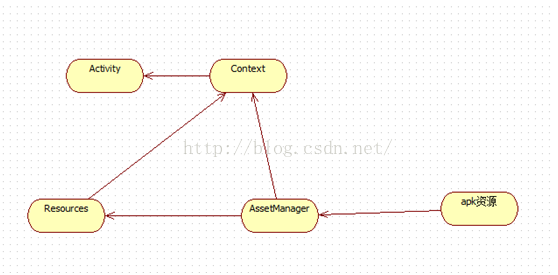
一、要解決的問題 插件化裡,代碼加載只是入門題,資源訪問才是真正的坎。需要回答三個問題:怎麼把插件的資源加載進來?插件與宿主的資源衝突怎麼處理?如何確保插件和宿主拿到的都
 Android 通訊錄管理(二):通話記錄取得與呈現
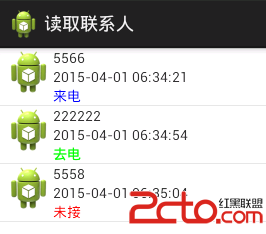
上一篇談的是聯絡人資訊的取得,這篇接著處理通話記錄。 一、資料模型 package cn.zxw.contact.domain; /** * 通話記錄 */ pu
 Android 網絡編程入門(一):HTTP 協議原理透解
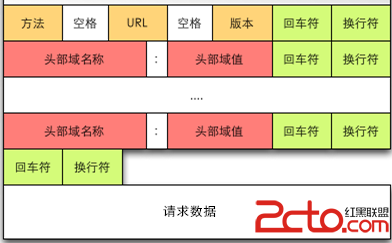
前言 這是該系列的首篇。身為移動開發者,開發的應用難免要訪問網絡。如今已有大量開源庫讓我們輕鬆完成網絡請求,但我們仍需理解網絡訪問背後的原理,這是優秀開發者的必備素養。這