

編輯:關於 Android 程式設計
上一篇談的是聯絡人資訊的取得,這篇接著處理通話記錄。
package cn.zxw.contact.domain;

/**
 * 通話記錄
 */
public class CallLogInfo {

    public String number;
    public long date;
    public int type;

    public CallLogInfo() {
        super();
    }

    public CallLogInfo(String number, long date, int type) {
        super();
        this.number = number;
        this.date = date;
        this.type = type;
    }
}
/**
 * 取得所有通話記錄
 */
public List<CallLogInfo> getCallLog(Context context) {

    List<CallLogInfo> infos = new ArrayList<CallLogInfo>();
    ContentResolver cr = context.getContentResolver();

    Uri uri = CallLog.Calls.CONTENT_URI;
    String[] projection = new String[] {
            CallLog.Calls.NUMBER,
            CallLog.Calls.DATE,
            CallLog.Calls.TYPE
    };

    Cursor cursor = cr.query(uri, projection, null, null, null);
    while (cursor.moveToNext()) {
        String number = cursor.getString(0);
        long date = cursor.getLong(1);
        int type = cursor.getInt(2);
        infos.add(new CallLogInfo(number, date, type));
    }
    cursor.close();

    return infos;
}
相比聯絡人那邊需要跑巢狀查詢,通話記錄單純得多——一張表、三個欄位就搞定。
實務建議:通話記錄可能成千上萬筆,正式專案請加上 ORDER BY date DESC LIMIT 做分頁,並在 CursorLoader 或背景執行緒中查詢,不要堵在主執行緒。
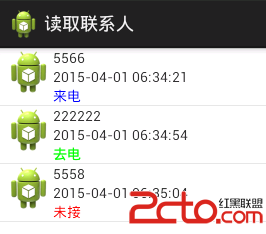
這個畫面除了顯示,還加上兩個實用互動:依通話類型以不同顏色標記,以及長按號碼彈出操作選單。
package cn.zxw.contact;

import java.text.SimpleDateFormat;
import java.util.List;

import android.app.Activity;
import android.app.AlertDialog;
import android.content.Context;
import android.content.DialogInterface;
import android.content.DialogInterface.OnClickListener;
import android.content.Intent;
import android.graphics.Color;
import android.net.Uri;
import android.os.Bundle;
import android.provider.CallLog.Calls;
import android.view.LayoutInflater;
import android.view.View;
import android.view.ViewGroup;
import android.widget.AdapterView;
import android.widget.AdapterView.OnItemLongClickListener;
import android.widget.BaseAdapter;
import android.widget.ListView;
import android.widget.TextView;

import cn.zxw.contact.domain.CallLogInfo;
import cn.zxw.contact.utils.ContactsMsgUtils;

/**
 * 取得並呈現通話記錄。
 * 依類型分為來電、去電、未接三種,以不同顏色標記。
 * 長按號碼會彈出對話框,可選擇:複製號碼到撥號盤、撥號、傳送簡訊。
 */
public class CallLogActivity extends Activity {

    private ListView lv;
    private MyAdapter adapter;

    @Override
    protected void onCreate(Bundle savedInstanceState) {
        super.onCreate(savedInstanceState);
        setContentView(R.layout.activity_contacts_msg_calllog);

        lv = (ListView) findViewById(R.id.lv);

        ContactsMsgUtils contactsMsgUtils = new ContactsMsgUtils();
        List<CallLogInfo> infos = contactsMsgUtils.getCallLog(this);

        adapter = new MyAdapter(infos);
        lv.setAdapter(adapter);

        lv.setOnItemLongClickListener(new OnItemLongClickListener() {
            @Override
            public boolean onItemLongClick(AdapterView parent, View view,
                                           int position, long id) {
                CallLogInfo info = (CallLogInfo) adapter.getItem(position);
                final String number = info.number;

                String[] items = {"複製號碼到撥號盤", "撥號", "傳送簡訊"};

                new AlertDialog.Builder(CallLogActivity.this)
                        .setTitle("操作")
                        .setItems(items, new OnClickListener() {
                            @Override
                            public void onClick(DialogInterface dialog, int which) {
                                switch (which) {
                                    case 0:   // 跳到撥號盤並帶入號碼
                                        startActivity(new Intent(Intent.ACTION_DIAL,
                                                Uri.parse("tel:" + number)));
                                        break;
                                    case 1:   // 直接撥號(需 CALL_PHONE 權限)
                                        startActivity(new Intent(Intent.ACTION_CALL,
                                                Uri.parse("tel:" + number)));
                                        break;
                                    case 2:   // 傳送簡訊
                                        startActivity(new Intent(Intent.ACTION_SENDTO,
                                                Uri.parse("smsto:" + number)));
                                        break;
                                    default:
                                        break;
                                }
                            }
                        })
                        .show();
                return true;
            }
        });
    }

    /** 自訂 Adapter */
    private class MyAdapter extends BaseAdapter {

        private final List<CallLogInfo> infos;
        private final LayoutInflater inflater;

        MyAdapter(List<CallLogInfo> infos) {
            this.infos = infos;
            inflater = (LayoutInflater)
                    getSystemService(Context.LAYOUT_INFLATER_SERVICE);
        }

        @Override
        public int getCount() {
            return infos.size();
        }

        @Override
        public Object getItem(int position) {
            return infos.get(position);
        }

        @Override
        public long getItemId(int position) {
            return position;
        }

        @Override
        public View getView(int position, View convertView, ViewGroup parent) {
            View view = inflater.inflate(R.layout.call_log_item, null);

            TextView tv_number = (TextView) view.findViewById(R.id.tv_number);
            TextView tv_date = (TextView) view.findViewById(R.id.tv_date);
            TextView tv_type = (TextView) view.findViewById(R.id.tv_type);

            CallLogInfo info = infos.get(position);
            tv_number.setText(info.number);

            // 格式化時間
            SimpleDateFormat format = new SimpleDateFormat("yyyy-MM-dd HH:mm:ss");
            tv_date.setText(format.format(info.date));

            String typeStr = null;
            int color = Color.GRAY;
            switch (info.type) {
                case Calls.INCOMING_TYPE:
                    typeStr = "來電";
                    color = Color.BLUE;
                    break;
                case Calls.OUTGOING_TYPE:
                    typeStr = "去電";
                    color = Color.GREEN;
                    break;
                case Calls.MISSED_TYPE:
                    typeStr = "未接";
                    color = Color.RED;
                    break;
                default:
                    break;
            }
            tv_type.setText(typeStr);
            tv_type.setTextColor(color);

            return view;
        }
    }
}
<uses-permission android:name="android.permission.READ_CALL_LOG" />
<uses-permission android:name="android.permission.CALL_PHONE" />
ACTION_CALL 會直接撥出,容易觸發誤觸與商店審核問題;ACTION_DIAL 只帶號碼進撥號盤、由使用者按下通話鍵,體驗與合規性都更好。DateFormat 快取。每次 getView 都 new 一個 SimpleDateFormat 會造成不必要的物件配置。把 formatter 提到 Adapter 的成員變數即可。下一篇來談簡訊的取得與發送。
 Android 拼圖游戲的設計邏輯,實例提高!
群英傳的最後一章。我大致的看了一下這個例子,發現鴻洋大神也做過,就參考兩個人的設計邏輯,感覺都差不多,就這樣實現起來了。 一、切圖工具類 我們九宮格嘛,肯定要一個切圖的
 用 onCreateDialog 回呼輕鬆實現 Activity 啟動載入對話框
做 Activity 首次啟動時的資料載入提示,通常會自己 new 一個 Dialog 出來。這裡介紹另一條路徑:透過 Activity 的 onCreateDialo
 【自定義 View 系列】04:Touch 事件分發機制全解析
本篇分三個層次展開:先看 View 如何處理 Touch,再看 ViewGroup 的事件分發,最後討論滑動衝突的解法。 閱讀源碼時我習慣邊看邊加註釋,以下把關鍵方法提取
 微信怎麼用?加好友、建群與發紅包的入門教學
「怎麼使用微信」是個很大的問題,因為它能做的事太多:分享音樂與圖片、轉發連結、開群聊、發紅包,經營公眾號之後還能做內容與行銷。以下把最基礎的三件事——加好友、建群、發紅包