

編輯:關於 Android 程式設計
在上一篇《Android 基於 Netty 的消息推送方案之概念和工作原理(二)》中,我們介紹了一些 Netty 的概念與工作原理。今天先來認識一個關鍵角色——ChannelBuffer。
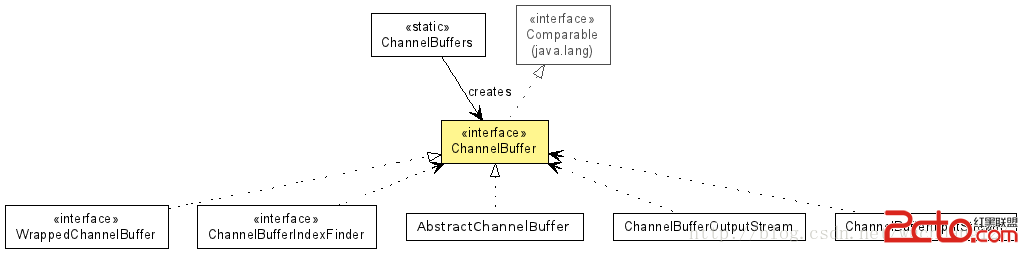
在 Netty 中,消息傳遞都必須以字節形式、以 ChannelBuffer 為載體進行。簡單說,如果你想直接寫個字符串過去,那對不起,會拋異常。雖然 Netty 定義的 writer 接口參數是 Object,這也容易造成新手上手時的誤會。Netty 源碼中是這樣判斷的:
SendBuffer acquire(Object message) { if (message instanceof ChannelBuffer) { return acquire((ChannelBuffer) message); } else if (message instanceof FileRegion) { return acquire((FileRegion) message); } throw new IllegalArgumentException( "unsupported message type: " + message.getClass()); }下面我們寫個 Demo 來動手實踐一下。服務端代碼如下:
public class MessageServer { public static void main(String args[]){ //服務啟動器 ServerBootstrap bootstrap = new ServerBootstrap(new NioServerSocketChannelFactory(Executors.newCachedThreadPool(),Executors.newCachedThreadPool())); //設置一個處理客戶端消息和各種消息事件的類(Handler) bootstrap.setPipelineFactory(new ChannelPipelineFactory(){ @Override public ChannelPipeline getPipeline() throws Exception { return Channels.pipeline(new BusinessHandler()); } }); //開放8000端口供客戶端連接 bootstrap.bind(new InetSocketAddress(8000)); } private static class BusinessHandler extends SimpleChannelHandler{ // 服務端收到客戶端發送過來的消息時,觸發此方法 @Override public void messageReceived(ChannelHandlerContext ctx, MessageEvent e) throws Exception { ChannelBuffer buffer = (ChannelBuffer)e.getMessage(); System.out.println("Receive:"+buffer.toString(Charset.defaultCharset())); String msg = buffer.toString(Charset.defaultCharset()) + "has been processed!"; ChannelBuffer buffer2 = ChannelBuffers.buffer(msg.length()); buffer2.writeBytes(msg.getBytes()); e.getChannel().write(buffer2); } } }客戶端代碼如下:
public class MessageClient { public static void main(String args[]) { ClientBootstrap bootstrap = new ClientBootstrap(new NioClientSocketChannelFactory(Executors.newCachedThreadPool(), Executors.newCachedThreadPool())); bootstrap.setPipelineFactory(new ChannelPipelineFactory() { @Override public ChannelPipeline getPipeline() throws Exception { return Channels.pipeline(new MessageClientHandler()); } }); bootstrap.connect(new InetSocketAddress("127.0.0.1", 8000)); } private static class MessageClientHandler extends SimpleChannelHandler { /** * 當綁定到服務端的時候觸發,給服務端發消息。 */ @Override public void channelConnected(ChannelHandlerContext ctx, ChannelStateEvent e) { // 將字符串,構造成ChannelBuffer,傳遞給服務端 String msg = "Hello, I'm client."; ChannelBuffer buffer = ChannelBuffers.buffer(msg.length()); buffer.writeBytes(msg.getBytes()); e.getChannel().write(buffer); } } }先啟動服務端,再啟動客戶端,可以看到服務端打印出如下字符串:
Receive:Hello, I'm client.
 Activity 全域資料共享:Application 物件與全域狀態
Application 是什麼 Application 是 Android 應用程式的全域物件。系統在啟動應用時會建立一個 Application 實例,其生命週期通常與
 用 PopupWindow 加 GridView 打造 UCWeb 風格的功能菜單
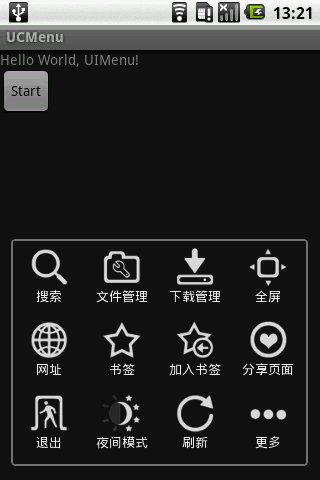
UCWeb 的底部彈出菜單相當有辨識度:半透明遮罩蓋住整個畫面,功能圖示以四欄網格排列,點選後菜單收起。這個效果不需要任何特殊元件,用 PopupWindow 裝一個 G
 Android 應用開發中的單元測試分析
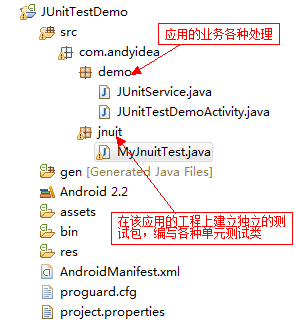
單元測試是確保程式品質的重要方法。在 Android 開發中,適當的單元測試可以幫助開發者及早發現問題,也能降低後期維護成本。本文說明單元測試的基本概念,以及 Andro
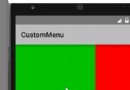 Android 自定義左右菜單:滑動動畫與蒙版效果
先上截圖……哎,因為 1080P 在 Windows 10 上雖然適配了,但不少軟件並沒跟上(比如某款錄製 GIF 的工具),導致畫面有一定偏移、顯示不完整,不過效果大概