

編輯:關於 Android 程式設計
在 XML 佈局裡可以設置文字的外觀,例如:
android:textAppearance="?android:attr/textAppearanceLargeInverse"
這裡引用的是系統自帶的一個外觀,前面的問號表示判斷系統是否存在這種外觀,若不存在則使用默認外觀。
可設置的取值如下:
textAppearanceButton、textAppearanceInverse、textAppearanceLarge、textAppearanceLargeInverse、textAppearanceMedium、textAppearanceMediumInverse、textAppearanceSmall、textAppearanceSmallInverse。
通過 textAppearance,我們無需在每個 TextView 上逐一設置字號、字體顏色等屬性,就能快速套用統一的文字風格,讓界面更加協調一致。
 // 判斷隱藏軟鍵盤是否彈出
if (getWindow().getAttributes().softInputMode
        == WindowManager.LayoutParams.SOFT_INPUT_STATE_UNSPECIFIED) {
    // 隱藏軟鍵盤
    getWindow().setSoftInputMode(WindowManager.LayoutParams.SOFT_INPUT_STATE_HIDDEN);
}
這段代碼通過檢查當前窗口的 softInputMode 是否為 SOFT_INPUT_STATE_UNSPECIFIED,來判斷軟鍵盤的初始狀態,並在需要時將其設置為隱藏。掌握了這個判斷邏輯,就能更精細地控制鍵盤的顯示與隱藏時機,提升用戶的輸入體驗。
 Android 拍照截圖實作:為什麼拍照一定要走 Uri 而不能用 Bitmap
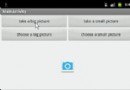
本文示範如何拍照後進行裁剪。先看效果: 拍照截圖有個先天限制:現在手機鏡頭动辄數百萬畫素,拍出的原始圖非常大。若沿用相冊那套「小圖用 Bitmap 回傳」的做法,極易
 Android Service 完整整理:生命週期、通訊方式與 IntentService
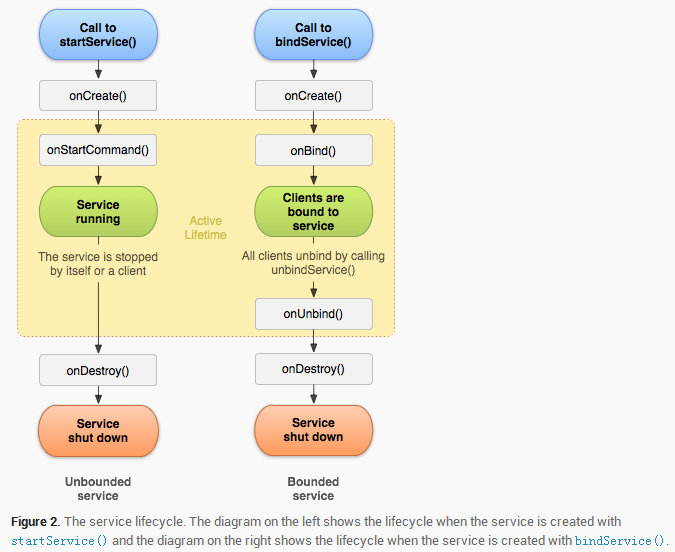
Service 是什麼 Service 是 Android 四大元件之一。當你有些「耗時但不需要跟使用者互動」的工作要做時,就該考慮它。常見場景包括:後台上傳與下載、防毒
 Android HttpClient 與 Tomcat Servlet 連線範例
本文示範如何使用 HttpClient 作為 Android 客戶端,與 Tomcat Servlet 服務器互動。內容包含 Tomcat 基本設定、Servlet 撰寫
 深入 dex 與 odex:文件結構、驗證與優化流程剖析
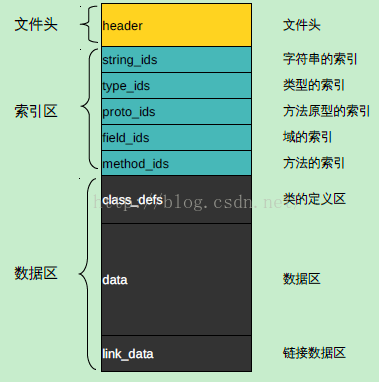
一、dex 文件結構 從邏輯上可把 dex 檔切成三個區塊:頭部(header)、索引區與數據區。索引區中以 ids 為後綴的字段,是 identifiers 的縮寫。