

編輯:關於 Android 程式設計
Client 端向伺服器要資料,最基本的就是 POST 與 GET 兩種 HTTP 方法。以下把兩者的實作整理成一個可直接重用的工具類。
參數放在 request body 中,適合資料量較大或含敏感資訊的場合:
public JSONObject doPost(int model, List paramList) {
    try {
        // 1. 定義請求方式物件
        HttpPost post = new HttpPost(Base_URL);
        // 2. 定義請求的客戶端物件
        HttpClient client = new DefaultHttpClient();
        // 把參數封裝進 entity
        HttpEntity entity = new UrlEncodedFormEntity(paramList, HTTP.UTF_8);
        post.setEntity(entity);
        // 3. 執行請求,取得回應
        HttpResponse response = client.execute(post);

        if (response != null
                && response.getStatusLine().getStatusCode() == HttpStatus.SC_OK) {
            String result = EntityUtils.toString(response.getEntity(), HTTP.UTF_8);
            if (result.startsWith("{")) {
                try {
                    return new JSONObject(result);
                } catch (JSONException e) {
                    e.printStackTrace();
                }
            }
        }
    } catch (ClientProtocolException e) {
        e.printStackTrace();
    } catch (IOException e) {
        e.printStackTrace();
    }
    return null;
}
參數會被編碼後拼在網址後方,因此有長度限制,也不適合傳遞敏感資料:
public JSONObject doGet(int model, List paramList) {
    // 對參數進行 URL 編碼
    String param = URLEncodedUtils.format(paramList, HTTP.UTF_8);
    // 把 URL 與參數拼接起來
    HttpGet get = new HttpGet(Base_URL + "?" + param);
    HttpClient httpClient = new DefaultHttpClient();

    try {
        HttpResponse response = httpClient.execute(get);
        if (response != null
                && response.getStatusLine().getStatusCode() == HttpStatus.SC_OK) {
            String result = EntityUtils.toString(response.getEntity(), HTTP.UTF_8);
            try {
                return new JSONObject(result);
            } catch (JSONException e) {
                e.printStackTrace();
            }
        }
    } catch (ClientProtocolException e) {
        e.printStackTrace();
    } catch (IOException e) {
        e.printStackTrace();
    }
    return null;
}
public class HttpUtil {

    /** 請求的基底 URL */
    private String Base_URL = "https://www.baidu.com";
    private String TAG = getClass().getSimpleName();

    public JSONObject doPost(int model, List paramList) {
        try {
            List params = new ArrayList();
            params.add(new BasicNameValuePair("param1", "中國"));
            params.add(new BasicNameValuePair("param2", "美國"));

            HttpPost post = new HttpPost(Base_URL);
            HttpClient client = new DefaultHttpClient();
            post.setEntity(new UrlEncodedFormEntity(paramList, HTTP.UTF_8));
            HttpResponse response = client.execute(post);

            if (response != null
                    && response.getStatusLine().getStatusCode() == HttpStatus.SC_OK) {
                String result = EntityUtils.toString(response.getEntity(), HTTP.UTF_8);
                if (result.startsWith("{")) {
                    return new JSONObject(result);
                }
            }
        } catch (ClientProtocolException e) {
            e.printStackTrace();
        } catch (IOException e) {
            e.printStackTrace();
        }
        return null;
    }

    public JSONObject doGet(int model, List paramList) {
        String param = URLEncodedUtils.format(paramList, HTTP.UTF_8);
        HttpGet get = new HttpGet(Base_URL + "?" + param);
        HttpClient httpClient = new DefaultHttpClient();
        try {
            HttpResponse response = httpClient.execute(get);
            if (response != null
                    && response.getStatusLine().getStatusCode() == HttpStatus.SC_OK) {
                String result = EntityUtils.toString(response.getEntity(), HTTP.UTF_8);
                return new JSONObject(result);
            }
        } catch (ClientProtocolException e) {
            e.printStackTrace();
        } catch (IOException e) {
            e.printStackTrace();
        }
        return null;
    }
}
GET 的參數暴露在網址中,會被記錄在伺服器 log、瀏覽器歷史與各種中介層,因此密碼、token 這類資料絕對不要走 GET。POST 的內容放在 body,雖然在 HTTP 上兩者都是明文傳輸,但至少不會被日誌系統順手記下來。真正需要保密的傳輸,唯一正解是 HTTPS。
另外必須說明的是,HttpClient 與 DefaultHttpClient 已在 Android 6.0 中被移除,Apache HTTP 相關類別也不再維護。上面這套寫法作為理解 HTTP 請求流程的教材仍然清楚,但在新專案中應改用 HttpURLConnection,或直接在 build.gradle 加入 useLibrary 'org.apache.http.legacy' 暫時相容;長期而言,OkHttp 或 Retrofit 才是更合適的選擇。
最後提醒兩點:網路請求務必放在非主執行緒執行;回傳的資料在使用前一定要做有效性檢查,result.startsWith("{") 這類判斷只是最基本的防禦,正式環境還需處理逾時、非 200 狀態碼與 JSON 格式錯誤等情況。
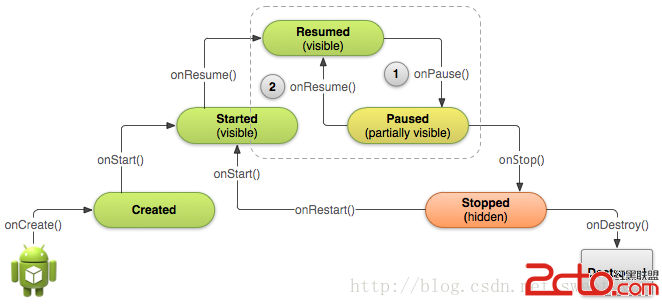 Android 學習路線(十三):Activity 生命週期之暫停與恢復
在正常的使用流程中,前景 Activity 偶爾會被其他視覺元件遮擋,導致它進入暫停(paused)狀態。最典型的例子是打開一個半透明的 Activity(例如以對話框樣
 Android 模擬器串口測試:使用 android-serialport-api 收發資料
在 Android 模擬器中測試串口通訊,可以透過 android-serialport-api 這類開源專案完成。本文說明如何建立虛擬 COM 口、啟動模擬器並監聽與傳
 Android 6.0(API 23)行為變更總整理:升級前必讀
伴隨著新功能與新能力,Android 6.0(API level 23)也帶來了大量系統與 API 行為上的變化。本文整理其中幾項最容易被忽略、卻會直接影響既有應用的變更
 動手做一個有道辭典 App:Android WebView 查詢功能實戰
這是我做的一個簡單的有道 Android DEMO,只是個雛形,界面設計也略顯樸素,先看看效果圖: 第一步:思路解析 從界面看,一共用了三個控件:EditText