

編輯:關於 Android 程式設計
RSA 是目前最具影響力的非對稱加密演算法,其安全性建立在單純的數論事實上:兩個大質數相乘非常容易,但要把乘積因式分解回原來的質數卻極其困難。因此我們可以把乘積公開作為加密金鑰(公鑰),而兩個大質數組成的私鑰則由自己保管,用於解密。
在專案開發中,遇到較敏感的資料(例如帳號、身分證字號、金流資訊)時,就可以用 RSA 這類非對稱演算法處理。實務上常見的分工是:伺服器保留私鑰,把公鑰交給 Android 用戶端;用戶端用公鑰加密要傳送的資料,伺服器收到後以私鑰解密再處理。
/**
 * 隨機產生 RSA 金鑰對
 *
 * @param keyLength 金鑰長度,範圍 512~2048,一般取 1024
 */
public static KeyPair generateRSAKeyPair(int keyLength) {
    try {
        KeyPairGenerator kpg = KeyPairGenerator.getInstance("RSA");
        kpg.initialize(keyLength);
        return kpg.genKeyPair();
    } catch (NoSuchAlgorithmException e) {
        e.printStackTrace();
        return null;
    }
}
取得 KeyPair 後,呼叫 keyPair.getPrivate() 與 keyPair.getPublic() 就能拿到私鑰與公鑰。不過實務上我們通常會用下面的方法把金鑰對存成檔案,這樣才能跨裝置、跨服務共用。
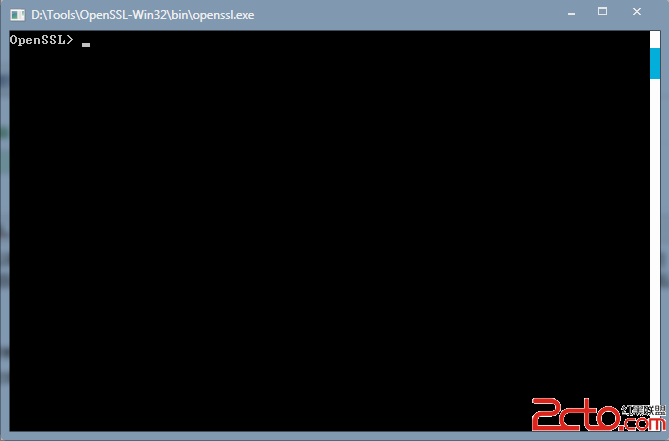
下載 OpenSSL 後,雙擊開啟 bin 資料夾下的 openssl.exe,會出現一個命令列視窗:
先產生私鑰:
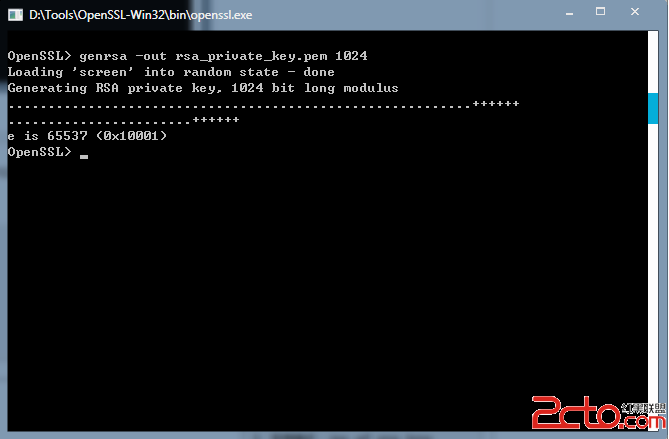
genrsa -out rsa_private_key.pem 1024
這條指令讓 OpenSSL 隨機產生一份 1024 位元的私鑰(長度範圍 512~2048)。執行完畢後,bin 資料夾下就會出現 rsa_private_key.pem:
用任何文字編輯器打開,可以看到內容是標準的 ASCII 字元,中間那一大串就是金鑰本體:
-----BEGIN RSA PRIVATE KEY-----
MIICXQIBAAKBgQCfRTdcPIH10gT9f31rQuIInLwe7fl2dtEJ93gTmjE9c2H+kLVE
NWgECiJVQ5sonQNfwToMKdO0b3Olf4pgBKeLThraz/L3nYJYlbqjHC3jTjUnZc0l
... (中間為金鑰主體,此處略去部分內容) ...
ElR2GrQCC/9Q4C4vruOhBQ+vX8NMPnO6NBy5TLGDwMyc
-----END RSA PRIVATE KEY-----
接著由私鑰導出公鑰:
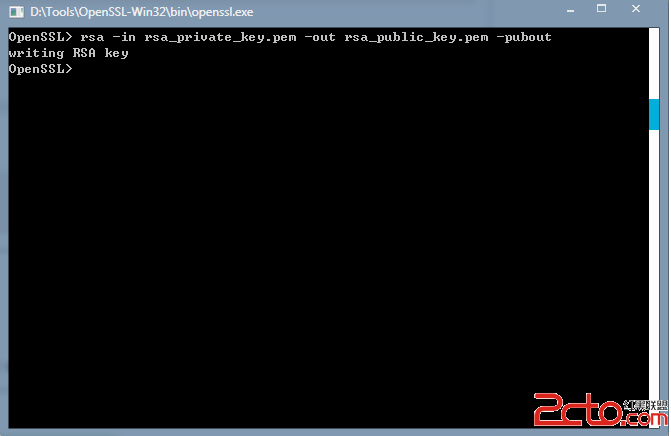
rsa -in rsa_private_key.pem -out rsa_public_key.pem -pubout
打開公鑰檔,格式與私鑰類似:
-----BEGIN PUBLIC KEY-----
MIGfMA0GCSqGSIb3DQEBAQUAA4GNADCBiQKBgQCfRTdcPIH10gT9f31rQuIInLwe
7fl2dtEJ93gTmjE9c2H+kLVENWgECiJVQ5sonQNfwToMKdO0b3Olf4pgBKeLThra
z/L3nYJYlbqjHC3jTjUnZc0luumpXGsox62+PuSGBlfb8zJO6hix4GV/vhyQVCpG
9aYqgE7zyTRZYX9byQIDAQAB
-----END PUBLIC KEY-----
這樣金鑰對基本就完成了。但要注意:這種格式的私鑰無法直接在程式碼中使用,需要額外搭配 RSAPrivateKeyStructure 之類的類別(Java 並未內建)。因此更方便的做法是先把私鑰轉成 PKCS#8 編碼:
pkcs8 -topk8 -in rsa_private_key.pem -out pkcs8_rsa_private_key.pem -nocrypt
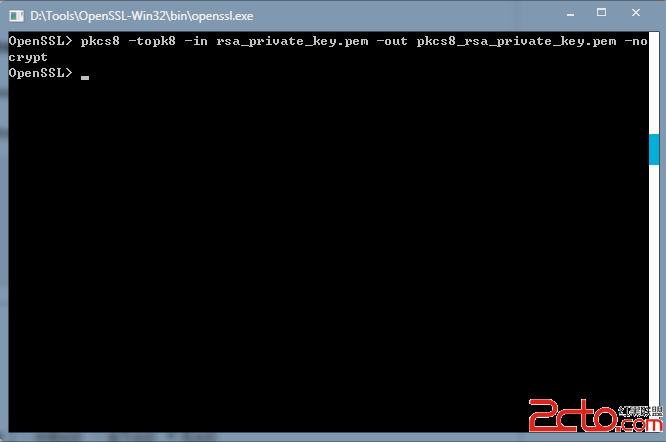
執行後同樣會在 bin 資料夾產生 pkcs8_rsa_private_key.pem,內容開頭已變成 BEGIN PRIVATE KEY:
-----BEGIN PRIVATE KEY-----
MIICdwIBADANBgkqhkiG9w0BAQEFAASCAmEwggJdAgEAAoGBAJ9FN1w8gfXSBP1/
fWtC4gicvB7t+XZ20Qn3eBOaMT1zYf6QtUQ1aAQKIlVDmyidA1/BOgwp07Rvc6V/
... (中間為金鑰主體,此處略去部分內容) ...
MFaLJXGY9ok45wXrcqkJgM+SN6i8hQeujXESVHYatAIL/1DgLi+u46EFD69fw0w+
c7o0HLlMsYPAzJw=
-----END PRIVATE KEY-----
使用時記得把首尾的 -----BEGIN ...----- 與 -----END ...----- 拿掉,只取中間的 Base64 內容。
package com.example.rsa;

import java.io.BufferedReader;
import java.io.IOException;
import java.io.InputStream;
import java.io.InputStreamReader;
import java.math.BigInteger;
import java.security.KeyFactory;
import java.security.KeyPair;
import java.security.KeyPairGenerator;
import java.security.NoSuchAlgorithmException;
import java.security.PrivateKey;
import java.security.PublicKey;
import java.security.interfaces.RSAPrivateKey;
import java.security.interfaces.RSAPublicKey;
import java.security.spec.InvalidKeySpecException;
import java.security.spec.PKCS8EncodedKeySpec;
import java.security.spec.RSAPublicKeySpec;
import java.security.spec.X509EncodedKeySpec;

import javax.crypto.Cipher;

public final class RSAUtils {

    private static final String RSA = "RSA";

    /** 隨機產生 RSA 金鑰對(預設 1024 位元) */
    public static KeyPair generateRSAKeyPair() {
        return generateRSAKeyPair(1024);
    }

    /** 隨機產生 RSA 金鑰對 */
    public static KeyPair generateRSAKeyPair(int keyLength) {
        try {
            KeyPairGenerator kpg = KeyPairGenerator.getInstance(RSA);
            kpg.initialize(keyLength);
            return kpg.genKeyPair();
        } catch (NoSuchAlgorithmException e) {
            e.printStackTrace();
            return null;
        }
    }

    /**
     * 用公鑰加密。每次加密的位元組數不可超過金鑰長度減去 11。
     */
    public static byte[] encryptData(byte[] data, PublicKey publicKey) {
        try {
            Cipher cipher = Cipher.getInstance(RSA);
            cipher.init(Cipher.ENCRYPT_MODE, publicKey);
            return cipher.doFinal(data);
        } catch (Exception e) {
            e.printStackTrace();
            return null;
        }
    }

    /** 用私鑰解密 */
    public static byte[] decryptData(byte[] encryptedData, PrivateKey privateKey) {
        try {
            Cipher cipher = Cipher.getInstance(RSA);
            cipher.init(Cipher.DECRYPT_MODE, privateKey);
            return cipher.doFinal(encryptedData);
        } catch (Exception e) {
            return null;
        }
    }

    /** 由 byte[] 還原公鑰(X.509 格式) */
    public static PublicKey getPublicKey(byte[] keyBytes)
            throws NoSuchAlgorithmException, InvalidKeySpecException {
        X509EncodedKeySpec keySpec = new X509EncodedKeySpec(keyBytes);
        KeyFactory keyFactory = KeyFactory.getInstance(RSA);
        return keyFactory.generatePublic(keySpec);
    }

    /** 由 byte[] 還原私鑰(PKCS#8 格式) */
    public static PrivateKey getPrivateKey(byte[] keyBytes)
            throws NoSuchAlgorithmException, InvalidKeySpecException {
        PKCS8EncodedKeySpec keySpec = new PKCS8EncodedKeySpec(keyBytes);
        KeyFactory keyFactory = KeyFactory.getInstance(RSA);
        return keyFactory.generatePrivate(keySpec);
    }

    /** 使用 N、e 值還原公鑰 */
    public static PublicKey getPublicKey(String modulus, String publicExponent)
            throws NoSuchAlgorithmException, InvalidKeySpecException {
        BigInteger bigIntModulus = new BigInteger(modulus);
        BigInteger bigIntExponent = new BigInteger(publicExponent);
        RSAPublicKeySpec keySpec = new RSAPublicKeySpec(bigIntModulus, bigIntExponent);
        KeyFactory keyFactory = KeyFactory.getInstance(RSA);
        return keyFactory.generatePublic(keySpec);
    }

    /** 使用 N、d 值還原私鑰 */
    public static PrivateKey getPrivateKey(String modulus, String privateExponent)
            throws NoSuchAlgorithmException, InvalidKeySpecException {
        BigInteger bigIntModulus = new BigInteger(modulus);
        BigInteger bigIntExponent = new BigInteger(privateExponent);
        RSAPrivateKeySpecCnf keySpec = new RSAPrivateKeySpecCnf(bigIntModulus, bigIntExponent);
        KeyFactory keyFactory = KeyFactory.getInstance(RSA);
        return keyFactory.generatePrivate(keySpec);
    }

    /** 從字串載入公鑰 */
    public static PublicKey loadPublicKey(String publicKeyStr) throws Exception {
        try {
            byte[] buffer = Base64Utils.decode(publicKeyStr);
            KeyFactory keyFactory = KeyFactory.getInstance(RSA);
            X509EncodedKeySpec keySpec = new X509EncodedKeySpec(buffer);
            return (RSAPublicKey) keyFactory.generatePublic(keySpec);
        } catch (NoSuchAlgorithmException e) {
            throw new Exception("無此算法");
        } catch (InvalidKeySpecException e) {
            throw new Exception("公鑰非法");
        } catch (NullPointerException e) {
            throw new Exception("公鑰數據為空");
        }
    }

    /**
     * 從字串載入私鑰,使用 PKCS#8 編碼的 KeySpec。
     */
    public static PrivateKey loadPrivateKey(String privateKeyStr) throws Exception {
        try {
            byte[] buffer = Base64Utils.decode(privateKeyStr);
            PKCS8EncodedKeySpec keySpec = new PKCS8EncodedKeySpec(buffer);
            KeyFactory keyFactory = KeyFactory.getInstance(RSA);
            return (RSAPrivateKey) keyFactory.generatePrivate(keySpec);
        } catch (NoSuchAlgorithmException e) {
            throw new Exception("無此算法");
        } catch (InvalidKeySpecException e) {
            throw new Exception("私鑰非法");
        } catch (NullPointerException e) {
            throw new Exception("私鑰數據為空");
        }
    }

    /** 從輸入流載入公鑰 */
    public static PublicKey loadPublicKey(InputStream in) throws Exception {
        try {
            return loadPublicKey(readKey(in));
        } catch (IOException e) {
            throw new Exception("公鑰數據流讀取錯誤");
        } catch (NullPointerException e) {
            throw new Exception("公鑰輸入流為空");
        }
    }

    /** 從輸入流載入私鑰 */
    public static PrivateKey loadPrivateKey(InputStream in) throws Exception {
        try {
            return loadPrivateKey(readKey(in));
        } catch (IOException e) {
            throw new Exception("私鑰數據讀取錯誤");
        } catch (NullPointerException e) {
            throw new Exception("私鑰輸入流為空");
        }
    }

    /** 讀取金鑰內容,自動跳過 BEGIN/END 標頭列 */
    private static String readKey(InputStream in) throws IOException {
        BufferedReader br = new BufferedReader(new InputStreamReader(in));
        String readLine;
        StringBuilder sb = new StringBuilder();
        while ((readLine = br.readLine()) != null) {
            if (readLine.charAt(0) == '-') {
                continue;
            } else {
                sb.append(readLine).append(' ');
            }
        }
        return sb.toString();
    }

    /** 輸出公鑰資訊 */
    public static void printPublicKeyInfo(PublicKey publicKey) {
        RSAPublicKey rsaPublicKey = (RSAPublicKey) publicKey;
        System.out.println("---------- RSAPublicKey ----------");
        System.out.println("Modulus.length = " + rsaPublicKey.getModulus().bitLength());
        System.out.println("Modulus = " + rsaPublicKey.getModulus().toString());
        System.out.println("PublicExponent.length = " + rsaPublicKey.getPublicExponent().bitLength());
        System.out.println("PublicExponent = " + rsaPublicKey.getPublicExponent().toString());
    }

    /** 輸出私鑰資訊 */
    public static void printPrivateKeyInfo(PrivateKey privateKey) {
        RSAPrivateKey rsaPrivateKey = (RSAPrivateKey) privateKey;
        System.out.println("---------- RSAPrivateKey ----------");
        System.out.println("Modulus.length = " + rsaPrivateKey.getModulus().bitLength());
        System.out.println("Modulus = " + rsaPrivateKey.getModulus().toString());
        System.out.println("PrivateExponent.length = " + rsaPrivateKey.getPrivateExponent().bitLength());
        System.out.println("PrivateExponent = " + rsaPrivateKey.getPrivateExponent().toString());
    }
}
這裡最該注意的是加密有長度限制:可加密的位元組數不能超過金鑰長度減 11,超過就會丟出異常。1024 位元的金鑰大約只能加密 117 個位元組,因此實務上有兩種解法:一是把資料分段加密再拼接,二是用 RSA 加密一組 AES 金鑰,再用 AES 加密真正的資料(混合加密),後者是業界標準做法。
程式碼中需要用到 Base64 轉換,而 Java 標準函式庫早期並未內建(Android 則有 android.util.Base64),因此自己實作一份,方便 Java 後端共用。以下省略兩張 64 字元對照表(base64EncodeChars 與 base64DecodeChars,內容即標準 Base64 表),核心加解密方法如下:
package com.example.rsa;

import java.io.UnsupportedEncodingException;

public class Base64Utils {

    // base64EncodeChars / base64DecodeChars 為標準 Base64 對照表,此處略去

    /** 加密(Base64 編碼) */
    public static String encode(byte[] data) {
        StringBuffer sb = new StringBuffer();
        int len = data.length;
        int i = 0;
        int b1, b2, b3;

        while (i < len) {
            b1 = data[i++] & 0xff;
            if (i == len) {
                sb.append(base64EncodeChars[b1 >>> 2]);
                sb.append(base64EncodeChars[(b1 & 0x3) << 4]);
                sb.append("==");
                break;
            }
            b2 = data[i++] & 0xff;
            if (i == len) {
                sb.append(base64EncodeChars[b1 >>> 2]);
                sb.append(base64EncodeChars[((b1 & 0x03) << 4) | ((b2 & 0xf0) >>> 4)]);
                sb.append(base64EncodeChars[(b2 & 0x0f) << 2]);
                sb.append("=");
                break;
            }
            b3 = data[i++] & 0xff;
            sb.append(base64EncodeChars[b1 >>> 2]);
            sb.append(base64EncodeChars[((b1 & 0x03) << 4) | ((b2 & 0xf0) >>> 4)]);
            sb.append(base64EncodeChars[((b2 & 0x0f) << 2) | ((b3 & 0xc0) >>> 6)]);
            sb.append(base64EncodeChars[b3 & 0x3f]);
        }
        return sb.toString();
    }

    /** 解密(Base64 解碼) */
    public static byte[] decode(String str) {
        try {
            return decodePrivate(str);
        } catch (UnsupportedEncodingException e) {
            e.printStackTrace();
        }
        return new byte[] {};
    }

    private static byte[] decodePrivate(String str) throws UnsupportedEncodingException {
        StringBuffer sb = new StringBuffer();
        byte[] data = str.getBytes("US-ASCII");
        int len = data.length;
        int i = 0;
        int b1, b2, b3, b4;

        while (i < len) {
            do { b1 = base64DecodeChars[data[i++]]; } while (i < len && b1 == -1);
            if (b1 == -1) break;
            do { b2 = base64DecodeChars[data[i++]]; } while (i < len && b2 == -1);
            if (b2 == -1) break;
            sb.append((char) ((b1 << 2) | ((b2 & 0x30) >>> 4)));

            do {
                b3 = data[i++];
                if (b3 == 61) return sb.toString().getBytes("iso8859-1");
                b3 = base64DecodeChars[b3];
            } while (i < len && b3 == -1);
            if (b3 == -1) break;
            sb.append((char) (((b2 & 0x0f) << 4) | ((b3 & 0x3c) >>> 2)));

            do {
                b4 = data[i++];
                if (b4 == 61) return sb.toString().getBytes("iso8859-1");
                b4 = base64DecodeChars[b4];
            } while (i < len && b4 == -1);
            if (b4 == -1) break;
            sb.append((char) (((b3 & 0x03) << 6) | b4));
        }
        return sb.toString().getBytes("iso8859-1");
    }
}
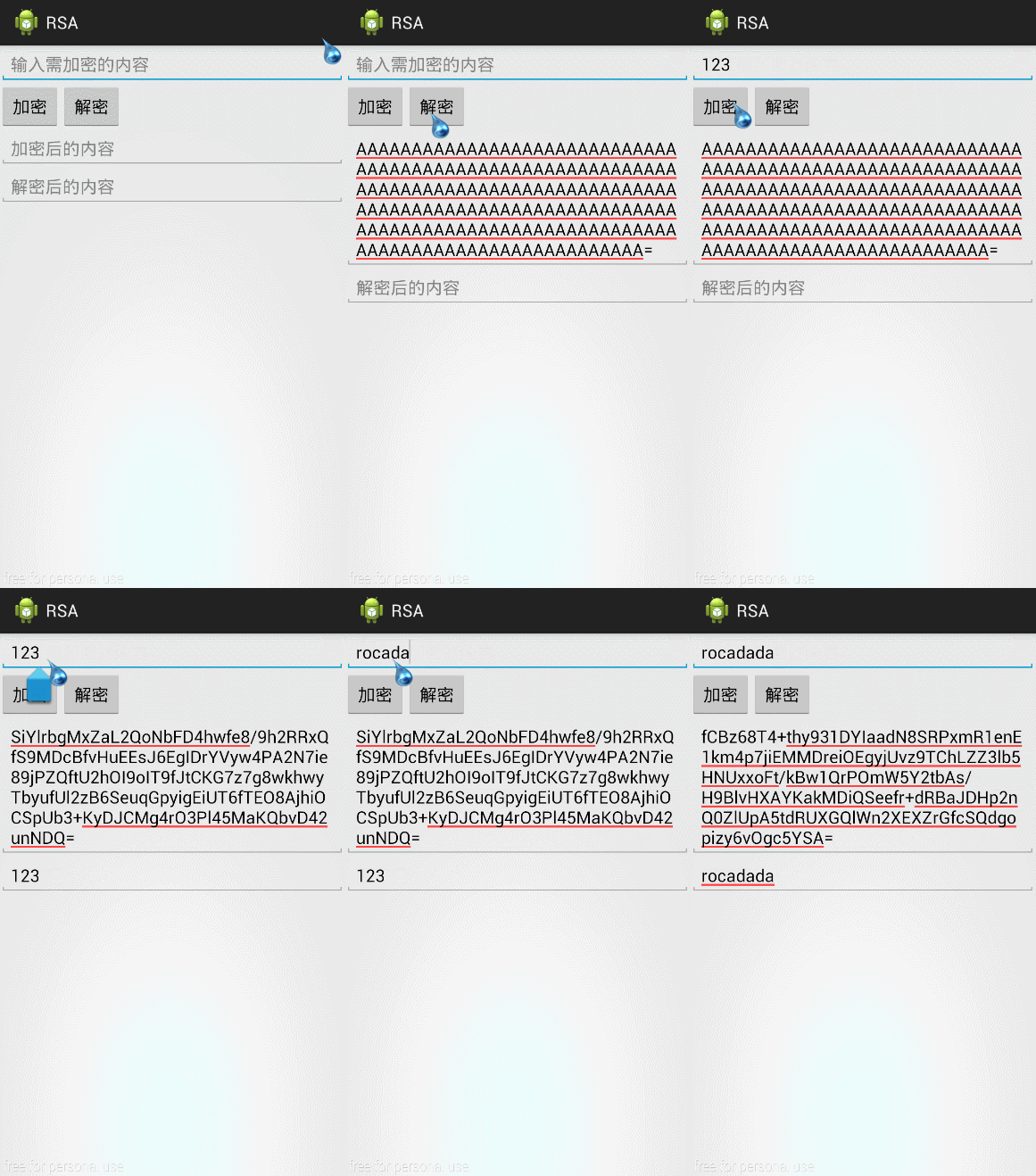
最後把兩者串起來。為了方便觀察,加密後的位元組會再做一次 Base64 編碼,否則畫面上只會顯示亂碼;解密時自然要先 Base64 解碼回來。
package com.example.rsa;

import java.io.InputStream;
import java.security.PrivateKey;
import java.security.PublicKey;

import android.app.Activity;
import android.os.Bundle;
import android.util.Base64;
import android.view.View;
import android.view.View.OnClickListener;
import android.widget.Button;
import android.widget.EditText;

public class MainActivity extends Activity implements OnClickListener {

    private Button btn1, btn2;      // 加密、解密
    private EditText et1, et2, et3; // 待加密內容、加密後內容、解密後內容

    /* 金鑰內容(Base64 code),此處以省略表示 */
    private static final String PUCLIC_KEY = "MIGfMA0GCSqGSIb3DQEBAQUAA4GNADCBiQKBgQ...IDAQAB";
    private static final String PRIVATE_KEY = "MIICdwIBADANBgkqhkiG9w0BAQEFAASCAmEwggJd...";

    @Override
    protected void onCreate(Bundle savedInstanceState) {
        super.onCreate(savedInstanceState);
        setContentView(R.layout.activity_main);
        initView();
    }

    private void initView() {
        btn1 = (Button) findViewById(R.id.btn1);
        btn2 = (Button) findViewById(R.id.btn2);
        btn1.setOnClickListener(this);
        btn2.setOnClickListener(this);

        et1 = (EditText) findViewById(R.id.et1);
        et2 = (EditText) findViewById(R.id.et2);
        et3 = (EditText) findViewById(R.id.et3);
    }

    @Override
    public void onClick(View v) {
        switch (v.getId()) {
            // 加密
            case R.id.btn1:
                String source = et1.getText().toString().trim();
                try {
                    // 也可以直接從字串取得公鑰:
                    // PublicKey publicKey = RSAUtils.loadPublicKey(PUCLIC_KEY);
                    InputStream inPublic = getResources().getAssets().open("rsa_public_key.pem");
                    PublicKey publicKey = RSAUtils.loadPublicKey(inPublic);

                    byte[] encryptByte = RSAUtils.encryptData(source.getBytes(), publicKey);

                    // 方便觀察,把加密結果再 Base64 編碼一次
                    String afterencrypt = Base64Utils.encode(encryptByte);
                    et2.setText(afterencrypt);
                } catch (Exception e) {
                    e.printStackTrace();
                }
                break;

            // 解密
            case R.id.btn2:
                String encryptContent = et2.getText().toString().trim();
                try {
                    InputStream inPrivate = getResources().getAssets().open("pkcs8_rsa_private_key.pem");
                    PrivateKey privateKey = RSAUtils.loadPrivateKey(inPrivate);

                    // 先 Base64 解碼,再交給 RSA 解密
                    byte[] decryptByte = RSAUtils.decryptData(
                            Base64Utils.decode(encryptContent), privateKey);
                    et3.setText(new String(decryptByte));
                } catch (Exception e) {
                    e.printStackTrace();
                }
                break;

            default:
                break;
        }
    }
}
我把金鑰放在 assets 資源目錄裡,也可以直接用字串載入(上面已註解保留)。
RSA/ECB/PKCS1Padding 或 RSA/ECB/OAEPWithSHA-256AndMGF1Padding,後者安全性更佳。 Android 自製帶圓形標記的數字進度列完整教學
開發緣起 設計師丟來一個帶圓形標記的進度條需求,我在 GitHub 上翻了一圈沒找到合適的現成元件,於是決定自己動手做一個。 先看成品效果: 核心思路是寫一個繼
 Android-PullRefreshLayout:一套搞定 AbsListView 與 RecyclerView
專案地址:Android-PullRefreshLayout 簡介:以 SwipeRefreshLayout 為基礎封裝,同時支援下拉刷新與上拉載入,且通吃所有 AbsL
 Android Xfermode 實作:用 PorterDuff SRC_IN 製作文字載入效果
在 Android 的繪圖處理中,Xfermode 常被用來處理圖層之間的混合規則。本文以 PorterDuff.Mode.SRC_IN 為例,說明如何製作一個文字逐漸顯
 【Android 基礎】MediaPlayer(一):結合 Service 播放音樂
MediaPlayer 這個類別主要用來播放音訊或影片,今天我們就來好好認識它。先看一張流程圖: 1 —— MediaPlayer 使用方法 |-- 1.1 簡單播放本