

編輯:關於 Android 程式設計
Activity 之間傳遞資料是日常開發的常見需求。本文整理三種主要方式:傳遞基本型別或字串、以 Bundle 打包、以及傳遞自訂物件(實作 Parcelable)。
1)傳遞基本型別或 String:
intent.putExtra("username", username); String username = intent.getStringExtra("username");
2)以 Bundle 形式傳遞:
Bundle bundle = new Bundle(); bundle.putString("username", username); bundle.putString("password", password); intent.putExtras(bundle); Bundle bundle = intent.getExtras(); String username = bundle.getString("username"); String password = bundle.getString("password");
3)傳遞自訂物件需實作 Parcelable,重寫 describeContents 與 writeToParcel,並提供 CREATOR 與 Parcel 建構子:
public int describeContents() { return 0; } public void writeToParcel(Parcel dest, int flags) { dest.writeInt(id); dest.writeString(name); dest.writeInt(age); } public static final Parcelable.Creator CREATOR = new Parcelable.Creator() { public Person createFromParcel(Parcel in) { return new Person(in); } public Person[] newArray(int size) { return new Person[size]; } }; public Person(Parcel in) { id = in.readInt(); name = in.readString(); age = in.readInt(); } intent.putExtra("person", person); Person person = intent.getParcelableExtra("person");
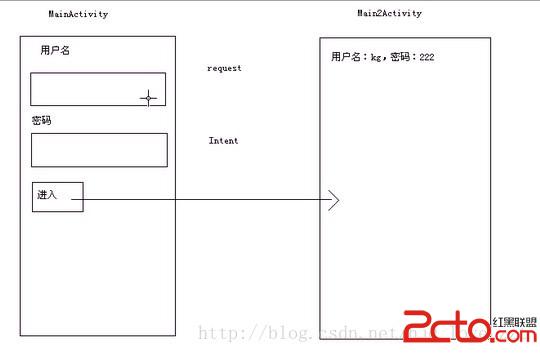
MainActivity 傳送資料:
package com.example.parsedata; import android.os.Bundle; import android.app.Activity; import android.content.Intent; import android.view.View; import android.widget.EditText; public class MainActivity extends Activity { private EditText et_username; private EditText et_password; @Override protected void onCreate(Bundle savedInstanceState) { super.onCreate(savedInstanceState); setContentView(R.layout.main); et_username = (EditText) findViewById(R.id.et_username); et_password = (EditText) findViewById(R.id.et_password); } public void enter(View view) { String username = et_username.getText().toString(); String password = et_password.getText().toString(); Intent intent = new Intent(this, MainActivity2.class); intent.putExtra("username", username); intent.putExtra("password", password); Bundle bundle = new Bundle(); bundle.putString("zhangzetian", "huangjundong"); intent.putExtras(bundle); Person person = new Person(2, "hjd is a handsomeboy..", 21); intent.putExtra("person", person); startActivity(intent); } }
MainActivity2 接收資料:
package com.example.parsedata; import android.app.Activity; import android.content.Intent; import android.os.Bundle; import android.widget.TextView; public class MainActivity2 extends Activity { private TextView tv_info; @Override protected void onCreate(Bundle savedInstanceState) { super.onCreate(savedInstanceState); setContentView(R.layout.main2); tv_info = (TextView) findViewById(R.id.tv_info); Intent intent = getIntent(); String username = intent.getStringExtra("username"); String password = intent.getStringExtra("password"); Bundle bundle = intent.getExtras(); Person p = intent.getParcelableExtra("person"); tv_info.setText("username: " + username + ",password: " + password + "zhangzetian's husband is : " + bundle.getString("zhangzetian") + " person: " + p.toString()); } }
原始碼下載:https://download.csdn.net/detail/caihongshijie6/7792903
成果示意圖:
 Android 監聽網絡變化的兩種方案:BroadcastReceiver 與 Service 組合
最近在做 App,需要監聽手機網絡的變化情況,並針對不同狀態給出不同的響應策略。這裡整理兩種實現方案,以及它們各自的適用場景。 方案一:工具類 + Broadcas
 Android Fragment 碎片使用指南
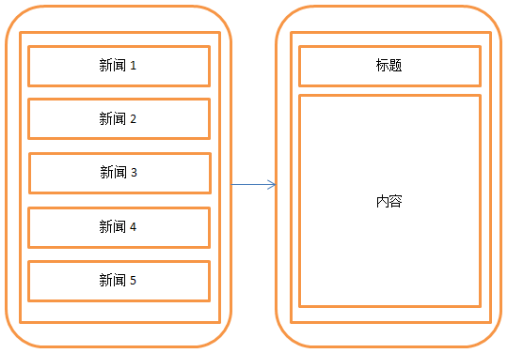
Fragment 是什麼Fragment 可以理解為嵌入在 Activity 中的 UI 片段。它能讓同一個畫面依螢幕尺寸重新組合,因此在平板與手機上特別有用。例如新聞列
 Android 待辦事項 ToDo 應用實現解析
這個 ToDo 是從 MediaTek 項目中剝離出來的一份完整代碼,功能不算花哨,但結構相當規範,很適合拿來學習「列表 + 多選 + ActionMode + 分組」這
 Android 程式碼混淆實踐:ProGuard 配置、保留規則與 mapping 還原
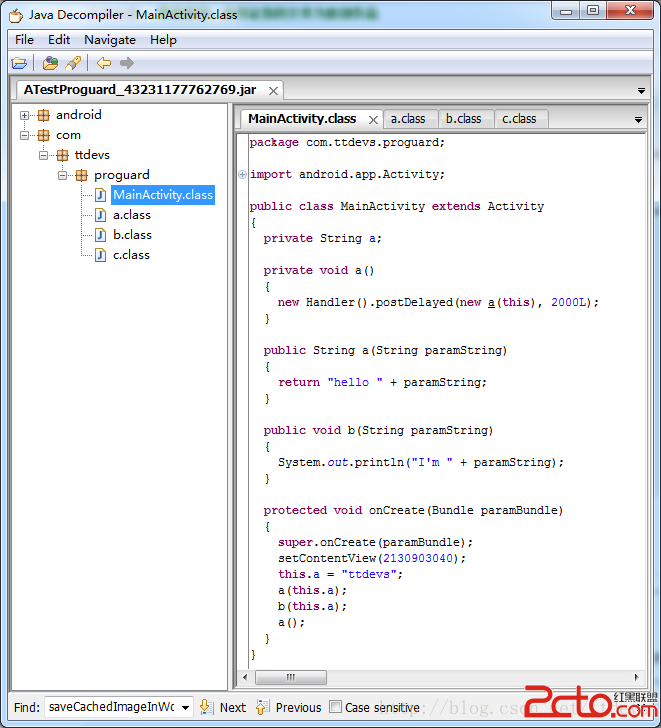
混淆流程 在 Eclipse 專案中,可將 project.properties 中的 proguard.config 註解取消,開啟混淆器。接著編輯 proguard-