

編輯:關於 Android 程式設計
應用上線後,如何讓用戶及時用上最新版本?自動檢測與升級機制必不可少。整體流程分三步:
1. 檢測當前版本信息,讀取 AndroidManifest.xml 中的 android:versionName。
2. 從服務器獲取最新版本號(存放於 xml 文件中),與本地版本比對。若不一致則提示用戶升級,一致則進入主界面。
3. 用戶點擊「確定」時,自動從服務器下載並安裝新版本;點擊「取消」則進入主界面。
效果圖:
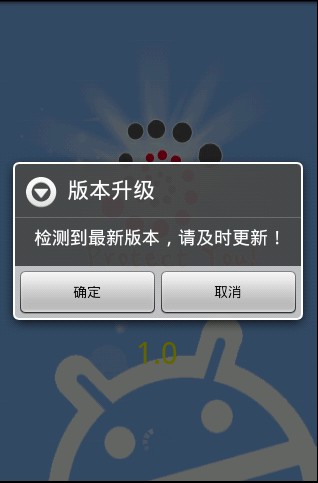
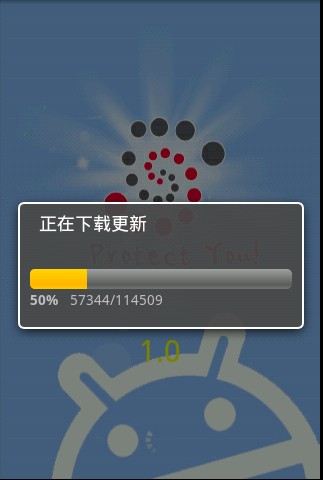
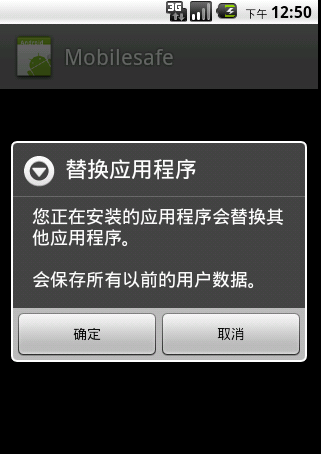
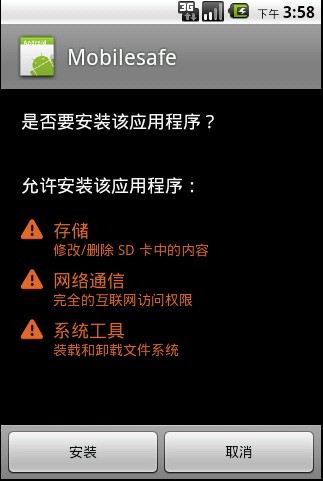
借助 PackageManager 即可拿到本應用的版本信息:
/*
 * 獲取當前程序的版本號
 */
private String getVersionName() throws Exception {
    // 獲取 PackageManager 的實例
    PackageManager packageManager = getPackageManager();
    // getPackageName() 是你當前類的包名,0 代表獲取版本信息
    PackageInfo packInfo = packageManager.getPackageInfo(getPackageName(), 0);
    return packInfo.versionName;
}
服務器返回一個封裝了版本號、下載地址和更新說明的 xml,用 pull 解析器解析即可:
/*
 * 用 pull 解析器解析服務器返回的 xml(xml 封裝了版本號)
 */
public static UpdataInfo getUpdataInfo(InputStream is) throws Exception {
    XmlPullParser parser = Xml.newPullParser();
    parser.setInput(is, "utf-8"); // 設置解析的數據源
    int type = parser.getEventType();
    UpdataInfo info = new UpdataInfo(); // 實體
    while (type != XmlPullParser.END_DOCUMENT) {
        switch (type) {
            case XmlPullParser.START_TAG:
                if (version.equals(parser.getName())) {
                    info.setVersion(parser.nextText()); // 獲取版本號
                } else if (url.equals(parser.getName())) {
                    info.setUrl(parser.nextText()); // 獲取要升級的 APK 文件
                } else if (description.equals(parser.getName())) {
                    info.setDescription(parser.nextText()); // 獲取該文件的信息
                }
                break;
        }
        type = parser.next();
    }
    return info;
}
public static File getFileFromServer(String path, ProgressDialog pd) throws Exception {
    // 如果相等表示當前的 sdcard 掛載在手機上並且在可用
    if (Environment.getExternalStorageState().equals(Environment.MEDIA_MOUNTED)) {
        URL url = new URL(path);
        HttpURLConnection conn = (HttpURLConnection) url.openConnection();
        conn.setConnectTimeout(5000);
        // 獲取到文件的大小
        pd.setMax(conn.getContentLength());
        InputStream is = conn.getInputStream();
        File file = new File(Environment.getExternalStorageDirectory(), "updata.apk");
        FileOutputStream fos = new FileOutputStream(file);
        BufferedInputStream bis = new BufferedInputStream(is);
        byte[] buffer = new byte[1024];
        int len;
        int total = 0;
        while ((len = bis.read(buffer)) != -1) {
            fos.write(buffer, 0, len);
            total += len;
            // 獲取當前下載量
            pd.setProgress(total);
        }
        fos.close();
        bis.close();
        is.close();
        return file;
    } else {
        return null;
    }
}
把上述能力串聯起來:後台線程請求服務器解析版本,通過 Handler 通知主線程彈出升級對話框,用戶確認後下載並調起系統安裝器:
/*
 * 從服務器獲取 xml 解析並進行比對版本號
 */
public class CheckVersionTask implements Runnable {
    public void run() {
        try {
            // 從資源文件獲取服務器地址
            String path = getResources().getString(R.string.serverurl);
            URL url = new URL(path);
            HttpURLConnection conn = (HttpURLConnection) url.openConnection();
            conn.setConnectTimeout(5000);
            InputStream is = conn.getInputStream();
            info = UpdataInfoParser.getUpdataInfo(is);

            if (info.getVersion().equals(versionname)) {
                Log.i(TAG, "版本號相同無需升級");
                LoginMain();
            } else {
                Log.i(TAG, "版本號不同,提示用戶升級");
                Message msg = new Message();
                msg.what = UPDATA_CLIENT;
                handler.sendMessage(msg);
            }
        } catch (Exception e) {
            Message msg = new Message();
            msg.what = GET_UNDATAINFO_ERROR;
            handler.sendMessage(msg);
            e.printStackTrace();
        }
    }
}

Handler handler = new Handler() {
    @Override
    public void handleMessage(Message msg) {
        super.handleMessage(msg);
        switch (msg.what) {
            case UPDATA_CLIENT:
                showUpdataDialog(); // 對話框通知用戶升級程序
                break;
            case GET_UNDATAINFO_ERROR:
                Toast.makeText(getApplicationContext(), "獲取服務器更新信息失敗", 1).show();
                LoginMain();
                break;
            case DOWN_ERROR:
                Toast.makeText(getApplicationContext(), "下載新版本失敗", 1).show();
                LoginMain();
                break;
        }
    }
};

// 彈出對話框通知用戶更新程序
protected void showUpdataDialog() {
    AlertDialog.Builder builer = new Builder(this);
    builer.setTitle("版本升級");
    builer.setMessage(info.getDescription());
    builer.setPositiveButton("確定", new OnClickListener() {
        public void onClick(DialogInterface dialog, int which) {
            downLoadApk(); // 從服務器下載新的 apk 然後安裝
        }
    });
    builer.setNegativeButton("取消", new OnClickListener() {
        public void onClick(DialogInterface dialog, int which) {
            LoginMain();
        }
    });
    AlertDialog dialog = builer.create();
    dialog.show();
}

// 從服務器中下載 APK
protected void downLoadApk() {
    final ProgressDialog pd = new ProgressDialog(this);
    pd.setProgressStyle(ProgressDialog.STYLE_HORIZONTAL);
    pd.setMessage("正在下載更新");
    pd.show();
    new Thread() {
        @Override
        public void run() {
            try {
                File file = DownLoadManager.getFileFromServer(info.getUrl(), pd);
                sleep(3000);
                installApk(file);
                pd.dismiss(); // 結束掉進度條對話框
            } catch (Exception e) {
                Message msg = new Message();
                msg.what = DOWN_ERROR;
                handler.sendMessage(msg);
                e.printStackTrace();
            }
        }
    }.start();
}

// 安裝 apk
protected void installApk(File file) {
    Intent intent = new Intent();
    intent.setAction(Intent.ACTION_VIEW);
    intent.setDataAndType(Uri.fromFile(file), "application/vnd.android.package-archive");
    startActivity(intent);
}
配套的實體類 UpdataInfo 封裝 version、url、description 三個字段並提供 getter/setter;服務器端的 update.xml 大致如下:
<?xml version="1.0" encoding="utf-8"?>
<info>
    <version>2.0</version>
    <url>https://192.168.1.187:8080/mobilesafe.apk</url>
    <description>檢測到最新版本,請及時更新!</description>
</info>
需要注意的是,直接下載並安裝 APK 涉及 REQUEST_INSTALL_PACKAGES 等權限,在較新的 Android 系統上還需引導用戶授予「安裝未知應用」的許可,否則安裝會被系統攔截。
 從零開始學 Android(十四):FrameLayout 幀布局詳解
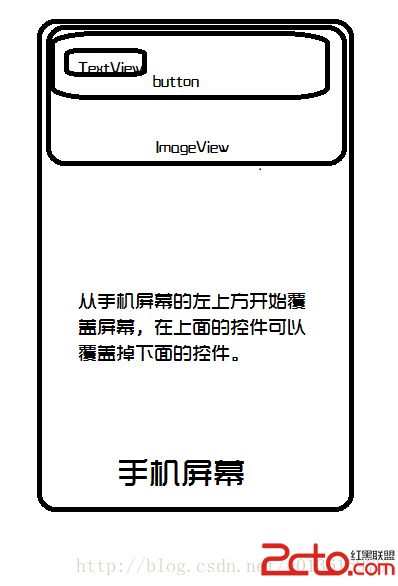
FrameLayout(幀布局)的工作方式很單純:它在屏幕上開闢一個矩形區域,所有放入的子組件預設都會被擺到左上角,並且彼此可以重疊層疊。這個「疊加」特性正是它名字裡「幀
 用 Fiddler 在 Android 上抓包(HTTP 與 HTTPS)實戰教學
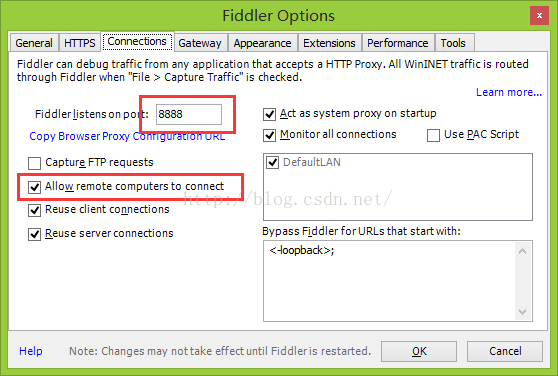
Fiddler 是一款 HTTP 協議的除錯代理工具,在開發網路應用時經常被使用。它最基本的功能是能攔截 HTTP 封包,當然還有更高階的用法,例如設定中斷點、修改請求與
 Android 自定義 Adapter 完全解析:從 MVC 到實戰
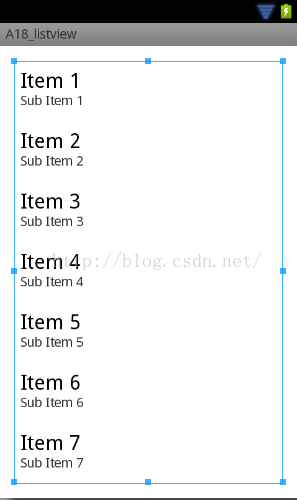
一、MVC 與模板概念的理解 MVC 原本存在於 Desktop 程序中,M 指數據模型(Model),V 指用戶界面(View),C 則是控制器(Controller)
 Android 自定義 DragGridView:長按拖拽與數據交換
在一些需要自定義排序的頁面中,用戶可能希望通過長按拖拽來調整 item 順序。實現這種效果,可以基於 GridView 進行擴展,結合長按監聽、WindowManager