

編輯:關於 Android 程式設計
通訊錄很少是平鋪的清單,使用者期待的是「先分組、再展開看成員」。Android 內建的 ExpandableListView 加上 CursorTreeAdapter,正好提供了這個兩層結構的現成骨架:資料來自資料庫游標,分組與子項各自的版面可以自由替換,程式碼量還相當可觀地少。
先看成果:
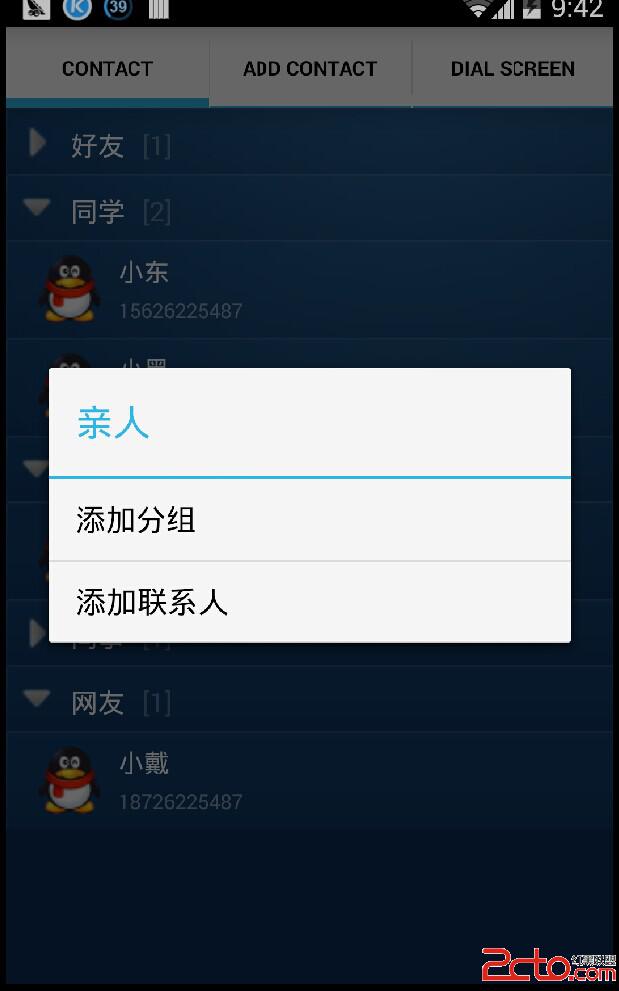
Activity 的工作其實只有三件:取得 ExpandableListView、清掉一些預設樣式、把 adapter 掛上去。
@Override
public void onCreate(Bundle savedInstanceState) {
    super.onCreate(savedInstanceState);
    requestWindowFeature(Window.FEATURE_NO_TITLE);
    setContentView(R.layout.main);

    mContactListView = getExpandableListView();
    mContactListView.setBackgroundResource(R.drawable.default_bg);
    registerForContextMenu(mContactListView);

    mContactDataBase = ((ContactApplication) getApplication()).getmContactDataBase();

    // 拖動時避免出現黑色底色
    getExpandableListView().setCacheColorHint(0);
    // 去掉每個項目下方的分隔線
    getExpandableListView().setDivider(null);
    // 自訂群組指示圖示
    getExpandableListView().setGroupIndicator(
            getResources().getDrawable(R.drawable.expander_ic_folder));

    setAdatperForExpandableListView();
}

/** 設定 ExpandableListView 的 adapter */
private void setAdatperForExpandableListView() {
    Cursor groupCursor = mContactDataBase.getAllGroups();
    // 游標的生命週期交由 Activity 管理,自動跟隨 Activity 同步
    startManagingCursor(groupCursor);

    ContactTreeAdapter contactTreeAdapter =
            new ContactTreeAdapter(groupCursor, this, true, mContactDataBase);
    setListAdapter(contactTreeAdapter);
}
這裡的 setCacheColorHint(0) 與 setDivider(null) 都是實戰累積出來的小修補:前者處理列表滾動時背景變黑的視覺瑕疵,後者拿掉那條每個項目底下多餘的線。setGroupIndicator 則決定展開箭頭長什麼樣子。
startManagingCursor 是個方便但需注意的 API:它把游標的生命週期綁到 Activity 上,Activity 銷毀時自動關閉,省下手動管理,但也就意味著游標不能活得比 Activity 更久。
CursorTreeAdapter 已經把「兩層游標」的複雜度吃掉了,你只要回答四個問題:子項游標從哪來、群組視覺怎麼畫、群組資料怎麼填、子項資料怎麼填。
public class ContactTreeAdapter extends CursorTreeAdapter {

    private static final String TAG = "ContactTreeAdapter";
    public Context mContext = null;
    private ContactDataBase mContactDataBase;

    // contact 表欄位索引
    private static final int INDEX_NAME = 1;
    private static final int INDEX_PHONENUMBER = 2;
    // group 表欄位索引
    private static final int INDEX_GROUPNAME = 1;

    public ContactTreeAdapter(Cursor cursor, Context context,
                              boolean autoRequery, ContactDataBase contactDataBase) {
        super(cursor, context, autoRequery);
        mContext = context;
        this.mContactDataBase = contactDataBase;
    }

    /** 子項游標:依目前群組名查詢成員 */
    @Override
    protected Cursor getChildrenCursor(Cursor groupCursor) {
        String groupName = groupCursor.getString(INDEX_GROUPNAME);
        return mContactDataBase.getContactsByGroupName(groupName);
    }

    @Override
    protected View newGroupView(Context context, Cursor cursor,
                                boolean isExpanded, ViewGroup parent) {
        LayoutInflater inflate = LayoutInflater.from(mContext);
        View view = inflate.inflate(R.layout.grouplayout, null);
        bindGroupView(view, context, cursor, isExpanded);
        return view;
    }

    @Override
    protected void bindGroupView(View view, Context context,
                                 Cursor cursor, boolean isExpanded) {
        TextView groupName = (TextView) view.findViewById(R.id.groupName);
        String group = cursor.getString(INDEX_GROUPNAME);
        groupName.setText(group);

        TextView groupCount = (TextView) view.findViewById(R.id.groupCount);
        int count = mContactDataBase.getCountContactByGroupName(group);
        groupCount.setText("[" + count + "]");
    }

    @Override
    protected View newChildView(Context context, Cursor cursor,
                                boolean isLastChild, ViewGroup parent) {
        LayoutInflater inflate = LayoutInflater.from(mContext);
        View view = inflate.inflate(R.layout.childlayout, null);
        bindChildView(view, context, cursor, isLastChild);
        return view;
    }

    @Override
    protected void bindChildView(View view, Context context,
                                 Cursor cursor, boolean isLastChild) {
        TextView name = (TextView) view.findViewById(R.id.name);
        name.setText(cursor.getString(INDEX_NAME));

        TextView description = (TextView) view.findViewById(R.id.description);
        description.setTextKeepState(cursor.getString(INDEX_PHONENUMBER));
    }
}
newXxxView 與 bindXxxView 成對出現,是 ListView 系列 adapter 的通用範式:前者負責「產生」,後者負責「填資料」。CursorTreeAdapter 甚至已經幫你做好了 convertView 的回收重用——同一組 new/bind 會被反覆呼叫,這正是列表能保持順暢的原因。
getChildrenCursor 是整個設計的精髓所在:它不需要你預先攸平所有資料,而是「展開到哪個群組,才去查那個群組的成員」。群組數量多、每組成員也多的時候,這個延遲查詢的策略能省下可觀的資源。
欄位索引寫成常數是必要的,因為游標取值靠的是位置而非名稱,一旦資料表欄序變動而程式碼沒跟著改,就會安靜地取到錯誤資料。
setTextKeepState 而非 setText,是為了在資料未變動時保留既有的多選狀態,這在支援勾選的清單裡是必須的。
最後,getChildrenCursor 回傳的游標同樣需要被管理。CursorTreeAdapter 內部會處理大部分情況,但若你在其中另外開了查詢,仍應留意關閉時機,避免游標洩漏。
由於這個 adapter 的每個方法命名都相當誠實——看到名字就知道用途——就不再逐一贅述。真正值得帶走的是它的結構思路:把兩層資料的取得交給延遲查詢,把兩層外觀的決定權留給自己。
 Android ListView 下拉加載更多(分頁加載)完整實現
今天聊聊 Android 開發中很常見的 ListView 下拉加載,也有人叫它分頁加載。名字很直白:當使用者把列表滑到底部時,出現一個「正在加載」的底部佈局,去拉取更多
 Android 自定義 LoadingView 實現小人跑動加載動畫
第一次看到「小人跑動」風格的加載動畫就眼前一亮,比起傳統的 ProgressBar 質感高了不止一個檔次。於是自己動手封裝了一個 LoadingView 自定義控件來實現
 Android Activity 四種啟動模式解析
Activity 是 Android 應用中最重要的元件之一。當應用程式運行時,Activity 會被放入任務堆疊中,而不同的啟動模式會影響 Activity 的建立與重
 Android 高仿 QQ5.0 側滑菜單:用屬性動畫打造自訂控件
上一篇實作了「史上最簡單的側滑菜單」,有朋友看過之後說這效果有點過時,QQ5.0 的版本還不錯。確實如此,而上一篇也預告過:稍微改一下就能做出 QQ5.0 的側滑效果。以