

編輯:關於 Android 程式設計
之所以特地寫一篇講 finalize,是因為我真的被它坑過。
當時在寫一個讀取 JNI 資料的類別,我在 finalize() 裡調用了關檔與釋放記憶體的方法,想說這樣比較保險。結果在頻繁建立、銷毀這個類別的過程中,JNI 層開始報錯。這個類別本身是單例,按理不該出這種問題;查了半天才想通:finalize() 被 GC 觸發時把檔案關掉了,而下次進入時以為檔案還開著,於是操作一個已關閉的 handle,直接爆掉。
出問題的程式碼長這樣:
public class TraceHandle {

    static {
        try {
            System.loadLibrary("TraceHandle");
        } catch (UnsatisfiedLinkError ule) {
            Log.e("JNI", "WARNING: Could not load TraceHandle.so");
        }
    }

    private TraceHandle(String filePath) {
        mFilePath = filePath;
        open(filePath);
    }

    /** 取得 TraceHandle 實例 */
    public static TraceHandle create(String filePath) {
        if (null == mTraceHandle) {
            mTraceHandle = new TraceHandle(filePath);
        }
        mTraceHandle.mInitCount++;
        return mTraceHandle;
    }

    /** 釋放 TraceHandle */
    public TraceHandle destory() {
        mInitCount--;
        if (mInitCount == 0 && mTraceHandle != null) {
            mTraceHandle.close();
            mTraceHandle = null;
        }
        return null;
    }

    private void celan() {
        if (mTraceHandle != null) {
            mTraceHandle.close();
            mTraceHandle = null;
        }
    }

    @Override
    protected void finalize() throws Throwable {
        super.finalize();
        // 這個方法由系統決定何時呼叫,對程式而言時機完全不可預見
        celan();
    }

    // 1、開啟檔案
    private native int open(String tracePath);
    // 2、搜尋指定漢字
    private native int[] search(byte[] wordArray);
    // 3、必須關閉檔案
    private native boolean close();

    private int mInitCount = 0;
    private String mFilePath = null;
    private static TraceHandle mTraceHandle = null;
}
翻過《Java 核心技術》相關章節後,答案很清楚。書裡是這樣寫的:
可以為任何一個類添加 finalize 方法。finalize 方法將在垃圾回收器清除物件之前呼叫。在實際應用中,不要依賴於使用 finalize 方法回收任何短缺的資源,這是因為很難知道這個方法什麼時候才能夠被呼叫。
如果某個資源需要在使用完畢立刻被關閉,那麼就需要由人工來管理。可以應用一個類 dispose 或 close 的方法來完成相應的清理操作。特別需要說明,如果一個類使用了這樣的方法,當物件不再被使用時一定要調用它。
修改後的版本直接把 finalize() 拿掉:
public class TraceHandle {

    static {
        try {
            System.loadLibrary("TraceHandle");
        } catch (UnsatisfiedLinkError ule) {
            Log.e("JNI", "WARNING: Could not load TraceHandle.so");
        }
    }

    private TraceHandle(String filePath) {
        mFilePath = filePath;
        open(filePath);
    }

    /** 取得 TraceHandle 實例 */
    public static TraceHandle create(String filePath) {
        if (null == mTraceHandle) {
            mTraceHandle = new TraceHandle(filePath);
        }
        mTraceHandle.mInitCount++;
        return mTraceHandle;
    }

    /** 釋放 TraceHandle */
    public TraceHandle destory() {
        mInitCount--;
        if (mInitCount == 0 && mTraceHandle != null) {
            mTraceHandle.close();
            mTraceHandle = null;
        }
        return null;
    }

    private void celan() {
        if (mTraceHandle != null) {
            mTraceHandle.close();
            mTraceHandle = null;
        }
    }

    // 1、開啟檔案
    private native int open(String tracePath);
    // 2、搜尋指定漢字
    private native int[] search(byte[] wordArray);
    // 3、必須關閉檔案
    private native boolean close();

    private int mInitCount = 0;
    private String mFilePath = null;
    private static TraceHandle mTraceHandle = null;
}
1. 時機不可控。Java 有 GC,但 GC 何時跑、 finalize 何時被呼叫都是不確定的。把「必須即時關閉」的資源交給它,等於把系統穩定性押在好運上。
2. 顯式生命週期才是正解。檔案、Socket、JNI handle、Cursor 這類資源,一律提供 close() 或 closeQuietly(),並用 try-finally(Java 7 以後用 try-with-resources)確保呼叫到。
3. 引用計數要自己管。本例的 create() / destory() 配對就是這個思路——把資源的釋放權交回呼叫者,並用計數避免重複關閉或提前關閉。
順帶一提,System.gc() 也同樣不值得依賴,它只是「建議」虛擬機執行 GC,不保證發生,且在多數 Android 版本上還會造成不必要的停頓。
參考資料:Why not to use finalize() method in java;When is the finalize() method called in Java?
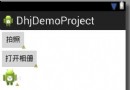 Android 打開相機與相冊獲取圖片示例
權限需要 INTERNET、WRITE_EXTERNAL_STORAGE、READ_EXTERNAL_STORAGE 與 MOUNT_UNMOUNT_FILESYSTEM
 跑馬燈 MarqueeView 源碼解析:它是怎麼自動滾動的
公告欄、活動通知那種一行行往上翻滾的效果,開源實現可以參考原作者項目:https://github.com/sfsheng0322/MarqueeView 。本文從源碼角
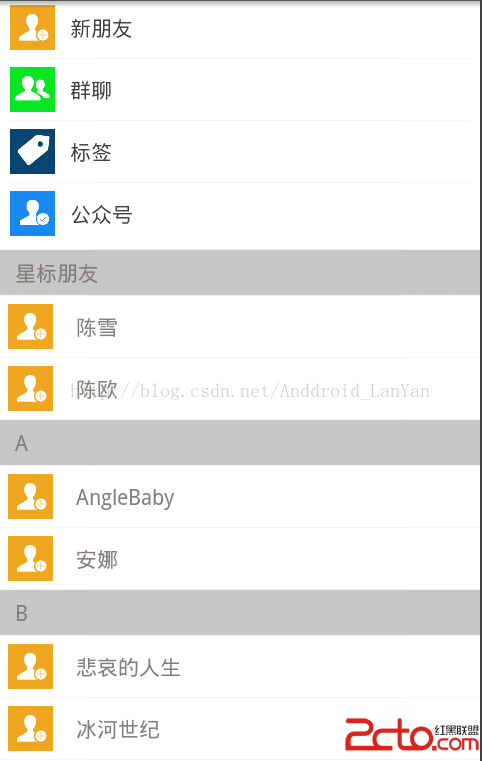 Android PinnedSectionListView 客製化:做出微信風格的懸浮分組列表
懸浮分組列表(Section 標題隨捲動吸頂)是很常見的交互模式,微信的聯絡人列表就是典型例子。開源的 pinned-section-listview 已經把核心邏輯處理
 Android 自定義 View 實現圓形與半圓形菜單詳解
前不久看到鴻洋大大的圓形菜單,實在太酷了,於是萌生模仿的念頭。結合朋友給我講的一些思路與分析,我便開始改造自己的圓形菜單。 文章結構:1. 功能介紹與展示;2. 部分代碼