

編輯:關於 Android 程式設計
這是一個室內定位專案的客戶端通訊層。設備啟動後先向伺服器註冊(回報 MAC、機型、持有者等資訊),隨後可把從 iBeacon 取得的座標上傳,由伺服器端定位演算法修正後再回傳校正結果。本文聚焦在通訊實作,座標的取得方式不在此贅述。
主要是兩個 Button 加一個用於即時顯示狀態的 TextView,另有一個 EditText 供實際除錯時輸入訊息。
<?xml version="1.0" encoding="utf-8"?>
<LinearLayout xmlns:android="https://schemas.android.com/apk/res/android"
    android:orientation="vertical"
    android:layout_width="fill_parent"
    android:layout_height="fill_parent">

    <LinearLayout
        android:orientation="horizontal"
        android:layout_width="fill_parent"
        android:layout_height="wrap_content"
        android:layout_marginTop="10dp">
        <TextView
            android:layout_width="wrap_content"
            android:layout_height="wrap_content"
            android:text="信息交互窗口"
            android:textSize="16dp"
            android:layout_marginRight="10dp" />
        <EditText
            android:id="@+id/tvEdit"
            android:layout_width="fill_parent"
            android:text=""
            android:layout_height="wrap_content" />
    </LinearLayout>

    <Button
        android:id="@+id/btnGetQuery"
        android:layout_width="fill_parent"
        android:layout_height="wrap_content"
        android:text="設備注冊" />

    <Button
        android:id="@+id/btnPostQuery"
        android:layout_width="fill_parent"
        android:layout_height="wrap_content"
        android:text="坐標傳送" />

    <TextView
        android:id="@+id/tvQueryResult"
        android:layout_width="fill_parent"
        android:layout_height="wrap_content" />
</LinearLayout>
這個類封裝了兩種 POST:無參數與帶 List<NameValuePair> 參數。url_ip 是伺服器前綴,getPostResult() 傳入的 url 是伺服器端定義的 action,本文為 equipment_Register_VIPRegister_n.action。
package net.blogjava.mobile;

import java.io.UnsupportedEncodingException;
import java.util.List;

import org.apache.http.HttpResponse;
import org.apache.http.HttpStatus;
import org.apache.http.NameValuePair;
import org.apache.http.client.HttpClient;
import org.apache.http.client.entity.UrlEncodedFormEntity;
import org.apache.http.client.methods.HttpPost;
import org.apache.http.impl.client.DefaultHttpClient;
import org.apache.http.params.BasicHttpParams;
import org.apache.http.params.HttpConnectionParams;
import org.apache.http.util.EntityUtils;

import android.util.Log;

public class NetworkService {

    private static String TAG = "NetworkService";
    private static String url_ip = "https://192.168.1.231:8080/indoor/";

    /** 釋放資源 */
    public static void cancel() {
        Log.i(TAG, "cancel!");
    }

    // 無參數傳遞
    public static String getPostResult(String url) {
        url = url_ip + url;
        HttpPost post = new HttpPost(url);

        BasicHttpParams httpParams = new BasicHttpParams();
        HttpConnectionParams.setConnectionTimeout(httpParams, 10 * 1000);
        HttpConnectionParams.setSoTimeout(httpParams, 10 * 1000);

        HttpClient httpClient = new DefaultHttpClient(httpParams);
        try {
            HttpResponse response = httpClient.execute(post);
            if (response.getStatusLine().getStatusCode() == HttpStatus.SC_OK) {
                return EntityUtils.toString(response.getEntity());
            }
        } catch (Exception e) {
            e.printStackTrace();
            return "{\"status\":405,\"resultMsg\":\"網絡超時!\"}";
        } finally {
            httpClient.getConnectionManager().shutdown();
        }
        return "{\"status\":405,\"resultMsg\":\"網絡超時!\"}";
    }

    // 有參數傳遞
    public static String getPostResult(String url, List<NameValuePair> paramList) {
        UrlEncodedFormEntity entity = null;
        try {
            entity = new UrlEncodedFormEntity(paramList, "utf-8");
        } catch (UnsupportedEncodingException e1) {
            e1.printStackTrace();
        }

        HttpPost post = new HttpPost(url);
        BasicHttpParams httpParams = new BasicHttpParams();
        HttpConnectionParams.setConnectionTimeout(httpParams, 10 * 1000);
        HttpConnectionParams.setSoTimeout(httpParams, 10 * 1000);
        post.setEntity(entity);

        HttpClient httpClient = new DefaultHttpClient(httpParams);
        try {
            HttpResponse response = httpClient.execute(post);
            if (response.getStatusLine().getStatusCode() == HttpStatus.SC_OK) {
                return EntityUtils.toString(response.getEntity(), "UTF-8");
            }
        } catch (Exception e) {
            e.printStackTrace();
            return "{\"status\":405,\"resultMsg\":\"網絡超時!\"}";
        } finally {
            httpClient.getConnectionManager().shutdown();
        }
        return "{\"status\":405,\"resultMsg\":\"網絡超時!\"}";
    }
}
1、組裝參數列表:
List<NameValuePair> paramList = new ArrayList<NameValuePair>();
paramList.add(new BasicNameValuePair("headTage", "device"));
paramList.add(new BasicNameValuePair("idmac", IDMAC));
paramList.add(new BasicNameValuePair("model", MODEL));
paramList.add(new BasicNameValuePair("holdername", HOLDERNAME));
2、呼叫 NetworkService:
String str = "";
str = NetworkService.getPostResult(url, paramList);
3、解析伺服器回應(需自行下載並加入 json 套件):
import org.json.JSONArray;
import org.json.JSONException;
import org.json.JSONObject;
import org.json.JSONTokener;
try {
    JSONTokener jsonParser = new JSONTokener(result);
    JSONObject responseobj = (JSONObject) jsonParser.nextValue();
    if ("failed".equals(responseobj.getString("errorMsg"))) {
        tvQueryResult.setText(responseobj.getString("resul"));
    } else {
        tvQueryResult.setText("數據獲取失敗");
    }
} catch (Exception e) {
    tvQueryResult.setText("數據獲取失敗");
}
4、由於 HTTP 屬耗時操作,註冊與座標傳送都必須放在異步執行緒中,否則在較新系統上會直接拋出 NetworkOnMainThreadException。
// 註冊
class RegisterAsyncTask extends AsyncTask<String, Integer, String> {

    Context myContext;
    TextView tvQueryResult = (TextView) findViewById(R.id.tvQueryResult);

    public RegisterAsyncTask(Context context) {
        myContext = context;
    }

    @Override
    protected String doInBackground(String... params) {
        try {
            resultData = InitData();
            Thread.sleep(1000);
        } catch (Exception e) {
        }
        return resultData;
    }

    @Override
    protected void onPreExecute() {
    }

    protected String InitData() {
        String IDMAC = getLocalMacAddress();
        String MODEL = android.os.Build.MODEL == null ? "未知" : android.os.Build.MODEL;
        String HOLDERNAME = android.os.Build.USER == null ? "未知" : android.os.Build.USER;
        String url = "https://192.168.1.226:8080/indoor/equipment_Register_VIPRegister_n.action";
        List<NameValuePair> paramList = new ArrayList<NameValuePair>();
        paramList.add(new BasicNameValuePair("headTage", "device"));
        paramList.add(new BasicNameValuePair("idmac", IDMAC));
        paramList.add(new BasicNameValuePair("model", MODEL));
        paramList.add(new BasicNameValuePair("holdername", HOLDERNAME));
        String str = NetworkService.getPostResult(url, paramList);
        Log.i("msg", str);
        return str;
    }

    protected void onPostExecute(String result) {
        try {
            JSONTokener jsonParser = new JSONTokener(result);
            JSONObject responseobj = (JSONObject) jsonParser.nextValue();
            if ("failed".equals(responseobj.getString("errorMsg"))) {
                tvQueryResult.setText(responseobj.getString("resul"));
            } else {
                tvQueryResult.setText("數據獲取失敗");
            }
        } catch (Exception e) {
            tvQueryResult.setText("數據獲取失敗");
        }
    }
}
package net.blogjava.mobile;

import java.util.ArrayList;
import java.util.List;

import org.json.JSONArray;
import org.json.JSONObject;
import org.json.JSONTokener;
import org.apache.http.NameValuePair;
import org.apache.http.message.BasicNameValuePair;

import android.app.Activity;
import android.os.AsyncTask;
import android.os.Bundle;
import android.util.Log;
import android.view.View;
import android.view.View.OnClickListener;
import android.widget.Button;
import android.widget.TextView;
import android.net.wifi.WifiInfo;
import android.net.wifi.WifiManager;
import android.content.Context;

public class Main extends Activity implements OnClickListener {

    private String resultData;

    @Override
    public void onCreate(Bundle savedInstanceState) {
        super.onCreate(savedInstanceState);
        setContentView(R.layout.main);
        Button btnGetQuery = (Button) findViewById(R.id.btnGetQuery);
        Button btnPostQuery = (Button) findViewById(R.id.btnPostQuery);
        btnGetQuery.setOnClickListener(this);
        btnPostQuery.setOnClickListener(this);
        RegisterDevice();
    }

    @Override
    public void onClick(View view) {
        TextView tvQueryResult = (TextView) findViewById(R.id.tvQueryResult);
        try {
            switch (view.getId()) {
                case R.id.btnGetQuery:
                    tvQueryResult.setText("正在注冊...");
                    RegisterDevice();
                    break;
                case R.id.btnPostQuery:
                    tvQueryResult.setText("傳送坐標信息...");
                    PositionPost();
                    break;
            }
        } catch (Exception e) {
            tvQueryResult.setText(e.getMessage());
        }
    }

    // 註冊按鈕
    protected void RegisterDevice() {
        RegisterAsyncTask Register = new RegisterAsyncTask(this);
        Register.execute("");
    }

    // 坐標傳送按鈕
    protected void PositionPost() {
        PositionPostAsyncTask PositionPost = new PositionPostAsyncTask(this);
        PositionPost.execute("");
    }

    // 位置坐標傳送
    class PositionPostAsyncTask extends AsyncTask<String, Integer, String> {

        Context myContext;

        public PositionPostAsyncTask(Context context) {
            myContext = context;
        }

        @Override
        protected String doInBackground(String... params) {
            try {
                resultData = InitData();
                Thread.sleep(1000);
            } catch (Exception e) {
            }
            return resultData;
        }

        @Override
        protected void onPreExecute() {
        }

        protected String InitData() {
            PositionInput position = new PositionInput();
            String url = "equipment_Register_VIPRegister_n.action";
            List<NameValuePair> paramList = new ArrayList<NameValuePair>();
            paramList.add(new BasicNameValuePair("headTage", "position"));
            paramList.add(new BasicNameValuePair("x", String.valueOf(position.getX())));
            paramList.add(new BasicNameValuePair("y", String.valueOf(position.getY())));
            paramList.add(new BasicNameValuePair("z", String.valueOf(position.getZ())));
            String str = NetworkService.getPostResult(url, paramList);
            Log.i("msg", str);
            return str;
        }

        protected void onPostExecute(String result) {
            try {
                JSONTokener jsonParser = new JSONTokener(result);
                JSONObject responseobj = (JSONObject) jsonParser.nextValue();
                if ("position".equals(responseobj.getString("headTage"))) {
                    JSONArray neworderlist = responseobj.getJSONArray("response");
                    int length = neworderlist.length();
                    for (int i = 0; i < length; i++) {
                        JSONObject jo = neworderlist.getJSONObject(i);
                        // 解析為坐標資訊
                        float x = Float.parseFloat(jo.getString("x"));
                        float y = Float.parseFloat(jo.getString("y"));
                        float z = Float.parseFloat(jo.getString("z"));
                    }
                }
            } catch (Exception e) {
            }
        }
    }

    public String getLocalMacAddress() {
        WifiManager wifi = (WifiManager) getSystemService(Context.WIFI_SERVICE);
        WifiInfo info = wifi.getConnectionInfo();
        return info.getMacAddress();
    }
}
這份程式碼反映的是當時的寫法,放到今天有幾處必須調整。第一,HttpClient 與 Apache HTTP 套件在 Android 6.0 之後已被移除,新專案請改用 HttpURLConnection 或 OkHttp。第二,WifiManager.getConnectionInfo().getMacAddress() 自 Android 6.0 起對一般應用一律回傳固定值 02:00:00:00:00:00,若設備識別碼是註冊流程的關鍵,應改用其他方案(例如 Settings.Secure.ANDROID_ID,或在授權下使用藍牙/Beacon 的識別碼)。第三,存取網路必須在 manifest 中宣告 INTERNET 權限;第四,IP 位址硬編碼在程式碼中不利維護,應移到 build.gradle 的 buildConfigField 或伺服器設定介面中。
 限時搶購秒殺系統架構深度剖析與實戰指南
秒殺(限時搶購)是電商領域最典型的高並發場景之一:低價促銷、大量推廣、瞬間售空、定時上架,時間短但瞬時並發量極高。這類系統對架構設計提出了嚴苛考驗。本文將從業務分析、技術
 城市列表實作:依拼音首字母排序
這次要完成的是一個常見需求:把城市名稱讀出來,轉成拼音、依首字母排序,再用 ListView 呈現。以下拆解每一步。 一、主佈局檔 <LinearLayout x
 Android for Work 實戰總結(下):流程演示與 EMM 配置
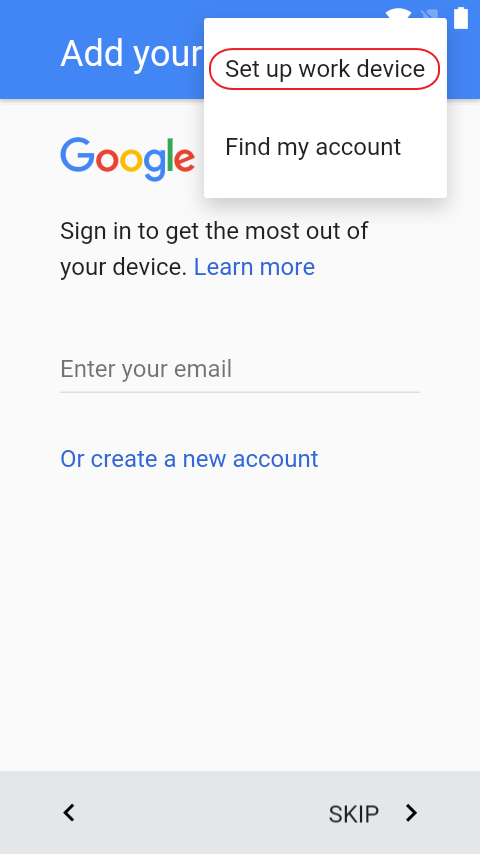
Afw 流程演示Device Owner(L 平台)先把設備恢復出廠設置,接著連接可翻牆的 Wi-Fi,直到出現如下引導界面:點擊「Set up work device」
 BroadcastReceiver廣播接收器完全詳解
BroadcastReceiver,也就是「廣播接收器」,用來接收來自系統和應用程式發出的廣播。在Android中,Broadcast是一種廣泛用於應用程式之間傳輸資訊的