

編輯:關於 Android 程式設計
前面兩篇講的是檔案快取,這次來談談 Android-Universal-Image-Loader 的記憶體快取。相關的類別繼承關係如下圖所示:
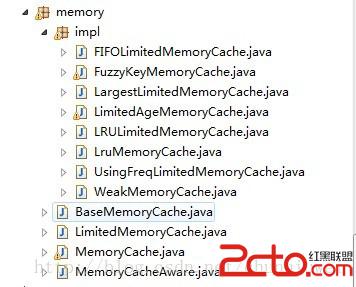
與檔案快取一樣,記憶體快取涉及兩個介面:MemoryCacheAware 與 MemoryCache,其中 MemoryCache 只是單純繼承了 MemoryCacheAware,並未額外宣告方法。MemoryCacheAware 的方法如下:
@Deprecated
public interface MemoryCacheAware<K, V> {
    /** 根據 key 放入 value,成功返回 true */
    boolean put(K key, V value);
    /** 根據 key 取值,無資料則返回 null */
    V get(K key);
    /** 根據 key 刪除資料 */
    void remove(K key);
    /** 返回快取中所有的 key */
    Collection<K> keys();
    /** 清空快取 */
    void clear();
}
這是個抽象類別,提供一個用來快取 Bitmap 弱引用的 Map:
private final Map<String, Reference<Bitmap>> softMap =
    Collections.synchronizedMap(new HashMap<String, Reference<Bitmap>>());
softMap 的 value 保存了 Bitmap 的引用類型。由於 Reference 分為強引用、弱引用、軟引用與虛引用,因此該類另提供一個抽象方法 createReference(Bitmap value) 讓子類重寫,以回傳不同類型的引用。put 時會呼叫它將 Bitmap 轉為 Reference:
protected abstract Reference<Bitmap> createReference(Bitmap value);

@Override
public boolean put(String key, Bitmap value) {
    softMap.put(key, createReference(value));
    return true;
}
這是繼承自 BaseMemoryCache 的抽象類別,對快取做了兩項限制:
sizeLimit 為標記,大於此值的 Bitmap 僅保存弱引用;否則同時用 LinkedList 變數 hardCache 保存強引用。removeNext() 交給子類實作(例如刪除最大者、依 FIFO 刪除等),這是典型的模板方法模式。
private final List<Bitmap> hardCache =
    Collections.synchronizedList(new LinkedList<Bitmap>());

@Override
public boolean put(String key, Bitmap value) {
    boolean putSuccessfully = false;
    int valueSize = getSize(value);
    int sizeLimit = this.sizeLimit;
    int curCacheSize = cacheSize.get();
    if (valueSize < sizeLimit) {
        while (curCacheSize + valueSize > sizeLimit) {
            Bitmap removedValue = removeNext();
            if (hardCache.remove(removedValue)) {
                curCacheSize = cacheSize.addAndGet(-getSize(removedValue));
            }
        }
        hardCache.add(value);
        cacheSize.addAndGet(valueSize);
        putSuccessfully = true;
    }
    return putSuccessfully;
}

protected abstract int getSize(Bitmap value);
protected abstract Bitmap removeNext();
當超出大小限制時,刪除快取中最大的那張 Bitmap。它用一個 Map 保存 Bitmap 對象及其大小:
private final Map<Bitmap, Integer> valueSizes =
    Collections.synchronizedMap(new HashMap<Bitmap, Integer>());

@Override
protected Bitmap removeNext() {
    Integer maxSize = null;
    Bitmap largestValue = null;
    Set<Entry<Bitmap, Integer>> entries = valueSizes.entrySet();
    synchronized (valueSizes) {
        for (Entry<Bitmap, Integer> entry : entries) {
            if (largestValue == null) {
                largestValue = entry.getKey();
                maxSize = entry.getValue();
            } else {
                Integer size = entry.getValue();
                if (size > maxSize) {
                    maxSize = size;
                    largestValue = entry.getKey();
                }
            }
        }
    }
    valueSizes.remove(largestValue);
    return largestValue;
}

@Override
protected int getSize(Bitmap value) {
    return value.getRowBytes() * value.getHeight();
}
當快取超出限制時,依 FIFO(先進先出)原則刪除最先加入的 Bitmap,以 LinkedList 實作:
private final List<Bitmap> queue =
    Collections.synchronizedList(new LinkedList<Bitmap>());

@Override
protected Bitmap removeNext() {
    return queue.remove(0);
}
最近最久未使用(LRU)策略,以 LinkedHashMap 實作,開啟存取順序追蹤:
private final Map<String, Bitmap> lruCache =
    Collections.synchronizedMap(new LinkedHashMap<String, Bitmap>(INITIAL_CAPACITY, LOAD_FACTOR, true));
當超出限制時,刪除使用次數最少的 Bitmap。以一個 Map 記錄每張 Bitmap 的使用次數,每次 get 時該次數 +1:
private final Map<Bitmap, Integer> usingCounts =
    Collections.synchronizedMap(new HashMap<Bitmap, Integer>());

@Override
public Bitmap get(String key) {
    Bitmap value = super.get(key);
    if (value != null) {
        Integer usageCount = usingCounts.get(value);
        if (usageCount != null) {
            usingCounts.put(value, usageCount + 1);
        }
    }
    return value;
}
針對超過時間限制的項目進行刪除,透過記錄載入時間來判斷是否過期:
public class LimitedAgeMemoryCache implements MemoryCache {
    private final MemoryCache cache;
    private final long maxAge;
    private final Map<String, Long> loadingDates =
        Collections.synchronizedMap(new HashMap<String, Long>());

    public LimitedAgeMemoryCache(MemoryCache cache, long maxAge) {
        this.cache = cache;
        this.maxAge = maxAge * 1000; // 轉為毫秒
    }

    @Override
    public boolean put(String key, Bitmap value) {
        boolean putSuccesfully = cache.put(key, value);
        if (putSuccesfully) {
            loadingDates.put(key, System.currentTimeMillis());
        }
        return putSuccesfully;
    }

    @Override
    public Bitmap get(String key) {
        Long loadingDate = loadingDates.get(key);
        if (loadingDate != null && System.currentTimeMillis() - loadingDate > maxAge) {
            cache.remove(key);
            loadingDates.remove(key);
        }
        return cache.get(key);
    }
    // 其餘方法省略
}
若快取中存在與待加入 key 相等的項目,先刪除舊項目再加入新的:
@Override
public boolean put(String key, Bitmap value) {
    synchronized (cache) {
        String keyToRemove = null;
        for (String cacheKey : cache.keys()) {
            if (keyComparator.compare(key, cacheKey) == 0) {
                keyToRemove = cacheKey;
                break;
            }
        }
        if (keyToRemove != null) {
            cache.remove(keyToRemove);
        }
    }
    return cache.put(key, value);
}
同樣是最近最久未使用策略,put 後透過 trimToSize 移除多餘項目:
@Override
public final boolean put(String key, Bitmap value) {
    synchronized (this) {
        size += sizeOf(key, value);
        Bitmap previous = map.put(key, value);
        if (previous != null) {
            size -= sizeOf(key, previous);
        }
    }
    trimToSize(maxSize);
    return true;
}

private void trimToSize(int maxSize) {
    while (true) {
        String key;
        Bitmap value;
        synchronized (this) {
            Map.Entry<String, Bitmap> toEvict = map.entrySet().iterator().next();
            if (toEvict == null) {
                break;
            }
            key = toEvict.getKey();
            value = toEvict.getValue();
            map.remove(key);
            size -= sizeOf(key, value);
        }
    }
}
 Android 五大資料儲存方式完整解析:SharedPreferences、檔案、SQLite、ContentProvider 與網路
資料要存哪裡,是每個 App 一開始就得回答的問題。Android 提供了五種主要方式,各自的適用場景差異很大,選錯了後面改起來很痛苦。以下逐一拆解原理、API 與實作。
 Android 事件分發機制全解析:從 dispatchTouchEvent 到 requestDisallowIntercept
一、概述 說到 Android 的事件分發機制,真是既熟悉又陌生。每次需要時翻翻源碼,總能若有所得;可要憑自己的理解從頭到尾講一遍,卻又一句也說不上來。歸根究底,大概是自
 Android 產品研發(十五):記憶體物件序列化,Serializable 與 Parcelable 該怎麼選
上一篇我們聊完了 App 的版本升級與更新流程。所謂升級,本質上是先取得遠端的最新版本資訊;更新則是把新版本下載下來並完成安裝覆蓋。取得升級資訊有兩條路:一是走應用商店的
 Android Bitmap 顏色替換:保留透明度的圖片處理技巧
在 Android 中製作觸控特效或圖示變化時,常需要將一張圖片重新上色。若原圖只是白色與透明度構成的遮罩,就能利用像素處理保留透明資訊,替換成不同顏色。 處理原理