

編輯:關於 Android 程式設計
HttpClient 是 Apache Jakarta Commons 底下的子專案,提供了一套高效、功能完整的 HTTP 協議用戶端編程工具包,並且支援當時最新的 HTTP 協議版本與建議。
它幾乎涵蓋了 HTTP 客戶端的所有需求:實作了全部 HTTP 方法(GET、POST、PUT、HEAD 等)、支援自動重新導向、支援 HTTPS 協議、支援代理伺服器。想知道更多細節,可以參考 HttpClient 官方網站。
1. 建立 HttpClient 的實例。
2. 建立某種連接方法的實例,例如
HttpGet,在它的建構子中傳入要連線的位址。3. 呼叫第一步建立的實例的
execute方法,執行第二步建立的方法物件。4. 讀取 response。
5. 釋放連接——無論執行成功與否,都必須釋放。
6. 處理取回的內容。
1. 版面配置沿用〈使用 RelativeLayout 實作登入介面〉的 activity_login.xml。
2. 伺服器端沿用〈使用 HttpURLConnection 的 GET 方式實作登入〉中的 Servlet,只用一支程式處理請求。
3. 先寫一個把串流轉字串的工具類 StreamTools:
package www.csdn.net.util;

import java.io.ByteArrayOutputStream;
import java.io.IOException;
import java.io.InputStream;

public class StreamTools {
    /**
     * 把串流物件轉換成字串物件
     */
    public static String streamToStr(InputStream is) {
        try {
            ByteArrayOutputStream os = new ByteArrayOutputStream();
            int len = 0;
            byte buffer[] = new byte[1024];
            // 循環讀取直到讀完為止
            while ((len = is.read(buffer)) != -1) {
                os.write(buffer, 0, len);
            }
            is.close();
            os.close();
            byte data[] = os.toByteArray();
            // 編碼必須與伺服器端一致,才不會出現亂碼(Android 預設為 UTF-8)
            return new String(data, "UTF-8");
        } catch (IOException e) {
            e.printStackTrace();
            return null;
        }
    }
}
4. LoginActivity 的完整程式碼,註解已標明每個步驟對應到哪個環節:
package www.csdn.net.lesson03;

import java.io.InputStream;
import java.util.ArrayList;
import java.util.List;
import org.apache.http.HttpEntity;
import org.apache.http.HttpResponse;
import org.apache.http.NameValuePair;
import org.apache.http.client.HttpClient;
import org.apache.http.client.entity.UrlEncodedFormEntity;
import org.apache.http.client.methods.HttpGet;
import org.apache.http.client.methods.HttpPost;
import org.apache.http.impl.client.DefaultHttpClient;
import org.apache.http.message.BasicNameValuePair;
import www.csdn.net.util.StreamTools;
import android.app.Activity;
import android.os.Bundle;
import android.text.TextUtils;
import android.view.View;
import android.widget.EditText;
import android.widget.TextView;
import android.widget.Toast;

public class LoginActivity extends Activity {
    private EditText et_name, et_pass;
    private TextView tv_result;

    @Override
    protected void onCreate(Bundle savedInstanceState) {
        super.onCreate(savedInstanceState);
        setContentView(R.layout.activity_login);
        et_name = (EditText) findViewById(R.id.et_name);   // 使用者名稱
        et_pass = (EditText) findViewById(R.id.et_pass);   // 密碼
        tv_result = (TextView) findViewById(R.id.tv_result); // 顯示伺服器回傳
    }

    /**
     * 按鈕點擊事件
     */
    public void login(View v) {
        int id = v.getId();
        switch (id) {
            case R.id.btn_login:
                final String userName = et_name.getText().toString();
                final String userPass = et_pass.getText().toString();
                if (TextUtils.isEmpty(userName.trim()) || TextUtils.isEmpty(userPass.trim())) {
                    Toast.makeText(this, "用戶名或者密碼不能為空", Toast.LENGTH_LONG).show();
                } else {
                    // 網路操作必須開子線程
                    new Thread(new Runnable() {
                        @Override
                        public void run() {
                            // loginByHttpClientPost(userName, userPass);
                            loginByHttpClientGet(userName, userPass);
                        }
                    }).start();
                }
                break;
            default:
                break;
        }
    }

    /**
     * HttpClient 的 POST 方式
     */
    public void loginByHttpClientPost(String userName, String userPass) {
        // 1. 建立 HttpClient 實例
        HttpClient client = new DefaultHttpClient();
        // 2. 建立連接方法實例
        String uri = "https://172.16.237.200:8080/video/login.do";
        HttpPost httpPost = new HttpPost(uri);
        try {
            // 封裝要傳送的參數
            List<NameValuePair> parameters = new ArrayList<NameValuePair>();
            parameters.add(new BasicNameValuePair("username", userName));
            parameters.add(new BasicNameValuePair("userpass", userPass));
            // 建立參數實體並指定編碼
            UrlEncodedFormEntity entity = new UrlEncodedFormEntity(parameters, "UTF-8");
            httpPost.setEntity(entity);

            // 3. 執行請求
            HttpResponse response = client.execute(httpPost);

            // 4. 讀取 response
            if (response.getStatusLine().getStatusCode() == 200) {
                InputStream is = response.getEntity().getContent();
                final String result = StreamTools.streamToStr(is);
                // 切回 UI 執行緒更新控制項
                LoginActivity.this.runOnUiThread(new Runnable() {
                    @Override
                    public void run() {
                        tv_result.setText(result);
                    }
                });
            }
        } catch (Exception e) {
            e.printStackTrace();
        } finally {
            // 6. 釋放連接
            client.getConnectionManager().shutdown();
        }
    }

    /**
     * HttpClient 的 GET 方式
     */
    public void loginByHttpClientGet(String userName, String userPass) {
        // 1. 建立 HttpClient 實例,等同開啟一個瀏覽器
        HttpClient client = new DefaultHttpClient();
        try {
            // 2. 建立連接方法實例,參數直接接在網址後面
            String uri = "https://172.16.237.200:8080/video/login.do?username="
                    + userName + "&userpass=" + userPass;
            // 注意:位址中不可出現 localhost
            HttpGet httpGet = new HttpGet(uri);

            // 3. 執行請求
            HttpResponse response = client.execute(httpGet);

            // 4. 讀取 response
            int statusCode = response.getStatusLine().getStatusCode();
            if (statusCode == 200) {
                HttpEntity entity = response.getEntity();
                InputStream is = entity.getContent();
                final String result = StreamTools.streamToStr(is);
                LoginActivity.this.runOnUiThread(new Runnable() {
                    @Override
                    public void run() {
                        tv_result.setText(result);
                    }
                });
            }
        } catch (Exception e) {
            e.printStackTrace();
        } finally {
            // 5. 釋放連接
            client.getConnectionManager().shutdown();
        }
    }
}
POST 用 NameValuePair 清單搭配 UrlEncodedFormEntity 封裝參數,資料放在請求本文中;GET 則直接把參數拼進網址。兩者都必須在子線程執行,並透過 runOnUiThread 把結果送回主線程更新畫面。最後,finally 區塊中的 shutdown() 是很多人會漏掉的一步,少了它會造成連接資源無法回收。
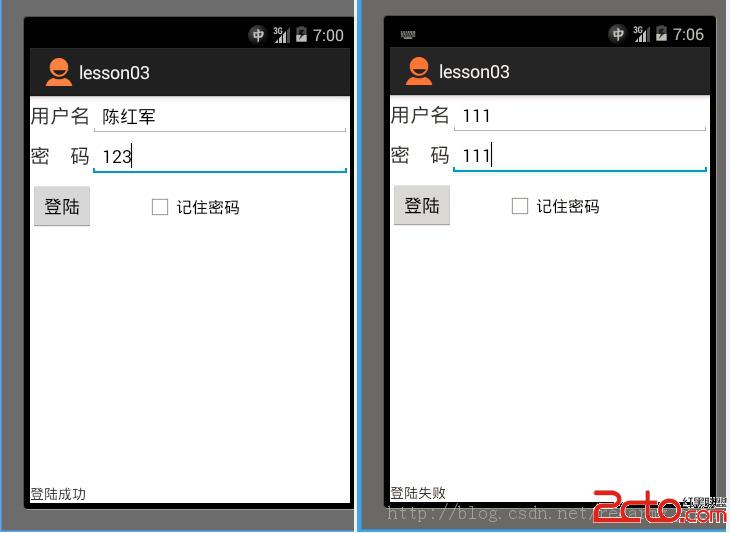
送出請求後,伺服器回傳的內容會顯示在 tv_result 上。另外提醒,Apache HttpClient 在 Android 5.0 之後已被標記為 deprecated,新專案建議改用 HttpURLConnection 或 OkHttp。
 解決 Virtualbox 虛擬機下 Android x86 4.0 無法聯網的問題
自從 Android x86 問世後,越來越多人開始在虛擬機上安裝體驗,但安裝過程並不簡單,網上因而出現各種教學。其中,Virtualbox 虛擬機下的 Android
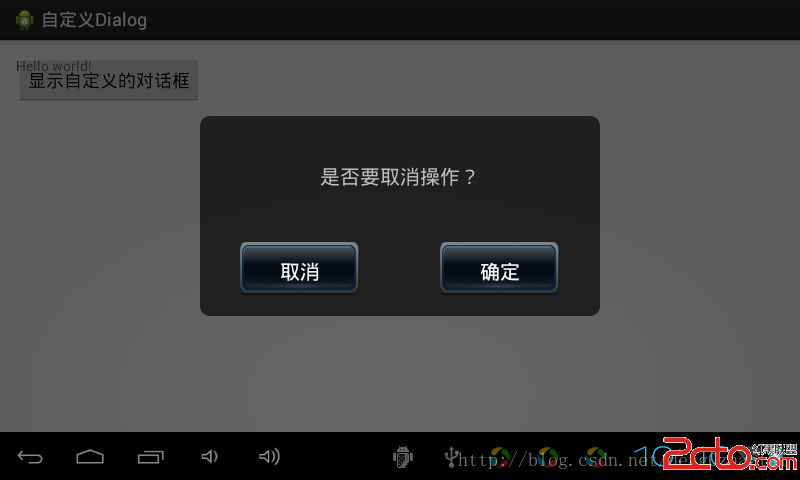 Android 自定義提示框實作教學
為什麼要自定義提示框Android 系統內建的提示框雖然方便,但在視覺風格、按鈕樣式與互動細節上未必符合產品需求。若希望提示框更貼近品牌設計,或需要更靈活的控制項,可以透
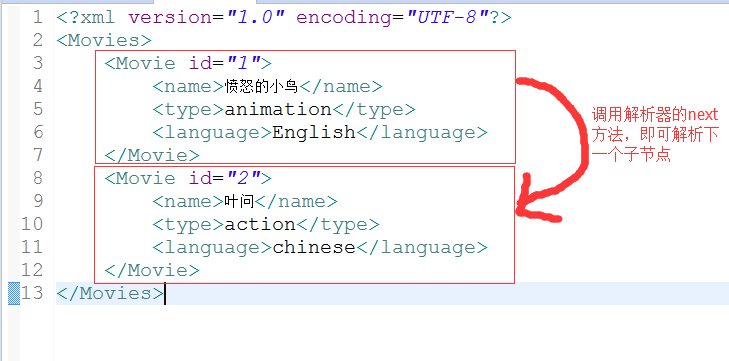 Android 開發筆記:使用 XmlPullParser 解析 XML 資源文件
在 Android 開發中,XML 經常用於儲存設定、版面配置與靜態資料。除了常見的 DOM 與 SAX 解析方式之外,Android 官方也推薦使用輕量且事件驅動的 X
 Android WebP 圖片壓縮與傳輸優化實踐
一、為什麼要關注圖片 即使在 4G 時代,行動網路流量仍然是寶貴資源。而在行動網路傳輸中,最佔流量的一種載體就是圖片,這也是行動開發者不得不正視的問題。 我們真正在意的,