

編輯:關於 Android 程式設計
使用百度地圖離線地圖時,建議先從官方 Demo 下載 .dat 檔案,再放入 Android 工程的 assets 目錄。若檔案格式不一致,後續初始化可能無法載入地圖。
應用啟動時,可將 assets 中的離線地圖複製到外部儲存空間的 BaiduMapSDK 目錄。複製前先建立資料夾,並以緩衝區串流寫入,避免一次性載入過大檔案。
public static void copy(Context context) {
    String dir = Environment.getExternalStorageDirectory() + "/BaiduMapSDK/vmp/h/";
    String target = dir + "xxxxx.dat";
    File folder = new File(dir);
    if (!folder.exists()) {
        folder.mkdirs();
    }
    try {
        InputStream is = context.getAssets().open("xxxx.dat");
        FileOutputStream fos = new FileOutputStream(target);
        byte[] buffer = new byte[8192];
        int count;
        while ((count = is.read(buffer)) > 0) {
            fos.write(buffer, 0, count);
        }
        fos.close();
        is.close();
    } catch (Exception e) {
        e.printStackTrace();
    }
}取得 MapController 後,建立 MKOfflineMap 並呼叫 init,註冊 MKOfflineMapListener 以接收下載、更新與版本狀態。
MKOfflineMap mOffline = new MKOfflineMap();
mOffline.init(mMapController, new MKOfflineMapListener() {
    public void onGetOfflineMapState(int type, int state) {
        // 依 type 與 state 處理下載或更新狀態
    }
}); 手機迅雷怎麼關閉朋友圈 個人中心設定教學
手機迅雷的朋友圈功能並非人人愛用,想關掉的朋友可以按以下步驟操作。 1、打開手機迅雷,切換到「我的迅雷」個人中心,點擊左上角【登錄】,已登錄可直接跳過。 2、在個人中心
 新浪微博怎麼加好友?發現找人完整教學
新浪微博是全國最主流、最具人氣的微博產品。一句話隨意記錄生活,用手機隨時隨地發微博。微博同樣能和朋友聊私信,你可以關注想關注的人,了解他們的生活。那麼新浪微博該如何加好友
 Android 圖片輪播廣告:滑動切換標題與焦點小圓點的實現
在許多應用的首頁,都會看到可以左右滑動、自動循環的圖片輪播效果,底部往往還帶有隨頁面切換而變化的標題與指示小圓點。本文以谷歌 v4 包中的 ViewPager 為基礎,一
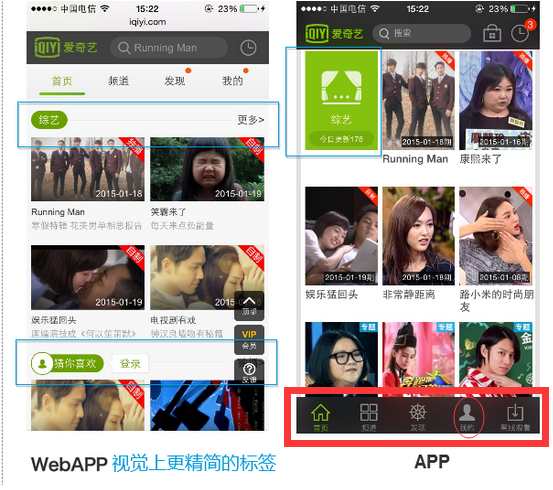 Web App 與原生 App 的差異與選擇指南
 許多團隊在規劃行動產品時,都會遇到一個關鍵問題:該使用 HTML5 封裝的 Web App,還是直接開發原生 App?兩