

編輯:關於 Android 程式設計
本文示範如何透過自訂 Adapter 實現 ListView,並特別說明向下相容的考量:雖然 Android 提供了較新的方法,但為了相容舊版本系統,仍需採用向下相容的寫法。
public class MainActivity extends Activity {
    private ListView listView;
    private GameAdapter adapter;
    private List> allValues = new ArrayList>();
    private int[] allImgs = {R.drawable.ph1, R.drawable.ph2, R.drawable.ph3, R.drawable.ph4};
    @Override
    protected void onCreate(Bundle savedInstanceState) {
        super.onCreate(savedInstanceState);
        Globals.init(this);// 初始化當前介面資料
        setContentView(R.layout.activity_main);
        // 初始化資料,理論上應從資料庫或網路讀取
        for (int i = 0; i < 5; i++) {
            Map map = new HashMap();
            map.put("title", "游戲名稱" + i);
            map.put("time", "2013-04-23 動作" + i);
            map.put("img", allImgs[i % 4]);
            allValues.add(map);
        }
        listView = (ListView) findViewById(R.id.list);
        adapter = new GameAdapter(this, allValues);
        listView.setAdapter(adapter);
        // list 中行元素監聽
        listView.setOnItemClickListener(new OnItemClickListener() {
            @Override
            public void onItemClick(AdapterView arg0, View arg1, int arg2, long arg3) {
                Map map = allValues.get(arg2);
                Toast.makeText(MainActivity.this, "當前所點擊的是: " + map.get("title"),
                        Toast.LENGTH_SHORT).show();
            }
        });
        // 滾動監聽
        listView.setOnScrollListener(new OnScrollListener() {
            @Override
            public void onScrollStateChanged(AbsListView view, int scrollState) {
                if (scrollState == OnScrollListener.SCROLL_STATE_IDLE) {
                    System.out.println("當前是空閒狀態");
                } else if (scrollState == OnScrollListener.SCROLL_STATE_TOUCH_SCROLL) {
                    System.out.println("觸屏滾動狀態");
                } else if (scrollState == OnScrollListener.SCROLL_STATE_FLING) {
                    System.out.println("慣性滾動狀態");
                }
            }
            @Override
            public void onScroll(AbsListView view, int firstVisibleItem,
                    int visibleItemCount, int totalItemCount) {
                System.out.println("當前的顯示項: " + firstVisibleItem + " "
                        + visibleItemCount + " --> " + totalItemCount);
            }
        });
    }
}
public class GameAdapter extends BaseAdapter {
    private Context ctx;
    private List> allValues;
    public GameAdapter(Context ctx, List> allValues) {
        this.ctx = ctx;
        this.allValues = allValues;
    }
    @Override
    public int getCount() {
        return allValues.size();
    }
    @Override
    public Object getItem(int position) {
        return allValues.get(position);
    }
    @Override
    public long getItemId(int position) {
        return position;
    }
    @Override
    public View getView(int position, View convertView, ViewGroup parent) {
        if (convertView == null) {
            convertView = LayoutInflater.from(ctx).inflate(R.layout.my_adapter_item, null);
            convertView.setLayoutParams(new LayoutParams(
                    LayoutParams.MATCH_PARENT, Globals.SCREEN_HEIGHT / 10));
        }
        TextView imgText = (TextView) convertView.findViewById(R.id.line_img);
        imgText.getLayoutParams().height = Globals.SCREEN_HEIGHT / 10;
        TextView titleText = (TextView) convertView.findViewById(R.id.line_title);
        TextView timeText = (TextView) convertView.findViewById(R.id.line_time);
        Map map = allValues.get(position);
        titleText.setText(map.get("title").toString());
        timeText.setText(map.get("time").toString());
        imgText.setBackgroundResource((Integer) map.get("img"));
        return convertView;
    }
}
getView 中的 convertView 是為了提高效能而準備的重用行元件,若目前行之前沒有建立過則為 null 需自行建立,否則只需修改其中的資料,形成元件循環利用。
public class Globals {
    public static int SCREEN_WIDTH;
    public static int SCREEN_HEIGHT;
    public static void init(Activity a) {
        // 初始化螢幕寬高,此方法不推薦使用,但為向下相容仍採用舊方法
        SCREEN_WIDTH = a.getWindowManager().getDefaultDisplay().getWidth();
        SCREEN_HEIGHT = a.getWindowManager().getDefaultDisplay().getHeight();
    }
}
此處刻意採用 getWidth()、getHeight() 等舊方法,是因為新方法需 API 4.0 以上,而專案需相容 2.3 以上版本,因此仍使用舊方法以確保向下相容。

 Android 開發:用 MediaRecorder 錄製影片
MediaRecorder 不只能錄音,也能錄影。整體流程與錄音幾乎一致,差別在於影片必須同時采集聲音與影像兩路資料。 因此除了呼叫 setAudioSource()
 Web 開發實戰:演示 Servlet 生命週期並解決中文亂碼問題
本文以一個完整示例演示 Servlet 的生命週期,並重點講解解決中文亂碼問題的多種方法。至於更佳的方案——使用過濾器(Filter),這裡暫不展開,留待後續學習時再補充
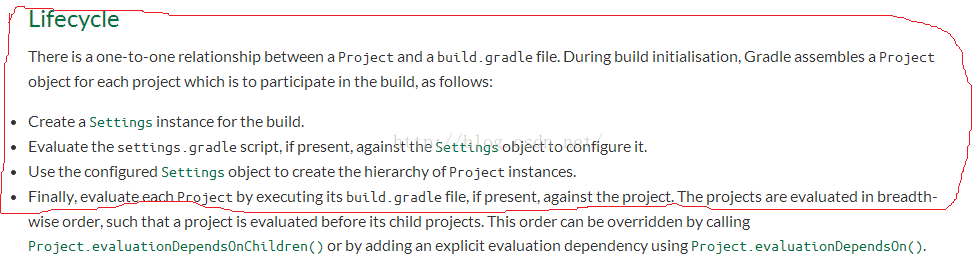 深入理解 Android Gradle:生命週期、任務與實作筆記
Gradle 是 Android 的重要建置工具。它本身負責流程與規則,實際建置能力則由外掛提供,例如 Android App 外掛、Android Library 外掛
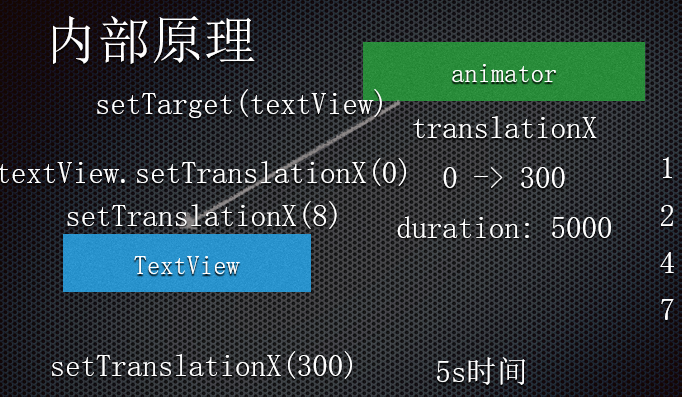 Day34 - Animation 動畫:補間、逐幀與屬性動畫一次講透
人眼存在視覺殘留現象,連續播放一系列靜態圖像,就會形成動畫效果。Android 中的動畫大致分為三類: · 遊戲動畫:利用自訂 View 的繪製方法,開啟執行緒高頻刷新介