

編輯:關於 Android 程式設計
以下範例示範如何用 Handler 每五秒送出一則通知,並透過不同的 id 區分不同則通知。
package com.example.notification;
import android.app.Activity;
import android.app.Notification;
import android.app.NotificationManager;
import android.app.PendingIntent;
import android.content.Context;
import android.content.Intent;
import android.os.Bundle;
import android.os.Handler;

public class MainActivity extends Activity {
 private Handler handler = new Handler();
 private int mId = 0;

 @Override
 protected void onCreate(Bundle savedInstanceState) {
 super.onCreate(savedInstanceState);
 setContentView(R.layout.activity_main);
 handler.post(runnable);
 }

 private Runnable runnable = new Runnable() {
 @Override
 public void run() {
 if(mId < 3) {
 sendNotification(mId);
 mId++;
 }
 handler.postDelayed(runnable, 5000);
 }
 };

 /**
 * 依不同的 id 發送不同內容的通知
 *
 * @param mId
 */
 @SuppressWarnings("deprecation")
 protected void sendNotification(int mId) {
 NotificationManager notificationManager =
 (NotificationManager) getSystemService(Context.NOTIFICATION_SERVICE);

 Notification noti = new Notification(R.drawable.ic_launcher,
 "狀態欄顯示滾輪信息", System.currentTimeMillis());
 noti.defaults |= Notification.DEFAULT_VIBRATE;
 // noti.vibrate = null;
 noti.defaults |= Notification.DEFAULT_SOUND;
 // noti.sound = null;
 noti.flags |= Notification.FLAG_AUTO_CANCEL;

 Intent intent = new Intent(MainActivity.this, ResultActivity.class);
 intent.putExtra("fromTag", "傳遞數據");
 PendingIntent pendingIntent = PendingIntent.getActivity(
 MainActivity.this, 0, intent, PendingIntent.FLAG_UPDATE_CURRENT);

 noti.setLatestEventInfo(MainActivity.this,
 "通知欄標題" + mId, "通知欄信息詳情" + mId, pendingIntent);

 notificationManager.notify(mId, noti);
 }

 @Override
 protected void onDestroy() {
 handler.removeCallbacks(runnable);
 super.onDestroy();
 }
}
幾個重點說明:
· NotificationManager 是發送通知的入口,透過 getSystemService 取得。
· defaults 用位元 OR 累加效果,這裡同時指定了震動與提示音;若要自訂,可改用 noti.vibrate 與 noti.sound 明確指定。
· FLAG_AUTO_CANCEL 讓使用者點掉通知後它會自動消失。
· PendingIntent 決定點擊通知後要跳到哪裡;FLAG_UPDATE_CURRENT 表示若已存在相同的 PendingIntent 就更新其 extras。
· 最後務必在 onDestroy 中移除 Handler 的 callback,否則 Activity 銷毀後仍會持續被觸發,造成記憶體洩漏。
需要提醒的是,範例中的 Notification 建構子與 setLatestEventInfo() 都已在新版 Android 被棄用。若要在 Android 8.0(API 26)以上正常顯示通知,必須改用 Notification.Builder、建立 NotificationChannel,並在 AndroidManifest.xml 宣告 POST_NOTIFICATIONS 權限(API 33 起需要執行期授權)。本範例可作為理解通知組成元素的入門參考。
 Android 動畫全解:變換動畫、幀動畫與佈局動畫
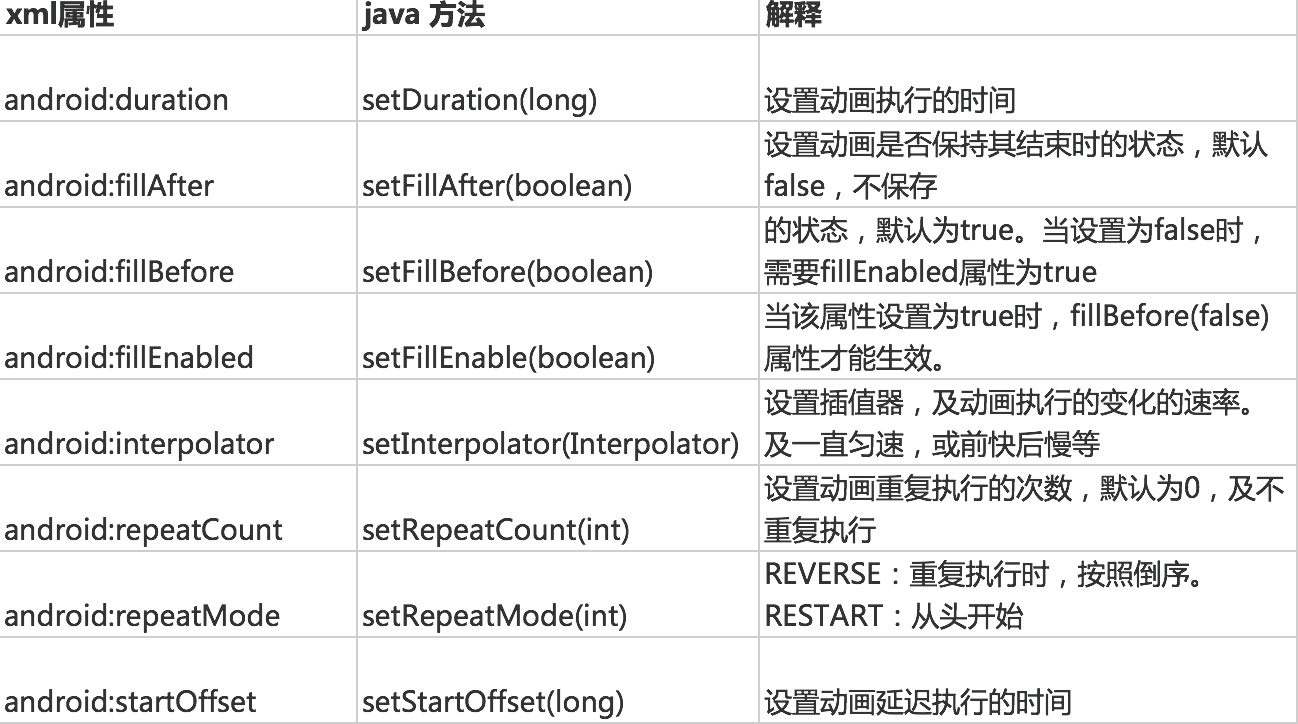
面試中經常被問到的一個問題是:Android 一共有哪幾類動畫?先記住這份清單——變換動畫(透明度、縮放、平移、旋轉)、逐幀動畫、佈局動畫、屬性動畫。 一、變換動畫(V
 Android Launcher 源碼研究:載入應用資料並綁定畫面
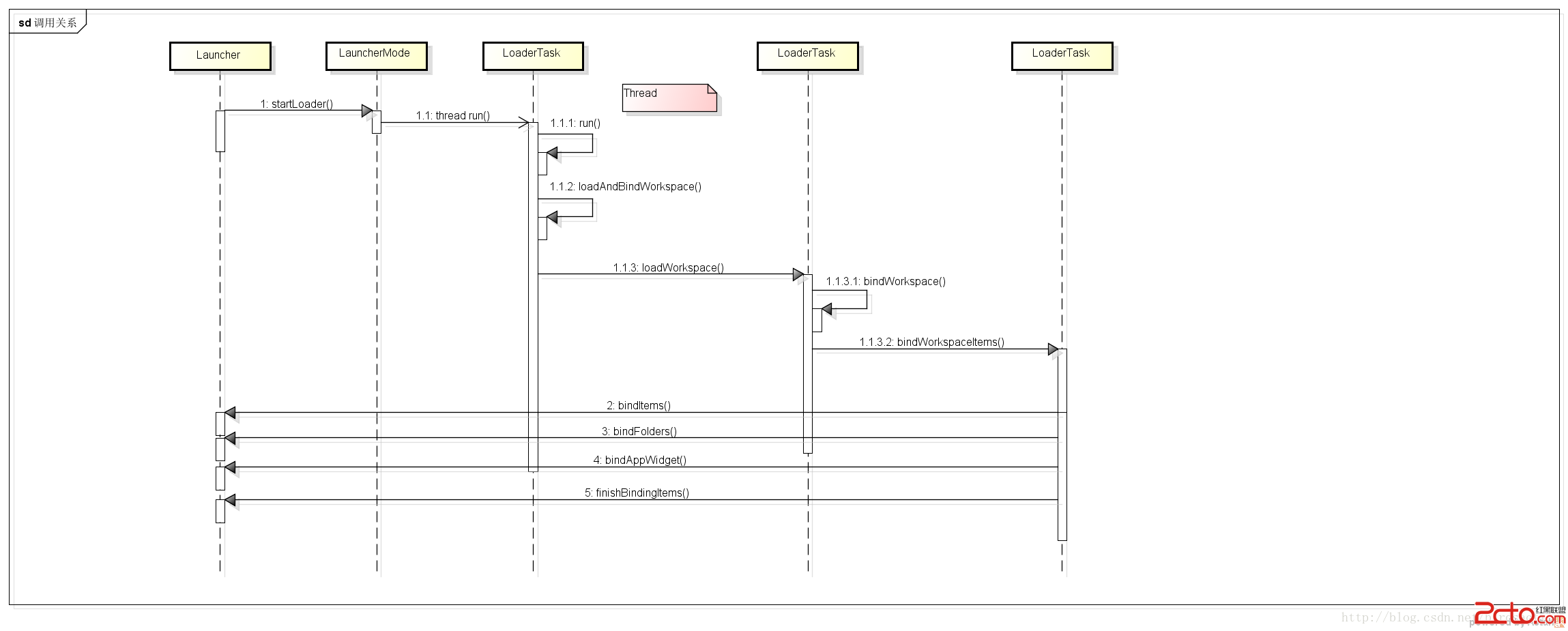
Launcher 在啟動時會透過背景執行緒載入應用資訊、桌面捷徑與小工具,再將資料綁定到畫面上。這個過程通常稱為 bind。 啟動載入流程 Launcher 會在 on
 Android Log 日誌管理:上線前一次關掉所有輸出的兩種做法
開發階段靠 Log 追問題,上線之後這些輸出就該全部關掉——既省效能,也避免把內部資訊洩漏到 logcat。手動刪除顯然不可行,比較務實的方式是包一層自己的日誌工具類,用
 iOS 開發:用 TableView 實作 QQ 風格的分組折疊與展開
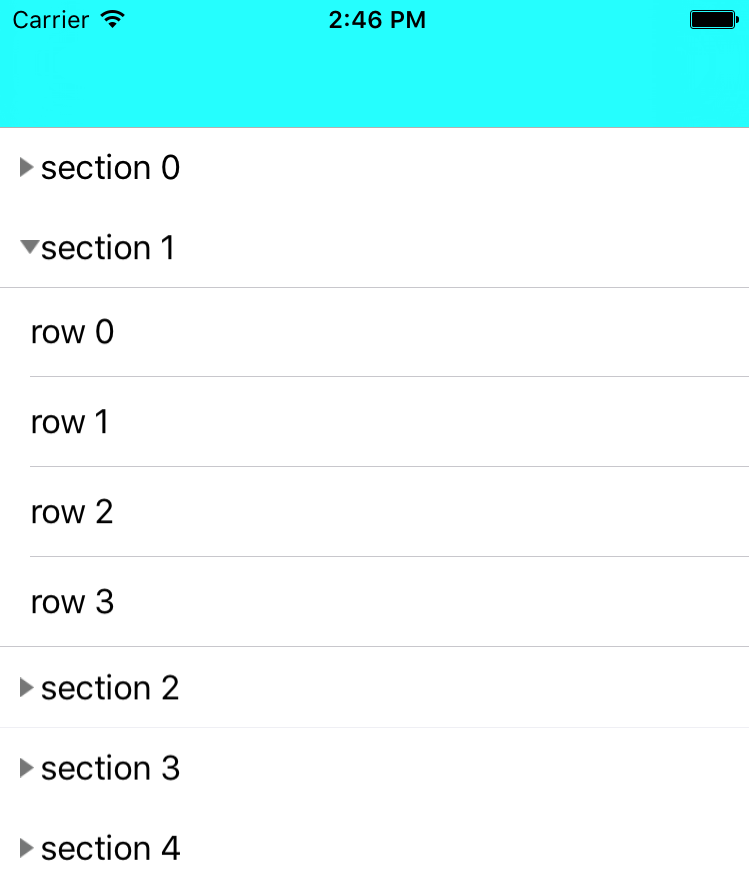
QQ 的聯絡人清單點一下分組標題就能收合或展開,這個效果在 UITableView 上實作起來比想像中簡單。一開始容易想到的路子是「在 cell 裡再嵌一個 UITabl