

編輯:關於 Android 程式設計
折騰了好幾天的 HTTP 請求終於跑通了,測試結果正常。這裡先把當前版本記錄下來,便於日後參考與迭代。
其中 POST 因為涉及多段(multipart)上傳,需要額外引入兩個包。我使用的是較新的 httpmime 4.3 版本,發現網上不少關於 MultipartEntity 的文章都是早期版本的寫法,那些老方法雖然還能用,但在新版本裡已不推薦,因此我全部改用新的 MultipartEntityBuilder 來處理。
需要引入的依賴:
httpmime-4.3.2.jar httpcore-4.3.1.jar
如果你用的是 Android Studio,可能會遇到 Android Duplicate files copied in APK 的報錯,需要留意依賴衝突問題。經過測試,POST 對中文的處理也正常,沒有出現亂碼。
ZHttpRequest.java
package com.ai9475.util; import org.apache.http.HttpEntity; import org.apache.http.HttpResponse; import org.apache.http.HttpStatus; import org.apache.http.client.HttpClient; import org.apache.http.client.methods.HttpGet; import org.apache.http.client.methods.HttpPost; import org.apache.http.client.methods.HttpRequestBase; import org.apache.http.entity.ContentType; import org.apache.http.entity.mime.HttpMultipartMode; import org.apache.http.entity.mime.MultipartEntityBuilder; import org.apache.http.impl.client.DefaultHttpClient; import org.apache.http.params.BasicHttpParams; import org.apache.http.params.HttpConnectionParams; import org.apache.http.params.HttpParams; import org.apache.http.protocol.HTTP; import java.io.ByteArrayOutputStream; import java.io.File; import java.io.IOException; import java.io.InputStream; import java.nio.charset.Charset; import java.util.Iterator; import java.util.Map; import java.util.Set; public class ZHttpRequest { protected String url = ""; protected Map<String, String> headers = null; protected int connectionTimeout = 5000; protected int soTimeout = 10000; protected int statusCode = 200; protected String charset = HTTP.UTF_8; protected HttpGet httpGet; protected HttpPost httpPost; protected HttpParams httpParameters; protected HttpResponse httpResponse; protected HttpClient httpClient; protected String inputContent; public ZHttpRequest setUrl(String url) { this.url = url; return this; } public ZHttpRequest setHeaders(Map headers) { this.headers = headers; return this; } public ZHttpRequest setConnectionTimeout(int timeout) { this.connectionTimeout = timeout; return this; } public ZHttpRequest setSoTimeout(int timeout) { this.soTimeout = timeout; return this; } public ZHttpRequest setCharset(String charset) { this.charset = charset; return this; } public HttpResponse getHttpResponse() { return this.httpResponse; } public HttpClient getHttpClient() { return this.httpClient; } public int getStatusCode() { return this.statusCode; } public String get(String url) throws IOException { this.setUrl(url); this.httpGet = new HttpGet(this.url); this.addHeaders(this.httpGet); this.initHttpClient(); this.httpResponse = this.httpClient.execute(this.httpGet); this.getInputStream(); if (this.statusCode != HttpStatus.SC_OK) { return null; } return this.inputContent; } public String post(String url, Map<String, String> datas, Map<String, String> files) throws IOException { this.setUrl(url); this.httpPost = new HttpPost(this.url); this.addHeaders(this.httpPost); this.initHttpClient(); Iterator iterator = datas.entrySet().iterator(); MultipartEntityBuilder multipartEntityBuilder = MultipartEntityBuilder.create(); multipartEntityBuilder.setMode(HttpMultipartMode.BROWSER_COMPATIBLE); multipartEntityBuilder.setCharset(Charset.forName(this.charset)); while (iterator.hasNext()) { Map.Entry<String, String> entry = (Map.Entry<String, String>) iterator.next(); multipartEntityBuilder.addTextBody(entry.getKey(), entry.getValue(), ContentType.create("text/plain", Charset.forName(this.charset))); } if (files != null) { iterator = files.entrySet().iterator(); while (iterator.hasNext()) { Map.Entry<String, String> entry = (Map.Entry<String, String>) iterator.next(); String path = entry.getValue(); if ("".equals(path) || path == null) continue; File file = new File(entry.getValue()); multipartEntityBuilder.addBinaryBody(entry.getKey(), file); } } HttpEntity httpEntity = multipartEntityBuilder.build(); this.httpPost.setEntity(httpEntity); this.httpResponse = this.httpClient.execute(this.httpPost); this.getInputStream(); if (this.statusCode != HttpStatus.SC_OK) { return null; } return this.inputContent.toString(); } protected void addHeaders(HttpRequestBase request) { if (this.headers != null) { Set keys = this.headers.entrySet(); Iterator iterator = keys.iterator(); Map.Entry<String, String> entry; while (iterator.hasNext()) { entry = (Map.Entry<String, String>) iterator.next(); request.addHeader(entry.getKey().toString(), entry.getValue().toString()); } } } protected void setParams() { this.httpParameters = new BasicHttpParams(); this.httpParameters.setParameter(charset, this.charset); HttpConnectionParams.setConnectionTimeout(this.httpParameters, this.connectionTimeout); HttpConnectionParams.setSoTimeout(this.httpParameters, this.soTimeout); } protected void initHttpClient() { this.setParams(); this.httpClient = new DefaultHttpClient(this.httpParameters); } protected void getInputStream() throws IOException { InputStream inStream = this.httpResponse.getEntity().getContent(); ByteArrayOutputStream baos = new ByteArrayOutputStream(); byte[] buf = new byte[1024]; int len = -1; while ((len = inStream.read(buf)) != -1) { baos.write(buf, 0, len); } this.inputContent = new String(baos.toByteArray()); inStream.close(); this.statusCode = this.httpResponse.getStatusLine().getStatusCode(); } protected void shutdownHttpClient() { if (this.httpClient != null && this.httpClient.getConnectionManager() != null) { this.httpClient.getConnectionManager().shutdown(); } } }
MainActivity.java(事件部分)
public void doClick(View view) { ZHttpRequest request = new ZHttpRequest(); String url = ""; TextView textView = (TextView) findViewById(R.id.showContent); String content = "空內容"; try { if (view.getId() == R.id.doGet) { url = "https://www.baidu.com"; content = "GET數據:" + request.get(url); } else { url = "https://192.168.1.6/test.php"; HashMap<String, String> datas = new HashMap<String, String>(); datas.put("p1", "abc"); datas.put("p2", "中文"); datas.put("p3", "abc中文cba"); datas.put("pic", this.picPath); HashMap<String, String> files = new HashMap<String, String>(); files.put("file", this.picPath); content = "POST數據:" + request.post(url, datas, files); } } catch (IOException e) { content = "IO異常:" + e.getMessage(); } catch (Exception e) { content = "異常:" + e.getMessage(); } textView.setText(content); }
其中 this.picPath 是 SD 卡裡圖片的完整路徑(String 類型)。整個封裝把 header、超時、編碼、GET/POST 都抽象成了鏈式方法,調用起來相當清爽。由於我對 Java 還不算特別熟,注釋是按自己的理解寫的,若有錯誤歡迎指正。
 使用 android.support.v8.renderscript 製作畫面特效
RenderScript 是 Android 提供的高效能運算框架,它把你的運算邏輯編譯成可在多核心 CPU 甚至 GPU 上平行執行的原生碼,因此特別適合每個像素都
 Android 仿微信 UI 布局視圖:圓角布局的實現
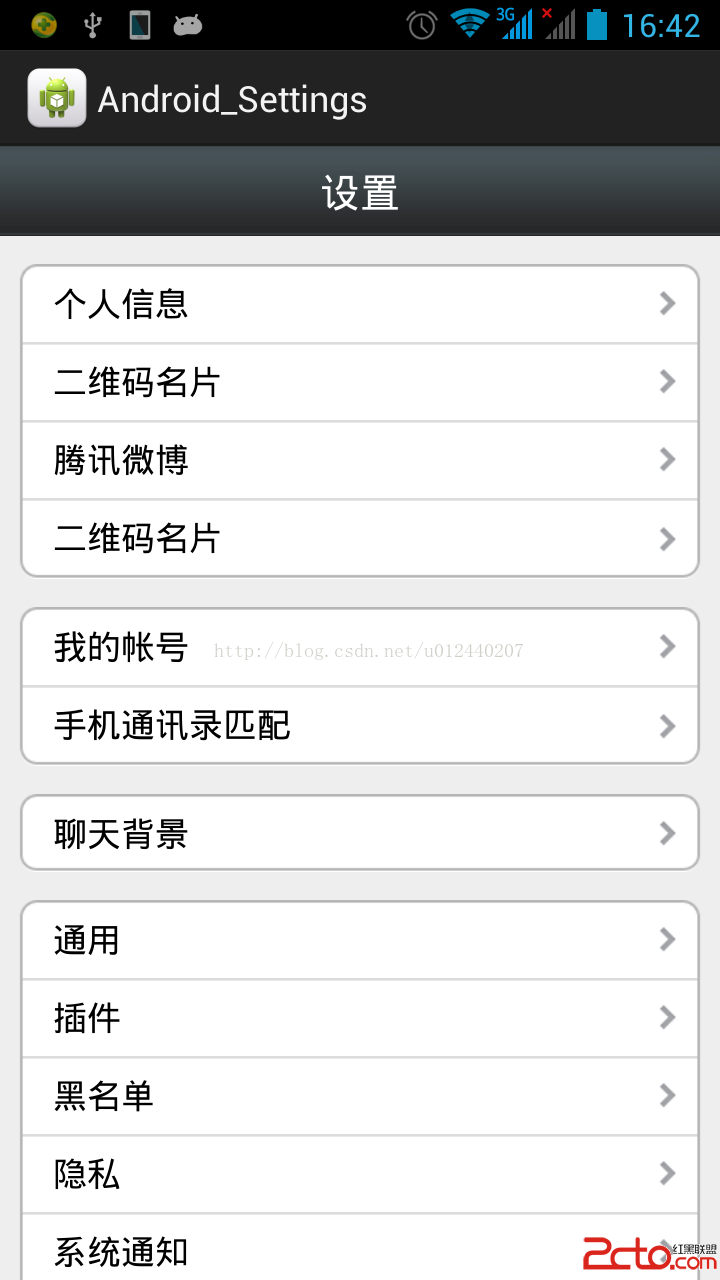
圓角按鈕或圓角布局,既可以在 XML 文件中實現,也可以直接使用圖片達到所需效果——早期版本的微信就採用了後者這種做法。 先看實現效果圖: 不得不說,這種做法還是比較
 Memcached 源碼分析:網路執行緒模型流程解析
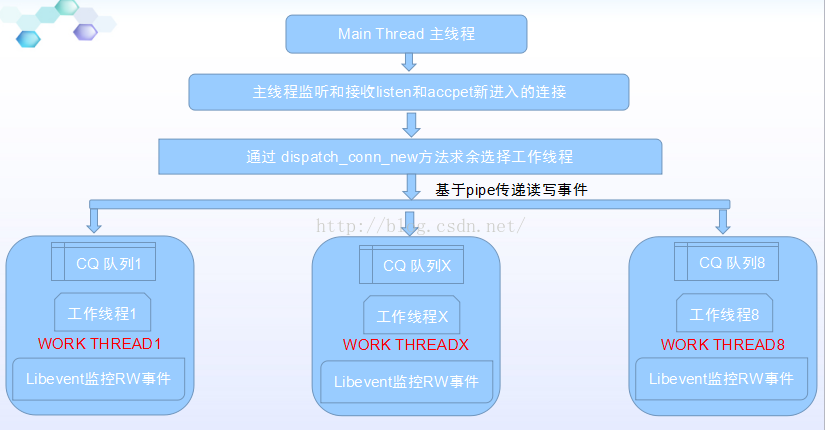
功能概述Memcached 是一套高效能的分散式記憶體物件快取系統,常用於動態網站以降低資料庫負擔。它將資料以鍵值對形式存放在記憶體中,減少重複查詢資料庫的次數,進而提升
 Android 通訊錄管理(一):如何正確取得聯絡人資料
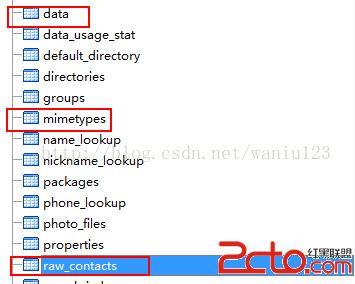
Android 的通訊錄與簡訊是透過 ContentProvider 對開發者開放介面的,因此一切都得從 ContentResolver 下手。 這塊最容易翻車的地方在於