

編輯:關於 Android 程式設計
圖片處理是應用開發中的高頻需求。這裡分享一個功能強大的 ImageUtils 工具類,涵蓋儲存圖片、寫入 SD 卡、檔案轉 Bitmap、縮放、加上倒影、圓角處理、取得圖片類型等實用功能,值得收藏參考。
import java.io.*;
import android.graphics.*;
import android.graphics.drawable.*;
import android.net.Uri;
import android.os.Environment;
import android.provider.MediaStore;
import android.util.DisplayMetrics;

/**
 * 圖片操作工具包
 */
public class ImageUtils {
    public final static String SDCARD_MNT = "/mnt/sdcard";
    public final static String SDCARD = "/sdcard";

    /** 請求相簿 */
    public static final int REQUEST_CODE_GETIMAGE_BYSDCARD = 0;
    /** 請求相機 */
    public static final int REQUEST_CODE_GETIMAGE_BYCAMERA = 1;
    /** 請求裁剪 */
    public static final int REQUEST_CODE_GETIMAGE_BYCROP = 2;

    /** 寫圖片檔案到應用私有目錄 */
    public static void saveImage(Context context, String fileName, Bitmap bitmap) throws IOException {
        saveImage(context, fileName, bitmap, 100);
    }

    public static void saveImage(Context context, String fileName, Bitmap bitmap, int quality) throws IOException {
        if (bitmap == null || fileName == null || context == null) return;
        FileOutputStream fos = context.openFileOutput(fileName, Context.MODE_PRIVATE);
        ByteArrayOutputStream stream = new ByteArrayOutputStream();
        bitmap.compress(Bitmap.CompressFormat.JPEG, quality, stream);
        byte[] bytes = stream.toByteArray();
        fos.write(bytes);
        fos.close();
    }

    /** 寫圖片檔案到 SD 卡 */
    public static void saveImageToSD(Context ctx, String filePath, Bitmap bitmap, int quality) throws IOException {
        if (bitmap != null) {
            File file = new File(filePath.substring(0, filePath.lastIndexOf(File.separator)));
            if (!file.exists()) {
                file.mkdirs();
            }
            BufferedOutputStream bos = new BufferedOutputStream(new FileOutputStream(filePath));
            bitmap.compress(Bitmap.CompressFormat.JPEG, quality, bos);
            bos.flush();
            bos.close();
            if (ctx != null) {
                scanPhoto(ctx, filePath);
            }
        }
    }

    /** 讓相簿能立即看到該圖片 */
    private static void scanPhoto(Context ctx, String imgFileName) {
        Intent mediaScanIntent = new Intent(Intent.ACTION_MEDIA_SCANNER_SCAN_FILE);
        Uri contentUri = Uri.fromFile(new File(imgFileName));
        mediaScanIntent.setData(contentUri);
        ctx.sendBroadcast(mediaScanIntent);
    }

    /** 取得 bitmap */
    public static Bitmap getBitmapByPath(String filePath) {
        return getBitmapByPath(filePath, null);
    }

    public static Bitmap getBitmapByPath(String filePath, BitmapFactory.Options opts) {
        FileInputStream fis = null;
        Bitmap bitmap = null;
        try {
            fis = new FileInputStream(new File(filePath));
            bitmap = BitmapFactory.decodeStream(fis, null, opts);
        } catch (FileNotFoundException e) {
            e.printStackTrace();
        } catch (OutOfMemoryError e) {
            e.printStackTrace();
        } finally {
            try {
                if (fis != null) fis.close();
            } catch (Exception e) { }
        }
        return bitmap;
    }

    /** 使用當前時間戳產生唯一檔名 */
    public static String getTempFileName() {
        SimpleDateFormat format = new SimpleDateFormat("yyyy-MM-dd_HH-mm-ss_SS");
        return format.format(new Timestamp(System.currentTimeMillis()));
    }

    /** 取得相機使用的目錄 */
    public static String getCamerPath() {
        return Environment.getExternalStorageDirectory() + File.separator
                + "FounderNews" + File.separator;
    }

    /** 取得圖片縮圖(僅 Android 2.1 以上支援) */
    public static Bitmap loadImgThumbnail(String filePath, int w, int h) {
        Bitmap bitmap = getBitmapByPath(filePath);
        return zoomBitmap(bitmap, w, h);
    }

    /** 計算縮放後的寬高 */
    public static int[] scaleImageSize(int[] img_size, int square_size) {
        if (img_size[0] <= square_size && img_size[1] <= square_size) return img_size;
        double ratio = square_size / (double) Math.max(img_size[0], img_size[1]);
        return new int[] { (int) (img_size[0] * ratio), (int) (img_size[1] * ratio) };
    }

    /** 放大縮小圖片 */
    public static Bitmap zoomBitmap(Bitmap bitmap, int w, int h) {
        Bitmap newbmp = null;
        if (bitmap != null) {
            int width = bitmap.getWidth();
            int height = bitmap.getHeight();
            Matrix matrix = new Matrix();
            float scaleWidht = ((float) w / width);
            float scaleHeight = ((float) h / height);
            matrix.postScale(scaleWidht, scaleHeight);
            newbmp = Bitmap.createBitmap(bitmap, 0, 0, width, height, matrix, true);
        }
        return newbmp;
    }

    /** 將 Drawable 轉為 Bitmap */
    public static Bitmap drawableToBitmap(Drawable drawable) {
        int width = drawable.getIntrinsicWidth();
        int height = drawable.getIntrinsicHeight();
        Bitmap bitmap = Bitmap.createBitmap(width, height,
                drawable.getOpacity() != PixelFormat.OPAQUE
                        ? Bitmap.Config.ARGB_8888 : Bitmap.Config.RGB_565);
        Canvas canvas = new Canvas(bitmap);
        drawable.setBounds(0, 0, width, height);
        drawable.draw(canvas);
        return bitmap;
    }

    /** 取得圓角圖片 */
    public static Bitmap getRoundedCornerBitmap(Bitmap bitmap, float roundPx) {
        Bitmap output = Bitmap.createBitmap(bitmap.getWidth(), bitmap.getHeight(), Bitmap.Config.ARGB_8888);
        Canvas canvas = new Canvas(output);
        final int color = 0xff424242;
        final Paint paint = new Paint();
        final Rect rect = new Rect(0, 0, bitmap.getWidth(), bitmap.getHeight());
        final RectF rectF = new RectF(rect);
        paint.setAntiAlias(true);
        canvas.drawARGB(0, 0, 0, 0);
        paint.setColor(color);
        canvas.drawRoundRect(rectF, roundPx, roundPx, paint);
        paint.setXfermode(new PorterDuffXfermode(PorterDuff.Mode.SRC_IN));
        canvas.drawBitmap(bitmap, rect, rect, paint);
        return output;
    }

    /** 取得帶倒影的圖片 */
    public static Bitmap createReflectionImageWithOrigin(Bitmap bitmap) {
        final int reflectionGap = 4;
        int width = bitmap.getWidth();
        int height = bitmap.getHeight();
        Matrix matrix = new Matrix();
        matrix.preScale(1, -1);
        Bitmap reflectionImage = Bitmap.createBitmap(bitmap, 0, height / 2, width, height / 2, matrix, false);
        Bitmap bitmapWithReflection = Bitmap.createBitmap(width, (height + height / 2), Bitmap.Config.ARGB_8888);
        Canvas canvas = new Canvas(bitmapWithReflection);
        canvas.drawBitmap(bitmap, 0, 0, null);
        Paint deafalutPaint = new Paint();
        canvas.drawRect(0, height, width, height + reflectionGap, deafalutPaint);
        canvas.drawBitmap(reflectionImage, 0, height + reflectionGap, null);
        Paint paint = new Paint();
        LinearGradient shader = new LinearGradient(0, bitmap.getHeight(),
                0, bitmapWithReflection.getHeight() + reflectionGap,
                0x70ffffff, 0x00ffffff, Shader.TileMode.CLAMP);
        paint.setShader(shader);
        paint.setXfermode(new PorterDuffXfermode(PorterDuff.Mode.DST_IN));
        canvas.drawRect(0, height, width, bitmapWithReflection.getHeight() + reflectionGap, paint);
        return bitmapWithReflection;
    }

    /** 取得圖片類型 */
    public static String getImageType(byte[] bytes) {
        if (isJPEG(bytes)) return "image/jpeg";
        if (isGIF(bytes))  return "image/gif";
        if (isPNG(bytes))  return "image/png";
        if (isBMP(bytes))  return "application/x-bmp";
        return null;
    }

    private static boolean isJPEG(byte[] b) {
        return b.length < 2 ? false : (b[0] == (byte) 0xFF) && (b[1] == (byte) 0xD8);
    }

    private static boolean isGIF(byte[] b) {
        return b.length < 6 ? false :
                b[0] == 'G' && b[1] == 'I' && b[2] == 'F' && b[3] == '8'
                && (b[4] == '7' || b[4] == '9') && b[5] == 'a';
    }

    private static boolean isPNG(byte[] b) {
        return b.length < 8 ? false :
                (b[0] == (byte) 137 && b[1] == (byte) 80 && b[2] == (byte) 78
                && b[3] == (byte) 71 && b[4] == (byte) 13 && b[5] == (byte) 10
                && b[6] == (byte) 26 && b[7] == (byte) 10);
    }

    private static boolean isBMP(byte[] b) {
        return b.length < 2 ? false : (b[0] == 0x42) && (b[1] == 0x4d);
    }
}
這份工具類把日常圖片操作所需的常見功能都做了封裝,直接引入專案即可大幅減少重複造輪子的時間,是相當值得參考的實作範本。
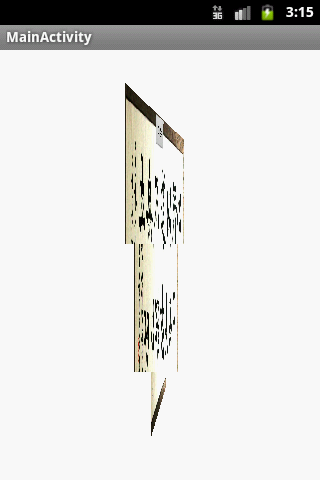 基於 Android 實現 3D 翻頁效果
3D 翻頁能替畫面切換增添動態感。本文示範如何在同一個 Activity 中,透過自定義動畫切換兩個布局,而不是依賴 Activity 之間的跳轉。布局設計主布局可使用
 Android 上使用 GreenDao 快速搭建 ORM 資料庫的完整流程
GreenDao 是一款在 Android 平台上廣泛使用的 ORM 框架,它能幫助我們擺脫繁瑣的 SQLite 語句,用面向物件的方式完成資料庫操作。本文將從環境配置開
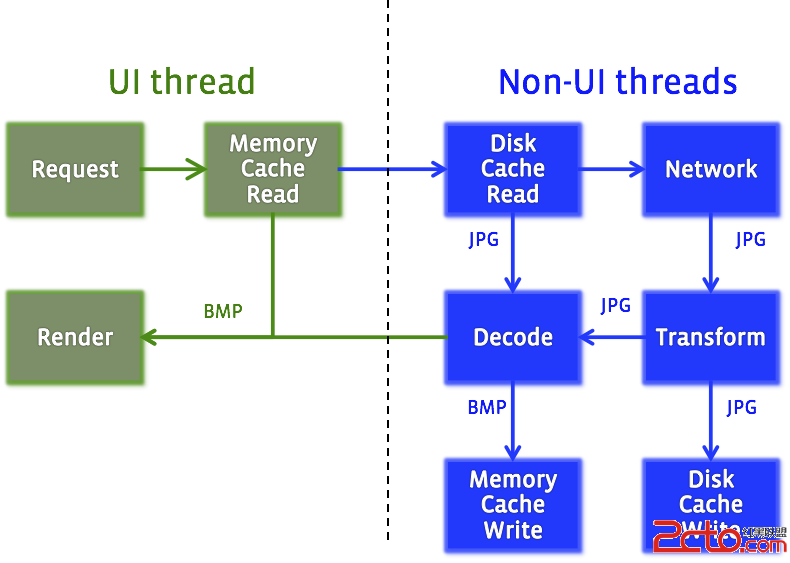 深入解析 Facebook 開源圖片庫 Fresco 的設計思路
轉載 原文連結:Introducing Fresco: A new image library for Android 作者:tyrone Nicholas 譯者:Z
 Android SurfaceView 實戰:打造精美抽獎轉盤
一、概述 今天為大家帶來一個 SurfaceView 的實戰案例。自定義 View 寫過不少,卻一直沒寫過 SurfaceView。它是個什麼東西?什麼時候用它比較合適