

編輯:關於 Android 程式設計
單選鈕(RadioButton)與多選鈕(CheckBox)是 Android 表單設計中不可或缺的元件。前者用於「多選一」的情境(如性別選擇),後者則用於「可複選」的情境(如興趣標記)。以下透過完整範例說明它們的用法。
<RadioGroup
    android:layout_width="wrap_content"
    android:layout_height="wrap_content"
    android:orientation="vertical"
    android:id="@+id/radioGroup">
    <RadioButton
        android:layout_width="wrap_content"
        android:layout_height="wrap_content"
        android:id="@+id/radio1"
        android:text="@string/female"/>
    <RadioButton
        android:layout_width="wrap_content"
        android:layout_height="wrap_content"
        android:id="@+id/radio2"
        android:text="@string/male"/>
</RadioGroup>

<CheckBox
    android:id="@+id/singBox"
    android:layout_width="wrap_content"
    android:layout_height="wrap_content"
    android:text="@string/sing"/>
<CheckBox
    android:id="@+id/runBox"
    android:layout_width="wrap_content"
    android:layout_height="wrap_content"
    android:text="@string/run"/>
<CheckBox
    android:id="@+id/danceBox"
    android:layout_width="wrap_content"
    android:layout_height="wrap_content"
    android:text="@string/dance"/>
package com.example.android1;

import android.app.Activity;
import android.content.Intent;
import android.os.Bundle;
import android.view.View;
import android.view.View.OnClickListener;
import android.widget.Button;
import android.widget.CheckBox;
import android.widget.CompoundButton;
import android.widget.RadioButton;
import android.widget.RadioGroup;
import android.widget.Toast;

public class LinearLayOut extends Activity {
    private RadioGroup radioGroup;
    private RadioButton radio1, radio2;
    private CheckBox runBox, singBox, danceBox;

    @Override
    protected void onCreate(Bundle savedInstanceState) {
        super.onCreate(savedInstanceState);
        setContentView(R.layout.activity_main);

        Button button = (Button) findViewById(R.id.button);
        button.setOnClickListener(new MyButtonListener());  // 綁定監聽器

        radio1 = (RadioButton) findViewById(R.id.radio1);
        radio2 = (RadioButton) findViewById(R.id.radio2);
        radioGroup = (RadioGroup) findViewById(R.id.radioGroup);
        runBox = (CheckBox) findViewById(R.id.runBox);
        singBox = (CheckBox) findViewById(R.id.singBox);
        danceBox = (CheckBox) findViewById(R.id.danceBox);

        // 單選鈕監聽器(監聽整個 RadioGroup)
        radioGroup.setOnCheckedChangeListener(new RadioGroup.OnCheckedChangeListener() {
            @Override
            public void onCheckedChanged(RadioGroup group, int checkedId) {
                if (radio1.getId() == checkedId) {
                    Toast.makeText(LinearLayOut.this, "選擇了女", Toast.LENGTH_SHORT).show();
                } else if (radio2.getId() == checkedId) {
                    System.out.println("男");
                }
            }
        });

        // 複選框監聽器:每個 CheckBox 都需要獨立設定
        runBox.setOnCheckedChangeListener(new CompoundButton.OnCheckedChangeListener() {
            @Override
            public void onCheckedChanged(CompoundButton buttonView, boolean isChecked) {
                System.out.println(isChecked ? "runBox is selected" : "runBox is unselected");
            }
        });

        singBox.setOnCheckedChangeListener(new CompoundButton.OnCheckedChangeListener() {
            @Override
            public void onCheckedChanged(CompoundButton buttonView, boolean isChecked) {
                System.out.println(isChecked ? "singBox is selected" : "singBox is unselected");
            }
        });

        danceBox.setOnCheckedChangeListener(new CompoundButton.OnCheckedChangeListener() {
            @Override
            public void onCheckedChanged(CompoundButton buttonView, boolean isChecked) {
                System.out.println(isChecked ? "danceBox is selected" : "danceBox is unselected");
            }
        });
    }

    class MyButtonListener implements OnClickListener {
        @Override
        public void onClick(View v) {
            Intent intent = new Intent();
            intent.setClass(LinearLayOut.this, TableLayout.class);
            LinearLayOut.this.startActivity(intent);
        }
    }
}
RadioGroup 中,並為整個群組設定 OnCheckedChangeListener,透過比對 checkedId 判斷被選中的選項。CheckBox 都是獨立的,需要各自設定 CompoundButton.OnCheckedChangeListener,並透過 isChecked 參數判斷勾選狀態。 京東強卡是什麼?京東強卡介紹
近來互聯網廠商競相推出流量卡:騰訊的大王卡/小王卡、支付寶的螞蟻大寶卡/小寶卡、滴滴的王卡等等。雖然各有使用限制,但相比傳統運營商套餐仍便宜靈活不少,頗受青睞。今日有消息
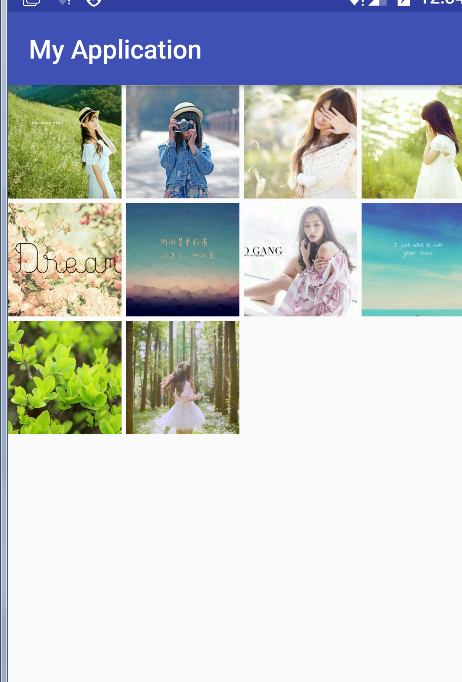 自定義 ViewGroup 打造微信朋友圈九宮格
本文以自定義 ViewGroup 實作類似微信朋友圈的九宮格圖片展示效果。相較於單純使用 GridView,自定義 ViewGroup 能更靈活地控制列數、每列數量、單圖
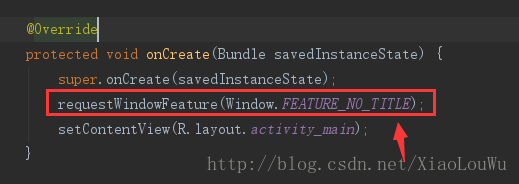 Android 無法取消標題欄的處理方式
在 Android 中取消標題欄,常見做法是透過 requestWindowFeature 或設定全螢幕主題。但在 Android 5.0 之後,部分寫法可能無法達到預期
 Android 攔截電源鍵長按、Home 鍵與 Home 鍵長按的廣播處理
在某些特殊應用場景中,開發者可能會需要攔截系統按鍵行為,例如電源鍵長按、Home 鍵或 Home 鍵長按。這類事件通常會透過系統廣播傳遞,而 Android 中常見的線索