

編輯:關於 Android 程式設計
在 Android 應用與伺服器互動時,若需要傳送較多或較敏感的中文字串資料,使用 HTTP POST 請求會比 GET 更合適。以下示範如何以 DefaultHttpClient 搭配 NameValuePair 組裝表單參數並提交。
public void send() {
    HttpPost request = new HttpPost("https://192.168.1.8:8080/AndroidWeb/InsertServlet");

    List<NameValuePair> parameters = new ArrayList<NameValuePair>();
    BasicNameValuePair im = new BasicNameValuePair("imageid", imageid + "");
    BasicNameValuePair un = new BasicNameValuePair("uname", name.getText() + "");
    BasicNameValuePair pw = new BasicNameValuePair("password", password.getText() + "");

    String sex;
    if (sex_man.isChecked()) {
        sex = "M";
    } else {
        sex = "W";
    }
    BasicNameValuePair sx = new BasicNameValuePair("sex", sex);
    BasicNameValuePair br = new BasicNameValuePair("birthday", birthday.getText() + "");

    parameters.add(un);
    parameters.add(im);
    parameters.add(pw);
    parameters.add(sx);
    parameters.add(br);

    HttpEntity en;
    try {
        en = new UrlEncodedFormEntity(parameters, HTTP.UTF_8);
        request.setEntity(en);
    } catch (UnsupportedEncodingException e1) {
        e1.printStackTrace();
    }

    DefaultHttpClient dhc = new DefaultHttpClient();
    try {
        HttpResponse response = dhc.execute(request);
    } catch (Exception e) {
        e.printStackTrace();
    }
}
NameValuePair 將每個欄位組裝成鍵值對,再統一加入 parameters 清單。UrlEncodedFormEntity 指定 UTF-8 編碼,可避免中文亂碼。request.setEntity() 將表單資料掛載到 POST 請求上,再由 client.execute() 送出。需要提醒的是,DefaultHttpClient 與 AndroidHttpClient 在較新的 Android 版本中已被標記為不建議使用,且網路請求應放在背景執行緒中進行,切勿在主執行緒(UI Thread)直接執行,以免觸發 NetworkOnMainThreadException。新專案建議改用 HttpURLConnection 或 OkHttp 等方案。
 Material Design 風格控件全攻略:CoordinatorLayout、Toolbar 與 NavigationView
想使用 Material Design(MD)風格控件,第一步得先在 Gradle 中引入 Support Design Library,例如: compile com.
 Android 屬性動畫進階實作:XML 動畫、LayoutTransition 與 View.animate()
屬性動畫的基本概念 屬性動畫的重點在於「改變物件的屬性值」,而不是只替換畫面。常見的 API 包含 ValueAnimator、ObjectAnimator 與 Anim
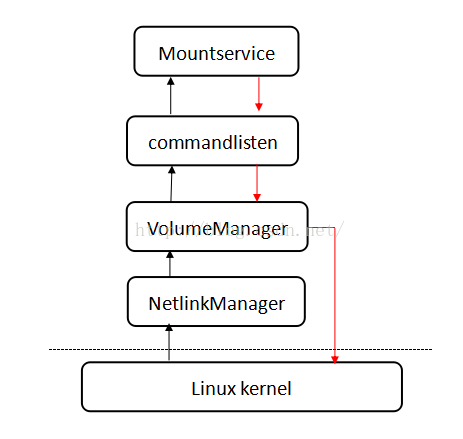 Vold 掛載管理解析:Android 外部存儲的核心機制
在 Android 系統中,外部存儲裝置的識別、掛載與卸載,並不是單純由應用層完成,而是由 Vold 這個原生守護進程統籌處理。本文從整體架構出發,梳理 Vold 與 N
 Android 自寫帶 group 指示器的 ExpandableListView
Android 原生的 ExpandableListView 有個明顯的痛點:分組標題無法固定在畫面上。往下滾動之後,看著一堆 child 卻完全說不清它們屬於哪個分組,