

編輯:關於 Android 程式設計
Android 原生的 ExpandableListView 有個明顯的痛點:分組標題無法固定在畫面上。往下滾動之後,看著一堆 child 卻完全說不清它們屬於哪個分組,使用者體驗自然打了折扣。
我在網上翻了不少「仿手機 QQ 好友分組」的實現,看完總覺得差了那麼一點意思,於是乾脆在別人的基礎上動手改良。原理其實大同小異,我主要補上了「往上擠出去」的位移動畫,同時把整體寫法再簡化一些。老實說,跟 QQ 的實際效果比起來仍有距離,若有人能做出更逼真的版本,也歡迎一起交流。先看成果:
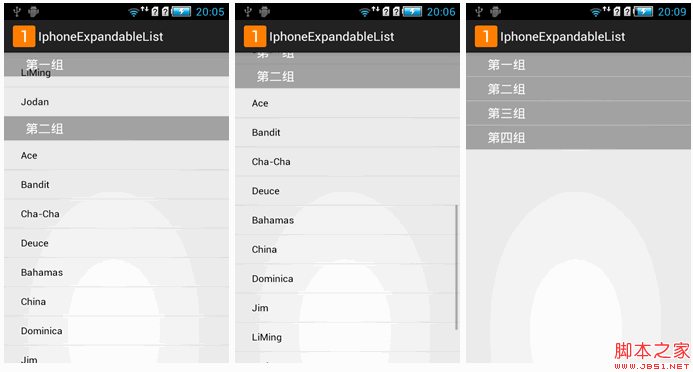
這次我沒有把 ExpandableListView 抽成獨立的新型別,而是沿用網路上常見的思路:監聽 OnScrollListener,一旦首列不再是 group 本身,就把頂部那個指示器顯示出來,並讓它的內容與當前 child 所屬分組的檢視保持一致,再補上一個點擊收合分組的行為,這樣就組出簡單的仿 QQ 好友分組效果。
最外層是一個 FrameLayout,疊在 ExpandableListView 之上的那個 topGroup 就是我們的指示器。用 FrameLayout 堆疊是為了讓指示器能浮在列表上方,而不佔用列表的排版空間。
<?xml version="1.0" encoding="utf-8"?>
<FrameLayout xmlns:android="https://schemas.android.com/apk/res/android"
    android:layout_width="match_parent"
    android:layout_height="match_parent" >

    <ExpandableListView
        android:id="@+id/expandableListView"
        android:layout_width="match_parent"
        android:layout_height="match_parent" >
    </ExpandableListView>

    <FrameLayout
        android:id="@+id/topGroup"
        android:layout_width="match_parent"
        android:layout_height="wrap_content"
        android:orientation="vertical" >
    </FrameLayout>

</FrameLayout>
整份程式碼裡最要紧的就是下面這段。當列表滑動時,我們需要判斷三件事:目前第一個可見項目是 group 還是 child、指示器該顯示哪個分組、以及指示器要露出多少高度。程式碼裡註解寫得比較完整,這裡就不逐行贅述,只把思路點一下:
/**
 * here is very importance for indicator group
 */
public void onScroll(AbsListView view, int firstVisibleItem,
        int visibleItemCount, int totalItemCount) {
    final ExpandableListView listView = (ExpandableListView) view;
    /** calculate point (0,0) */
    int npos = view.pointToPosition(0, 0);// 其實就是 firstVisibleItem
    if (npos == AdapterView.INVALID_POSITION)// 如果第一個位置值無效
        return;
    long pos = listView.getExpandableListPosition(npos);
    int childPos = ExpandableListView.getPackedPositionChild(pos);// 第一行 child 的 id
    int groupPos = ExpandableListView.getPackedPositionGroup(pos);// 第一行 group 的 id
    if (childPos == AdapterView.INVALID_POSITION) {// 第一行不是 child,就是 group,此時沒必要顯示指示器
        View groupView = listView.getChildAt(npos - listView.getFirstVisiblePosition());
        indicatorGroupHeight = groupView.getHeight();// 取得 group 的高度
        indicatorGroup.setVisibility(View.GONE);// 隱藏指示器
    } else {
        indicatorGroup.setVisibility(View.VISIBLE);// 滾動到第一行是 child,就顯示指示器
    }
    // get an error data, so return now
    if (indicatorGroupHeight == 0) {
        return;
    }
    // update the data of indicator group view
    if (groupPos != indicatorGroupId) {// 指示器顯示的不是當前 group
        mAdapter.getGroupView(groupPos, listView.isGroupExpanded(groupPos),
                indicatorGroup.getChildAt(0), null);// 將指示器更新為當前 group
        indicatorGroupId = groupPos;
        Log.e(TAG, PRE + "bind to new group,group position = " + groupPos);
        // 為指示器加上點擊事件
        indicatorGroup.setOnClickListener(new OnClickListener() {
            public void onClick(View v) {
                listView.collapseGroup(indicatorGroupId);
            }
        });
    }
    if (indicatorGroupId == -1)// group id 無效則返回
        return;
    /** calculate point (0,indicatorGroupHeight),下面是形成往上推出的效果 */
    int showHeight = indicatorGroupHeight;
    int nEndPos = listView.pointToPosition(0, indicatorGroupHeight);// 第二個 item 的位置
    if (nEndPos == AdapterView.INVALID_POSITION)// 無效直接返回
        return;
    long pos2 = listView.getExpandableListPosition(nEndPos);
    int groupPos2 = ExpandableListView.getPackedPositionGroup(pos2);// 第二個 group 的 id
    if (groupPos2 != indicatorGroupId) {// 不等於指示器當前的 group
        View viewNext = listView.getChildAt(nEndPos - listView.getFirstVisiblePosition());
        showHeight = viewNext.getTop();
        Log.e(TAG, PRE + "update the show part height of indicator group:" + showHeight);
    }
    // update group position
    MarginLayoutParams layoutParams = (MarginLayoutParams) indicatorGroup.getLayoutParams();
    layoutParams.topMargin = -(indicatorGroupHeight - showHeight);
    indicatorGroup.setLayoutParams(layoutParams);
}
這種做法的優點是侵入性低,不必另外封裝控制項,任何原本的 ExpandableListView 都能改造成這個樣子;缺點則是所有狀態都得靠外部自己維護,像是 indicatorGroupId、indicatorGroupHeight 這類變數一旦沒清乾淨,就容易出現指示器閃動或位置錯亂。
另外提醒一個實務上的坑:indicatorGroup 的高度必須在首列為 group 時才能正確取得,所以第一次進入頁面時若直接是 child 開頭,記得先給一個合理的預設值,否則會出現指示器高度為 0 而完全不顯示的情形。
最後分享另一份仿 iPhone 通訊錄效果的實作,它是 ListView 的擴充,整體完成度相當高。若有人能把 ExpandableListView 也做到同樣的水準,那就更完美了。
 修正 Android 對話方塊中 EditText 取值的空指標異常
撰寫一個包含輸入欄位的對話方塊時,點擊按鈕去讀取 EditText 的內容,卻一直收到空指標異常,折騰了好一陣子才找到原因。 原本的程式碼是這樣寫的: // 更新對話方塊
 Android 如何播放 RTMP 直播流——Vitamio 庫實戰
本文將介紹如何在 Android 上基於 Real Time Messaging Protocol(RTMP)實現直播串流播放,並延伸說明 RTSP、m3u8(HLS)
 Android 用 SurfaceView 打造流暢的九宮格抽獎效果
項目裡要做九宮格抽獎活動,我以前沒做過類似功能。雖然平時看博客時偶爾掃到過抽獎相關的文章,但因為用不上,一直沒點進去看。這回項目真要做了,只能硬著頭皮去翻。 網上翻了半天
 Android Studio 搭配 Genymotion 模擬器的實戰組合
(一)關於 Android Studio 的安裝:安裝完成後,再從官方下載所需的 SDK 套件(也可透過 SDK Manager 下載,只是偶爾會遇到連線受阻的情況),基