

編輯:關於 Android 程式設計
使用 Esri ArcGIS Android SDK 時,常會遇到啟動就閃退、拋出 InflateException 的錯誤。本文記錄這個問題的成因與解法。
10-18 10:47:35.210: ERROR/AndroidRuntime(15412): FATAL EXCEPTION: main
10-18 10:47:35.210: ERROR/AndroidRuntime(15412): java.lang.RuntimeException: Unable to start activity ComponentInfo{com.esri.arcgis.android.samples.helloworld/com.esri.arcgis.android.samples.helloworld.HelloWorld}: android.view.InflateException: Binary XML file line #6: Error inflating class com.esri.android.map.MapView
...
10-18 10:47:35.210: ERROR/AndroidRuntime(15412): Caused by: java.lang.ExceptionInInitializerError
10-18 10:47:35.210: ERROR/AndroidRuntime(15412): at com.esri.android.map.MapView.a(Unknown Source)
10-18 10:47:35.210: ERROR/AndroidRuntime(15412): at com.esri.android.map.MapView.<init>(Unknown Source)
...
10-18 10:47:35.210: ERROR/AndroidRuntime(15412): Caused by: java.lang.UnsatisfiedLinkError: Couldn't load runtimecore_java: findLibrary returned null
10-18 10:47:35.210: ERROR/AndroidRuntime(15412): at java.lang.Runtime.loadLibrary(Runtime.java:365)
10-18 10:47:35.210: ERROR/AndroidRuntime(15412): at java.lang.System.loadLibrary(System.java:535)
10-18 10:47:35.210: ERROR/AndroidRuntime(15412): at com.esri.core.internal.util.e$1.initialize(Unknown Source)
...
關鍵在最後一行:java.lang.UnsatisfiedLinkError: Couldn't load runtimecore_java: findLibrary returned null。也就是說,MapView 在初始化時需要載入名為 runtimecore_java 的 native 函式庫,但找不到對應的 .so 檔,於是引發連鎖的 InflateException。
你的布局中使用了 MapView:
<?xml version="1.0" encoding="utf-8"?>
<LinearLayout xmlns:android="https://schemas.android.com/apk/res/android"
    android:layout_width="fill_parent"
    android:layout_height="fill_parent"
    android:orientation="vertical">
    <com.esri.android.map.MapView
        android:id="@+id/map"
        android:layout_width="fill_parent"
        android:layout_height="fill_parent"
        initExtent="-19332033.11, -3516.27, -1720941.80, 11737211.28"/>
</LinearLayout>
系統在膨脹(inflate)這個自訂的 MapView 時,因為底層缺少其所需的 native 定義(.so 檔)而無法完成初始化。
問題的根源是缺少 native 函式庫,所以需要把 ArcGIS SDK 中的 .so 檔加入專案:
簡言之,InflateException 的表象之下,真正的原因是缺了 native 的 .so 函式庫;補上 armeabi / armeabi-v7a 後,MapView 就能正常載入了。
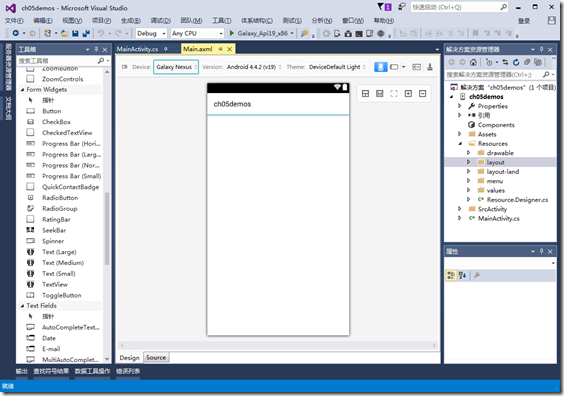 Android 項目基本結構詳解(資源、Assets 與權限管理)
一、簡介 第 3 章雖然透過百度地圖應用展示了你可能感興趣的內容,但對初學者來說,一開始就要看懂並理解程式碼可能非常吃力。為了解決這個問題,從這一章開始,本模塊將從最基本
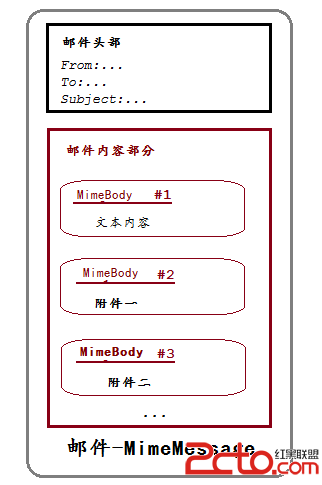 在 Android 上發送帶附件的郵件
在 Android 上發送郵件,主要有兩種方式:第一種是借助 GMail APP 客戶端。它的缺點是必須使用 GMail 帳號,優點則是相當方便——無須撰寫太多程式碼,但
 Android 自訂載入中對話框:為網路請求加上流暢回饋
效果預覽 簡要說明 現在的 Android 應用幾乎離不開網路請求,而擁有良好互動體驗的程式,對這些耗時操作的處理尤其講究。一個得體的載入提示,能讓使用者清楚知道系統正
 Android 中實現圖片翻頁效果的完整做法
翻頁效果能為電子書、相簿這類應用帶來擬真而優雅的閱讀體驗。以下透過一個自定義的 PageWidget 來實現類似真實書本翻頁的效果,核心在於利用 Canvas 繪製前景圖