

編輯:關於 Android 程式設計
本文用一個小範例把幾個最常見的 UI 元件串起來:狀態列通知、各種類型的 AlertDialog,以及 ProgressDialog 進度對話框。
小技巧:按鈕之間若要切換事件處理方式,只要在 XML 中加上 android:onClick="clearNoti" 並實作同名方法即可,不必撰寫 setOnClickListener。
public void Notification(View v) {
    showNotification("親來短信了", "5557", "我喜歡你",
            R.drawable.ic_launcher, R.drawable.ic_launcher);
}

public void showNotification(String tickerText, String contentTitle,
                             String contentText, int iconId, int notiId) {
    notificationManager = (NotificationManager) getSystemService(NOTIFICATION_SERVICE);
    // 建立一個 Notification
    Notification notification = new Notification();
    notification.icon = iconId;                       // 通知圖示
    notification.tickerText = tickerText;             // 短暫飄出的文字
    notification.when = System.currentTimeMillis();    // 通知時間
    notification.defaults = Notification.DEFAULT_VIBRATE;  // 震動效果
    // 建立 PendingIntent,交由 Android 系統維護
    PendingIntent pendingIntent = PendingIntent.getActivity(this, 0, getIntent(), 0);
    // 設定詳細內容
    notification.setLatestEventInfo(this, contentTitle, contentText, pendingIntent);
    // 以 notiId 作為識別碼發出通知
    notificationManager.notify(notiId, notification);
}
public void clearNoti(View v) {
    notificationManager.cancelAll();   // 清除所有通知
}
public void DiaLog() {
    AlertDialog alertDialog = new AlertDialog.Builder(this)
        .setIcon(R.drawable.mw)
        .setTitle("DiaLog")
        .setMessage("是否創建文件")
        .setPositiveButton("確認", new DialogInterface.OnClickListener() {
            @Override
            public void onClick(DialogInterface dialog, int which) {
                new AlertDialog.Builder(MainActivity.this)
                    .setMessage("您點擊了確認按鈕,文件已經被創建").show();
            }
        })
        .setNegativeButton("取消", new DialogInterface.OnClickListener() {
            @Override
            public void onClick(DialogInterface dialog, int which) {
                new AlertDialog.Builder(MainActivity.this)
                    .setMessage("您已經選擇了取消的按鈕,該文件不會被創建")
                    .create().show();
            }
        }).show();
}
public void Simplelistdialog(View v) {
    final String items[] = {"java", "php", "3g", ".net"};
    AlertDialog alertDialog = new AlertDialog.Builder(this)
        .setTitle("簡單列表對話框")
        .setItems(items, new DialogInterface.OnClickListener() {
            @Override
            public void onClick(DialogInterface dialog, int which) {
                Toast.makeText(getApplicationContext(),
                        "親,你喜歡的科目是:" + items[which],
                        Toast.LENGTH_LONG).show();
            }
        }).show();
}
setSingleChoiceItems 有三種多載形式:傳入字串陣列、傳入資源 ID 陣列,或傳入 Cursor(此時需指定 labelColumn,也就是資料集中作為顯示文字的那個欄位名稱)。第二個參數 checkedItem 用來指定預設勾選項。
public void Radiolistdialog(View v) {
    final String items[] = {"java", "php", "3g", ".net"};
    AlertDialog alertDialog = new AlertDialog.Builder(this)
        .setTitle("單選列表對話框")
        .setSingleChoiceItems(items, 1, new DialogInterface.OnClickListener() {
            @Override
            public void onClick(DialogInterface dialog, int which) {
                Toast.makeText(getApplicationContext(),
                        "親,你喜歡的科目是:" + items[which],
                        Toast.LENGTH_LONG).show();
            }
        }).show();
}
public void Multiselectlistdialog(View v) {
    final String items[] = {"Java", "PHP", "3G", ".NET"};
    new AlertDialog.Builder(this)
        .setTitle("多選列表對話框")
        .setMultiChoiceItems(items, new boolean[]{false, true, true, false},
            new DialogInterface.OnMultiChoiceClickListener() {
                @Override
                public void onClick(DialogInterface dialog, int which, boolean isChecked) {
                    if (isChecked) {
                        Toast.makeText(getApplicationContext(),
                                "親,你選中的科目是:" + items[which],
                                Toast.LENGTH_LONG).show();
                    }
                }
            })
        .setPositiveButton("確認", new DialogInterface.OnClickListener() {
            @Override
            public void onClick(DialogInterface dialog, int which) {
                Toast.makeText(getApplicationContext(),
                        "親,你喜歡的科目有:", Toast.LENGTH_LONG).show();
            }
        }).show();
}
ProgressDialog 搭配 Handler 定時送訊息,就能做出前進的進度條;setProgressStyle 可選擇 STYLE_SPINNER(旋轉)或 STYLE_HORIZONTAL(水平)。
public void ProgressDialog(View v) {
    handler = new Handler() {
        @Override
        public void handleMessage(Message msg) {
            super.handleMessage(msg);
            switch (msg.what) {
                case PRO:
                    if (PRO >= MAX_PROGRESS) {
                        progress = 0;
                        progressDialog.dismiss();     // 銷毀對話框
                    } else {
                        progress++;
                        progressDialog.incrementProgressBy(1);
                        handler.sendEmptyMessageDelayed(PRO, 100);  // 延遲發送
                    }
                    break;
                default:
                    break;
            }
        }
    };
    progressDialog = new ProgressDialog(this);
    progressDialog.setIcon(R.drawable.mw);
    progressDialog.setTitle("正在處理數據......");
    progressDialog.setMessage("請稍後.....");
    progressDialog.setProgressStyle(ProgressDialog.STYLE_SPINNER);
    progressDialog.setMax(MAX_PROGRESS);
    progressDialog.setButton("暫停", new DialogInterface.OnClickListener() {
        @Override
        public void onClick(DialogInterface dialog, int which) {
            handler.removeMessages(PRO);
        }
    });
    progressDialog.setButton2("取消", new DialogInterface.OnClickListener() {
        @Override
        public void onClick(DialogInterface dialog, int which) {
            handler.removeMessages(PRO);   // 清空訊息佇列
            progress = 0;
            progressDialog.setProgress(progress);
        }
    });
    progressDialog.show();
    // 必須在 show 之後設定,show 之前可能出問題
    progress = (progress > 0) ? progress : 0;
    progressDialog.setProgress(progress);
    handler.sendEmptyMessage(PRO);
}
另一種常見的呈現方式如下:
想讓對話框呈現自訂的內容,只要用 LayoutInflater 把配置檔轉成 View,再交給 setView() 即可。
public void MyDialog(View v) {
    LayoutInflater layoutInflater = getLayoutInflater();
    View view = layoutInflater.inflate(R.layout.activity_main, null);
    new AlertDialog.Builder(this)
        .setView(view)
        .setTitle("自定義的對話框")
        .setPositiveButton("確認按鈕", new DialogInterface.OnClickListener() {
            @Override
            public void onClick(DialogInterface dialog, int which) {
                // 在這裡處理確認後的邏輯
            }
        }).show();
}
本範例中的 Notification 寫法、setLatestEventInfo() 與 ProgressDialog 都屬於早期 API。在 Android 5.0 之後,通知應改用 NotificationCompat.Builder 搭配 NotificationChannel(Android 8.0 起強制要求),ProgressDialog 也已被官方標示為不建議使用,正式專案中請改用 ProgressBar 或 SwipeRefreshLayout 呈現等待狀態。
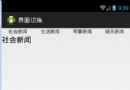 用 Fragment 做選項卡:一次完整的動態切換實踐
本文把之前講過的「動態創建 Fragment」拿來實踐一次,做一個四頁新聞切換的選項卡。 項目布局 整體結構很簡單:上面一條橫向 LinearLayout 放四個 Tex
 用 include 標籤重用版面配置:讓 UI 維護成本降下來
重複寫同樣的配置,遲早出問題 如果每個 XML 檔都把相同的區塊重寫一遍,會有兩個後果:一是程式碼冗餘、可讀性差;二是修改時到處都得改,對後期維護非常不利。 所以合理的做
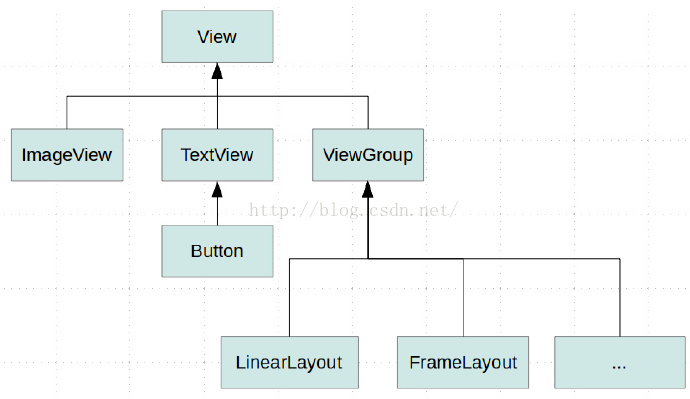 Android View 的工作原理:測量、布局與繪製
Android 的介面由 View 與 ViewGroup 構成。ViewGroup 作為容器負責排列子 View,而 View 本身負責繪製內容。整體結構近似樹狀,從根
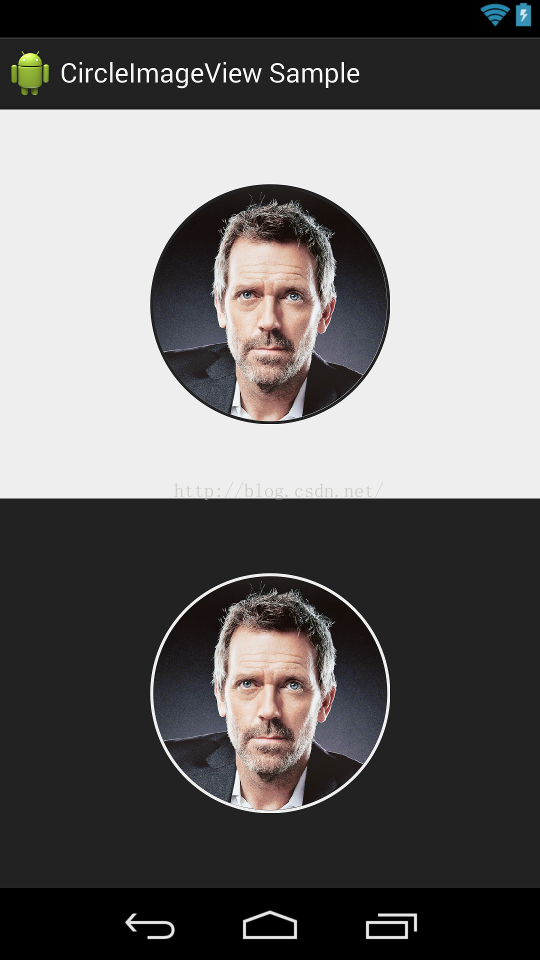 CircleImageView 與 RoundedBitmapDrawable 該怎麼選
CircleImageView 是 GitHub 上一個實現圓形 ImageView 的第三方開源專案,主頁:https://github.com/hdodenhof/C


