

編輯:關於 Android 程式設計
Android 每個應用的資料庫都是私有的,預設情況下別的 App 無法直接開啟你的 SQLite 檔案。當兩個 App(例如主程式與擴充套件、或開發者自己的兩個產品)需要共用同一份資料時,標準做法就是 ContentProvider:把資料庫包裝成一個統一的 URI 入口,讓讀寫都透過 ContentResolver 完成。
URI、表名、欄位名、authority 這些字串會散落在多個檔案裡,一旦拼錯就是執行期崩潰。建議全部收在一個契約類(Contract)中,並把建構子設為 private,避免被實體化。
package com.example.providerdemo;

import android.net.Uri;

public final class UserContract {

    public static final String DB_NAME = "user_db";
    public static final String TABLE_NAME = "user";
    public static final int DB_VERSION = 1;

    public static final String COL_ID = "_id";
    public static final String COL_NAME = "username";
    public static final String COL_DATE = "date";
    public static final String COL_SEX = "sex";

    /** authority 必須全系統唯一,通常直接用應用包名 */
    public static final String AUTHORITY = "com.example.providerdemo";

    /** UriMatcher 使用的匹配碼 */
    public static final int CODE_USER = 1;
    public static final int CODE_USER_ID = 2;

    public static final String MIME_DIR = "vnd.android.cursor.dir/vnd.example.user";
    public static final String MIME_ITEM = "vnd.android.cursor.item/vnd.example.user";

    public static final Uri CONTENT_URI =
            Uri.parse("content://" + AUTHORITY + "/user");

    private UserContract() {}
}SQLiteOpenHelper 只負責建表與升級,不要在這裡寫業務邏輯。注意欄位型別:時間戳用 INTEGER 比 TEXT 更容易排序與比較。
package com.example.providerdemo;

import android.content.Context;
import android.database.sqlite.SQLiteDatabase;
import android.database.sqlite.SQLiteOpenHelper;

public class DbHelper extends SQLiteOpenHelper {

    public DbHelper(Context context) {
        super(context, UserContract.DB_NAME, null, UserContract.DB_VERSION);
    }

    @Override
    public void onCreate(SQLiteDatabase db) {
        db.execSQL("CREATE TABLE " + UserContract.TABLE_NAME + " ("
                + UserContract.COL_ID + " INTEGER PRIMARY KEY AUTOINCREMENT,"
                + UserContract.COL_NAME + " TEXT NOT NULL,"
                + UserContract.COL_DATE + " INTEGER NOT NULL,"
                + UserContract.COL_SEX + " TEXT NOT NULL)");
    }

    @Override
    public void onUpgrade(SQLiteDatabase db, int oldVersion, int newVersion) {
        db.execSQL("DROP TABLE IF EXISTS " + UserContract.TABLE_NAME);
        onCreate(db);
    }
}Provider 需要實作 query、insert、update、delete、getType。所有方法的第一個參數都是 Uri,因此必須先用 UriMatcher 判斷「對方要的是整張表,還是某一筆特定記錄」。
package com.example.providerdemo;

import android.content.ContentProvider;
import android.content.ContentUris;
import android.content.ContentValues;
import android.content.UriMatcher;
import android.database.Cursor;
import android.database.sqlite.SQLiteDatabase;
import android.net.Uri;
import android.text.TextUtils;

public class UserProvider extends ContentProvider {

    private static final UriMatcher MATCHER = new UriMatcher(UriMatcher.NO_MATCH);

    static {
        MATCHER.addURI(UserContract.AUTHORITY, UserContract.TABLE_NAME,
                UserContract.CODE_USER);
        MATCHER.addURI(UserContract.AUTHORITY, UserContract.TABLE_NAME + "/#",
                UserContract.CODE_USER_ID);
    }

    private DbHelper mHelper;

    @Override
    public boolean onCreate() {
        mHelper = new DbHelper(getContext());
        return true;
    }

    @Override
    public Cursor query(Uri uri, String[] projection, String selection,
                        String[] selectionArgs, String sortOrder) {
        SQLiteDatabase db = mHelper.getReadableDatabase();
        Cursor cursor;
        switch (MATCHER.match(uri)) {
            case UserContract.CODE_USER:
                cursor = db.query(UserContract.TABLE_NAME, projection,
                        selection, selectionArgs, null, null, sortOrder);
                break;
            case UserContract.CODE_USER_ID:
                String id = uri.getPathSegments().get(1);
                String where = UserContract.COL_ID + " = ?"
                        + (TextUtils.isEmpty(selection) ? "" : " AND (" + selection + ")");
                cursor = db.query(UserContract.TABLE_NAME, projection, where,
                        prependId(id, selectionArgs), null, null, sortOrder);
                break;
            default:
                throw new IllegalArgumentException("Unknown URI: " + uri);
        }
        // 綁定通知 URI,資料變化時 Cursor 能自動刷新
        cursor.setNotificationUri(getContext().getContentResolver(), uri);
        return cursor;
    }

    @Override
    public Uri insert(Uri uri, ContentValues values) {
        if (MATCHER.match(uri) != UserContract.CODE_USER) {
            throw new IllegalArgumentException("Unknown URI: " + uri);
        }
        SQLiteDatabase db = mHelper.getWritableDatabase();
        long rowId = db.insert(UserContract.TABLE_NAME, null, values);
        if (rowId <= 0) {
            throw new IllegalArgumentException("Insert failed: " + uri);
        }
        Uri result = ContentUris.withAppendedId(UserContract.CONTENT_URI, rowId);
        getContext().getContentResolver().notifyChange(result, null);
        return result;
    }

    @Override
    public int update(Uri uri, ContentValues values, String selection,
                      String[] selectionArgs) {
        SQLiteDatabase db = mHelper.getWritableDatabase();
        int count;
        switch (MATCHER.match(uri)) {
            case UserContract.CODE_USER:
                count = db.update(UserContract.TABLE_NAME, values, selection, selectionArgs);
                break;
            case UserContract.CODE_USER_ID:
                String id = uri.getPathSegments().get(1);
                String where = UserContract.COL_ID + " = ?"
                        + (TextUtils.isEmpty(selection) ? "" : " AND (" + selection + ")");
                count = db.update(UserContract.TABLE_NAME, values, where,
                        prependId(id, selectionArgs));
                break;
            default:
                throw new IllegalArgumentException("Unknown URI: " + uri);
        }
        getContext().getContentResolver().notifyChange(uri, null);
        return count;
    }

    @Override
    public int delete(Uri uri, String selection, String[] selectionArgs) {
        SQLiteDatabase db = mHelper.getWritableDatabase();
        int count;
        switch (MATCHER.match(uri)) {
            case UserContract.CODE_USER:
                count = db.delete(UserContract.TABLE_NAME, selection, selectionArgs);
                break;
            case UserContract.CODE_USER_ID:
                String id = uri.getPathSegments().get(1);
                String where = UserContract.COL_ID + " = ?"
                        + (TextUtils.isEmpty(selection) ? "" : " AND (" + selection + ")");
                count = db.delete(UserContract.TABLE_NAME, where,
                        prependId(id, selectionArgs));
                break;
            default:
                throw new IllegalArgumentException("Unknown URI: " + uri);
        }
        getContext().getContentResolver().notifyChange(uri, null);
        return count;
    }

    @Override
    public String getType(Uri uri) {
        switch (MATCHER.match(uri)) {
            case UserContract.CODE_USER:
                return UserContract.MIME_DIR;
            case UserContract.CODE_USER_ID:
                return UserContract.MIME_ITEM;
            default:
                throw new IllegalArgumentException("Unknown URI: " + uri);
        }
    }

    /** 把 Uri 中的 id 放到 selectionArgs 的最前面,全程使用佔位符避免 SQL 注入 */
    private String[] prependId(String id, String[] selectionArgs) {
        if (selectionArgs == null) {
            return new String[]{id};
        }
        String[] args = new String[selectionArgs.length + 1];
        args[0] = id;
        System.arraycopy(selectionArgs, 0, args, 1, selectionArgs.length);
        return args;
    }
}註冊時的 android:authorities 必須和契約類裡的 AUTHORITY 完全一致,否則解析 URI 會失敗。若要讓「其他 App」也能訪問,Android 4.2 以上需明確加上 android:exported="true",並搭配讀寫權限控制。
<provider
    android:name=".UserProvider"
    android:authorities="com.example.providerdemo"
    android:exported="true"
    android:readPermission="com.example.providerdemo.READ"
    android:writePermission="com.example.providerdemo.WRITE" />

<permission
    android:name="com.example.providerdemo.READ"
    android:protectionLevel="signature" />
<permission
    android:name="com.example.providerdemo.WRITE"
android:protectionLevel="signature" />呼叫端不需要知道資料庫名稱、也不需要依賴 Provider 所在的程式,只要拿著 URI 操作即可。這正是跨項目共用的關鍵。
ContentResolver resolver = getContentResolver();

// 新增
ContentValues values = new ContentValues();
values.put(UserContract.COL_NAME, "carman lee");
values.put(UserContract.COL_DATE, System.currentTimeMillis());
values.put(UserContract.COL_SEX, "女");
Uri inserted = resolver.insert(UserContract.CONTENT_URI, values);

// 查詢全部
Cursor cursor = resolver.query(UserContract.CONTENT_URI,
        new String[]{UserContract.COL_NAME, UserContract.COL_DATE, UserContract.COL_SEX},
        null, null, UserContract.COL_DATE + " DESC");

List<String> rows = new ArrayList<>();
while (cursor.moveToNext()) {
    rows.add(cursor.getString(0) + " "
            + cursor.getString(1) + " "
            + cursor.getString(2));
}

// 更新指定 id
ContentValues update = new ContentValues();
update.put(UserContract.COL_NAME, "louis koo");
resolver.update(ContentUris.withAppendedId(UserContract.CONTENT_URI, inserted.getId()... ), update, null, null);
補充說明:ContentUris.parseUri(inserted, 1) 才是取出 id 的正確方式,上面最後一行僅示意「針對單筆記錄操作」的寫法,實作時請改用 long id = ContentUris.parseId(inserted); 再組出帶 id 的 Uri。
 Android 手勢實作:讓 View 跟著手指跑
先看效果: 嚴格說這不算動畫,本質上是手勢處理。廢話不多說,直接看程式。 核心邏輯 public class SimpleDragSample extends Act
 Android 自訂下拉刷新:仿 QQ 主介面效果實作
問題背景 早期實作下拉刷新時,常見做法是監聽 ListView 是否滑到最後一項,再觸發更新。但這種方式有個缺點:只要滑到底就會自動刷新,開發者不容易控制取消或重新整理的
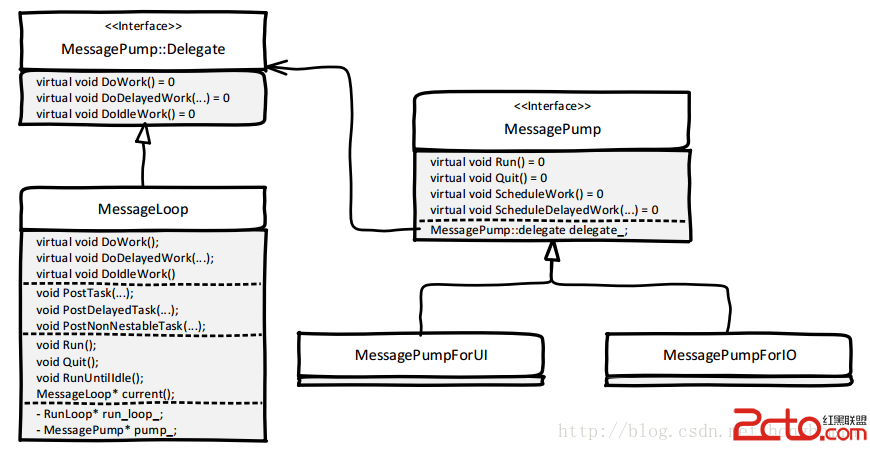 Chromium on Android:主消息循環如何整合進 Android 系統
剛接觸 Chromium on Android 時,最好奇的一件事是:Chromium 的主消息循環究竟怎麼整合到 Android 應用程式裡?Android 程式一旦啟
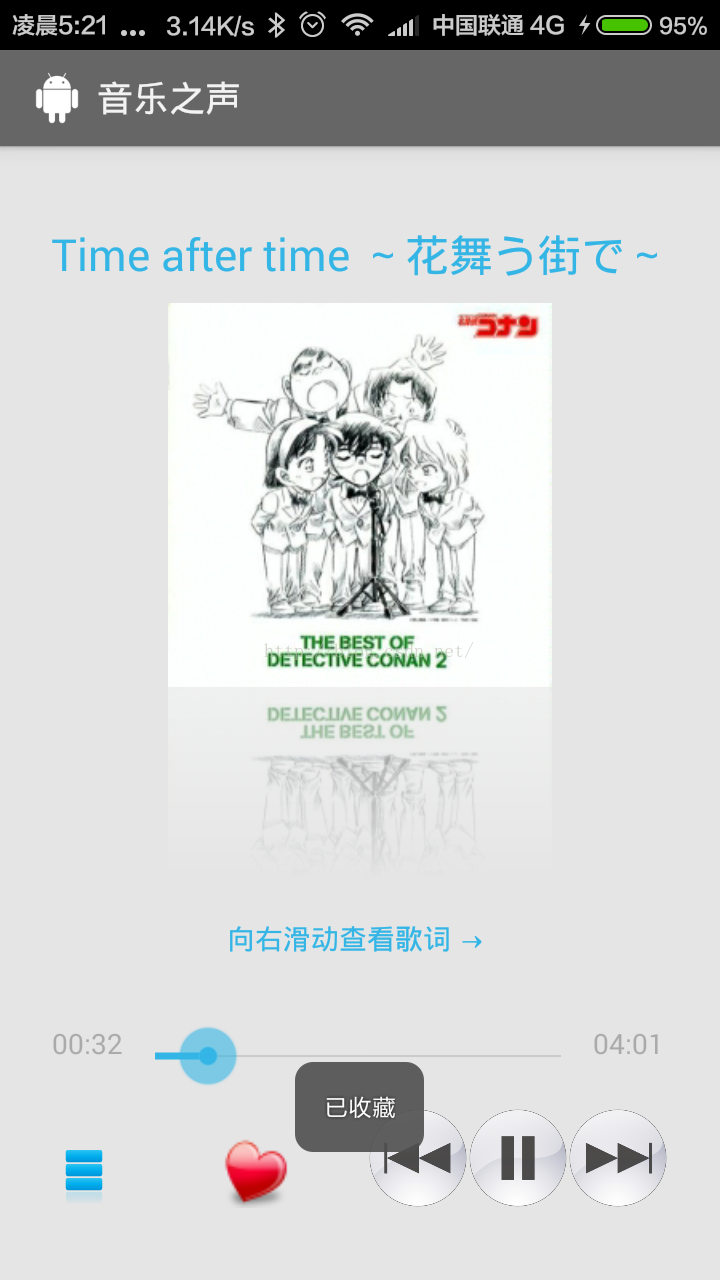 Android 本地與網絡 MP3 播放器(九)音樂收藏與列表切換
本篇要實現的功能: 使用快速開發框架 xUtils 中的 DbUtils 模塊,為音樂收藏功能做準備; 實現 PlayActivity(獨立播放界面)的收藏/取消收藏按鈕