

編輯:關於 Android 程式設計
本文記錄以百度地圖 Android SDK 打造一個地圖應用的前期實作:包含地圖顯示、衛星/交通圖切換、自訂標記覆蓋物,以及先定位再跳轉到地圖頁的啟動流程。整體架構分為「定位頁 GetLocationActivity」與「地圖頁 MainActivity」兩個 Activity,中間以自訂廣播傳遞經緯度。
繼承 MapActivity,負責初始化 BMapManager、載入 API key、設定縮放與覆蓋物,並處理衛星圖/路況切換與各功能按鈕。
package com.android.mapelves.org;

import java.util.ArrayList;
import java.util.List;

import android.annotation.SuppressLint;
import android.content.Intent;
import android.graphics.drawable.Drawable;
import android.os.Bundle;
import android.view.View;
import android.view.View.OnClickListener;
import android.view.Window;
import android.widget.CompoundButton;
import android.widget.CompoundButton.OnCheckedChangeListener;
import android.widget.ImageView;
import android.widget.RelativeLayout;
import android.widget.TextView;
import android.widget.Toast;
import android.widget.ToggleButton;
import android.widget.ZoomControls;

import com.baidu.mapapi.BMapManager;
import com.baidu.mapapi.GeoPoint;
import com.baidu.mapapi.ItemizedOverlay;
import com.baidu.mapapi.MKGeneralListener;
import com.baidu.mapapi.MapActivity;
import com.baidu.mapapi.MapController;
import com.baidu.mapapi.MapView;
import com.baidu.mapapi.MyLocationOverlay;
import com.baidu.mapapi.OverlayItem;

@SuppressLint({ "ParserError", "ParserError" })
public class MainActivity extends MapActivity {
    private int lat;
    private int lon;
    // 地圖控件
    private MapView mapView;
    // 地圖引擎
    private BMapManager bMapManager;
    // 百度地圖 key
    private String mapKey = "64C2995A762A8C16C9A9DA8928B0F42489D5C106";
    // 地圖控制器,負責縮放與置中
    private MapController mapController;
    // 地圖覆蓋物
    private MyLocationOverlay mLocationOverlay;
    // 地圖模式切換(衛星/交通)
    private ToggleButton modelChange;
    // 是否開啟實時路況
    private ToggleButton roadCond;
    private ImageView search;   // 搜索
    private ImageView road;     // 線路
    private ImageView nearby;   // 附近
    private ImageView navBar;   // 導航

    @SuppressLint("ParserError")
    @Override
    public void onCreate(Bundle savedInstanceState) {
        super.onCreate(savedInstanceState);

        requestWindowFeature(Window.FEATURE_NO_TITLE);
        setContentView(R.layout.main);
        mapView = (MapView) this.findViewById(R.id.bmapView);
        modelChange = (ToggleButton) findViewById(R.id.model_change);
        roadCond = (ToggleButton) findViewById(R.id.road_cond);
        bMapManager = new BMapManager(MainActivity.this);

        Bundle bundle = this.getIntent().getExtras();
        lat = bundle.getInt("lat");
        lon = bundle.getInt("lon");

        // 載入 key
        bMapManager.init(mapKey, new MKGeneralListener() {

            public void onGetPermissionState(int arg0) {
                if (arg0 == 300) {
                    Toast.makeText(MainActivity.this, "驗證失敗", Toast.LENGTH_LONG).show();
                }
            }

            public void onGetNetworkState(int arg0) {
            }
        });

        this.initMapActivity(bMapManager);
        mapView.setBuiltInZoomControls(true);   // 啟用縮放
        mapView.setDrawOverlayWhenZooming(true);
        mapController = mapView.getController();

        // 取出 mapView 內建的縮放控件並調整位置
        ZoomControls zoomControls = (ZoomControls) mapView.getChildAt(2);
        zoomControls.setPadding(0, 0, 0, 100);

        mLocationOverlay = new MyLocationOverlay(this, mapView);
        mLocationOverlay.enableCompass();
        // 加上定位覆蓋物
        mapView.getOverlays().add(mLocationOverlay);

        mapController.setZoom(15);  // 縮放層級
        Drawable drawable = getResources().getDrawable(R.drawable.iconmarka);
        mapView.getOverlays().add(new MyOverlayItem(drawable));
        mapView.setTraffic(true);   // 顯示交通圖
        mapView.invalidate();

        modelChange.setOnCheckedChangeListener(new ModelChangeListener());
        roadCond.setOnCheckedChangeListener(new RoadCondListener());

        nearby = (ImageView) findViewById(R.id.nearby);
        nearby.setOnClickListener(null);

        search = (ImageView) findViewById(R.id.search);
        search.setOnClickListener(new Searchlistener());

        road = (ImageView) findViewById(R.id.road);
        road.setOnClickListener(new Roadlistener());

        navBar = (ImageView) findViewById(R.id.nav);
        nearby.setOnClickListener(null);
    }

    // 開關實時路況
    class RoadCondListener implements OnCheckedChangeListener {
        public void onCheckedChanged(CompoundButton buttonView, boolean isChecked) {
            if (isChecked) {
                mapView.setTraffic(true);
                mapView.invalidate();
                Toast.makeText(MainActivity.this, "實時路況已開啟", Toast.LENGTH_LONG).show();
            } else {
                mapView.setTraffic(false);
                mapView.invalidate();
                Toast.makeText(MainActivity.this, "實時路況已關閉", Toast.LENGTH_LONG).show();
            }
        }
    }

    // 線路規劃面板的顯示/隱藏
    class Roadlistener implements OnClickListener {
        public void onClick(View v) {
            RelativeLayout rl = (RelativeLayout) findViewById(R.id.RelativeLayout_roadsearch_top);
            if (rl.getVisibility() == View.GONE) {
                rl.setVisibility(View.VISIBLE);
            } else {
                rl.setVisibility(View.GONE);
            }
        }
    }

    // 跳到搜索頁
    class Searchlistener implements OnClickListener {
        public void onClick(View v) {
            Intent intent = new Intent();
            intent.setClass(MainActivity.this, SearchActivity.class);
            startActivity(intent);
        }
    }

    // 自訂覆蓋物:在地圖上放一個標記
    public class MyOverlayItem extends ItemizedOverlay<OverlayItem>{

        private List<OverlayItem> list = new ArrayList<OverlayItem>();

        public MyOverlayItem(Drawable drawable){
            super(drawable);
            GeoPoint geoPoint = new GeoPoint(lat, lon);
            mapController.setCenter(geoPoint);  // 設定地圖中心
            list.add(new OverlayItem(geoPoint, "我在這兒", "我在這兒"));
            populate();
        }

        // 回傳清單中指定索引的座標
        @Override
        protected OverlayItem createItem(int arg0) {
            return list.get(arg0);
        }

        @Override
        public int size() {
            return list.size();
        }

        @Override
        public boolean onTap(int i) {
            Toast.makeText(MainActivity.this, list.get(i).getSnippet(), Toast.LENGTH_LONG).show();
            return true;
        }
    }

    @Override
    protected void onDestroy() {
        super.onDestroy();
        if (bMapManager != null) {
            bMapManager.destroy();
            bMapManager = null;
        }
    }

    @Override
    protected void onResume() {
        super.onResume();
        if (bMapManager != null) {
            bMapManager.start();
        }
    }

    @Override
    protected void onPause() {
        super.onPause();
        if (bMapManager != null){
            bMapManager.stop();
        }
    }

    // 衛星圖/交通圖切換
    public class ModelChangeListener implements OnCheckedChangeListener{
        public void onCheckedChanged(CompoundButton buttonView, boolean isChecked) {
            if (isChecked){
                mapView.setTraffic(false);
                mapView.setSatellite(true);
                mapView.invalidate();
            } else {
                mapView.setSatellite(false);
                mapView.setTraffic(true);
                mapView.invalidate();
            }
        }
    }

    @Override
    protected boolean isRouteDisplayed() {
        return false;
    }
}
BMapManager 生命週期是重點:在 onResume() 呼叫 start()、onPause() 呼叫 stop()、onDestroy() 呼叫 destroy() 並清空參考。漏掉任何一段都可能造成背景耗電或記憶體配置未被釋放。
此處僅搭好版面骨架,實際的 POI 搜尋邏輯因篇幅而未實作。
package com.android.mapelves.org;

import android.app.Activity;
import android.os.Bundle;
import android.view.Window;

public class SearchActivity extends Activity{

    @Override
    protected void onCreate(Bundle savedInstanceState) {
        super.onCreate(savedInstanceState);
        requestWindowFeature(Window.FEATURE_NO_TITLE);
        setContentView(R.layout.search);
    }
}
這是應用的啟動頁。它先在背景執行緒中啟動百度定位,取得經緯度後以自訂廣播回傳,再由 Handler 帶著座標跳到 MainActivity。
package com.android.mapelves.org.getlotion;

import android.app.Activity;
import android.app.ProgressDialog;
import android.content.BroadcastReceiver;
import android.content.Context;
import android.content.Intent;
import android.content.IntentFilter;
import android.location.Location;
import android.os.Bundle;
import android.os.Handler;
import android.os.Message;
import android.view.Window;
import android.widget.Toast;

import com.android.mapelves.org.MainActivity;
import com.android.mapelves.org.R;
import com.baidu.mapapi.BMapManager;
import com.baidu.mapapi.GeoPoint;
import com.baidu.mapapi.LocationListener;
import com.baidu.mapapi.MKAddrInfo;
import com.baidu.mapapi.MKBusLineResult;
import com.baidu.mapapi.MKDrivingRouteResult;
import com.baidu.mapapi.MKGeneralListener;
import com.baidu.mapapi.MKLocationManager;
import com.baidu.mapapi.MKPoiResult;
import com.baidu.mapapi.MKSearch;
import com.baidu.mapapi.MKSearchListener;
import com.baidu.mapapi.MKSuggestionResult;
import com.baidu.mapapi.MKTransitRouteResult;
import com.baidu.mapapi.MKWalkingRouteResult;
import com.baidu.mapapi.MapActivity;

public class GetLocationActivity extends MapActivity{
    private int lat;
    private int lon;
    private BroadcastReceiver receiver;
    private String ACTION = "LOCATION_CHANGE_ACTION";
    // 百度地圖 key
    private String mapKey = "64C2995A762A8C16C9A9DA8928B0F42489D5C106";
    private BMapManager bMapManager;
    private MKSearch mkSearch;
    private ProgressDialog dialog;

    @Override
    protected void onCreate(Bundle arg0) {
        super.onCreate(arg0);
        requestWindowFeature(Window.FEATURE_NO_TITLE);
        setContentView(R.layout.face);
        bMapManager = new BMapManager(this);
        bMapManager.init(mapKey, new MKGeneralListener() {

            public void onGetPermissionState(int arg0) {
                if (arg0 == 300) {
                    Toast.makeText(GetLocationActivity.this, "驗證失敗", Toast.LENGTH_LONG).show();
                    dialog.dismiss();
                }
            }

            public void onGetNetworkState(int arg0) {
                Toast.makeText(GetLocationActivity.this, "網絡出錯", Toast.LENGTH_LONG).show();
                dialog.dismiss();
            }
        });

        this.bMapManager.start();
        mkSearch = new MKSearch();
        dialog = ProgressDialog.show(this, "定位", "正在定位,請稍候...", true, true);
        new MyThread(this).start();
    }

    private class MyThread extends Thread{
        private GetLocationActivity activity;

        public MyThread(GetLocationActivity activity) {
            this.activity = activity;
        }

        @Override
        public void run() {
            super.run();
            onceStartMyLocation();
            mkSearch.init(bMapManager, new MyMKSearchlistener());

            receiver = new BroadcastReceiver() {

                @Override
                public void onReceive(Context context, Intent intent) {
                    intent.getAction();
                    Bundle bundle = intent.getExtras();
                    if (bundle.getInt("lat") != 0 && bundle.getInt("lon") != 0) {
                        lat = bundle.getInt("lat");
                        lon = bundle.getInt("lon");
                        handler.sendEmptyMessage(0);
                    }
                }
            };
            IntentFilter iFilter = new IntentFilter();
            iFilter.setPriority(Integer.MAX_VALUE);
            iFilter.addAction(ACTION);
            registerReceiver(receiver, iFilter);
        }
    }

    private Handler handler = new Handler() {
        @Override
        public void handleMessage(Message msg) {
            if (dialog.isShowing()){
                dialog.dismiss();
                Intent intent = new Intent(GetLocationActivity.this, MainActivity.class);
                intent.putExtra("lon", lon);
                intent.putExtra("lat", lat);
                startActivityForResult(intent, 11);

                int version = Integer.valueOf(android.os.Build.VERSION.SDK);
                if (version >= 5) {
                    // 自訂的轉場動畫;下面兩行為系統預設備選方案
                    overridePendingTransition(R.anim.anim_in, R.anim.anim_out);
                    // overridePendingTransition(android.R.anim.fade_in, android.R.anim.fade_out);
                    // overridePendingTransition(android.R.anim.slide_in_left, android.R.anim.slide_out_right);
                }
                unregisterReceiver(receiver);
                GetLocationActivity.this.finish();
            }
        }
    };

    // 反向地理編碼結果會透過廣播送回
    private class MyMKSearchlistener implements MKSearchListener{

        public void onGetAddrResult(MKAddrInfo arg0, int arg1) {
            if (arg0 == null) {
                return;
            }
            Intent intent = new Intent();
            intent.setAction(ACTION);
            intent.putExtra("lon", arg0.geoPt.getLongitudeE6());
            intent.putExtra("lat", arg0.geoPt.getLatitudeE6());
            sendBroadcast(intent);
        }

        public void onGetBusDetailResult(MKBusLineResult arg0, int arg1) { }
        public void onGetDrivingRouteResult(MKDrivingRouteResult arg0, int arg1) { }
        public void onGetPoiDetailSearchResult(int arg0, int arg1) { }
        public void onGetPoiResult(MKPoiResult arg0, int arg1, int arg2) { }
        public void onGetRGCShareUrlResult(String arg0, int arg1) { }
        public void onGetSuggestionResult(MKSuggestionResult arg0, int arg1) { }
        public void onGetTransitRouteResult(MKTransitRouteResult arg0, int arg1) { }
        public void onGetWalkingRouteResult(MKWalkingRouteResult arg0, int arg1) { }
    }

    // 持續定位自己的位置
    private LocationListener locationListener = new LocationListener() {

        public void onLocationChanged(Location location) {
            if (location != null) {
                Double geolat = location.getLatitude() * 1E6;
                Double geoLng = location.getLongitude() * 1E6;
                GeoPoint mypoint = new GeoPoint(geolat.intValue(), geoLng.intValue());

                mkSearch.reverseGeocode(mypoint);
            }
        }
    };

    private void onceStartMyLocation() {
        bMapManager.getLocationManager().enableProvider(MKLocationManager.MK_NETWORK_PROVIDER);
        bMapManager.getLocationManager().requestLocationUpdates(locationListener);
        bMapManager.getLocationManager().setNotifyInternal(0, 0); // 通知間隔,單位秒
    }

    @Override
    protected boolean isRouteDisplayed() {
        return false;
    }

    @Override
    protected void onResume() {
        bMapManager.start();
        super.onResume();
    }

    @Override
    protected void onPause() {
        bMapManager.getLocationManager().removeUpdates(locationListener);
        bMapManager.stop();
        super.onPause();
    }

    @Override
    public void onBackPressed() {
        super.onBackPressed();
        dialog.dismiss();
    }
}
流程小結:開啟定位提供者 → 收到 onLocationChanged → 以 GeoPoint 做反向地理編碼 → onGetAddrResult 中把經緯度以 ACTION 廣播送出 → 接收器交給 Handler → 關閉進度框並帶著 lat/lon 跳到 MainActivity。離開時記得 removeUpdates() 並 stop 引擎。
<!-- anim_in.xml -->
<?xml version="1.0" encoding="utf-8"?>
<set xmlns:android="https://schemas.android.com/apk/res/android"
       android:interpolator="@android:anim/decelerate_interpolator">
    <scale android:fromXScale="2.0" android:toXScale="1.0"
           android:fromYScale="2.0" android:toYScale="1.0"
           android:pivotX="50%p" android:pivotY="50%p"
           android:duration="@android:integer/config_mediumAnimTime" />
</set>
<!-- anim_out.xml -->
<?xml version="1.0" encoding="utf-8"?>
<set xmlns:android="https://schemas.android.com/apk/res/android"
       android:interpolator="@android:anim/decelerate_interpolator"
       android:zAdjustment="top">
    <scale android:fromXScale="1.0" android:toXScale=".5"
           android:fromYScale="1.0" android:toYScale=".5"
           android:pivotX="50%p" android:pivotY="50%p"
           android:duration="@android:integer/config_mediumAnimTime" />
    <alpha android:fromAlpha="1.0" android:toAlpha="0"
           android:duration="@android:integer/config_mediumAnimTime"/>
</set>
這幾個 selector 用來把「正常/按下/停用/勾選」狀態對應到不同圖檔,是打造原生手感按鈕的標準做法。
<!-- btn_default_small.xml -->
<?xml version="1.0" encoding="UTF-8"?>
<selector xmlns:android="https://schemas.android.com/apk/res/android">
    <item android:state_enabled="false" android:drawable="@drawable/btn_default_small_normal_disable" />
    <item android:state_pressed="true" android:drawable="@drawable/btn_default_small_pressed" />
    <item android:drawable="@drawable/btn_default_small_normal" />
</selector>
<!-- btn_its_selector.xml:ToggleButton 用 -->
<?xml version="1.0" encoding="utf-8"?>
<selector xmlns:android="https://schemas.android.com/apk/res/android">
    <item android:state_checked="true" android:drawable="@drawable/btn_its_open" />
    <item android:drawable="@drawable/btn_its_close" />
</selector>
<!-- btn_map_poi.xml -->
<?xml version="1.0" encoding="UTF-8"?>
<selector xmlns:android="https://schemas.android.com/apk/res/android">
    <item android:state_pressed="true" android:drawable="@drawable/direct_mapsearch_pressed" />
    <item android:drawable="@drawable/direct_mapsearch" />
</selector>
<!-- btn_nav_drag_down.xml -->
<?xml version="1.0" encoding="UTF-8"?>
<selector xmlns:android="https://schemas.android.com/apk/res/android">
    <item android:state_pressed="true" android:drawable="@drawable/btn_nav_drag_down_pressed" />
    <item android:drawable="@drawable/btn_nav_drag_down_normal" />
</selector>
<!-- mode_driving.xml / mode_transit.xml / mode_walk.xml:路徑規劃模式切換 -->
<selector xmlns:android="https://schemas.android.com/apk/res/android">
    <item android:state_pressed="true" android:drawable="@drawable/mode_driving_focused" />
    <item android:drawable="@drawable/mode_driving_off" />
</selector>

<selector xmlns:android="https://schemas.android.com/apk/res/android">
    <item android:state_pressed="true" android:drawable="@drawable/mode_transit_focused" />
    <item android:drawable="@drawable/mode_transit_on" />
</selector>

<selector xmlns:android="https://schemas.android.com/apk/res/android">
    <item android:state_pressed="true" android:drawable="@drawable/mode_walk_focused" />
    <item android:drawable="@drawable/mode_walk_off" />
</selector>
<!-- shape.xml:搜尋框的圓角外框 -->
<?xml version="1.0" encoding="utf-8"?>
<shape xmlns:android="https://schemas.android.com/apk/res/android">
    <solid android:color="#FFFFFF"/>
    <corners android:radius="8px"/>
    <stroke android:width="2px" />
</shape>
<!-- text_search.xml:輸入框的三種狀態 -->
<?xml version="1.0" encoding="UTF-8"?>
<selector xmlns:android="https://schemas.android.com/apk/res/android">
    <item android:state_focused="false" android:state_enabled="true" android:state_pressed="false" android:drawable="@drawable/text_search_default" />
    <item android:state_enabled="true" android:state_pressed="true" android:drawable="@drawable/text_search_pressed" />
    <item android:state_focused="true" android:state_enabled="true" android:state_pressed="false" android:drawable="@drawable/text_search_selected" />
</selector>
啟動頁 face.xml:一張全螢幕的圖片,定位期間作為過場。
<?xml version="1.0" encoding="utf-8"?>
<LinearLayout xmlns:android="https://schemas.android.com/apk/res/android"
    android:layout_width="fill_parent"
    android:layout_height="fill_parent"
    android:layout_gravity="center"
    android:orientation="vertical" >
    <ImageView
        android:src="@drawable/bg"
        android:layout_width="fill_parent"
        android:layout_height="fill_parent"/>
</LinearLayout>
地圖頁 main.xml:以 FrameLayout 疊層,MapView 在最底,控制項以 RelativeLayout 疊在上方,底部是 TableLayout 組成的功能列(附近/搜尋/線路/導航),最上層是預設隱藏的路線規劃面板。
<FrameLayout xmlns:android="https://schemas.android.com/apk/res/android"
    xmlns:tools="https://schemas.android.com/tools"
    android:layout_width="fill_parent"
    android:layout_height="fill_parent"
    android:orientation="vertical" >

    <com.baidu.mapapi.MapView
        android:id="@+id/bmapView"
        android:layout_width="fill_parent"
        android:layout_height="fill_parent"
        android:clickable="true" />

    <RelativeLayout
        android:layout_width="fill_parent"
        android:layout_height="fill_parent">

        <!-- 衛星圖/交通圖切換 -->
        <ToggleButton
            android:id="@+id/model_change"
            android:layout_width="wrap_content"
            android:layout_height="wrap_content"
            android:layout_alignParentRight="true"
            android:alpha="0.7"
            android:textOn="衛星地圖"
            android:textOff="交通地圖"/>

        <!-- 實時路況開關 -->
        <LinearLayout
            android:layout_width="wrap_content"
            android:layout_height="wrap_content"
            android:layout_alignParentRight="true"
            android:layout_below="@id/model_change"
            android:paddingRight="4.0dip" >
            <ToggleButton
                android:id="@+id/road_cond"
                android:layout_width="wrap_content"
                android:layout_height="wrap_content"
                android:background="@drawable/btn_its_selector"
                android:checked="false"
                android:textOff=""
                android:textOn="" />
        </LinearLayout>

        <!-- 底部功能列:附近、搜尋、線路、導航 -->
        <TableLayout
            android:layout_width="fill_parent"
            android:layout_height="wrap_content"
            android:layout_alignParentBottom="true"
            android:background="#D3D3D3"
            android:alpha="0.8" >
            <TableRow >
                <FrameLayout android:layout_weight="1"
                    android:layout_width="wrap_content"
                    android:layout_height="wrap_content">
                    <LinearLayout
                        android:layout_width="wrap_content"
                        android:layout_height="wrap_content"
                        android:layout_gravity="center"
                        android:orientation="vertical">
                        <ImageView android:id="@+id/nearby"
                            android:src="@drawable/nearby"
                            android:layout_gravity="center"
                            android:layout_width="wrap_content"
                            android:layout_height="wrap_content"/>
                        <TextView android:text="附近"
                            android:layout_width="wrap_content"
                            android:layout_gravity="center"
                            android:layout_height="wrap_content"
                            android:textStyle="italic"/>
                    </LinearLayout>
                </FrameLayout>
                <!-- search、road、nav 三個 FrameLayout 結構相同,
                     分別掛上 @+id/search、@+id/road、@+id/nav -->
            </TableRow>
        </TableLayout>
    </RelativeLayout>

    <!-- 路線規劃面板,預設隱藏 -->
    <RelativeLayout
        android:id="@id/RelativeLayout_roadsearch_top"
        android:layout_width="fill_parent"
        android:layout_height="wrap_content"
        android:background="@drawable/search_plate_global"
        android:visibility="gone"
        android:gravity="center" >

        <!-- 起點/終點選擇按鈕 -->
        <ImageButton
            android:id="@id/imagebtn_roadsearch_startoption"
            android:layout_width="wrap_content"
            android:layout_height="wrap_content"
            android:layout_alignParentRight="true"
            android:layout_alignParentTop="true"
            android:layout_marginRight="10.0dip"
            android:layout_marginTop="6.0dip"
            android:background="@android:color/transparent"
            android:src="@drawable/btn_nav_drag_down" />

        <ImageButton
            android:id="@id/imagebtn_roadsearch_goalsoption"
            android:layout_width="wrap_content"
            android:layout_height="wrap_content"
            android:layout_alignParentRight="true"
            android:layout_below="@id/imagebtn_roadsearch_startoption"
            android:layout_marginRight="10.0dip"
            android:layout_marginTop="8.0dip"
            android:background="@android:color/transparent"
            android:src="@drawable/btn_nav_drag_down" />

        <!-- 起點輸入框 -->
        <AutoCompleteTextView
            android:id="@id/autotextview_roadsearch_start"
            android:layout_width="fill_parent"
            android:layout_height="wrap_content"
            android:layout_alignTop="@id/imagebtn_roadsearch_startoption"
            android:layout_marginLeft="5.0dip"
            android:layout_toLeftOf="@id/imagebtn_roadsearch_startoption"
            android:background="@drawable/text_search"
            android:dropDownVerticalOffset="1.0dip"
            android:hint="起點:"
            android:imeOptions="actionDone"
            android:inputType="text|textAutoComplete"
            android:maxLength="20"
            android:paddingRight="37.0dip"
            android:singleLine="true"
            android:textSize="16.0sp" />

        <!-- 終點輸入框(同上,id 為 autotextview_roadsearch_goals,hint 為「終點:」) -->

        <!-- 公車/開車/步行 三種路線模式 + 查詢按鈕 -->
        <LinearLayout
            android:id="@id/btn_layout"
            android:layout_width="fill_parent"
            android:layout_height="48.0dip"
            android:layout_below="@id/imagebtn_roadsearch_goalsoption"
            android:layout_marginLeft="10.0dip"
            android:layout_marginRight="6.0dip"
            android:layout_marginTop="6.0dip"
            android:orientation="horizontal"
            android:paddingBottom="10.0dip" >
            <LinearLayout
                android:layout_width="fill_parent"
                android:layout_height="fill_parent"
                android:layout_weight="2.0"
                android:orientation="horizontal" >
                <Button android:id="@id/imagebtn_roadsearch_tab_transit"
                    android:layout_width="fill_parent"
                    android:layout_height="fill_parent"
                    android:layout_weight="1.0"
                    android:background="@drawable/mode_transit" />
                <Button android:id="@id/imagebtn_roadsearch_tab_driving"
                    android:layout_width="fill_parent"
                    android:layout_height="fill_parent"
                    android:layout_weight="1.0"
                    android:background="@drawable/mode_driving" />
                <Button android:id="@id/imagebtn_roadsearch_tab_walk"
                    android:layout_width="fill_parent"
                    android:layout_height="fill_parent"
                    android:layout_weight="1.0"
                    android:background="@drawable/mode_walk" />
            </LinearLayout>
            <LinearLayout
                android:layout_width="fill_parent"
                android:layout_height="fill_parent"
                android:layout_marginLeft="10.0dip"
                android:layout_weight="3.0" >
                <ImageButton android:id="@id/imagebtn_roadsearch_search"
                    android:layout_width="fill_parent"
                    android:layout_height="41.0dip"
                    android:background="@drawable/btn_default_small"
                    android:src="@drawable/btn_poi_search_normal" />
            </LinearLayout>
        </LinearLayout>
    </RelativeLayout>
</FrameLayout>
搜尋頁 search.xml:上方是帶圓角外框的 EditText 與送出按鈕,下方以「分隔線 + TableLayout」分成好幾組分類入口(餐飲、購物、銀行、交通、住宿、生活、娛樂休閒、公共設施、汽車服務、政府機關),每組兩個項目,每個項目都是「ImageButton + TextView」的垂直 LinearLayout。
<?xml version="1.0" encoding="utf-8"?>
<LinearLayout xmlns:android="https://schemas.android.com/apk/res/android"
    android:layout_width="fill_parent"
    android:layout_height="fill_parent"
    android:background="#D3D3D3"
    android:orientation="vertical" >

    <LinearLayout
        android:layout_width="fill_parent"
        android:layout_height="wrap_content">
        <TableLayout
            android:background="#FFE4C4"
            android:layout_width="fill_parent"
            android:layout_height="wrap_content">
            <TableRow>
                <EditText
                    android:id="@+id/et_search"
                    android:layout_width="fill_parent"
                    android:layout_weight="20"
                    android:layout_height="wrap_content"
                    android:layout_gravity="center"
                    android:drawableLeft="@drawable/search"
                    android:background="@drawable/shape"
                    android:padding="10px"
                    android:hint="地點、公交、地鐵......"
                    android:singleLine="true" />
                <ImageButton
                    android:id="@+id/ht"
                    android:src="@drawable/ht"
                    android:background="@null"
                    android:layout_marginTop="10px"
                    android:layout_width="fill_parent"
                    android:layout_height="wrap_content"
                    android:layout_weight="1"/>
            </TableRow>
        </TableLayout>
    </LinearLayout>

    <!-- 以下重複「分隔線 + 一列兩個分類入口」的結構,
         分類包含:餐飲、購物、銀行、交通、住宿、生活、
         娛樂休閒、公共設施、汽車服務、政府機關 -->
    <TextView
        android:layout_width="fill_parent"
        android:layout_height="2dp"
        android:layout_marginLeft="10dp"
        android:layout_marginRight="10dp"
        android:layout_marginTop="20dp"
        android:background="#FFA500"/>

    <TableLayout
        android:layout_marginTop="5dp"
        android:layout_width="fill_parent"
        android:layout_height="wrap_content">
        <TableRow >
            <LinearLayout
                android:layout_weight="1"
                android:orientation="vertical"
                android:layout_width="fill_parent"
                android:layout_height="wrap_content">
                <ImageButton
                    android:id="@+id/repast"
                    android:src="@drawable/repast"
                    android:layout_gravity="center"
                    android:layout_width="wrap_content"
                    android:layout_height="wrap_content"
                    android:background="@null"/>
                <TextView
                    android:text="餐飲"
                    android:textSize="20dp"
                    android:layout_gravity="center"
                    android:layout_width="wrap_content"
                    android:layout_height="wrap_content"/>
            </LinearLayout>
            <!-- 另一個 LinearLayout 結構相同(此處為購物,id 為 shopping) -->
        </TableRow>
    </TableLayout>
</LinearLayout>
ids.xml:路線規劃面板中的控制項 id 集中定義在這裡,方便多處共用。
<?xml version="1.0" encoding="utf-8"?>
<resources>
   <item type="id" name="RelativeLayout_roadsearch_top"></item>
   <item type="id" name="imagebtn_roadsearch_startoption"></item>
   <item type="id" name="imagebtn_roadsearch_goalsoption"></item>
   <item type="id" name="autotextview_roadsearch_start"></item>
   <item type="id" name="autotextview_roadsearch_goals"></item>
   <item type="id" name="btn_layout"></item>
   <item type="id" name="imagebtn_roadsearch_tab_transit"></item>
   <item type="id" name="imagebtn_roadsearch_tab_driving"></item>
   <item type="id" name="imagebtn_roadsearch_tab_walk"></item>
   <item type="id" name="imagebtn_roadsearch_search"></item>
</resources>
strings.xml
<resources>
   <string name="app_name">MapElves</string>
   <string name="hello_world">Hello world!</string>
   <string name="menu_settings">Settings</string>
   <string name="title_activity_main">地圖導航</string>
   <string name="toplayout_tv_search">查詢</string>
   <string name="search_title">搜索關鍵字</string>
</resources>
AndroidManifest.xml:GetLocationActivity 作為啟動頁(LAUNCHER),MainActivity 與 SearchActivity 一般註冊即可。地圖應用需要的權限不少,包含網路狀態、定位、網際網路、外部儲存、Wi-Fi 狀態與通話相關權限。
<manifest xmlns:android="https://schemas.android.com/apk/res/android"
   package="com.android.mapelves.org"
   android:versionCode="1"
   android:versionName="1.0" >

   <uses-sdk
       android:minSdkVersion="8"
       android:targetSdkVersion="15"/>
   <supports-screens
       android:largeScreens="true"
       android:normalScreens="false"
       android:smallScreens="true"
       android:resizeable="true"
       android:anyDensity="true" />

   <application
       android:hardwareAccelerated="false"
       android:icon="@drawable/iconmarka"
       android:label="地圖導航"
       android:theme="@style/AppTheme" >
       <activity
           android:name=".getlotion.GetLocationActivity"
           android:label="地圖導航" >
           <intent-filter>
               <action android:name="android.intent.action.MAIN" />
               <category android:name="android.intent.category.LAUNCHER" />
           </intent-filter>
       </activity>
       <activity android:name=".MainActivity"></activity>
       <activity android:name=".SearchActivity"></activity>
   </application>

   <uses-permission android:name="android.permission.ACCESS_NETWORK_STATE" />
   <uses-permission android:name="android.permission.ACCESS_FINE_LOCATION" />
   <uses-permission android:name="android.permission.INTERNET" />
   <uses-permission android:name="android.permission.WRITE_EXTERNAL_STORAGE" />
   <uses-permission android:name="android.permission.ACCESS_WIFI_STATE" />
   <uses-permission android:name="android.permission.CHANGE_WIFI_STATE" />
   <uses-permission android:name="android.permission.READ_PHONE_STATE" />
   <uses-permission android:name="android.permission.CALL_PHONE" />
</manifest>
目前只完成了「定位 → 顯示地圖 → 顯示標記 → 切換圖層」這條主線。若要繼續補完,建議依序處理:搜尋頁的 POI 查詢(MKSearch 的 poiSearch)、路線規劃面板三種模式(公交/開車/步行)對應 MKTransitRouteResult、MKDrivingRouteResult、MKWalkingRouteResult 的繪製,以及把定位頁改用更現代的定位方式。另外提醒兩點實務問題:API key 不應寫死在原始碼中,建議改由建置設定注入;而 android:hardwareAccelerated="false" 會讓地圖與自訂動畫的效能明顯下降,正式版本應改為開啟。
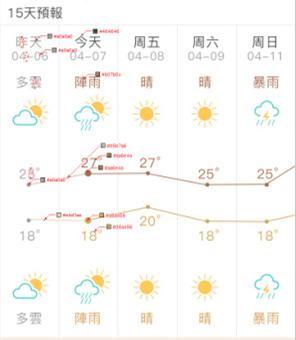 自定義 View 實作天氣折線圖
需求與思路 天氣模組常需要展示多天預報,若只用一個自定義 View 繪製全部內容,效能與維護都不理想。改採水平 RecyclerView,可讓每個日期成為獨立項目,並在項
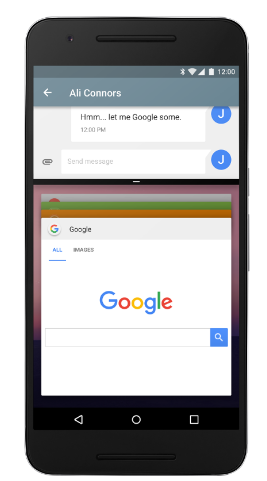 Android N 開發者必看:多視窗、JIT、Data Saver 與一批關鍵新 API
Android N 當時仍以 N Developer Preview 的形式釋出,但已經可以下載試用。以下整理其中對開發者影響最大的幾項變革,並提醒你同步查閱行為變更文件
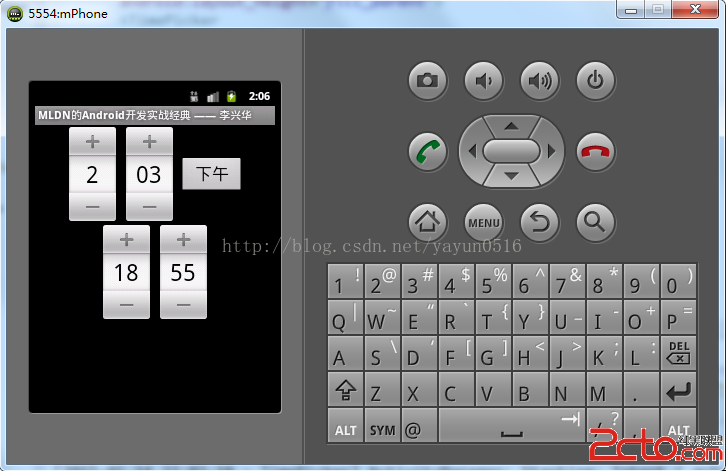 Android 時間選擇器 TimePicker 的基本用法
TimePicker 是 Android 內建的時間選擇元件,使用方式相當直接:放進版面,程式碼中取得實例後讀取或設定時、分即可。 版面檔 <?xml vers
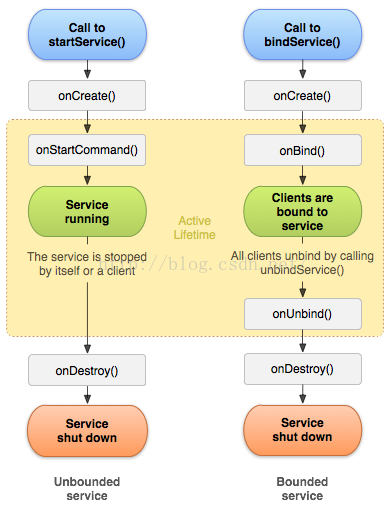 Android Service 詳解:啟動、綁定與生命週期
來源:https://developer.android.com/guide/components/services.html Service 是一種可以在後台執行長時間