

編輯:關於 Android 程式設計
Android 開發過程中難免遇到各種錯誤,以下整理一系列常見的報錯訊息與對應的解決方式,方便隨時查閱。
安裝對應的 API 版本,或在 default.properties 中把 target=android-2 改為 target=android-7 即可。
main.xml 放錯資料夾了,應該放在 \res\layout 下。
原因:SD 卡容量不足。解法一是在模擬器的「Additional Emulator Command Line Options」中加上 -partition-size 128;解法二是進入 settings > applications > manage applications,選>That 應用並 uninstall 徹底刪除後再重裝。
清除 C:\Users\<使用者>\AppData\Local\Temp\AndroidEmulator 資料夾下的 tmp 檔。
右鍵點擊專案 Refresh 一下即可。原因通常是檔案在 Eclipse 之外被編輯了。
該工程已被導入 Eclipse,一個工程不能重複導入兩次;或把資料夾複製到別的目錄後重新導入即可。
在 AndroidManifest.xml 加上 <uses-permission android:name="android.permission.VIBRATE"></uses-permission>。原因是使用了震動功能卻未宣告權限。
在 Eclipse 中執行「Project」→「Clean…」。原因是模擬器中還有東西在運行,該 Activity 已有一個實例存在。
new ArrayAdapter 的第二個參數必須是 TextView 的資源 ID,可改為 android.R.layout.simple_spinner_dropdown_item。
右鍵專案 → Build Project。原因通常是 res/drawable 下的檔名含有 a~z、0~9 以外的字元。
ScrollView 內部只能有一個直接子元素,需把所有子元素包進一個 LinearLayout 或 RelativeLayout 中。
這是沒有正常關閉導致的,刪除 .android\avd\<版本> 下以 .lock 結尾的資料夾即可,因為這些鎖檔未被釋放。
在工作管理員中關閉所有 adb.exe,然後重啟 Eclipse 即可。
將 android:name="Acitivity" 改為 android:name=".Acitivity",即 Manifest 中 Activity 的路徑寫錯了。
右鍵 Build Path → Configure Build Path,在 Libraries 中找到帶叉號的套件(路徑錯誤),修正後 F5 刷新。通常是 .classpath 引用了實際上不存在的 jar。
使用 Intent 時找不到目標 Activity,需在 AndroidManifest.xml 中補上對應的 <activity> 設定。
在 Manifest 加入 <uses-permission android:name="android.permission.CAMERA" />;若仍不行,在 surfaceDestroyed 中加上 mCamera.stopPreview(); mCamera.release(); 正確釋放相機。
建立 AlertDialog 時必須傳入 Activity 的 Context(如 Activity.this),而不能用 getApplicationContext(),因为只有 Activity 才能添加窗體。
兩個互相依賴的位置屬性不能同時使用,需調整 RelativeLayout 的對齊屬性避免循環依賴。
在相對佈局中若用到 android:layout_above 且其 id 之前未出現過,需寫成 @+id/...,多加一個「+」。
Window → Preferences → Java → Compiler,把 Compiler compliance level 改為 1.6,且不要在個別專案裡做 specific 覆寫。
原因一是 onKeyDown 中 return super 未改;原因二是關閉 Activity 時沒有關閉 AlertDialog。可將 return 改為 false,或在 onPause 中 dismiss 對話框,或在 Manifest 加上 android:configChanges="orientation|keyboardHidden|navigation"。
可嘗試:移除 Manifest 中 application 的 android:name;將全局類或變量改為私有;或檢查 package 路徑是否正確。
呼叫 setTestProviderEnabled 前,需先用 addTestProvider 註冊該測試提供者並設定各項參數即可。
以上就是 Android 開發中經常遇到的錯誤整理。遇到問題時,先看懂錯誤訊息再對照排查,往往能事半功倍。
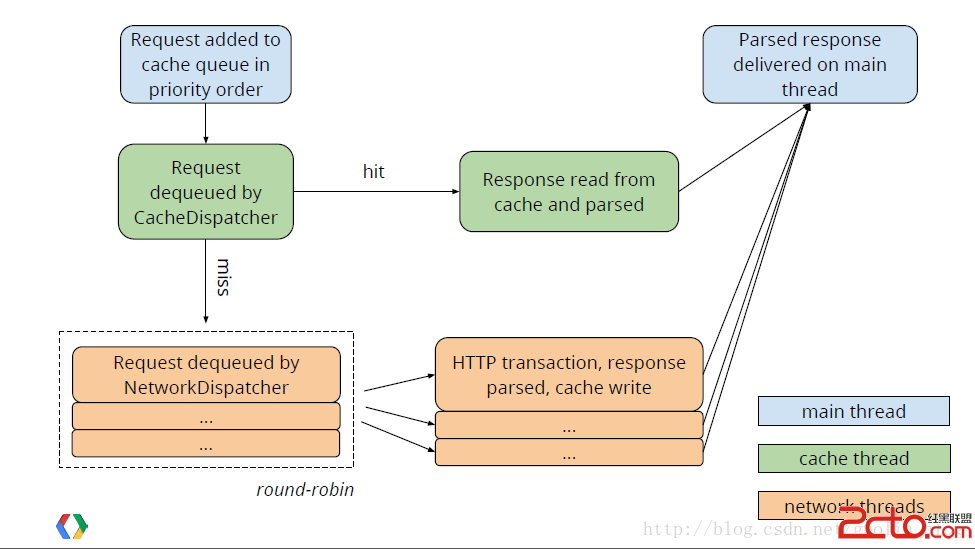 Volley 原始碼剖析:一條快取執行緒與四條網路執行緒的協你放心智模型
Volley 的定位與適用場景 Volley 把 HttpURLConnection 與 HttpClient 包裝成統一的請求佇列,同時吸收了 AsyncHttpCli
 扣丁音樂(四):本地音樂加載的完整實現
一、本地音樂加載的本質,其實就是一個 ListView 的應用 先看看扣丁音樂 1.0 前部分的演示效果(受限於 gif 圖大小): 首先是實體類 Mp3Info,封裝
 OkHttp 學習(三):同步、異步上傳與進度回調
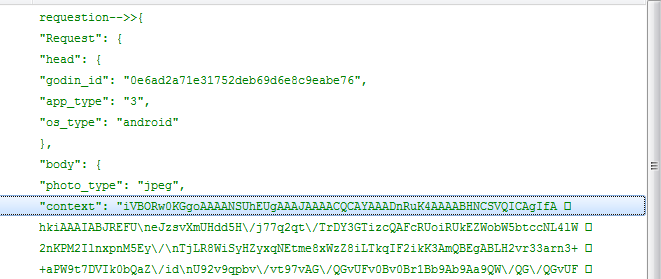
本文整理 OkHttp 上傳資料至伺服器的常見方式,包含同步上傳、異步上傳,以及透過自訂 RequestBody 實作上傳進度回調。 上傳思路 以圖片為例,可先將圖片轉
 把 Android 模組打成 jar 並用 ProGuard 混淆的實操筆記
又是一個睡不著的夜裡,來處理一件拖了很久的事:專案裡有部分程式碼想對外提供成 jar,而且不希望被人直接反編譯看光光。 步驟一:打包 jar 在 Eclipse 中