

編輯:關於 Android 程式設計
一、本地音樂加載的本質,其實就是一個 ListView 的應用
先看看扣丁音樂 1.0 前部分的演示效果(受限於 gif 圖大小):
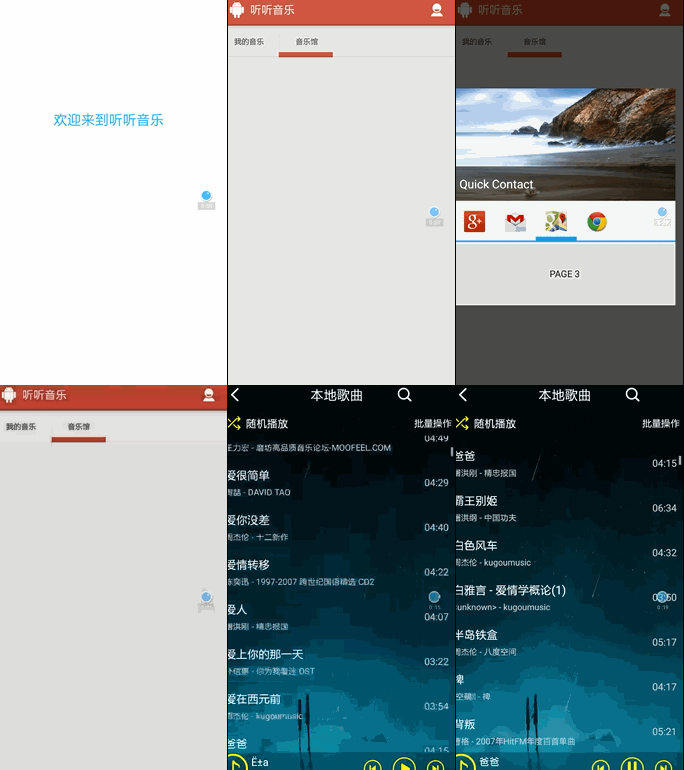
首先是實體類 Mp3Info,封裝歌曲相關的數據以及 get、set 方法:
public class Mp3Info {
    private long id;
    private String title;   // 歌名
    private String artist;  // 藝術家
    private String album;   // 專輯
    private long albumId;
    private long duration;  // 時長
    private long size;      // 大小
    private String url;     // 路徑
    private int isMusic;    // 是否為音樂

    public long getId() { return id; }
    public void setId(long id) { this.id = id; }
    public String getTitle() { return title; }
    public void setTitle(String title) { this.title = title; }
    public String getArtist() { return artist; }
    public void setArtist(String artist) { this.artist = artist; }
    public String getAlbum() { return album; }
    public void setAlbum(String album) { this.album = album; }
    public long getAlbumId() { return albumId; }
    public void setAlbumId(long albumId) { this.albumId = albumId; }
    public long getDuration() { return duration; }
    public void setDuration(long duration) { this.duration = duration; }
    public long getSize() { return size; }
    public void setSize(long size) { this.size = size; }
    public String getUrl() { return url; }
    public void setUrl(String url) { this.url = url; }
    public int getIsMusic() { return isMusic; }
    public void setIsMusic(int isMusic) { this.isMusic = isMusic; }

    @Override
    public String toString() {
        return "Mp3Info{" + "id=" + id + ", title='" + title + '\''
            + ", artist='" + artist + '\'' + ", album='" + album + '\''
            + ", albumId=" + albumId + ", duration=" + duration + ", size=" + size
            + ", url='" + url + '\'' + ", isMusic=" + isMusic + '}';
    }
}
再來是工具類 MediaUtils,負責諸如歌曲長度篩選、時間格式化、圖片處理等工作:
public class MediaUtils {
    // 獲取專輯封面的 Uri
    private static final Uri albumArtUri = Uri.parse("content://media/external/audio/albumart");

    /** 獲取默認專輯圖片 */
    public static Bitmap getDefaultArtwork(Context context, boolean small) {
        BitmapFactory.Options opts = new BitmapFactory.Options();
        opts.inPreferredConfig = Bitmap.Config.RGB_565;
        if (small) {
            return BitmapFactory.decodeStream(context.getResources().openRawResource(R.drawable.music_play), null, opts);
        }
        return BitmapFactory.decodeStream(context.getResources().openRawResource(R.drawable.music_play), null, opts);
    }

    /** 從文件當中獲取專輯封面位圖 */
    private static Bitmap getArtworkFromFile(Context context, long songid, long albumid) {
        Bitmap bm = null;
        if (albumid < 0 && songid < 0) {
            throw new IllegalArgumentException("Must specify an album or a song id");
        }
        try {
            BitmapFactory.Options options = new BitmapFactory.Options();
            FileDescriptor fd = null;
            if (albumid < 0) {
                Uri uri = Uri.parse("content://media/external/audio/media" + songid + "/albumart");
                ParcelFileDescriptor pfd = context.getContentResolver().openFileDescriptor(uri, "r");
                if (pfd != null) {
                    fd = pfd.getFileDescriptor();
                }
            } else {
                Uri uri = ContentUris.withAppendedId(albumArtUri, albumid);
                ParcelFileDescriptor pfd = context.getContentResolver().openFileDescriptor(uri, "r");
                if (pfd != null) {
                    fd = pfd.getFileDescriptor();
                }
            }
            options.inSampleSize = 1;
            options.inJustDecodeBounds = true;
            BitmapFactory.decodeFileDescriptor(fd, null, options);
            options.inSampleSize = 100;
            options.inJustDecodeBounds = false;
            options.inDither = false;
            options.inPreferredConfig = Bitmap.Config.ARGB_8888;
            bm = BitmapFactory.decodeFileDescriptor(fd, null, options);
        } catch (FileNotFoundException e) {
            e.printStackTrace();
        }
        return bm;
    }

    /** 獲取專輯封面位圖對象 */
    public static Bitmap getArtwork(Context context, long song_id, long album_id, boolean allowdefault, boolean small) {
        if (album_id < 0) {
            if (song_id < 0) {
                Bitmap bm = getArtworkFromFile(context, song_id, -1);
                if (bm != null) {
                    return bm;
                }
            }
            if (allowdefault) {
                return getDefaultArtwork(context, small);
            }
            return null;
        }
        ContentResolver res = context.getContentResolver();
        Uri uri = ContentUris.withAppendedId(albumArtUri, album_id);
        if (uri != null) {
            InputStream in = null;
            try {
                in = res.openInputStream(uri);
                BitmapFactory.Options options = new BitmapFactory.Options();
                options.inSampleSize = 1;
                options.inJustDecodeBounds = true;
                BitmapFactory.decodeStream(in, null, options);
                if (small) {
                    options.inSampleSize = computeSampleSize(options, 40);
                } else {
                    options.inSampleSize = computeSampleSize(options, 600);
                }
                options.inJustDecodeBounds = false;
                options.inDither = false;
                options.inPreferredConfig = Bitmap.Config.ARGB_8888;
                in = res.openInputStream(uri);
                return BitmapFactory.decodeStream(in, null, options);
            } catch (FileNotFoundException e) {
                Bitmap bm = getArtworkFromFile(context, song_id, album_id);
                if (bm != null) {
                    if (bm.getConfig() == null) {
                        bm = bm.copy(Bitmap.Config.RGB_565, false);
                        if (bm == null && allowdefault) {
                            return getDefaultArtwork(context, small);
                        }
                    } else if (allowdefault) {
                        bm = getDefaultArtwork(context, small);
                    }
                    return bm;
                }
            } finally {
                try {
                    if (in != null) {
                        in.close();
                    }
                } catch (IOException e) {
                    e.printStackTrace();
                }
            }
        }
        return null;
    }

    /** 對圖片進行合適的縮放 */
    public static int computeSampleSize(BitmapFactory.Options options, int target) {
        int w = options.outWidth;
        int h = options.outHeight;
        int candidateW = w / target;
        int candidateH = h / target;
        int candidate = Math.max(candidateW, candidateH);
        if (candidate == 0) {
            return 1;
        }
        if (candidate > 1) {
            if ((w > target) && (w / candidate) < target) {
                candidate -= 1;
            }
            if ((h > target) && (h / candidate) < target) {
                candidate -= 1;
            }
        }
        return candidate;
    }

    /** 用於從數據庫中查詢歌曲的信息,保存在 List 當中 */
    public static ArrayList<Mp3Info> getMp3Infos(Context context) {
        Cursor cursor = context.getContentResolver().query(
            MediaStore.Audio.Media.EXTERNAL_CONTENT_URI, null,
            MediaStore.Audio.Media.DURATION + ">=180000", null,
            MediaStore.Audio.Media.DEFAULT_SORT_ORDER);
        ArrayList<Mp3Info> mp3Infos = new ArrayList<Mp3Info>();
        for (int i = 0; i < cursor.getCount(); i++) {
            cursor.moveToNext();
            long id = cursor.getLong(cursor.getColumnIndex(MediaStore.Audio.Media._ID));
            String title = cursor.getString(cursor.getColumnIndex(MediaStore.Audio.Media.TITLE));
            String artist = cursor.getString(cursor.getColumnIndex(MediaStore.Audio.Media.ARTIST));
            String album = cursor.getString(cursor.getColumnIndex(MediaStore.Audio.Media.ALBUM));
            long albumId = cursor.getLong(cursor.getColumnIndex(MediaStore.Audio.Media.ALBUM_ID));
            long duration = cursor.getLong(cursor.getColumnIndex(MediaStore.Audio.Media.DURATION));
            long size = cursor.getLong(cursor.getColumnIndex(MediaStore.Audio.Media.SIZE));
            String url = cursor.getString(cursor.getColumnIndex(MediaStore.Audio.Media.DATA));
            int isMusic = cursor.getInt(cursor.getColumnIndex(MediaStore.Audio.Media.IS_MUSIC));
            if (isMusic != 0) {
                Mp3Info mp3Info = new Mp3Info();
                mp3Info.setId(id);
                mp3Info.setTitle(title);
                mp3Info.setArtist(artist);
                mp3Info.setAlbum(album);
                mp3Info.setAlbumId(albumId);
                mp3Info.setDuration(duration);
                mp3Info.setSize(size);
                mp3Info.setUrl(url);
                mp3Infos.add(mp3Info);
            }
        }
        cursor.close();
        return mp3Infos;
    }

    /** 格式化時間,將毫秒轉換為 分:秒 格式 */
    public static String formatTime(long time) {
        String min = time / (1000 * 60) + "";
        String sec = time % (1000 * 60) + "";
        if (min.length() < 2) {
            min = "0" + time / (1000 * 60) + "";
        } else {
            min = time / (1000 * 60) + "";
        }
        if (sec.length() == 4) {
            sec = "0" + (time % (1000 * 60)) + "";
        } else if (sec.length() == 3) {
            sec = "00" + (time % (1000 * 60)) + "";
        } else if (sec.length() == 2) {
            sec = "000" + (time % (1000 * 60)) + "";
        } else if (sec.length() == 1) {
            sec = "0000" + (time % (1000 * 60)) + "";
        }
        return min + ":" + sec.trim().substring(0, 2);
    }
}
activity_local_songs.xml 與 item_music_fragment.xml 這裡暫不展開。值得一提的是,歌曲圖片往往不好找、顯示效果也不夠美觀,所以我在列表項裡選擇展示歌名、歌手、專輯和時長,這個布局完全可以按個人喜好調整。
LocalSongsListAdapter.java
public class LocalSongsListAdapter extends BaseAdapter {
    private Context context;
    private ArrayList<Mp3Info> mp3Infos;

    public LocalSongsListAdapter(Context context, ArrayList<Mp3Info> mp3Infos) {
        this.context = context;
        this.mp3Infos = mp3Infos;
    }

    public void setMp3Infos(ArrayList<Mp3Info> mp3Infos) {
        this.mp3Infos = mp3Infos;
    }

    @Override
    public int getCount() {
        return mp3Infos.size();
    }

    @Override
    public Object getItem(int position) {
        return mp3Infos.get(position);
    }

    @Override
    public long getItemId(int position) {
        return position;
    }

    @Override
    public View getView(int position, View convertView, ViewGroup parent) {
        ViewHolder vh;
        if (convertView == null) {
            convertView = LayoutInflater.from(context).inflate(R.layout.item_music_list, null);
            vh = new ViewHolder();
            vh.tv_song_name = (TextView) convertView.findViewById(R.id.tv_song_name);
            vh.tv_song_artist = (TextView) convertView.findViewById(R.id.tv_song_artist);
            vh.tv_song_album = (TextView) convertView.findViewById(R.id.tv_song_album);
            vh.tv_song_duration = (TextView) convertView.findViewById(R.id.tv_song_duration);
            convertView.setTag(vh);
        } else {
            vh = (ViewHolder) convertView.getTag();
        }
        // 給控件賦值要寫在 if 語句外面,否則第一次加載數據會失敗
        Mp3Info mp3Info = mp3Infos.get(position);
        vh.tv_song_name.setText(mp3Info.getTitle());
        vh.tv_song_artist.setText(mp3Info.getArtist());
        vh.tv_song_album.setText(mp3Info.getAlbum());
        vh.tv_song_duration.setText(MediaUtils.formatTime(mp3Info.getDuration()));
        return convertView;
    }

    static class ViewHolder {
        TextView tv_song_name;
        TextView tv_song_artist;
        TextView tv_song_album;
        TextView tv_song_duration;
    }
}
LocalSongsActivity.java
寫到這裡,LocalSongsActivity 裡面只需初始化控件即可:
/** 初始化本地音樂列表 */
private void initDate() {
    mp3Infos = MediaUtils.getMp3Infos(this);
    System.out.println(mp3Infos.size());
    localSongsListAdapter = new LocalSongsListAdapter(this, mp3Infos);
    localSongsListAdapter.notifyDataSetChanged();
    lv_local_songs_list.setAdapter(localSongsListAdapter);
}
最後,別忘了在清單文件中申請 SD 卡讀寫權限與網絡權限:
<uses-permission android:name="android.permission.READ_EXTERNAL_STORAGE"></uses-permission>
<uses-permission android:name="android.permission.WRITE_EXTERNAL_STORAGE"></uses-permission>
<uses-permission android:name="android.permission.INTERNET"></uses-permission>
做到這一步,本地歌曲的加載就大功告成了。
 MUI組件詳解(二):複選框、對話框、圖片輪播、圖標與輸入框
本文繼續梳理MUI的高頻組件,涵蓋複選框、對話框、圖片輪播、圖標和輸入框五個部分。 一、Checkbox(複選框) 複選框常用於多選場景,比如批量刪除、添加群聊等。默認c
 Android 實戰:實現圖標選中後放大浮動的效果
在瀏覽某體育門戶客戶端時,作者注意到一個有趣的交互:輕觸賽事圖標,圖標會有一個放大浮出的動畫效果。於是便仿照實現了一個,本文將分享其實現思路與代碼。 先看效果圖: 本質
 Android 手勢識別與處理:雙擊、滑動與拖曳完整解析
概述 View 類有個 View.OnTouchListener 內部介面,透過重寫 onTouch(View v, MotionEvent event) 可以處理 to
 Android平台Camera實時濾鏡實現方法探討(十):代碼地址與簡介
簡單做了一個相機與圖片編輯模組。由於時間關係,很多功能尚未完成,也還存在一些BUG,敬請見諒,之後會抽空逐步修改完善。 代碼地址 PS:歡迎點個Star ^-^ 簡介: