

編輯:關於 Android 程式設計
在 Android 開發中,借助 ORM 映射框架,我們也能像使用 Hibernate 那樣以物件導向的方式操作資料庫。以下程式碼是筆者從網上整理而來,僅供參考,使用的是 ORMLite 這個在 Android 上頗受歡迎的 ORM 庫。
DataHelper 負責資料庫的建立、更新與 Dao 的取得:
[java]
package com.cng.utils;
import java.sql.SQLException;
import android.content.Context;
import android.database.sqlite.SQLiteDatabase;
import android.util.Log;
import com.cng.modal.Hello;
import com.j256.ormlite.android.apptools.OrmLiteSqliteOpenHelper;
import com.j256.ormlite.dao.Dao;
import com.j256.ormlite.support.ConnectionSource;
import com.j256.ormlite.table.TableUtils;
public class DataHelper extends OrmLiteSqliteOpenHelper
{
private static final String DATABASE_NAME = "HelloOrmlite.db";
private static final int DATABASE_VERSION = 1;
private Dao<Hello, Integer> helloDao = null;
public DataHelper(Context context)
{
super(context, DATABASE_NAME, null, DATABASE_VERSION);
}
@Override
public void onCreate(SQLiteDatabase db, ConnectionSource connectionSource)
{
try
{
TableUtils.createTable(connectionSource, Hello.class);
} catch (SQLException e)
{
Log.e(DataHelper.class.getName(), "創建數據庫失敗", e);
e.printStackTrace();
}
}
@Override
public void onUpgrade(SQLiteDatabase db, ConnectionSource connectionSource,
int arg2, int arg3)
{
try
{
TableUtils.dropTable(connectionSource, Hello.class, true);
onCreate(db, connectionSource);
} catch (SQLException e)
{
Log.e(DataHelper.class.getName(), "更新數據庫失敗", e);
e.printStackTrace();
}
}
@Override
public void close()
{
super.close();
helloDao = null;
}
public Dao<Hello, Integer> getHelloDataDao() throws SQLException
{
if (helloDao == null)
{
helloDao = getDao(Hello.class);
}
return helloDao;
}
}
OrmliteLoginActivity 並未繼承 Activity,而是繼承了 OrmLiteBaseActivity,藉此取得 helper 並操作資料:
[java]
package com.cng;
import java.sql.SQLException;
import java.util.List;
import com.cng.modal.Hello;
import com.cng.utils.DataHelper;
import com.j256.ormlite.android.apptools.OrmLiteBaseActivity;
import com.j256.ormlite.dao.Dao;
import android.os.Bundle;
import android.widget.TextView;
public class OrmliteLoginActivity extends OrmLiteBaseActivity<DataHelper>
{
@Override
public void onCreate(Bundle savedInstanceState)
{
super.onCreate(savedInstanceState);
setContentView(R.layout.main);
TextView tv = (TextView) this.findViewById(R.id.output);
try
{
Dao<Hello, Integer> helloDao = getHelper().getHelloDataDao();
// 添加數據
for (int i = 0; i < 2; i++)
{
Hello hello = new Hello("Hello" + i);
helloDao.create(hello);
}
tv.setText(tv.getText() + "\n" + "添加數據完成");
// 查詢添加的數據
List<Hello> hellos = helloDao.queryForAll();
for (Hello h : hellos)
{
tv.setText(tv.getText() + "\n" + h.toString());
}
// 刪除第一條數據
helloDao.delete(hellos.get(0));
tv.setText(tv.getText() + "\n" + "刪除數據完成");
// 修改數據
Hello h1 = hellos.get(0);
h1.setWord("這是修改過的數據");
helloDao.update(h1);
} catch (SQLException e)
{
e.printStackTrace();
}
}
}
Hello 類透過 @DatabaseField 註解映射到資料表,注意一定要保留無參數的預設建構子,否則會出錯:
[java]
package com.cng.modal;
import com.j256.ormlite.field.DatabaseField;
public class Hello
{
@DatabaseField(generatedId = true, unique = true)
int id;
@DatabaseField
String word;
// 這是必須加的,否則會出錯
public Hello() {}
public Hello(String word)
{
super();
this.word = word;
}
public String getWord() { return word; }
public void setWord(String word) { this.word = word; }
@Override
public String toString()
{
return "id=" + id + " ,word=" + word;
}
}
總結一下,這三個類各司其職:DataHelper 負責資料庫的建立與更新、Hello 是映射到資料表的模型類(具體用法可參考官方 API 文件),而 OrmliteLoginActivity 則是操作層。API 文件與 jar 包的官方下載地址為 https://ormlite.com/releases/。
 Android Dialog 去除白色邊框的實作思路與程式碼
問題來源 Android 的 Dialog 預設會帶一圈白色邊框,自訂版面時常常顯得突兀。要拿掉它,得先理解 Dialog 的樣式是怎麼套上的。 一、定義自訂樣式 在
 Android AIDL 深入解析:跨進程通信的代理與樁
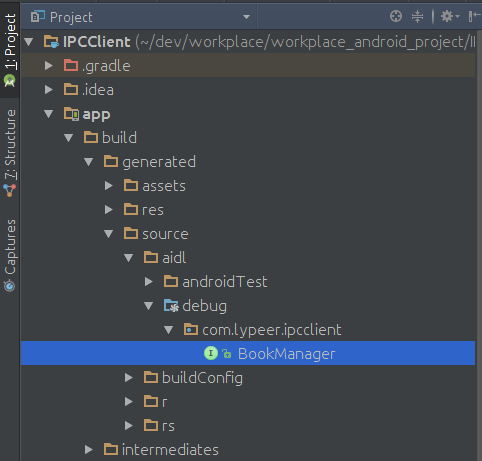
AIDL 是 Android 跨進程通信中常見的工具。它的目的不是發明新的通信方式,而是簡化 Binder 機制的使用。工程師只要定義介面,編譯器就會產生對應的 Java
 Android 成長之路(3):Activity 的生命週期入門
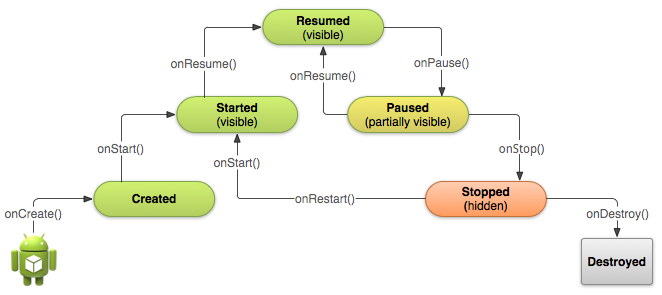
當用戶使用一個 App 時,Activity 會在不同狀態之間不斷切換。理解 Activity 的生命週期,是每一個 Android 開發者必須掌握的基礎能力。只有真正理
 Android 屏幕適配完全攻略
一、為什麼需要做屏幕適配 由於 Android 系統的開放性,用戶、開發者、OEM 廠商乃至運營商都可以對它進行定制,改成各自想要的樣子。那麼這種「碎片化」究竟嚴重到什麼