

編輯:關於 Android 程式設計
本文整理兩個實用主題:SQLite 的事務(Transaction)處理,以及如何用 ListView 把資料庫內容以列表形式顯示出來。
使用 SQLiteDatabase 的 beginTransaction() 可以開啟一個事務。當程式執行到 endTransaction() 時,會檢查事務的成功標誌:若在 endTransaction() 之前呼叫了 setTransactionSuccessful(),則提交事務;若沒有呼叫,則回滾事務。範例如下:
[java]
SQLiteDatabase db = ....;
db.beginTransaction();// 開始事務
try {
db.execSQL("insert into person(name, age) values(?,?)", new Object[]{"傳智播客", 4});
db.execSQL("update person set name=? where personid=?", new Object[]{"傳智", 1});
db.setTransactionSuccessful();// 設定成功標誌,執行到 endTransaction() 時會提交
} finally {
db.endTransaction();// 依標誌決定提交或回滾
}
db.close();
如此一來,這兩條 SQL 語句就會在同一個事務中執行,具備原子性——要嘛全部成功,要嘛全部回滾。
先在 layout 資料夾下建立一個 item.xml(水平線性配置的條目畫面),再在 main.xml 中放入 <ListView/>。把資料綁定到 ListView 有三種常見方式:
show():使用 SimpleAdapter,把 List<HashMap> 資料綁到條目上;
show2():使用 SimpleCursorAdapter,直接把資料庫的 Cursor 綁到條目上;
show3():使用自訂的 BaseAdapter(PersonAdapter),在特殊需求下最靈活。
以 SimpleCursorAdapter 為例:
[java]
Cursor cursor = personService.getCursorScrollData(0, 20);
SimpleCursorAdapter adapter = new SimpleCursorAdapter(this, R.layout.item, cursor,
new String[]{"name", "phone", "amount"}, new int[]{R.id.name, R.id.phone, R.id.amount});
listView.setAdapter(adapter);
若使用自訂的 PersonAdapter,核心在於重寫 getView 方法,並善用 convertView 與 ViewCache(透過 setTag 快取 view)來避免重複 inflate,提升列表滾動效能:
[java]
public View getView(int position, View convertView, ViewGroup parent) {
TextView nameView, phoneView, amountView;
if(convertView == null){
convertView = inflater.inflate(resource, null);
nameView = (TextView) convertView.findViewById(R.id.name);
phoneView = (TextView) convertView.findViewById(R.id.phone);
amountView = (TextView) convertView.findViewById(R.id.amount);
ViewCache cache = new ViewCache();
cache.nameView = nameView;
cache.phoneView = phoneView;
cache.amountView = amountView;
convertView.setTag(cache);
}else{
ViewCache cache = (ViewCache) convertView.getTag();
nameView = cache.nameView;
phoneView = cache.phoneView;
amountView = cache.amountView;
}
Person person = persons.get(position);
nameView.setText(person.getName());
phoneView.setText(person.getPhone());
amountView.setText(person.getAmount().toString());
return convertView;
}
此外,透過 listView.setOnItemClickListener,在回呼中即可取得被點擊項目的資料(無論是 Cursor 還是自訂物件),進而做出對應處理。掌握事務與列表顯示這兩大主題,就能應付大量資料驅動型的 Android 應用場景。
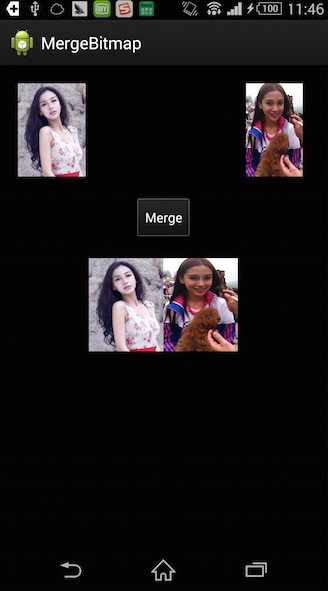 Android Canvas 合併 Bitmap:將兩張圖片拼在同一畫布
在 Android 中合併圖片時,可以使用 Canvas 將多張 Bitmap 繪製到同一個目標 Bitmap 上。這種方式適合用於拼接圖片、製作簡單合成圖或產生分享圖。
 微信發不出語音怎麼辦?從網路到快取資料的排查順序
微信最常用的功能就是語音,一旦發不出去,整個溝通就卡住。這個問題看起來嚴重,但多數情況可以用幾個步驟自己解決。先排除最常見的原因語音傳送失敗,多半來自網路問題:訊號不穩、
 利用 overScrollBy 打造下拉視差效果
overScrollBy 的作用overScrollBy 會在捲動超出邊界時被呼叫,可用來處理額外的視覺位移。若要在下拉時讓頭部圖片逐漸露出,可在這個方法中調整 Imag
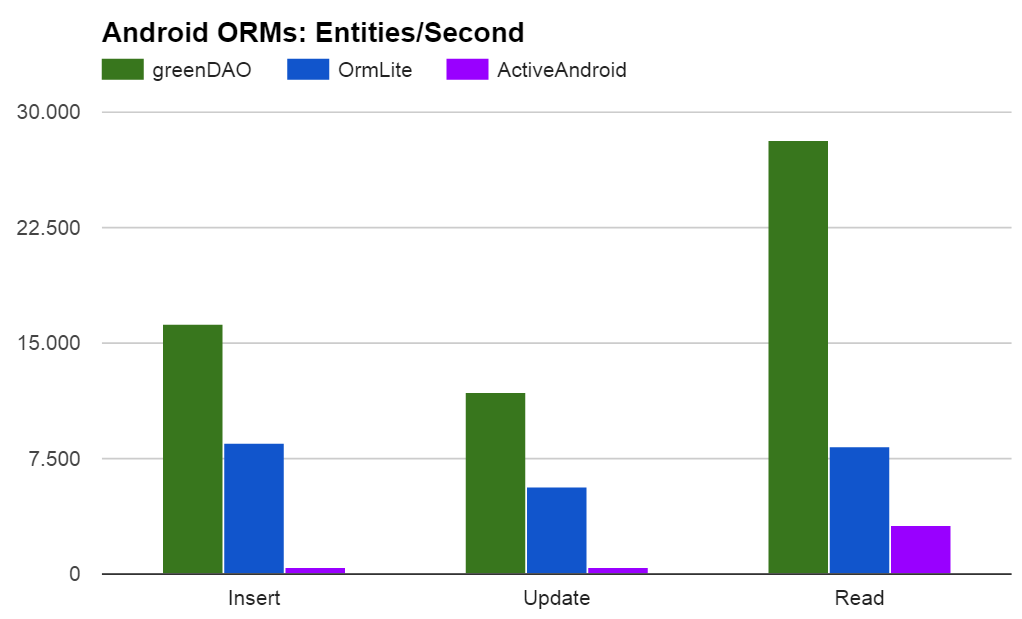 GreenDao 應用解析:ORM 配置、實體生成與資料庫升級
GreenDao 是一個物件關聯映射 ORM 框架,常用於 Android 本機資料庫開發。相較於手寫 SQL,它能讓開發者以物件方式操作資料,並減少重複的 CRUD 程