

編輯:關於 Android 程式設計
做筆記類的 App,第一步一定是把資料存進 SQLite,第二步則是把資料讀出來攤在畫面上。這篇文章示範一個最小可行組合:用 NotesDbAdapter 封裝資料庫邏輯,提供一個 getall() 方法取出所有備忘資料,再透過 ListActivity 與 SimpleCursorAdapter 把它綁定到清單。
NotesDbAdapter 負責三件事:定義表結構、在首次運行時建表、以及對外提供查詢介面。內部類 DatabaseHelper 繼承 SQLiteOpenHelper,把「建表」與「升級」的邏輯收攏在 onCreate 與 onUpgrade 兩個回呼裡。
package com.demo.android.dummynote;

import android.content.Context;
import android.database.Cursor;
import android.database.SQLException;
import android.database.sqlite.SQLiteDatabase;
import android.database.sqlite.SQLiteOpenHelper;

public class NotesDbAdapter {
    private static final String DATABASE_NAME = "notes.db";
    private static final int DATABASE_VERSION = 1;
    private static final String DATABASE_TABLE = "notes";
    private static final String DATABASE_CREATE =
            "create table notes("
            + "_id INTEGER PRIMARY KEY,"
            + "note TEXT,"
            + "created INTEGER,"
            + "modified INTEGER"
            + ");";

    private static class DatabaseHelper extends SQLiteOpenHelper {
        DatabaseHelper(Context context) {
            super(context, DATABASE_NAME, null, DATABASE_VERSION);
        }

        @Override
        public void onCreate(SQLiteDatabase db) {
            db.execSQL(DATABASE_CREATE);
        }

        @Override
        public void onUpgrade(SQLiteDatabase db, int oldVersion, int newVersion) {
            db.execSQL("DROP TABLE IF EXISTS " + DATABASE_TABLE);
            onCreate(db);
        }
    }

    private final Context mCtx;
    private DatabaseHelper dbHelper;
    private SQLiteDatabase db;

    public static final String KEY_ROWID = "_id";
    static final String KEY_NOTE = "note";
    private static final String KEY_CREATED = "created";

    public NotesDbAdapter(Context ctx) {
        this.mCtx = ctx;
    }

    public NotesDbAdapter open() throws SQLException {
        dbHelper = new DatabaseHelper(mCtx);
        db = dbHelper.getWritableDatabase();
        return this;
    }

    public void close() {
        dbHelper.close();
    }

    /** 取得 notes 資料表中的所有紀錄 */
    public Cursor getall() {
        return db.rawQuery("SELECT * FROM notes", null);
    }
}這裡有兩個容易忽略的細節。第一,_id 命名為主鍵並非風格問題,而是因為 Android 的 Cursor 與多數 Adapter 都預設會去找這個欄位當作列識別碼,改名容易踩坑。第二,onUpgrade 目前採用「掉表重建」的粗暴做法,適合學習與原型開發;正式產品理應寫成逐版本遷移,否則使用者升級後資料會全部消失。
DummyNote 繼承 ListActivity,在 onCreate 中指定空清單時要顯示的提示檢視,接著建立 Adapter、開啟資料庫並填資料。
package com.demo.android.dummynote;

import android.app.ListActivity;
import android.database.Cursor;
import android.os.Bundle;
import android.widget.SimpleCursorAdapter;

public class DummyNote extends ListActivity {

    private NotesDbAdapter mDbHelper;
    private Cursor mNotesCursor;

    @Override
    public void onCreate(Bundle savedInstanceState) {
        super.onCreate(savedInstanceState);
        setContentView(R.layout.main);

        // 清單沒有資料時顯示的提示檢視
        getListView().setEmptyView(findViewById(R.id.empty));

        mDbHelper = new NotesDbAdapter(this);
        mDbHelper.open();
        fillData();
    }

    private void fillData() {
        mNotesCursor = mDbHelper.getall();
        startManagingCursor(mNotesCursor);

        // 要顯示的欄位
        String[] from = new String[]{NotesDbAdapter.KEY_NOTE};
        // 要綁定的目標檢視
        int[] to = new int[]{android.R.id.text1};

        SimpleCursorAdapter adapter = new SimpleCursorAdapter(
                this,
                android.R.layout.simple_list_item_1,
                mNotesCursor, from, to);
        setListAdapter(adapter);
    }

    @Override
    protected void onDestroy() {
        super.onDestroy();
        mDbHelper.close();
    }
}
版面配置需要預留一個空清單提示:
<LinearLayout xmlns:android="https://schemas.android.com/apk/res/android"
    android:layout_width="fill_parent"
    android:layout_height="fill_parent"
    android:orientation="vertical">

    <ListView
        android:id="@id/android:list"
        android:layout_width="fill_parent"
        android:layout_height="fill_parent" />

    <TextView
        android:id="@id/android:empty"
        android:layout_width="fill_parent"
        android:layout_height="fill_parent"
        android:text="No data" />
</LinearLayout>startManagingCursor() 會讓 Activity 代管 Cursor 的生命週期,在 Activity 結束時自動關閉;但它也被標記為老舊 API,新專案建議改用 CursorLoader 或 Jetpack 的資料層元件。SimpleCursorAdapter 的 from 是資料庫欄位名稱、to 是版面中的 View id,兩者必須等長且順序對應,否則會出現文字跑錯位置的情況。onDestroy 中補上 close() 是好習慣,即使 startManagingCursor 已經幫你兜了一層。 Android 音樂播放器(二):清單界面、播放控制與斜切轉場動畫
寫程式的過程中想法總在變,同一個功能常常糾結於「哪一種做法更好」。這個音樂播放器原本規劃把歌單頁與歌詞頁放進同一個 Activity 的兩個 Fragment,靠左右滑動
 Android ListView 左右滑動刪除效果:Scroller 與 NineOldAndroids 兩種實作
滑動刪除的兩種思路 左右滑動刪除是許多 App 常見的互動模式,例如聯絡人、通知列表或訊息列表。它讓使用者可以用手勢快速刪除項目,而不必進入詳細頁面。本文將說明兩種常見實
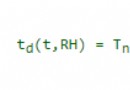 Android 感測器 API 解析:運動、位置與環境感測器
Android 感測器可分為運動、位置與環境三大類。運動感測器用於偵測裝置移動與旋轉,位置感測器用於判斷方向與距離,環境感測器則提供溫度、濕度、光照與氣壓等資訊。 運動感
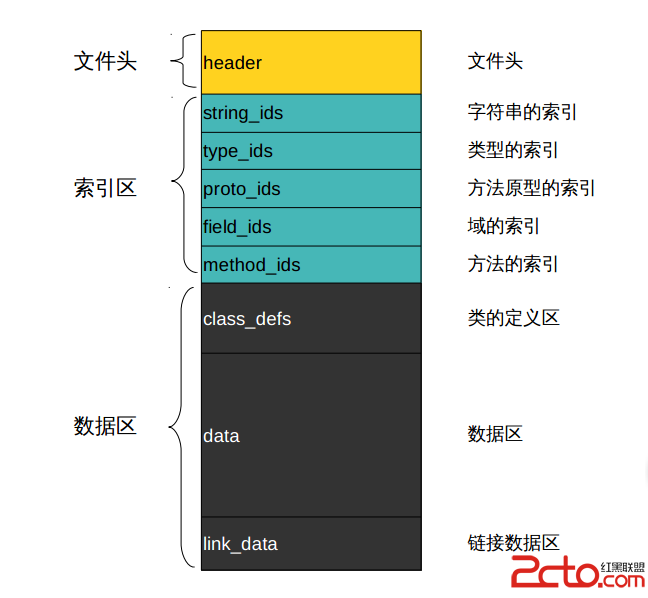 Android 對抗反編譯的一種思路:動一動 dex 的 source_file_idx
本文記錄一種干擾反編譯工具的做法。核心思路並不是加密,而是利用 dex 格式中一個「可有可無」的字段,讓靜態解析工具解析失敗,從而提高逆向的門檻。 一、先認識 dex 與