

編輯:關於 Android 程式設計
密碼輸入錯誤時讓輸入框左右晃一下,是很常見又很好用的回饋手法。Android 的 Translate 動畫加上 CycleInterpolator,幾行 XML 就能做到。
Animation shake = AnimationUtils.loadAnimation(this, R.anim.shake);
findViewById(R.id.pw).startAnimation(shake);
<translate xmlns:android="https://schemas.android.com/apk/res/android"
    android:duration="5000"
    android:fromXDelta="0"
    android:interpolator="@anim/cycle_7"
    android:toXDelta="10" />
三個參數的意義:duration 是整段動畫的時間(毫秒),fromXDelta 與 toXDelta 決定水平位移的起點與終點,也就是抖動幅度。
<cycleInterpolator xmlns:android="https://schemas.android.com/apk/res/android"
    android:cycles="50" />
CycleInterpolator 會讓位移在起點與終點之間來回擺盪,cycles 就是擺盪次數。次數越多看起來越急促,這也是檔名叫 cycle_7 由來——官方範例用的是 7 次。
<EditText android:id="@+id/pw"
    android:layout_width="match_parent"
    android:layout_height="wrap_content"
    android:layout_margin="50dip"
    android:clickable="true"
    android:singleLine="true"
    android:password="true" />
把 duration 設成 5000、toXDelta 設成 10,晃起來會又慢又幾乎看不出來,示範用可以,實際產品上建議 duration 落在 300 到 600 毫秒、cycles 設 3 到 7,幅度則視你要的「激烈程度」微調。抖動這種效果一旦過頭,使用者只會覺得界面在故障。
 仿 vivo X6 閃充動畫:弧線與刻度的自定義 View 實作
自定義 View 練了一陣子之後,大致能寫出一些實用的小控件了。某天在家用手機,正好沒電在充電,看到那個充電動畫覺得挺有意思,就拆解了一下裡面的元素,心想這個我也能畫出來
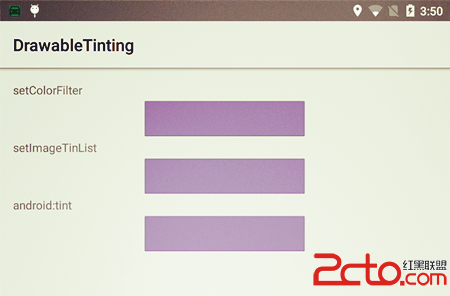 Android 著色機制解析:ColorFilter 與 Tint 到底差在哪
概述 Android 的 ColorFilter 與 Tint 一直是很多人混淆的一對概念。兩者都是拿來對顯示的圖片做著色或色彩過濾: ColorFilter:色彩過濾T
 OSGi ServiceListener實戰:動態監聽服務註冊與變更
前言 在OSGi的世界裡,動態性是最鮮明的特徵之一。Bundle可以在執行期安裝、啟動、停止、更新與移除,而服務也可能隨時被註冊、修改或取消註冊。若應用需要即時感知這些變
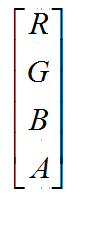 Android 影像矩陣全解析:ColorMatrix 與 Matrix 的原理與實作
Android 裡有兩個舉足輕重的矩陣類別:ColorMatrix 與 Matrix。前者負責改變 Bitmap 的顏色與透明度,後者則負責平移、縮放與錯切等幾何變換。