

編輯:關於 Android 程式設計
有了版面與資料層之後,接下來就是把播放器的主要 Activity 寫完。這一步要處理的事不少:播放與暫停、快轉快退、上下一首、播放列表選曲、進度條同步、循環與隨機播放,以及播放結束後的自動接續。
讓主要 Activity 實作 OnCompletionListener 與 SeekBar.OnSeekBarChangeListener,前者用來接收「播完了」的通知,後者處理使用者拖動進度條:
public class AndroidBuildingMusicPlayerActivity extends Activity
        implements OnCompletionListener, SeekBar.OnSeekBarChangeListener {

    private ImageButton btnPlay;
    private ImageButton btnForward;
    private ImageButton btnBackward;
    private ImageButton btnNext;
    private ImageButton btnPrevious;
    private ImageButton btnPlaylist;
    private ImageButton btnRepeat;
    private ImageButton btnShuffle;
    private SeekBar songProgressBar;
    private TextView songTitleLabel;
    private TextView songCurrentDurationLabel;
    private TextView songTotalDurationLabel;

    // Media Player
    private MediaPlayer mp;
    // 用於更新 UI 計時器與進度條
    private Handler mHandler = new Handler();
    private SongsManager songManager;
    private Utilities utils;
    private int seekForwardTime = 5000;   // 5000 毫秒
    private int seekBackwardTime = 5000;  // 5000 毫秒
    private int currentSongIndex = 0;
    private boolean isShuffle = false;
    private boolean isRepeat = false;
    private ArrayList<HashMap<String, String>> songsList =
            new ArrayList<HashMap<String, String>>();
}
// 播放器按鈕
btnPlay = (ImageButton) findViewById(R.id.btnPlay);
btnForward = (ImageButton) findViewById(R.id.btnForward);
btnBackward = (ImageButton) findViewById(R.id.btnBackward);
btnNext = (ImageButton) findViewById(R.id.btnNext);
btnPrevious = (ImageButton) findViewById(R.id.btnPrevious);
btnPlaylist = (ImageButton) findViewById(R.id.btnPlaylist);
btnRepeat = (ImageButton) findViewById(R.id.btnRepeat);
btnShuffle = (ImageButton) findViewById(R.id.btnShuffle);
songProgressBar = (SeekBar) findViewById(R.id.songProgressBar);
songTitleLabel = (TextView) findViewById(R.id.songTitle);
songCurrentDurationLabel = (TextView) findViewById(R.id.songCurrentDurationLabel);
songTotalDurationLabel = (TextView) findViewById(R.id.songTotalDurationLabel);

// MediaPlayer 與輔助類別
mp = new MediaPlayer();
songManager = new SongsManager();
utils = new Utilities();

// 註冊監聽器,這兩行不可省
songProgressBar.setOnSeekBarChangeListener(this);
mp.setOnCompletionListener(this);

// 取得所有歌曲清單
songsList = songManager.getPlayList();
點擊播放列表按鈕時跳到 PlayListActivity,使用者選好歌之後再把索引傳回來:
btnPlaylist.setOnClickListener(new View.OnClickListener() {
    @Override
    public void onClick(View arg0) {
        Intent i = new Intent(getApplicationContext(), PlayListActivity.class);
        startActivityForResult(i, 100);
    }
});
接收結果(注意要寫在 onCreate 之外):
@Override
protected void onActivityResult(int requestCode, int resultCode, Intent data) {
    super.onActivityResult(requestCode, resultCode, data);
    if (resultCode == 100) {
        currentSongIndex = data.getExtras().getInt("songIndex");
        // 播放選中的歌曲
        playSong(currentSongIndex);
    }
}
public void playSong(int songIndex) {
    try {
        mp.reset();
        mp.setDataSource(songsList.get(songIndex).get("songPath"));
        mp.prepare();
        mp.start();

        // 顯示歌名
        String songTitle = songsList.get(songIndex).get("songTitle");
        songTitleLabel.setText(songTitle);

        // 播放時把按鈕圖示換成暫停
        btnPlay.setImageResource(R.drawable.btn_pause);

        // 重設進度條
        songProgressBar.setProgress(0);
        songProgressBar.setMax(100);

        // 開始更新進度條
        updateProgressBar();
    } catch (IllegalArgumentException e) {
        e.printStackTrace();
    } catch (IllegalStateException e) {
        e.printStackTrace();
    } catch (IOException e) {
        e.printStackTrace();
    }
}
btnForward.setOnClickListener(new View.OnClickListener() {
    @Override
    public void onClick(View arg0) {
        int currentPosition = mp.getCurrentPosition();
        if (currentPosition + seekForwardTime <= mp.getDuration()) {
            mp.seekTo(currentPosition + seekForwardTime);
        } else {
            mp.seekTo(mp.getDuration());
        }
    }
});

btnBackward.setOnClickListener(new View.OnClickListener() {
    @Override
    public void onClick(View arg0) {
        int currentPosition = mp.getCurrentPosition();
        if (currentPosition - seekBackwardTime >= 0) {
            mp.seekTo(currentPosition - seekBackwardTime);
        } else {
            mp.seekTo(0);
        }
    }
});
兩處都做了邊界檢查,避免 seek 超出 0 到總長度的範圍。
btnNext.setOnClickListener(new View.OnClickListener() {
    @Override
    public void onClick(View arg0) {
        if (currentSongIndex < (songsList.size() - 1)) {
            playSong(currentSongIndex + 1);
            currentSongIndex = currentSongIndex + 1;
        } else {
            playSong(0);
            currentSongIndex = 0;
        }
    }
});

btnPrevious.setOnClickListener(new View.OnClickListener() {
    @Override
    public void onClick(View arg0) {
        if (currentSongIndex > 0) {
            playSong(currentSongIndex - 1);
            currentSongIndex = currentSongIndex - 1;
        } else {
            playSong(songsList.size() - 1);
            currentSongIndex = songsList.size() - 1;
        }
    }
});
用 Handler 每 100 毫秒重新計算一次播放位置,這是避免阻塞 UI 執行緒的標準做法:
public void updateProgressBar() {
    mHandler.postDelayed(mUpdateTimeTask, 100);
}

private Runnable mUpdateTimeTask = new Runnable() {
    public void run() {
        long totalDuration = mp.getDuration();
        long currentDuration = mp.getCurrentPosition();

        songTotalDurationLabel.setText("" + utils.milliSecondsToTimer(totalDuration));
        songCurrentDurationLabel.setText("" + utils.milliSecondsToTimer(currentDuration));

        int progress = (int) (utils.getProgressPercentage(currentDuration, totalDuration));
        songProgressBar.setProgress(progress);

        // 100 毫秒後再跑一次
        mHandler.postDelayed(this, 100);
    }
};
使用者開始拖動進度條時必須先停掉這個刷新,否則會互相打架:
@Override
public void onProgressChanged(SeekBar seekBar, int progress, boolean fromTouch) {
}

@Override
public void onStartTrackingTouch(SeekBar seekBar) {
    mHandler.removeCallbacks(mUpdateTimeTask);
}

@Override
public void onStopTrackingTouch(SeekBar seekBar) {
    mHandler.removeCallbacks(mUpdateTimeTask);
    int totalDuration = mp.getDuration();
    int currentPosition = utils.progressToTimer(seekBar.getProgress(), totalDuration);
    mp.seekTo(currentPosition);
    updateProgressBar();
}
兩者互斥:開啟循環時關掉隨機,反之亦然,並同步切換按鈕的圖示狀態。
btnRepeat.setOnClickListener(new View.OnClickListener() {
    @Override
    public void onClick(View arg0) {
        if (isRepeat) {
            isRepeat = false;
            Toast.makeText(getApplicationContext(), "Repeat is OFF", Toast.LENGTH_SHORT).show();
            btnRepeat.setImageResource(R.drawable.btn_repeat);
        } else {
            isRepeat = true;
            Toast.makeText(getApplicationContext(), "Repeat is ON", Toast.LENGTH_SHORT).show();
            isShuffle = false;
            btnRepeat.setImageResource(R.drawable.btn_repeat_focused);
            btnShuffle.setImageResource(R.drawable.btn_shuffle);
        }
    }
});

btnShuffle.setOnClickListener(new View.OnClickListener() {
    @Override
    public void onClick(View arg0) {
        if (isShuffle) {
            isShuffle = false;
            Toast.makeText(getApplicationContext(), "Shuffle is OFF", Toast.LENGTH_SHORT).show();
            btnShuffle.setImageResource(R.drawable.btn_shuffle);
        } else {
            isShuffle = true;
            Toast.makeText(getApplicationContext(), "Shuffle is ON", Toast.LENGTH_SHORT).show();
            isRepeat = false;
            btnShuffle.setImageResource(R.drawable.btn_shuffle_focused);
            btnRepeat.setImageResource(R.drawable.btn_repeat);
        }
    }
});
這是整個播放器最需要想清楚的一段:一首歌放完時,要依據目前狀態決定下一步。
@Override
public void onCompletion(MediaPlayer arg0) {
    if (isRepeat) {
        // 循環:重播同一首
        playSong(currentSongIndex);
    } else if (isShuffle) {
        // 隨機:挑一首
        Random rand = new Random();
        currentSongIndex = rand.nextInt(songsList.size());
        playSong(currentSongIndex);
    } else {
        // 都不是:順序播放下一首
        if (currentSongIndex < (songsList.size() - 1)) {
            playSong(currentSongIndex + 1);
            currentSongIndex = currentSongIndex + 1;
        } else {
            playSong(0);
            currentSongIndex = 0;
        }
    }
}
播放與暫停的切換。上面只示範了把圖示換成暫停,實際的 btnPlay 點擊事件要判斷 mp.isPlaying(),在 play 與 pause 之間切換,並在暫停時記得 mHandler.removeCallbacks(mUpdateTimeTask) 停止刷新。
onPause 與 onDestroy。Activity 不可見時應暫停播放,銷毀時一定要呼叫 mp.release() 並清掉 Handler 的 callback,否則會漏記憶體,也可能殘留背景播放。
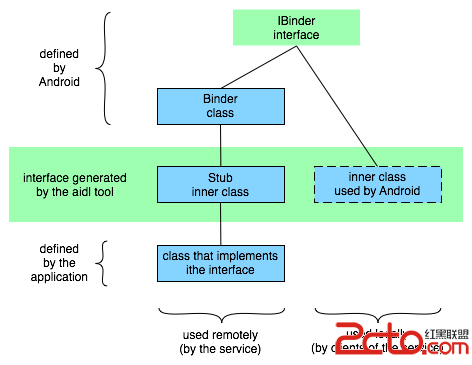
後台播放。若要讓程式離開前景後仍能播放,MediaPlayer 應該搬到 Service 裡,Activity 只負責 UI,兩者以 Binder 或 MediaSession 溝通。這一步做完,才算是一個可以上架的播放器。
 自定義 ViewPager:子 ViewPager 滑到邊緣後自動切換父 ViewPager
最近的項目裡有個需求:用 ViewPager 嵌套 ViewPager 來實現整體效果。沒做任何處理就直接寫,做出來發現只能不停地滑動子 ViewPager,父 View
 Android 應用程式基礎知識:元件、意圖與生命週期全解析
Android 應用程式的組成方式 Android 應用程式通常以 Java 或 Kotlin 撰寫,編譯後與資源檔一起打包成 APK。安裝後,系統會以應用程式為單位管理
 Android 學習筆記:SQLite 資料庫完整用法與事務處理
前面我們談過 Android 的兩種輕量級資料儲存方式——檔案儲存與 SharedPreferences。但當資料具備關聯性、需要條件查詢、需要交易保證時,就該請出 SQ
 Android XML 解析三種方式比較:SAX、Pull 與 DOM
在 Android 開發中,解析 XML 是很常見的需求。最常被提到的三種方式是 SAX、Pull 與 DOM。它們各有特色,適用場景也不完全相同。SAX:事件驅動的串流