

編輯:關於 Android 程式設計
上一篇談完 measure,接著就是 layout。如果把 View 樹想成一份文件,measure 決定的是「每個區塊要多大」,layout 決定的則是「每個區塊要放在哪裡」。這篇文章以 Android 4.0.4 原始碼為基準,把 layout 的呼叫鏈完整拆開來看。
在 View.java 中,layout() 的職責是「更新自己的四條邊界,然後通知別人」:
public void layout(int l, int t, int r, int b) {
    int oldL = mLeft;
    int oldT = mTop;
    int oldB = mBottom;
    int oldR = mRight;

    boolean changed = setFrame(l, t, r, b);
    if (changed || (mPrivateFlags & LAYOUT_REQUIRED) == LAYOUT_REQUIRED) {
        onLayout(changed, l, t, r, b);
        mPrivateFlags &= ~LAYOUT_REQUIRED;

        ListenerInfo li = mListenerInfo;
        if (li != null && li.mOnLayoutChangeListeners != null) {
            ArrayList<OnLayoutChangeListener> listenersCopy =
                (ArrayList<OnLayoutChangeListener>) li.mOnLayoutChangeListeners.clone();
            int numListeners = listenersCopy.size();
            for (int i = 0; i < numListeners; ++i) {
                listenersCopy.get(i).onLayoutChange(
                        this, l, t, r, b, oldL, oldT, oldR, oldB);
            }
        }
    }
    mPrivateFlags &= ~FORCE_LAYOUT;
}
流程非常直白:先用 setFrame() 替 mLeft、mTop、mRight、mBottom 四個成員賦值;接著回呼 onLayout();最後逐一通知註冊過的 OnLayoutChangeListener。其中 setFrame() 的回傳值代表位置是否真的變動,若沒變動又沒有 LAYOUT_REQUIRED 標記,就連回呼都省下來,這是一個小型效能優化。
而對於單純的 View 而言,onLayout() 是空實作,因為葉節點沒有子孫要安排:
protected void onLayout(boolean changed, int left, int top, int right, int bottom) {
}
public final void layout(int l, int t, int r, int b) {
    if (mTransition == null || !mTransition.isChangingLayout()) {
        super.layout(l, t, r, b);
    } else {
        // 記錄「這次被跳過了」,等 transition 結束再 requestLayout()
        mLayoutSuppressed = true;
    }
}
super.layout() 呼叫的就是上面 View 的版本。差別在於 ViewGroup 多了一層 LayoutTransition 的判斷。LayoutTransition 負責的是「子 View 被加入或移除時」的動畫效果;如果此刻動畫正在跑,就先設 mLayoutSuppressed = true 把這次布局壓下來,等動畫結束再補一次 requestLayout(),避免動畫過程中版面被硬生重排而跳動。
接著來到關鍵:ViewGroup 把 onLayout() 宣告為 abstract,也就是說 任何自訂的 ViewGroup 都必須實作 onLayout,因為「子 View 要擺在哪裡」只有你自己知道:
@Override
protected abstract void onLayout(boolean changed, int l, int t, int r, int b);
反觀 onMeasure() 並不是 abstract,因為——如後所述——measure 對某些 ViewGroup 來說是可以省略的。
layout 的 l、t、r、b 從哪裡來?答案通常來自 measure 的結果:getMeasuredWidth() 與 getMeasuredHeight()。來看 LinearLayout.layoutVertical():
void layoutVertical() {
    ......
    for (int i = 0; i < count; i++) {
        final View child = getVirtualChildAt(i);
        if (child == null) {
            childTop += measureNullChild(i);
        } else if (child.getVisibility() != GONE) {
            final int childWidth = child.getMeasuredWidth();
            final int childHeight = child.getMeasuredHeight();
            ......
            setChildFrame(child, childLeft, childTop + getLocationOffset(child),
                    childWidth, childHeight);
            childTop += childHeight + lp.bottomMargin + getNextLocationOffset(child);
            i += getChildrenSkipCount(child, i);
        }
    }
}

private void setChildFrame(View child, int left, int top, int width, int height) {
    child.layout(left, top, left + width, top + height);
}
注意 setChildFrame():右邊界是 left + width,下邊界是 top + height,而 width/height 直接取自 measure 的結果。這就是 measure 存在的意義——為 layout 提供每個子 View 的顯示範圍參考值。
layout 的四個參數完全由版面設計者決定,系統不會檢查你有沒有採用 measure 的結果。也就是說,你完全可以無視 mMeasuredWidth 與 mMeasuredHeight,自行計算每個子 View 的位置與大小。這正是為什麼 ViewGroup 只強制要求實作 onLayout,而不強制 onMeasure:如果你的版面中子 View 的數量、位置、大小都是固定已知的,整個 measure 流程都可以跳過。
public final int getMeasuredWidth() {
    return mMeasuredWidth & MEASURED_SIZE_MASK;
}

public final int getWidth() {
    return mRight - mLeft;
}
兩者來源完全不同:getMeasuredWidth() 讀的是 measure 階段寫入的 mMeasuredWidth;getWidth() 讀的是 layout 階段寫入的左右邊界之差。如果 layout 時傳入的數值與 measure 結果不一致(自訂 ViewGroup 常見),兩組數值就會不同。另一個經典陷阱是在 onCreate() 裡呼叫 getWidth() 拿到 0,因為此時 layout 還沒跑過;要取得實際尺寸,請用 ViewTreeObserver、post(),或改讀 getMeasuredWidth()。
layout 的邏輯相對單純:預設會參考 measure 算出來的尺寸來安排子 View,但這只是慣例而非規定。真正硬性要求的是「自訂 ViewGroup 必須實作 onLayout」。理解這一點,你在寫自訂版面時就能自由決定要不要走 measure 流程。
 Android 自訂帶有清除按鈕的 EditText
在表單輸入中,使用者常需要快速清空已輸入的內容。若能在 EditText 右側顯示清除按鈕,會讓操作更直覺。本文說明如何自訂一個具備清除功能的 EditText。 基本
 Android 中使用 shape 標籤的屬性詳解
shape 標籤常用的屬性有: - corners —— 圓角 - padding —— 內邊距 - size(height、width)—— 設定寬高 - stroke
 Android 圖像繪製(二)畫布上放大縮小的位置問題
在 Android 中將圖像在畫布上放大縮小時,圖像的邊框大小並不會跟著改變! 原圖如下: 放大後:原圖的邊框沒有改變,位置依舊! 所以若要正確擺放圖片的位置,
 Android 電話服務實戰:黑名單攔截、通話錄音與 AIDL 掛斷
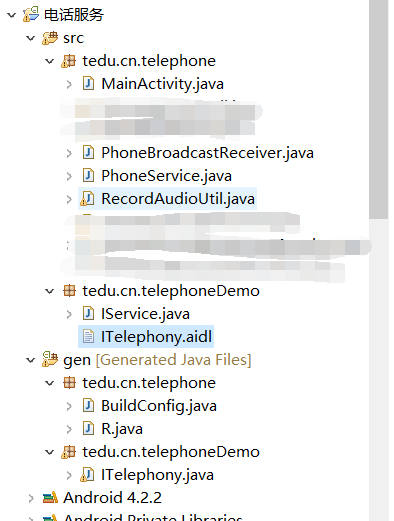
之前的代碼都是零散片段,這次把電話相關的能力整合成一個完整的服務模塊:來電黑名單攔截、通話錄音、以及通過 AIDL 實現的掛斷能力。整理成文,歡迎交流指正。 先說前提:本