

編輯:關於 Android 程式設計
Intent 是 Android 元件之間溝通的核心,可用來啟動 Activity、Service,或傳送 Broadcast。它既能明確指定目標元件,也能描述想要執行的動作。
若直接指定要啟動的類別,例如 new Intent(this, TargetActivity.class),就是顯式 Intent。Android 會直接啟動該元件,忽略 action、category 與 data 的額外比對。
若只宣告 action,例如 ACTION_VIEW,Android 會在系統中尋找能處理此動作的 Activity。例如:
Intent intent = new Intent(Intent.ACTION_VIEW);
intent.setData(Uri.parse("https://www.baidu.com"));
startActivity(intent);
這會開啟可處理網址的瀏覽器。
Activity 可在 AndroidManifest.xml 中透過 intent-filter 宣告可處理的 action、category 與 data。若有多個 Activity 符合,系統會讓使用者選擇。
隱式 Intent 的比對條件包含 action、category、data 中的 host、path、scheme、mimeType 等。若要被隱式 Intent 匹配,通常必須包含 DEFAULT category。
Intent 可透過 Bundle 傳遞基本型別或物件。常見做法有兩種:
效能示意:
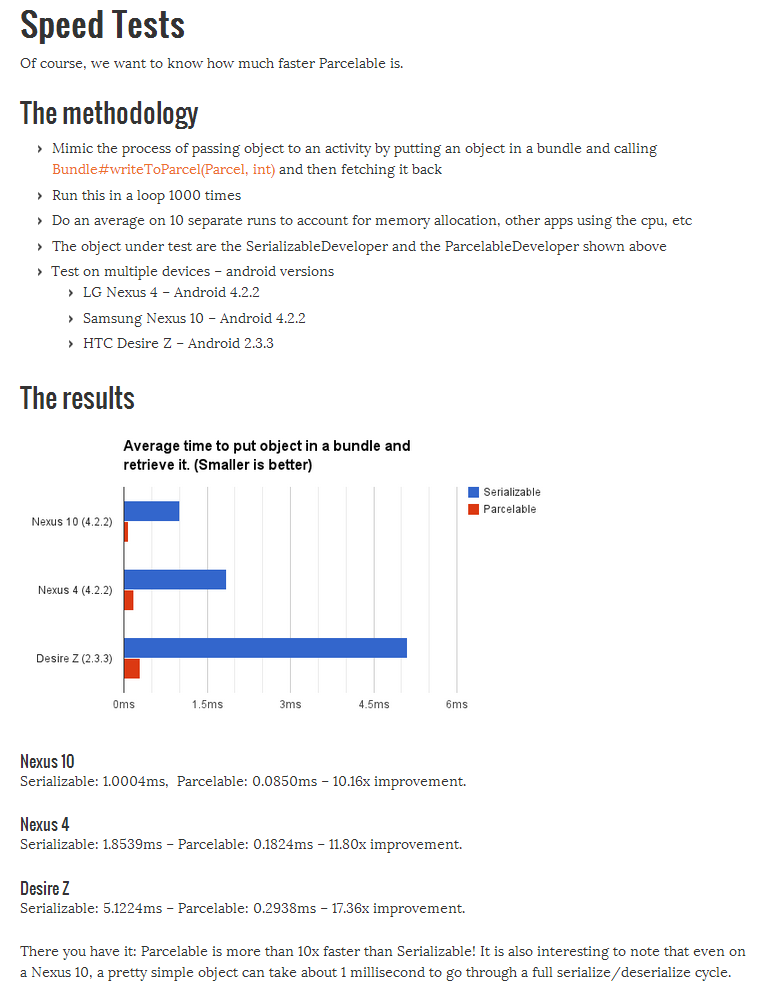
一般小量資料可用 Serializable;若注重效能或傳遞較大物件,建議優先使用 Parcelable。
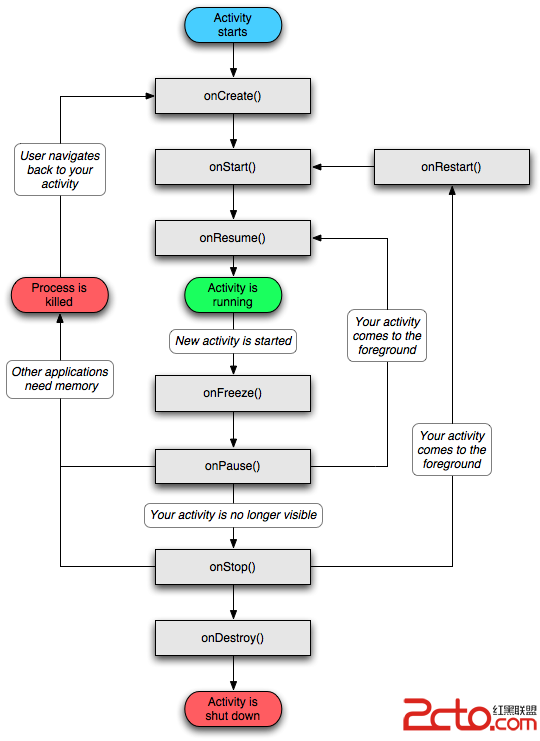 深入解析 android.app.Activity 與其生命週期
目前網路上關於 Android 的資料不算多,針對 Activity 的說明更少,因此我把官方文件中 android.app.Activity 的內容翻譯整理,並加入一些
 Android 日誌機制完整解析:從核心層 printk 到 logcat 的取用與調校技巧
不論是 debug 階段還是產品上線後的事件追蹤,Log 都是開發者最常打交道的夥伴。Android 的日誌體系並非單一來源,而是由核心層與使用者層兩套機制疊合而成,理解
 小米手機音量鍵喚醒怎麼開?夜間操作更方便
小米手機可啟用音量鍵喚醒。進入系統設定、進階設定,找到按鍵音量鍵喚醒螢幕並開啟。 之後按音量鍵即可亮屏,夜間查看時間或通知時更方便。
 SharedPreferences 輕量資料持久化完全上手
SharedPreferences 是 Android 提供的最輕量的資料持久化方案,要點有四: 1. 屬於輕量級的資料儲存方式。2. 本質是基於 XML 檔案保存 ke