

編輯:關於 Android 程式設計
一、写在前面
需求上遇到背景設透明度其實很常見,做法有好幾種,但不同場景下各方式可能踩到不同的問題。這篇針對開發實務做一次整理。
二、先看效果圖
圖 1:
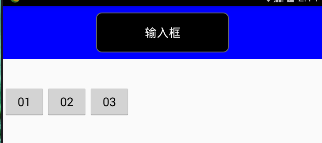
圖 2:
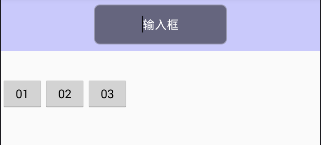
圖 3:
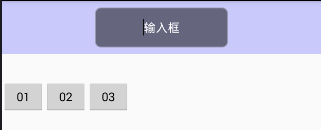
圖 4
說明:圖 1 為藍色標題列與輸入框的初始狀態。
圖 2 為點擊按鈕 01,輸入框透明度不生效,與 title 的透明度一致。
圖 3 為點擊按鈕 02,背景透明度設定正常,但可能影響到全域背景。
圖 4 為點擊按鈕 03,背景透明度設定正常,原因見程式碼註解。
三、加上程式碼
按鈕點擊事件
public void button01(View view){ // search 透明度不起作用 title.setAlpha(0.2f); search.setAlpha(0.8f); } public void button02(View view){ // 在布局中多個控件同時使用一個資源的時候,這些控件會共用一個狀態 // 如果你改變了一個控件的狀態,其他的控件都會接收到相同的通知 title.getBackground().setAlpha(51); search.getBackground().setAlpha(153); } public void button03(View view){ // 使用 mutate() 方法使該控件狀態獨立,這樣就不會共享自己的狀態了 title.getBackground().mutate().setAlpha(51); search.getBackground().mutate().setAlpha(153); } 布局檔
<?xml version="1.0" encoding="utf-8"?> <LinearLayout xmlns:android="https://schemas.android.com/apk/res/android" android:orientation="vertical" android:layout_width="match_parent" android:layout_height="match_parent"> <LinearLayout android:id="@+id/ll_title" android:layout_width="match_parent" android:layout_height="80dp" android:gravity="center" android:background="#0000ff" android:orientation="horizontal"> <EditText android:id="@+id/et_search" android:layout_width="200dp" android:layout_height="60dp" android:gravity="center" android:hint="輸入框" android:textColorHint="#ffffff" android:background="@drawable/search_title_bg"/> </LinearLayout> <LinearLayout android:layout_width="match_parent" android:layout_height="wrap_content" android:layout_marginTop="40dp" android:orientation="horizontal"> <Button android:layout_width="wrap_content" android:layout_height="wrap_content" android:text="01" android:onClick="button01"/> <Button android:layout_width="wrap_content" android:layout_height="wrap_content" android:text="02" android:onClick="button02"/> <Button android:layout_width="wrap_content" android:layout_height="wrap_content" android:text="03" android:onClick="button03"/> </LinearLayout> </LinearLayout>
輸入框背景 search_title_bg
<?xml version="1.0" encoding="utf-8"?> <shape xmlns:android="https://schemas.android.com/apk/res/android" android:shape="rectangle"> <solid android:color="#000000"/> <corners android:radius="8dp"/> <stroke android:width="1dp" android:color="#666666"/> </shape>
四、写在后面
背景透明度是很常見的需求,關鍵在於同一個 drawable 資源被多個 View 共用時會共享狀態,此時用 mutate() 就能讓各自的透明度設定互不干擾,解決狀態異常的問題。
 從零打造 Android 影片播放器(一):以 Vitamio 為核心動手實作
先前我曾經接觸過 Vitamio 這個第三方播放庫,後來因為種種瑣事耽擱下來,就一直沒有繼續深入。最近直播產業火熱,讓我重新意識到「影片」這塊技術值得好好下一番功夫,於是
 用 Smoothie 讓 ListView/GridView 的捲動更順:輕量非同步載入骨架庫介紹
翻譯 By Long Luo | 原文:Introducing Smoothie 在 Pattern UI 這類介面裡,很大一部份的內容是「滑動時從雲端抓一長串圖片回來
 Android 從零搭建框架系列(一):聯網與數據管理設計
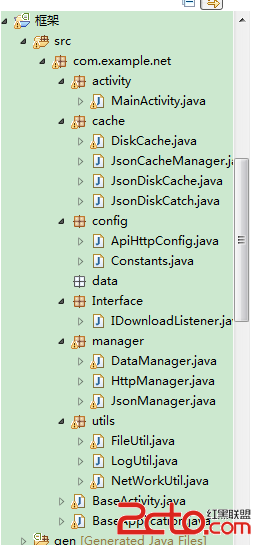
工作幾年,回頭發現自己沒留下什麼沉澱,每天埋頭開發卻很少總結。於是決定寫這個系列博客,把搭建框架的思路記錄下來,希望能對廣大開發者有所幫助。 框架的作用與職責 框架最
 華為P9 Plus怎麼雙清?Recovery 模式清除快取與資料的步驟
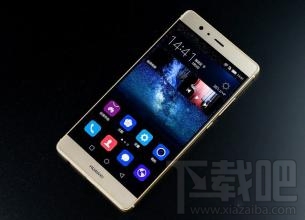
「雙清」指的是同時執行「清除快取」與「恢復原廠設定」兩個動作。手機變慢、記憶體塞滿,或是忘記解鎖密碼,都可以用它解決。華為 P9 Plus 的雙清必須在 Recovery