

編輯:關於 Android 程式設計
要做毛玻璃效果,需要一組 compute kernels(撰寫於 .rs 檔中),再搭配一組控制 RenderScript 的 Java API(.rs 檔會自動產生對應的 Java 類別)。由於撰寫 compute kernels 有一定學習成本,Android 從 JELLY_BEAN_MR1 起便內建了一些常用運算的 kernels,其中就包含高斯模糊。
以下透過實作說明如何用 RenderScript 完成高斯模糊,最終效果是將文字背景做模糊處理:
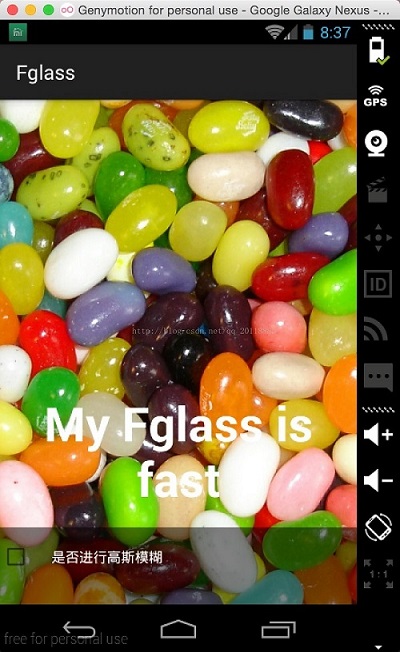
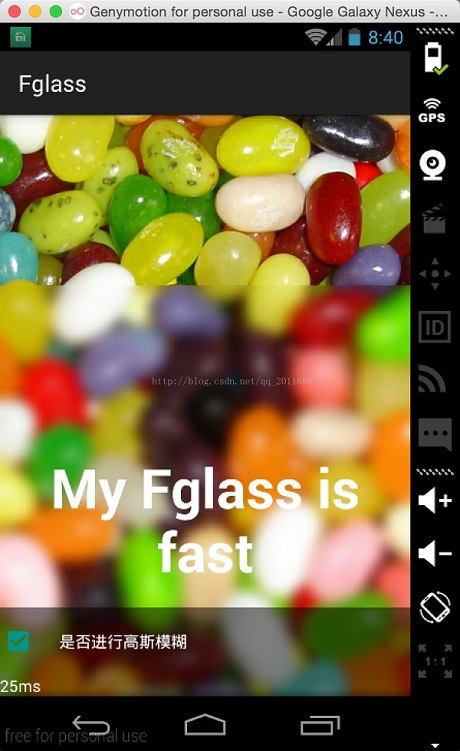
實作程式碼:
<html><head> <meta http-equiv="content-type" content="text/html; charset=UTF-8"></head><body><textarea>private void applyBlur() { image.getViewTreeObserver().addOnPreDrawListener(new ViewTreeObserver.OnPreDrawListener() { @Override public boolean onPreDraw() { image.getViewTreeObserver().removeOnPreDrawListener(this); image.buildDrawingCache(); Bitmap bmp = image.getDrawingCache(); blur(bmp, text, true); return true; } }); } @TargetApi(Build.VERSION_CODES.JELLY_BEAN_MR1) private void blur(Bitmap bkg, View view) { long startMs = System.currentTimeMillis(); float radius = 20; Bitmap overlay = Bitmap.createBitmap((int)(view.getMeasuredWidth()), (int)(view.getMeasuredHeight()), Bitmap.Config.ARGB_8888); Canvas canvas = new Canvas(overlay); canvas.translate(-view.getLeft(), -view.getTop()); canvas.drawBitmap(bkg, 0, 0, null); RenderScript rs = RenderScript.create(SecondActivity.this); Allocation overlayAlloc = Allocation.createFromBitmap(rs, overlay); ScriptIntrinsicBlur blur = ScriptIntrinsicBlur.create(rs, overlayAlloc.getElement()); blur.setInput(overlayAlloc); blur.setRadius(radius); blur.forEach(overlayAlloc); overlayAlloc.copyTo(overlay); view.setBackground(new BitmapDrawable(getResources(), overlay)); rs.destroy(); statusText.setText("cost " + (System.currentTimeMillis() - startMs) + "ms"); }</textarea></body></html> 布局如下:
<?xml version="1.0" encoding="utf-8"?> <FrameLayout xmlns:Android="https://schemas.android.com/apk/res/android" android:layout_width="match_parent" android:layout_height="match_parent" > <ImageView android:id="@+id/picture" android:layout_width="match_parent" android:layout_height="match_parent" android:src="@drawable/splash" android:scaleType="centerCrop" /> <TextView android:id="@+id/text" android:gravity="center_horizontal" android:layout_width="match_parent" android:layout_height="wrap_content" android:text="Gaussian Blur" android:textColor="@android:color/black" android:layout_gravity="center_vertical" android:text android:textSize="48sp" /> <LinearLayout android:id="@+id/controls" android:layout_width="match_parent" android:layout_height="wrap_content" android:background="#7f000000" android:orientation="vertical" android:layout_gravity="bottom" /> </FrameLayout>
以上所述就是關於在 Android 上實作 iOS 風格毛玻璃效果的說明,希望對大家有幫助。若有任何疑問歡迎留言,我們會盡快回覆。也非常感謝大家對本站的支持!
 Android 自訂衛星菜單:ViewGroup、屬性與動畫的完整實作
衛星菜單常見於相機、工具或快速操作入口。它通常由一個主按鈕與多個子按鈕組成,展開時子按鈕以圓弧排列,並搭配旋轉與平移動畫。 自訂 ViewGroup 的步驟 實作時先自訂
 Android 實現二維碼掃描登入網頁的實作
之前寫過一個二維碼掃描 demo,用的是 Zxing 框架。後續在掃描二維碼時遇到一些問題,比如壓縮圖片、調整掃描視窗大小等等。後來單位要求做掃描登入功能,發現最大的難點
 自定義 EditText 中 hint 文本字體大小的技巧
同事日前遇到一個問題:EditText 設定了文字大小之後,過長的 hint 文字沒辦法完整顯示出來,於是想問有沒有辦法「單獨」設定 hint 的字級。網上翻了一圈都找不
 Android 模糊效果詳解:BlurMaskFilter 的四種模式對照說明
在 Android 中,邊緣模糊效果是透過 BlurMaskFilter 實現的。使用時需要指定一個模糊半徑與一種模糊風格(Blur),而不同的風格會帶來截然不同的視覺結