

編輯:關於 Android 程式設計
ToggleButton 是一個帶有開/關狀態切換的按鈕控件,本文整理它的基本用法。
一、簡介

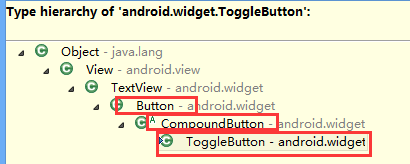
從類結構來看,ToggleButton 的父類是 CompoundButton,引包時留意一下。
二、使用方法
1、新建 ToggleButton 控件及物件:
private ToggleButton toggleButton1;
toggleButton1 = (ToggleButton) findViewById(R.id.toggleButton1);
2、設置 setOnCheckedChangeListener 監聽:
toggleButton1.setOnCheckedChangeListener(new OnCheckedChangeListener() {})
3、根據是否 checked 實現相應操作:
if (isChecked) {// 開
    linearLayout1.setOrientation(LinearLayout.VERTICAL);
} else {// 關
    linearLayout1.setOrientation(LinearLayout.HORIZONTAL);
}
三、程式碼實例
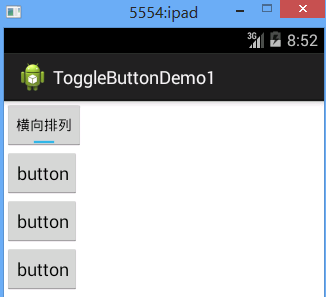
效果圖(開狀態):
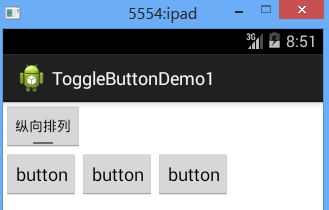
關狀態:
package fry;

import com.example.ToggleButtonDemo1.R;
import android.app.Activity;
import android.os.Bundle;
import android.widget.CompoundButton;
import android.widget.CompoundButton.OnCheckedChangeListener;
import android.widget.LinearLayout;
import android.widget.ToggleButton;

public class Activity01 extends Activity {
    private LinearLayout linearLayout1;
    private ToggleButton toggleButton1;

    @Override
    protected void onCreate(Bundle savedInstanceState) {
        super.onCreate(savedInstanceState);
        setContentView(R.layout.activity01);
        linearLayout1 = (LinearLayout) findViewById(R.id.linearLayout1);
        toggleButton1 = (ToggleButton) findViewById(R.id.toggleButton1);

        toggleButton1.setOnCheckedChangeListener(new OnCheckedChangeListener() {
            @Override
            public void onCheckedChanged(CompoundButton buttonView, boolean isChecked) {
                if (isChecked) {// 開
                    linearLayout1.setOrientation(LinearLayout.VERTICAL);
                } else {// 關
                    linearLayout1.setOrientation(LinearLayout.HORIZONTAL);
                }
            }
        });
    }
}
activity01.xml:
<?xml version="1.0" encoding="utf-8"?>
<LinearLayout xmlns:android="https://schemas.android.com/apk/res/android"
    android:layout_width="match_parent"
    android:layout_height="match_parent"
    android:orientation="vertical" >

    <ToggleButton
        android:id="@+id/toggleButton1"
        android:layout_width="wrap_content"
        android:layout_height="wrap_content"
        android:checked="true"
        android:textOn="橫向排列"
        android:textOff="縱向排列" />

    <LinearLayout
        android:id="@+id/linearLayout1"
        android:layout_width="wrap_content"
        android:layout_height="wrap_content"
        android:orientation="vertical" >
        <Button android:layout_width="wrap_content" android:layout_height="wrap_content" android:text="button" />
        <Button android:layout_width="wrap_content" android:layout_height="wrap_content" android:text="button" />
        <Button android:layout_width="wrap_content" android:layout_height="wrap_content" android:text="button" />
    </LinearLayout>
</LinearLayout>
四、重點整理
ToggleButton 非常適合用來做「開/關」這類二態切換的場景,搭配監聽器即可驅動對應的業務邏輯。
 Android 圖案解鎖的設計原理與完整實作
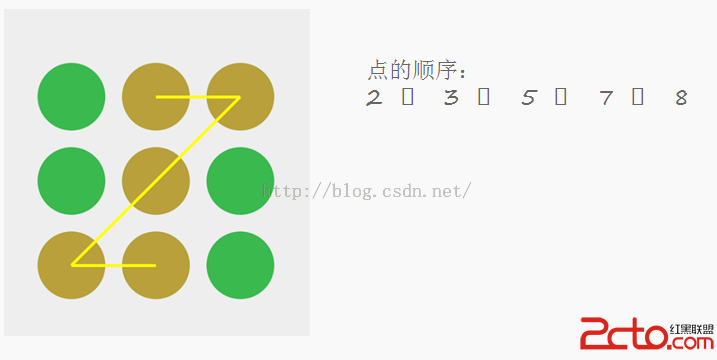
Android 圖案解鎖 首先要理解圖案的實現原理,看下面這張圖: 由圖可見,圖案中的手勢記錄其實就是 1-9 或 0-8 的順序,保存的順序就是密碼。當然有些密碼是可
 Android ExpandableListView 控件使用教學
ExpandableListView 適合用來呈現具有層級結構的資料,例如群組與子項目。本文以一個簡易通訊錄為例,說明如何建立群組資料、子項資料,並透過自適配器完成畫面綁
 主流 Android 熱修復技術比較:超級補丁、Tinker 與 HotFix
熱修復的核心問題 Android 熱修復的目標,是在不重新發版的情況下修復線上問題。常見方案包括類加載、DEX 合併與 Native 方法替換。不同方案在生效速度、相容性
 使用 Android Studio 匯入 Android 源碼
背景 Android 原始碼內有 development/tools/idegen,可產生 IntelliJ 與 Eclipse 專案設定。Android Studio