

編輯:關於 Android 開發
有時候我們需要在一個 TextView 中讓不同部分的文字呈現不同的顏色和字號,例如「白雪公主向您發來了 2 條消息」這樣的提示,其中姓名和數字長度不固定,還要求各自有不同的顏色。本文將介紹一種簡潔高效的實現方式。
最初我想到用 SpannableString 與 SpannableStringBuilder 來實現,它能夠讓一段文字顯示不同樣式。但它似乎只能固定某些位置的文字樣式,難以適應長度不變的場景,於是放棄了這個思路。
後來我改用 Html.fromHtml(String str) 方法來實現。從方法名就能看出,它可以顯示字符串對應的 HTML 格式文本。例如:
Html.fromHtml("<font color='red' size='24'>你好</font>")
這段代碼就能把「你好」以紅色、字號 24 的 HTML 樣式顯示出來。
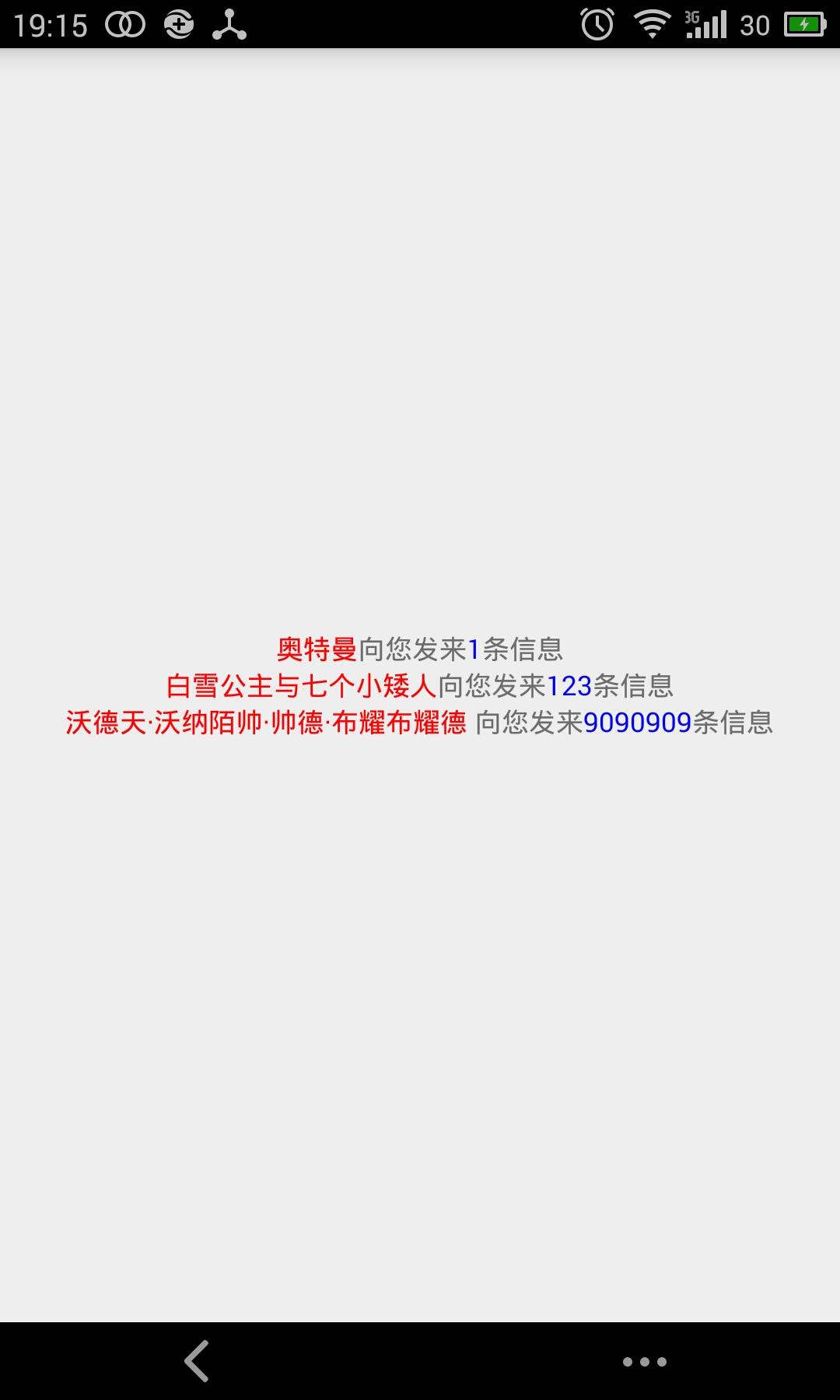
下面通過一個小 Demo 展示這個方法的使用。我們準備三組姓名與數字長度各不相同的數據,實現姓名顯示紅色、數字顯示藍色、其餘文字顯示默認灰色的效果。
首先編寫布局文件,包含三個 TextView:
<LinearLayout xmlns:android="https://schemas.android.com/apk/res/android"
    xmlns:tools="https://schemas.android.com/tools"
    android:layout_width="match_parent"
    android:layout_height="match_parent"
    android:paddingLeft="@dimen/activity_horizontal_margin"
    android:paddingRight="@dimen/activity_horizontal_margin"
    android:paddingTop="@dimen/activity_vertical_margin"
    android:paddingBottom="@dimen/activity_vertical_margin"
    android:gravity="center"
    android:orientation="vertical"
    tools:context=".MainActivity">
    <TextView
        android:id="@+id/html_text"
        android:gravity="center"
        android:layout_width="wrap_content"
        android:layout_height="wrap_content" />
    <TextView
        android:id="@+id/html_text2"
        android:gravity="center"
        android:layout_width="wrap_content"
        android:layout_height="wrap_content" />
    <TextView
        android:id="@+id/html_text3"
        android:gravity="center"
        android:layout_width="wrap_content"
        android:layout_height="wrap_content" />
</LinearLayout>
接著在 Activity 的 onCreate() 方法中拼接 HTML 字符串並設置文本:
@Override
protected void onCreate(Bundle savedInstanceState) {
    super.onCreate(savedInstanceState);
    setContentView(R.layout.activity_main);
    textView = (TextView) findViewById(R.id.html_text);
    textView2 = (TextView) findViewById(R.id.html_text2);
    textView3 = (TextView) findViewById(R.id.html_text3);
    names = new ArrayList<>();
    counts = new ArrayList<>();
    message = new ArrayList<>();
    names.add("奧特曼");
    names.add("白雪公主與七個小矮人");
    names.add("沃德天·沃納陌帥·帥德·布耀布耀德 ");
    counts.add(1);
    counts.add(123);
    counts.add(9090909);
    for (int i = 0; i < 3; i++) {
        message.add("<font color='red' size='20'>" + names.get(i) + "</font>" + "向您發來" + "<font color='blue' size='30'>" + counts.get(i) + "</font>" + "條信息");
    }
    textView.setText(Html.fromHtml(message.get(0)));
    textView2.setText(Html.fromHtml(message.get(1)));
    textView3.setText(Html.fromHtml(message.get(2)));
}
效果如下圖所示。可以看到,只要簡單掌握一些 HTML 基礎,就能輕鬆實現豐富的文字樣式,是不是很方便呢?
 動手打造 Android 自訂 XML 軟鍵盤完整實作教學
 在 Android 開發中,除了系統預設的輸入法,我們其實可以自己打造一個完全自訂的軟鍵盤。它並不像想像中那麼
 用 RadioButton 快速實現圖文上下或左右布局
在 Android 開發中,經常會遇到圖片與文字組合展示的需求,例如圖片在上、文字在下,或者圖片在左、文字在右。通常
 拼圖遊戲設計檢討:從規則、命名到可維護性的六點反思
拼圖遊戲的本質 拼圖遊戲看似是圖片排列,實際上與數字推盤遊戲相同:玩家在有限空格中移動方塊,讓所有方塊恢復順序。因此,規則設計是否貼近傳統玩法,會直接影響遊戲的完成度。
 Android 自定義 View 繪製流程重點整理
自定義 View 的測量、配置與繪製是理解 Android UI 的關鍵。若直接繼承 View 或 ViewGroup,