

編輯:關於 Android 開發
下面這份範例以 jQuery Mobile 打造一個行動版的公司簡介頁面,示範了 page、header、content、footer 的基本結構,以及底部頁籤導覽與 listview 通訊錄(含搜尋過濾)的實作方式。
<!doctype html> <html> <head> <meta charset="utf-8"> <meta name="viewport" content="width=device-width,initial-width=1.0,maximum-width=1.0,user-scalable=no"/> <title>無標題文檔</title> <link rel="stylesheet" href="https://code.jquery.com/mobile/1.3.2/jquery.mobile-1.3.2.min.css"> <script src="https://code.jquery.com/jquery-1.8.3.min.js"></script> <script src="https://code.jquery.com/mobile/1.3.2/jquery.mobile-1.3.2.min.js"></script> </head> <body> <div data-role="page" id="home"> <div data-role="header"> <a data-role="button" href="#home" data-icon="home">主頁</a> <h4>公司簡介</h4> <a data-role="button" href="#home" data-icon="search">搜索</a> </div> <div data-role="content">歡迎訪問公司!我公司是專業制作手機app的軟件公司。</div> <div data-role="footer" class="ui-btn"> <a data-role="button" href="#home">公司簡介</a> <a data-role="button" href="#page1">技術力量</a> <a data-role="button" href="#page2">聯系方式</a> <a data-role="button" href="#page3">通訊錄</a> </div> </div> <div data-role="page" id="page1"> <div data-role="header"> <a data-role="button" href="#home" data-icon="home">主頁</a> <h4>技術力量</h4> <a data-role="button" href="#home" data-icon="search">搜索</a> </div> <div data-role="content">公司有專業設計師、軟件開發工程師數十名。</div> <div data-role="footer" class="ui-btn"> <a data-role="button" href="#home">公司簡介</a> <a data-role="button" href="#page1">技術力量</a> <a data-role="button" href="#page2">聯系方式</a> <a data-role="button" href="#page3">通訊錄</a> </div> </div> <div data-role="page" id="page2"> <div data-role="header"> <a data-role="button" href="#home" data-icon="home">主頁</a> <h4>聯系方式</h4> <a data-role="button" href="#home" data-icon="search">搜索</a> </div> <div data-role="content">QQ:23110134。</div> <div data-role="footer" class="ui-btn"> <a data-role="button" href="#home">公司簡介</a> <a data-role="button" href="#page1">技術力量</a> <a data-role="button" href="#page2">聯系方式</a> <a data-role="button" href="#page3">通訊錄</a> </div> </div> <div data-role="page" id="page3"> <div data-role="header"> <a data-role="button" href="#home" data-icon="home">主頁</a> <h4>通訊錄</h4> <a data-role="button" href="#home" data-icon="search">搜索</a> </div> <div data-role="content"> <ul data-role="listview" data-autodividers="true" data-inset="true" data-filter="true" data-filter-placeholder="搜索姓名..."> <li>Bill Gates</li> <li>James Wang</li> <li>Jeff Chen</li> <li>陳安國 歐巴</li> </ul> </div> <div data-role="footer" class="ui-btn"> <a data-role="button" href="#home">公司簡介</a> <a data-role="button" href="#page1">技術力量</a> <a data-role="button" href="#page2">聯系方式</a> <a data-role="button" href="#page3">通訊錄</a> </div> </div> </body> </html>
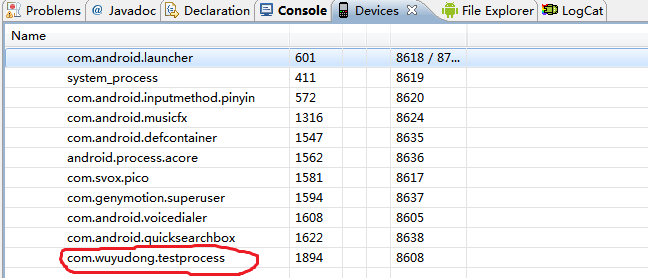 Android 中關閉應用的三種方式
應用不再使用時,通常需要主動關閉以釋放資源。Android 提供了幾種不同的思路,各有適用場景和限制。 方法一:殺死當前進程 先獲取當前進程的 id,再調用 killPr
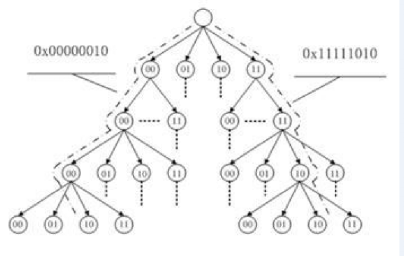 Linux 內核基數樹應用分析:從映射到文件頁快取
基數樹是什麼 基數樹可視為以二進位位串為索引的多層索引結構,常用來把 id 或頁索引快速映射成物件指標。它兼具樹狀結構與固定分段的特性,適合動態增刪大量物件。 在 Li
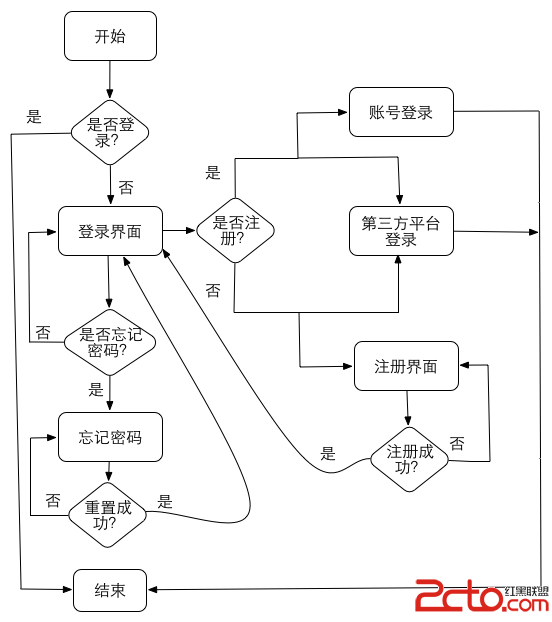 Android 開發技巧(2):登入註冊模組的完整解決方案
前言 幾乎每一個 App 都離不開登入與註冊功能。以筆者開發的「南方週末新聞閱讀器」為例,登入、手機註冊、忘記密碼等入口一应俱全。這個模組看似簡單,但要做得完善,其實需要
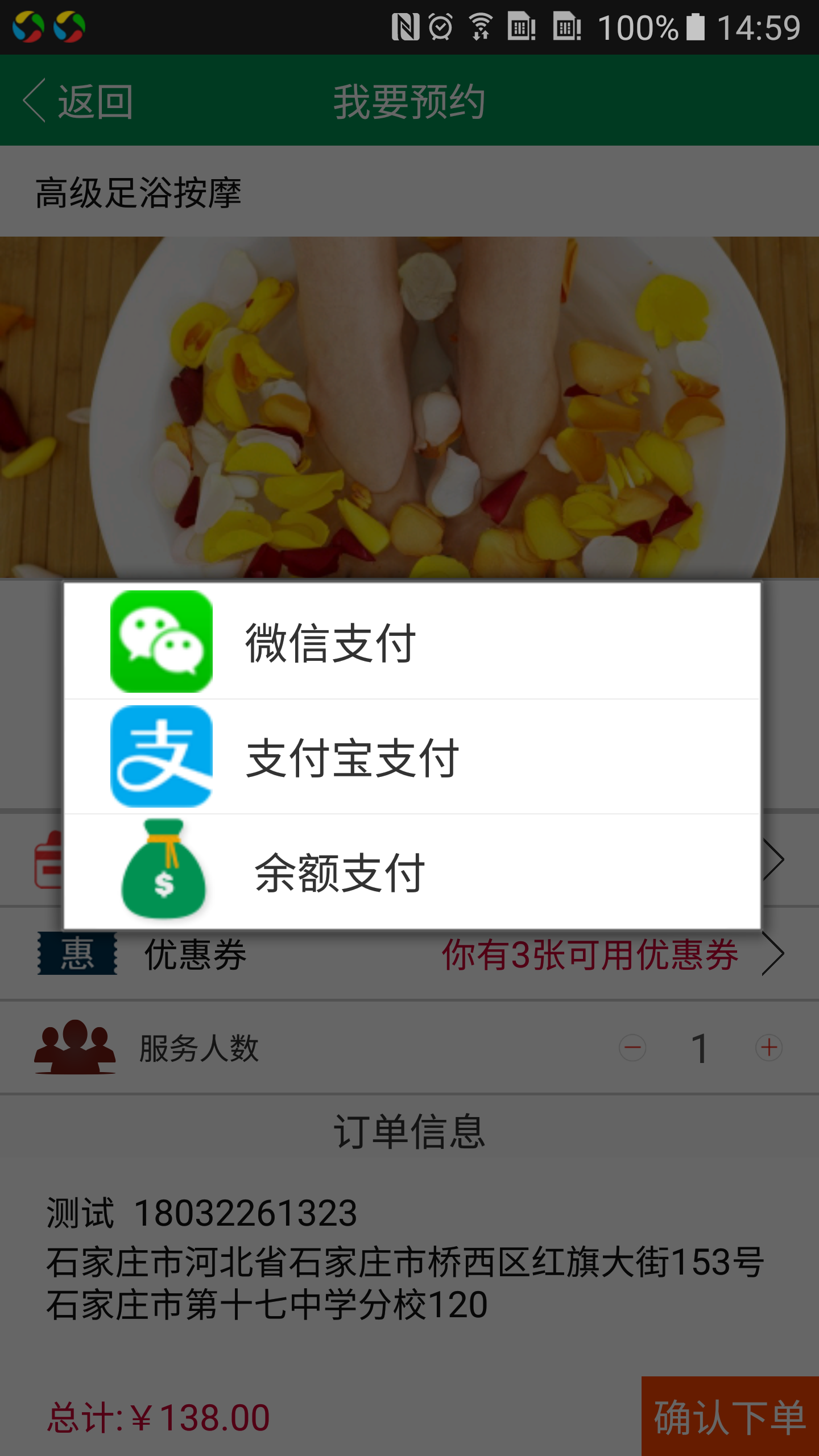 Android 系統對話框加入圖片選項
在部分 App 中,系統對話框不只是純文字選單,還需要加入圖示,讓使用者更容易辨識選項。例如支付方式選擇、分享方式選擇或設定選單,都可以透過圖文並列的清單呈現。自訂清單版