

編輯:關於 Android 開發
本文整理 Android 開發過程中經常遇到的錯誤訊息與對應的解決辦法,方便日後查閱。
訊息:Application does not specify an API level requirement。
原因:不影響運行,只是 AndroidManifest.xml 沒寫 API 版本。可在 <manifest> 標籤內加入 <uses-sdk android:minSdkVersion="3" />。
訊息:INSTALL_FAILED_INSUFFICIENT_STORAGE。原因是裝置沒有足夠儲存空間安裝應用,需清理空間後重試。
原因:目標目錄已存在同名資料夾,導致 copy apk 時出錯。先刪除同名資料夾即可。
原因:同一個類被重複引入,通常是 jar 包衝突。檢查並移除重複的依賴即可。
訊息:This Android SDK requires Android Developer Toolkit version 10.0.0 or above。原因是 Eclipse 的 Android 開發插件版本過低,需下載並安裝對應版本的 ADT。
關閉模擬器與 Eclipse,執行 adb kill-server 後重試。
訊息:java.net.SocketException: Permission denied (maybe missing INTERNET permission)。需訪問網絡時,要在 AndroidManifest.xml 中加入 <uses-permission android:name="android.permission.INTERNET" />。
原因通常有二:一是服務端 Soap 版本為 1.0,需把 SoapEnvelope.VER11 改為 VER10;二是 serviceUrl 結尾要去掉 .wsdl 或 ?wsdl。
訊息:java.lang.RuntimeException: Can't create handler inside thread that has not called Looper.prepare()。原因是不能在子線程直接操作 UI,需透過 Handler 向 UI 主線程發送消息。
原因同樣是在非 UI 主線程操作 UI 組件。需在任務完成後用 Handler 通知主線程顯示提示。
解法一:不修改 SDK 版本時,用 Project Clean 即可。
解法二:修改 SDK 版本時,需依序調整 Build Path 的 library、classpath 檔、AndroidManifest.xml 的 uses-sdk,以及 default.properties 的 target。
訊息:'JDI thread evaluations' has encountered a problem / Exception processing async thread queue。這與運行無關,關掉 expressions 視圖即可。
解法:建立 default.properties 檔;若仍報錯,刪除專案重新 import,並確認 gen 目錄存在。
原因:手機已啟動相同名字的應用,關閉後再試。
原因:dl-ssl.google.com 在大陸被牆。解法是修改 C:\Windows\System32\drivers\etc\hosts 檔加入對應映射,然後重啟 SDK Manager。
解法:在任務管理器關閉所有 adb.exe,重啟 Eclipse 即可。
解法:Project → Properties → Java Compiler,確認 Compiler compliance level 設為 1.6,並勾選 Enable project specific settings。
解法:可能是缺少資源檔。可在 Window → Preferences → Android → Lint Error Checking 中取消勾選 Run full error check when exporting app。
原因:多因引用第三方包(如 ksoap2-android-assembly-2.4-jar-with-dependencies.jar)導致。不需要混淆的話移除 proguard.cfg 即可,或在其中加入 -ignorewarnings。
解法:進入使用者目錄下的 .android,刪除 debug.keystore 與 ddms.cfg,重新生成即可。
訊息:requires the FLAG_ACTIVITY_NEW_TASK flag。解法是為 Intent 加上 it.setFlags(Intent.FLAG_ACTIVITY_NEW_TASK)。
原因:ProGuard 混淆後 xmlpull 與 ksoap2 包衝突。解法是打開 ksoap2 包,移除其中與系統衝突的 org.xmlpull.v1.XmlPullParser 與 XmlSerializer。
解法:使用 Android 異步處理(Thread + Handler)在子線程更新 UI 界面。
解法:ScrollView 內部只能有一個直接子元素,需把所有子元素放進一個 LinearLayout 或 RelativeLayout 後再包上 ScrollView。
原因:RelativeLayout 中引用的目標控件尚未定義或順序在後。把被引用控件的順序調整到前面即可。
原因:模擬器路徑含中文亂碼。解法是設定系統環境變數 ANDROID_SDK_HOME 指向無中文的路徑,並在 eclipse 的 org.eclipse.ui.ide.prefs 中補上該變數。
以上彙整了 Android 開發中常見的編譯、安裝、調試、簽名與運行時錯誤。遇到問題時,先看懂錯誤訊息的關鍵字,再對症下藥,往往能事半功倍。
 Android 四大組件之 Broadcast 廣播詳解
廣播的概念 現實中,我們常通過電台發送廣播發布消息,買個收音機就能收聽。在 Android 中也是類似:系統在產生某個事件時發送廣播,應用通過廣播接收者接收這個廣播,就能
 自訂左下角弧形旋轉選單的實作解析
成品效果 整個自訂控制項的核心其實就是一個 ArcMenu(那圈半圓弧),左下角的圖示並未加入控制項本身。我是在既有類別的基礎上做了些調整: 首先,原本的做法是把左下角關
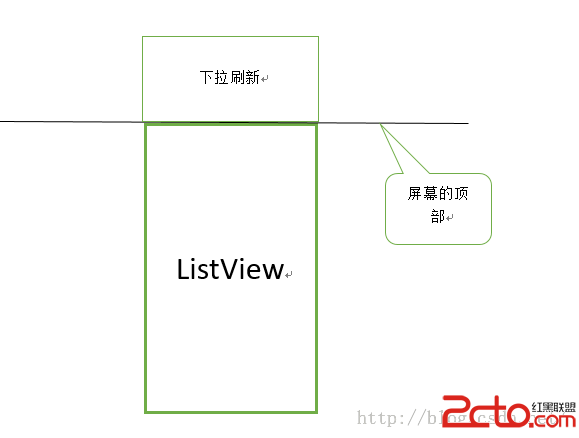 Android 自訂下拉重新整理與上拉載入更多 ListView 教學
打造順暢的列表體驗:下拉重新整理與上拉載入更多 在許多 App 的列表頁面中,使用者只要將手指往下滑,就能看見「下拉重新整理」提示;當手指釋放後,列表會進入刷新狀態,稍待
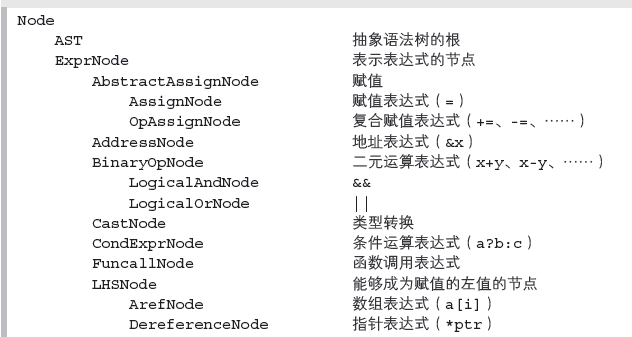 編譯器開發:Ocelot 語言的抽象語法樹
抽象語法樹是編譯器前端的關鍵產物。它會把原始碼轉換成具有結構的節點樹,方便後續進行語意分析、最佳化與程式碼產生。Ocelot 語