

編輯:關於 Android 開發
Volley 本身沒有直接提供檔案上傳,需要自己補上 multipart/form-data 的實作。做法是先自訂一個 HttpEntity 負責組裝請求本文,再自訂一個 Request 把它包起來。
用瀏覽器上傳一次檔案,再用 Wireshark 抓包,可以看到本文大致長這樣:
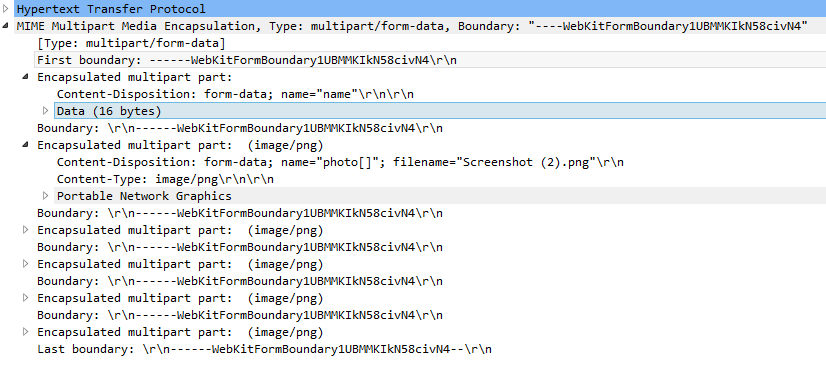
MIME Multipart Media Encapsulation, Type: multipart/form-data,
Boundary: "----WebKitFormBoundary1UBMMKIkN58civN4"

[Type: multipart/form-data]
First boundary: ------WebKitFormBoundary1UBMMKIkN58civN4\r\n
Encapsulated multipart part: Content-Disposition: form-data; name="name"\r\n\r\n
Data (16 bytes)
Boundary: \r\n------WebKitFormBoundary1UBMMKIkN58civN4\r\n
Encapsulated multipart part: (image/png)
    Content-Disposition: form-data; name="photo[]"; filename="Screenshot (2).png"\r\n
    Content-Type: image/png\r\n\r\n
Portable Network Graphics
Boundary: \r\n------WebKitFormBoundary1UBMMKIkN58civN4\r\n
...
Last boundary: \r\n------WebKitFormBoundary1UBMMKIkN58civN4--\r\n
由此歸納出本文由四部分組成:Content-Type 標頭、第一道 boundary、各檔案的二進位內容、最後一道 boundary。多檔上傳時重複中間兩段即可,檔案之間以 Boundary 分隔,每個檔案都要帶上 Content-Disposition 與 Content-Type。
package cc.dewdrop.volleydemo.utils;

import com.android.volley.VolleyLog;
import org.apache.http.Header;
import org.apache.http.HttpEntity;
import org.apache.http.message.BasicHeader;

import java.io.*;

import javax.activation.MimetypesFileTypeMap;

public class FileUploadEntity implements HttpEntity {

    private static final String TAG = FileUploadEntity.class.getSimpleName();
    private static final String BOUNDARY = "__FILE_UPLOAD_ENTITY__";

    private ByteArrayOutputStream mOutputStream;

    public FileUploadEntity() {
        mOutputStream = new ByteArrayOutputStream();
        try {
            writeFirstBoundary();
        } catch (IOException e) {
            e.printStackTrace();
        }
    }

    /** 寫入第一道 boundary 與普通文字欄位 */
    private void writeFirstBoundary() throws IOException {
        VolleyLog.e("writeFirstBoundary");
        mOutputStream.write(("--" + BOUNDARY + "\r\n").getBytes());
        mOutputStream.write(
            ("Content-Disposition: form-data; name=\"" + "name" + "\"\r\n\r\n")
                .getBytes());
        mOutputStream.write("Content-Transfer-Encoding: binary\n\n".getBytes());
        mOutputStream.flush();
    }

    /** 寫入最後一道 boundary */
    private void writeLastBoundary() throws IOException {
        VolleyLog.e("writeLastBoundary");
        mOutputStream.write(("\r\n--" + BOUNDARY + "--\r\n").getBytes());
    }

    /** 加入一個檔案,可呼叫多次以支援多檔上傳 */
    public void addFile(final String key, final File file) {
        VolleyLog.e("addFile");
        InputStream inputStream = null;
        try {
            mOutputStream.write(("\r\n--" + BOUNDARY + "\r\n").getBytes());

            StringBuilder contentDisposition = new StringBuilder();
            contentDisposition.append("Content-Disposition: ");
            contentDisposition.append("form-data; ");
            contentDisposition.append("name=\"" + key + "\"; ");
            contentDisposition.append("filename=\"" + file.getName() + "\"\r\n");
            mOutputStream.write(contentDisposition.toString().getBytes());

            StringBuilder contentType = new StringBuilder();
            contentType.append("Content-Type: ");
            contentType.append(new MimetypesFileTypeMap().getContentType(file));
            contentType.append("\r\n\r\n");
            mOutputStream.write(contentType.toString().getBytes());

            inputStream = new FileInputStream(file);
            final byte[] buffer = new byte[1024];
            int len;
            while ((len = inputStream.read(buffer)) != -1) {
                mOutputStream.write(buffer, 0, len);
            }
            mOutputStream.flush();
        } catch (FileNotFoundException e) {
            e.printStackTrace();
        } catch (IOException e) {
            e.printStackTrace();
        } finally {
            closeSilently(inputStream);
        }
    }

    private void closeSilently(Closeable closeable) {
        try {
            if (closeable != null) {
                closeable.close();
            }
        } catch (final IOException e) {
            e.printStackTrace();
        }
    }

    @Override
    public boolean isRepeatable() { return false; }

    @Override
    public boolean isChunked() { return false; }

    @Override
    public long getContentLength() {
        return mOutputStream.toByteArray().length;
    }

    @Override
    public Header getContentType() {
        return new BasicHeader("Content-Type",
                "multipart/form-data; boundary=" + BOUNDARY);
    }

    @Override
    public Header getContentEncoding() { return null; }

    @Override
    public InputStream getContent() throws IOException, UnsupportedOperationException {
        return new ByteArrayInputStream(mOutputStream.toByteArray());
    }

    @Override
    public void writeTo(OutputStream outputStream) throws IOException {
        writeLastBoundary();
        outputStream.write(mOutputStream.toByteArray());
    }

    @Override
    public boolean isStreaming() { return false; }

    @Override
    public void consumeContent() throws IOException { }
}
幾個實作重點:
package cc.dewdrop.volleydemo.utils;

import com.android.volley.*;
import com.android.volley.Response.Listener;
import com.android.volley.toolbox.HttpHeaderParser;

import java.io.ByteArrayOutputStream;
import java.io.IOException;
import java.io.UnsupportedEncodingException;
import java.util.HashMap;
import java.util.Map;

public class FileUploadRequest extends Request<String> {

    private final Listener<String> mListener;
    private FileUploadEntity mFileUploadEntity = new FileUploadEntity();
    private Map<String, String> mHeaders = new HashMap<>();

    public FileUploadRequest(String url, Listener<String> listener) {
        this(url, listener, null);
    }

    public FileUploadRequest(String url, Listener<String> listener,
                             ErrorListener errorListener) {
        this(Method.POST, url, listener, errorListener);
    }

    public FileUploadRequest(int method, String url, Listener<String> listener,
                             ErrorListener errorListener) {
        super(method, url, errorListener);
        this.mListener = listener;
    }

    public FileUploadEntity getFileUploadEntity() {
        return mFileUploadEntity;
    }

    @Override
    public String getBodyContentType() {
        return mFileUploadEntity.getContentType().getValue();
    }

    public void addHeader(String key, String value) {
        mHeaders.put(key, value);
    }

    @Override
    public Map<String, String> getHeaders() throws AuthFailureError {
        return mHeaders;
    }

    @Override
    public byte[] getBody() throws AuthFailureError {
        ByteArrayOutputStream outputStream = new ByteArrayOutputStream();
        try {
            mFileUploadEntity.writeTo(outputStream);
        } catch (IOException e) {
            e.printStackTrace();
        }
        return outputStream.toByteArray();
    }

    @Override
    protected Response<String> parseNetworkResponse(NetworkResponse response) {
        String parsed;
        try {
            parsed = new String(response.data,
                    HttpHeaderParser.parseCharset(response.headers));
        } catch (UnsupportedEncodingException e) {
            parsed = new String(response.data);
        }
        return Response.success(parsed, HttpHeaderParser.parseCacheHeaders(response));
    }

    @Override
    protected void deliverResponse(String response) {
        if (mListener != null) {
            mListener.onResponse(response);
        }
    }
}
這個 Request 的寫法與 Volley 內建的其他 Request 一致,主要差別在於 getBody() 回傳的是自訂 entity 組出的 multipart 本文,getBodyContentType() 也要一併帶上 boundary。
private void simpleUploadFile() {
    File file = new File(
            Environment.getExternalStorageDirectory().getPath() + "/upload.png");

    fileUploadRequest = new FileUploadRequest(
        Request.Method.POST,
        urlList.get(2),
        new Response.Listener<String>() {
            @Override
            public void onResponse(String response) {
                textViewInfo.setText("Post Succeed:\n" + response.replace("<br>", "\n"));
                Log.e(TAG, response);
                dialog.dismiss();
            }
        },
        new Response.ErrorListener() {
            @Override
            public void onErrorResponse(VolleyError error) {
                textViewInfo.setText("Post Failed:\n" + error.getMessage());
                Log.e(TAG, error.getMessage());
                dialog.dismiss();
            }
        }
    );

    fileUploadRequest.addHeader("User-Agent", "Android 5.1.1");

    FileUploadEntity fileUploadEntity = fileUploadRequest.getFileUploadEntity();
    // 呼叫多次即為多檔上傳
    fileUploadEntity.addFile("file[]", file);
    fileUploadEntity.addFile("file[]", file);

    requestQueue.add(fileUploadRequest);
    dialog.show();
}
使用方式與其他類型的 Request 完全相同:建立 Request 物件、取得 Entity、用 addFile() 加入檔案、丟進 requestQueue。
compile 'org.apache.httpcomponents:httpcore:4.4.4'
compile 'org.apache.httpcomponents:httpmime:4.5.1'
compile files('libs/volley.jar')
compile files('libs/activation.jar')
最後提醒一點:這種做法會先把整個檔案讀進記憶體再送出,適合小檔案。若要上傳大檔案或大量檔案,建議改用 HttpURLConnection 直接串流寫入,避免 OOM。
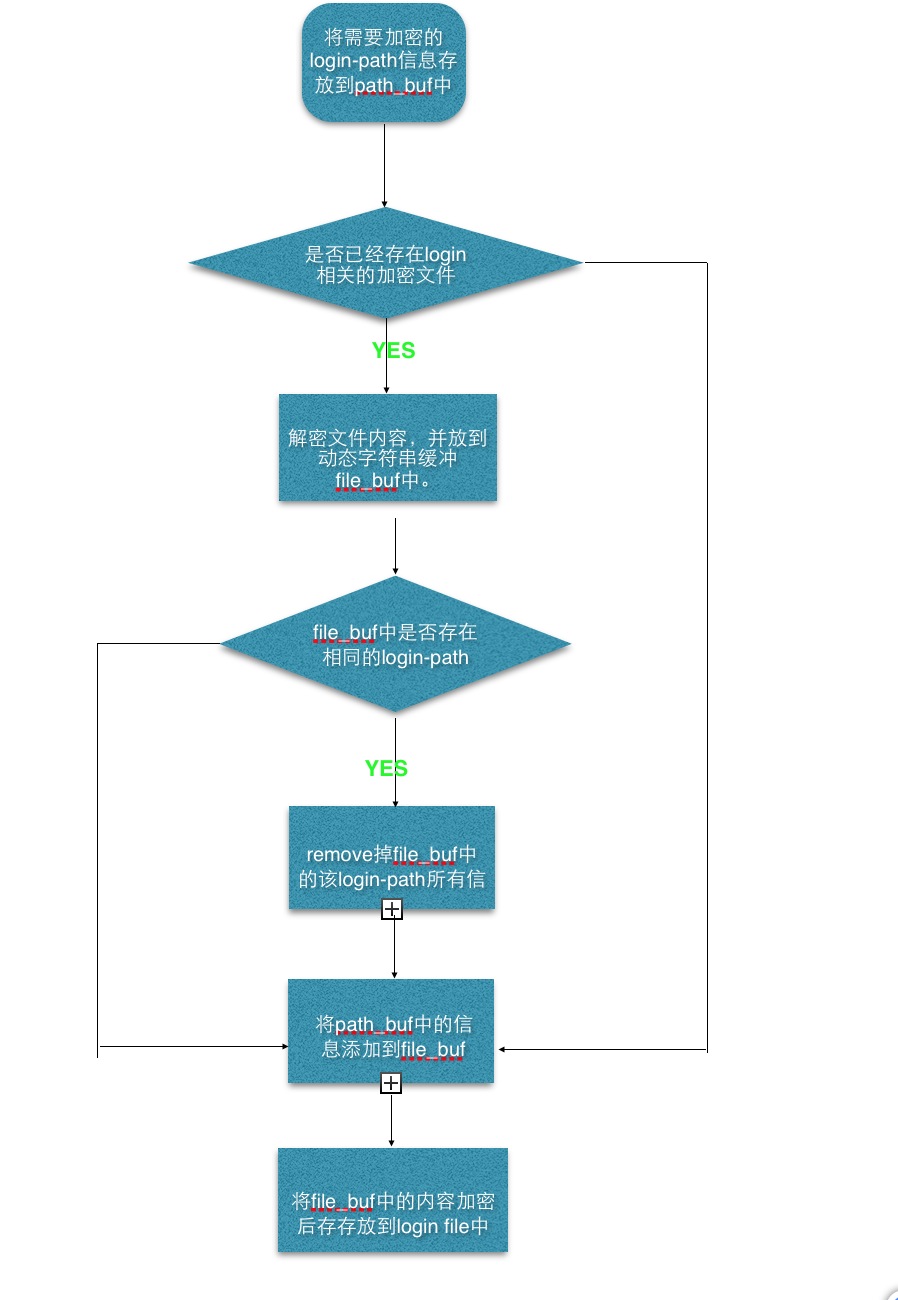 MySQL 新特性解析:mysql_config_editor 加密原理與原始碼
 從 MySQL 5.6 開始,官方推出了加密工具 mysql_config_editor
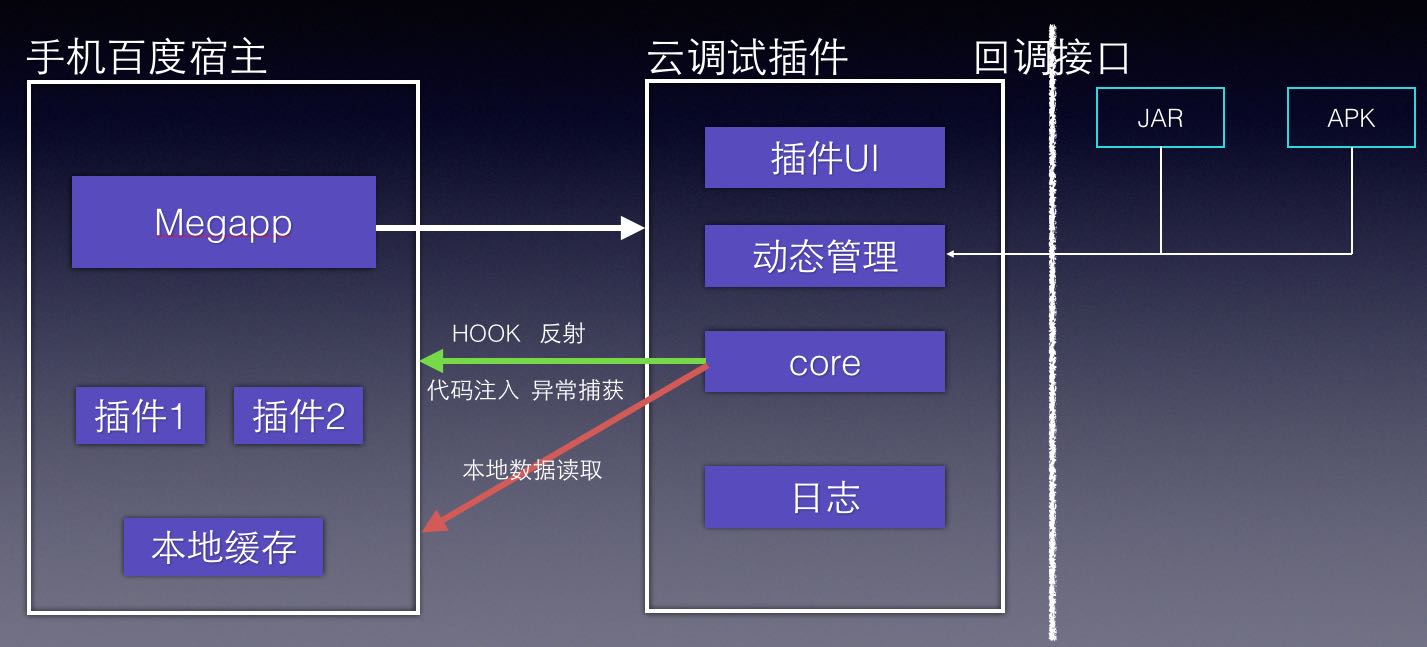 移動測試黑科技:一種基於動態插件系統的思路
 百度 MTC 是業界領先的移動應用測試服務平台,致力於為開發者在移動測試中面臨的成本、技術與效率問題提供解決方案。本文作者 h
 Android 程式碼故事 第一回:那些等間距排列的按鈕
App 新做了一個放操作按鈕的畫面,老闆的要求是「簡潔美觀有內涵,按鈕要均勻分布」。設計 MM 給了一張圖,示意起來大概是這樣: |===================
 Android 中 Activity、Window 與 View 三者之間的關係
 一、概述 Activity 可以說是應用程式的載體(也可理解為界面的載體,但不等於界面本