

編輯:關於 Android 開發
預設的 ListView 外觀略顯單調,若想讓它更具設計感,可以透過 shape 定義為列表加上圓角與漸層。以下示範如何實作一個圓角 ListView。
首先在 Activity 中以 ArrayAdapter 綁定一組資料:
String[] mStrings = { "aaaa", "bbbb", "cccc" }; ListView listView = (ListView) findViewById(R.id.list); listView.setAdapter(new ArrayAdapter<String>(this, android.R.layout.simple_list_item_1, mStrings));
接著在版面配置中,透過 android:background 指定一個自訂的 shape 資源作為背景:
<ListView android:id="@+id/list" android:layout_width="fill_parent" android:layout_height="wrap_content" android:background="@layout/list_corner_1" android:layout_weight="1.0" />
重點在於 list_corner_1.xml 這個 shape 定義,用 <corners> 設定四角圓角半徑,並以 <gradient> 加上漸層:
<?xml version="1.0" encoding="UTF-8"?> <shape xmlns:android="https://schemas.android.com/apk/res/android" android:shape="rectangle"> <gradient android:startColor="#CCCCFF" android:endColor="#99CCFF" android:angle="90" /> <corners android:bottomRightRadius="10dp" android:bottomLeftRadius="10dp" android:topLeftRadius="10dp" android:topRightRadius="10dp" /> </shape>
透過 shape 的 corners 與 gradient 標籤,就能輕鬆為 ListView 換上柔和的圓角與漸層外觀,讓列表視覺更精緻。
 Android 百度地圖 API 集成(一):完成基礎地圖顯示
 在把百度地圖 API 整合進 App 的過程中,筆者踩過一些坑,特此開篇記錄。以下直接進入實作。 1. 建
 Android 5.0 最應該實現的 8 個期望
 毫無疑問,Android 5.0 將是令人興奮的作業系統。由於 Android 4.0 至 4.4 之間並無顯著差異,谷
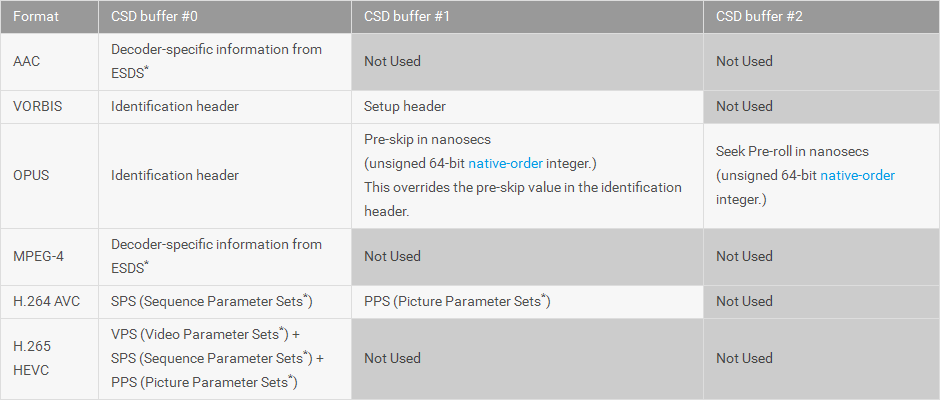 MediaCodec 中文 API 重點整理
MediaCodec 概覽 MediaCodec 可存取 Android 底層媒體編解碼器,常用於播放、轉碼、編碼與解碼。它與 MediaExtractor、MediaM
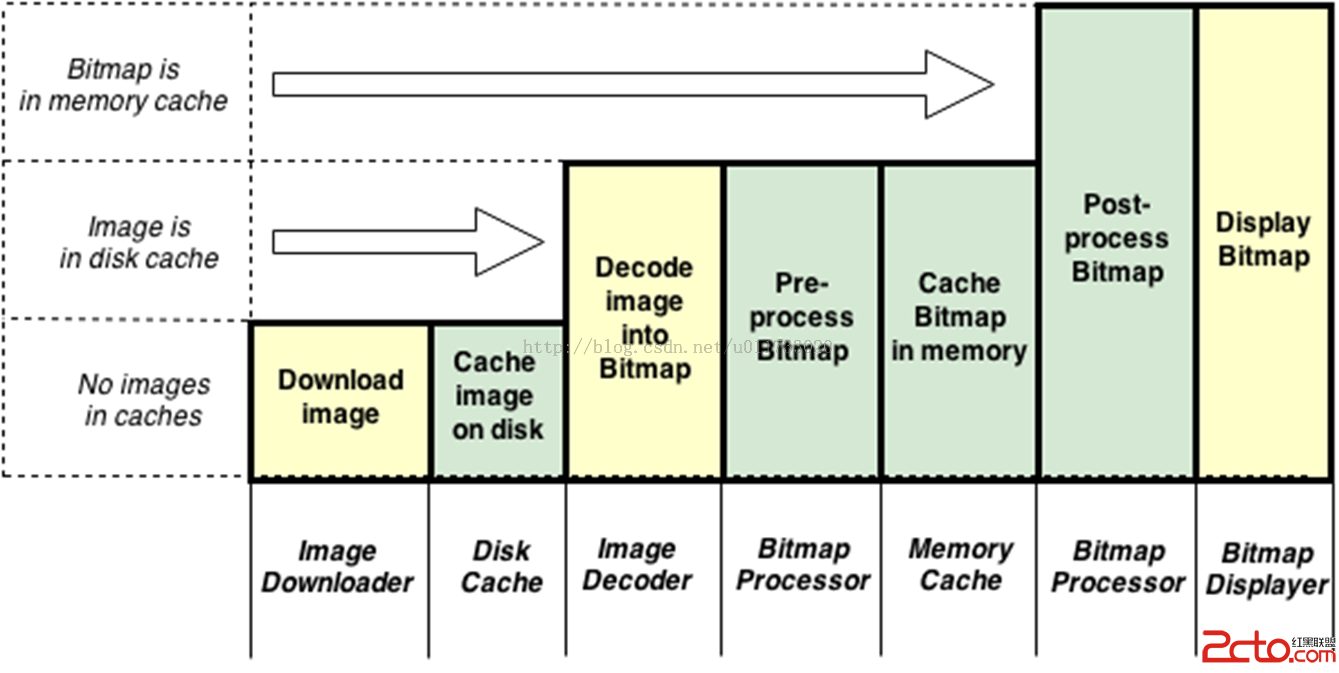 Android-Universal-Image-Loader 源碼解析:圖片加載與兩級快取
Android-Universal-Image-Loader 源碼解析 圖片加載是 Android 開發中常見的效能考題。Android-Universal-Image-