

編輯:關於 Android 開發
本文示範如何以 URLConnection 從網路下載檔案並寫入 SD 卡,同時透過 Handler 與 Message 機制回報下載進度,實作一個具備進度條的檔案下載功能。
public void downFile(String url, String path, String fileName) throws IOException {
    if (fileName == null || fileName == "")
        this.FileName = url.substring(url.lastIndexOf("/") + 1);
    else
        this.FileName = fileName; // 若輸入新檔名則使用新檔名

    URL Url = new URL(url);
    URLConnection conn = Url.openConnection();
    conn.connect();
    InputStream is = conn.getInputStream();
    this.fileSize = conn.getContentLength(); // 依回應取得檔案大小
    if (this.fileSize <= 0) { // 內容長度為 0
        throw new RuntimeException("無法得知檔案大小 ");
    }
    if (is == null) { // 沒有下載串流
        sendMsg(Down_ERROR);
        throw new RuntimeException("無法取得檔案");
    }
    FileOutputStream FOS = new FileOutputStream(path + this.FileName);
    byte buf[] = new byte[1024];
    downLoadFilePosition = 0;
    int numread;
    while ((numread = is.read(buf)) != -1) {
        FOS.write(buf, 0, numread);
        downLoadFilePosition += numread;
    }
    try {
        is.close();
    } catch (Exception ex) { ; }
}
使用網路時,記得要在 AndroidManifest.xml 中加入網路存取權限。
若要顯示下載進度,可透過訊息傳遞機制,隨下載進度更新進度條:
private Handler downloadHandler = new Handler() { // 接收並處理進度訊息
    @Override
    public void handleMessage(Message msg) {
        if (!Thread.currentThread().isInterrupted()) {
            switch (msg.what) {
                case DOWN_START:
                    pb.setMax(fileSize); // 設定進度最大值
                case DOWN_POSITION:
                    pb.setProgress(downLoadFilePosition); // 設定目前進度
                    break;
                case DOWN_COMPLETE:
                    Toast.makeText(DownLoadFileTest.this, "下載完成!", 1).show();
                    break;
                case Down_ERROR:
                    String error = msg.getData().getString("下載出錯!");
                    Toast.makeText(DownLoadFileTest.this, error, 1).show();
                    break;
            }
        }
        super.handleMessage(msg);
    }
};
透過下載過程中持續發送位置訊息,即可讓進度條即時反映下載狀態;下載完成或出錯時也能給予使用者明確提示。
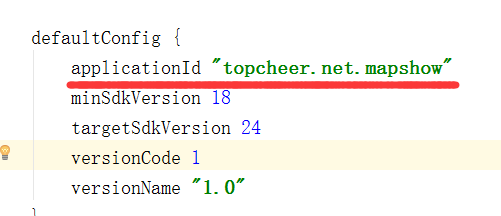 百度地圖 SDK 接入 Android 的兩個常見坑:包名與 SHA1 校驗
坑一:模擬器上必須用 TextureMapView 在布局中直接寫 <MapView>,在部分模擬器上會渲染失敗或報錯。替代方案是改用 <Texture
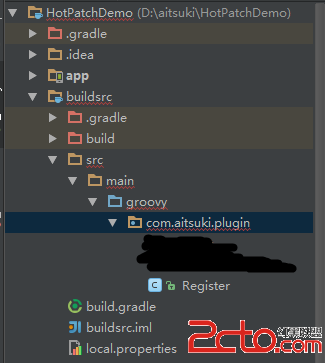 Android 熱修補動態修復(三):用 Javassist 注入位元碼,打造可用的熱修補框架雛形
一、先說個插曲 這篇原本在 4 月 8 日晚上就發佈了,接著我埋頭寫第四篇,結果把(四)存進草稿箱時,發現已發佈的(三)憑空消失,位置上變成了第四篇。問過論壇版主,可能
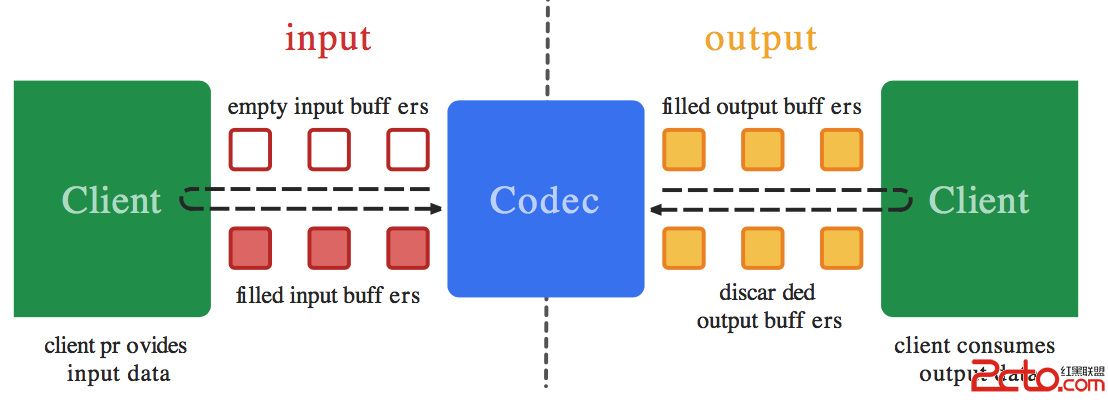 Android 音頻開發(5):一幀音頻數據的編碼與解碼
 本系列前四篇分別介紹了音頻開發的基礎知識、如何採集一幀音頻、如何播放一幀音頻,以及如何存儲與解析 WAV 格式文
 安卓生成二維碼實作與中文亂碼問題解決
 參考資料:https://blog.csdn.net/books1958/article/details/46346531 與 ht