

編輯:關於 Android 開發
Redis Cluster 的高可用能力,最終要靠一次真實的宕機演練來驗證。本文以一套三主三從的集群為例,逐步關停節點,觀察 slot 覆蓋率、slave 自動升主以及集群進入 fail 狀態的過程,並總結哪些操作是可自愈的、哪些必須人工介入。
三台主機,每台各跑一個 master 與一個 slave,共 16384 個 slot 均分為三段:
| IP | 端口 | 角色 |
|---|---|---|
| 192.168.31.208 | 6379 | master |
| 192.168.31.208 | 6378 | slave |
| 192.168.31.209 | 6379 | master |
| 192.168.31.209 | 6378 | slave |
| 192.168.31.210 | 6379 | master |
| 192.168.31.210 | 6378 | slave |
為方便操作,先在環境變量裡約定好起停方式:
PATH=$PATH:$HOME/cpprelease/redis-3.0.2/src/:$HOME/bin
BASE_PATH=/home/beidou_soa/cpprelease/
export PATH

alias redisstart1='cd ~/redis/ && redis-server $BASE_PATH/cfg/redis/redis1.conf && cd -'
alias redisstart2='cd ~/redis/ && redis-server $BASE_PATH/cfg/redis/redis2.conf && cd -'
alias redisstop1='cd ~/redis/ && redis-cli -p 6379 shutdown && cd -'
alias redisstop2='cd ~/redis/ && redis-cli -p 6378 shutdown && cd -'
用 redis-trib.rb check 檢查節點互通與 slot 分配:
[beidou_soa@localhost~]$ redis-trib.rb check 192.168.31.208:6379
Connecting to node 192.168.31.208:6379: OK
...
>>> Performing Cluster Check (using node 192.168.31.208:6379)
M: 273aa3c0... 192.168.31.208:6379 slots:10923-16383 (5461 slots) 1 additional replica(s)
S: 08f61dcd... 192.168.31.210:6378 slots:(0 slots) slave replicates 40cecda2...
S: d8e8369b... 192.168.31.209:6378 slots:(0 slots) slave replicates 4f11d426...
M: 40cecda2... 192.168.31.210:6379 slots:0-5460 (5461 slots) 1 additional replica(s)
M: 4f11d426... 192.168.31.209:6379 slots:5461-10922 (5462 slots) 1 additional replica(s)
S: 4b6e2b13... 192.168.31.208:6378 slots:(0 slots) slave replicates 273aa3c0...
[OK] All nodes agree about slots configuration.
[OK] All 16384 slots covered.
再用 redis-cli -c 寫入幾個 key 驗證 MOVED 重定向是否正常:
127.0.0.1:6379> set testkey002 testvalue002
-> Redirected to slot [401] located at 192.168.31.210:6379
OK
192.168.31.210:6379> get testkey002
"testvalue002"
關掉 208 上的 master 後,立刻查看其 slave(208:6378)的日誌:
6874:S 30 Dec 15:28:04.755 # Error condition on socket for SYNC: Connection refused
6874:S 30 Dec 15:28:06.647 * FAIL message received from 40cecda2... about 273aa3c0...
6874:S 30 Dec 15:28:06.647 # Cluster state changed: fail
6874:S 30 Dec 15:28:06.662 # Start of election delayed for 842 milliseconds (rank #0, offset 105547)
6874:S 30 Dec 15:28:07.565 # Starting a failover election for epoch 4
6874:S 30 Dec 15:28:07.567 # Failover election won: I'm the new master.
6874:M 30 Dec 15:28:07.567 * Discarding previously cached master state.
6874:M 30 Dec 15:28:07.567 # Cluster state changed: ok
此時 208:6378 已持有 10923-16383 這段 slot,集群恢復 ok。可見只要每個 master 都有 slave,單點宕機的恢復是秒級的自動過程。
關掉一台 slave後,集群狀態完全不變,只是 master 變成 0 additional replica(s),可用性不受影響。
關掉三台 slave後,slot 覆蓋依然完整,但集群已經失去任何容錯能力——此時再掛一台 master,就是致命的。
在沒有 slave 的情況下關閉一台 master:
>>> Check slots coverage...
[ERR] Not all 16384 slots are covered by nodes.
集群進入 fail 狀態,所有請求都會收到 (error) CLUSTERDOWN The cluster is down。
嘗試只拉起一台 slave,結果是無效的:
*** WARNING: 192.168.31.208:6379 claims to be slave of unknown node ID 4b6e2b13...
[ERR] Not all 16384 slots are covered by nodes
原因很直白:這台 slave 找不到自己的 master,也就無法接管 slot,集群仍然不可用。
把對應的 master 進程拉起來之後,slot 覆蓋恢復完整,集群立刻回到 ok。也就是說,fail 狀態的恢復依賴於「承載缺失 slot 的那個進程重新上線」,而不是靠選舉。
再重複一次「關 master → 等約一分鐘」的過程,可以看到被踢掉的那段 slot 由重新上線的節點重新接管,選舉完成後集群自動恢復正常。
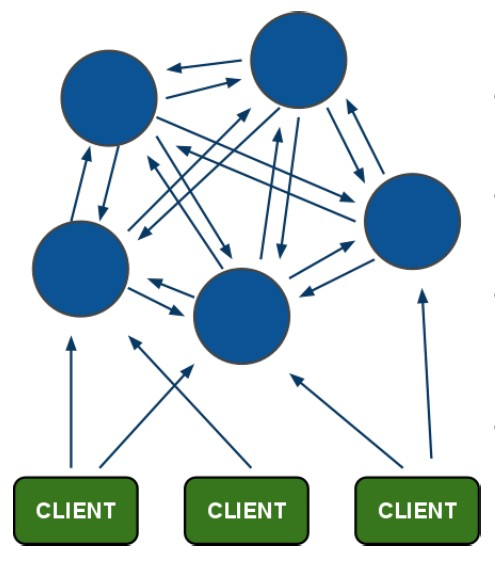
幾個關鍵設計:
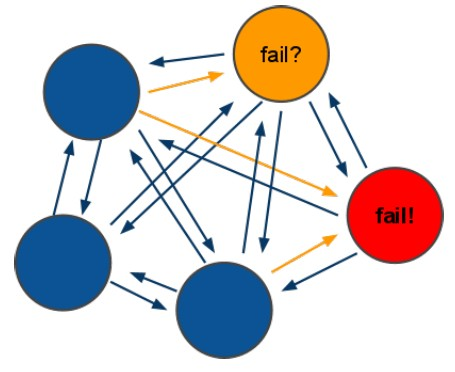

cluster-node-timeout 內無響應,該 master 被判定掛掉。cluster_state:fail 的兩種情況:
實踐結論:三主三從是 Redis Cluster 的最小靠譜配置。務必保證每個 master 至少一個 slave,並且讓 slave 與 master 分處不同物理機;同時要意識到「多數派丟失」是不可自動恢復的,這類場景只能靠備份與人工處置。
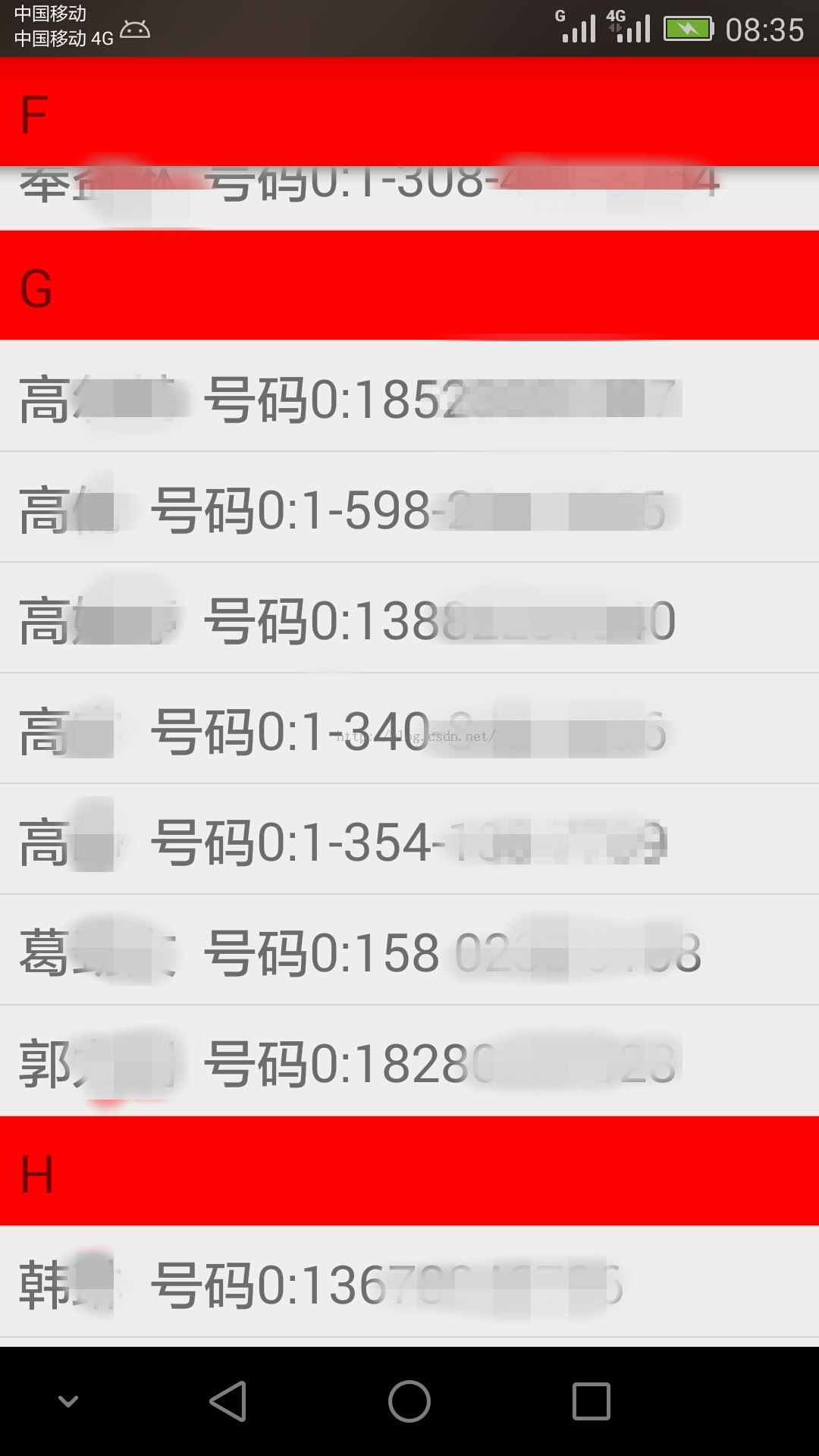 讀取手機通訊錄並用 PinnedSectionListView 分組展示、點擊撥號
要做一個類似系統通訊錄的頁面,需要解決三件事:讀取聯絡人資料、依姓名首字母分組並讓組標題懸浮固定、點擊項目直接撥號。以下用 PinnedSectionListView 一
 Android 圖片處理:平移、鏡像與倒影效果
 在前面幾篇文章中陸續介紹了圖片的旋轉與縮放,本文則繼續示範另外幾種常見的圖片操作:平移、鏡像與倒影,核心都是透過 Matr
 Android 效能優化:常見的記憶體洩漏與對策
前言 記憶體洩漏幾乎每個人都遇過,只是它藏在堆(heap)中,看不見摸不著。要檢測是否發生洩漏,實務上常借助工具:MAT 功能強大但上手門檻高;LeakCanary 則是
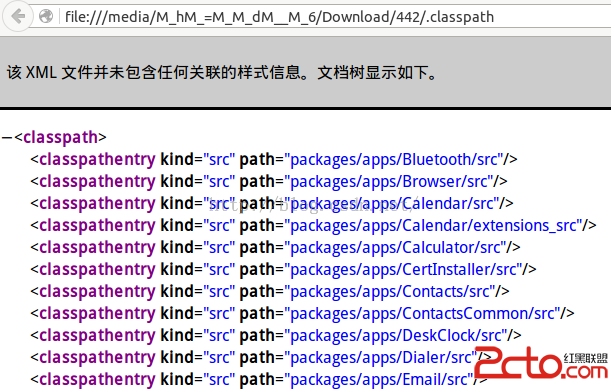 用 Eclipse 閱讀 Android 源碼:配置文件準備與常見報錯處理
想深入研究 Android 系統,直接讀源碼是最有效的途徑。雖然 Android Studio 已經是主流,但 Eclipse 在瀏覽龐大源碼樹時依然有其便利之處。本文記