

編輯:關於 Android 開發
SimpleAdapter是擴展性最好的適配器,可以定義各種你想要的布局,而且使用很方便。
layout:
1 <?xml version="1.0" encoding="utf-8"?> 2 <LinearLayout xmlns:android="https://schemas.android.com/apk/res/android" 3 android:layout_width="match_parent" 4 android:layout_height="match_parent" 5 android:orientation="horizontal"> 6 <ListView 7 android:layout_width="match_parent" 8 android:layout_height="wrap_content" 9 android:divider="#7f00" //分割線 10 android:dividerHeight="2dp" 11 android:id="@+id/listview_sample"/> 12 </LinearLayout>
header layout:
1 <?xml version="1.0" encoding="utf-8"?> 2 <LinearLayout xmlns:android="https://schemas.android.com/apk/res/android" 3 android:orientation="vertical" android:layout_width="match_parent" 4 android:layout_height="match_parent"> 5 <ImageView 6 android:layout_width="match_parent" 7 android:layout_height="wrap_content" 8 android:src="@mipmap/ic_launcher"/> 9 </LinearLayout>
自定義布局 item:
1 <?xml version="1.0" encoding="utf-8"?> 2 <LinearLayout xmlns:android="https://schemas.android.com/apk/res/android" 3 android:layout_width="match_parent" 4 android:layout_height="match_parent" 5 android:orientation="horizontal"> 6 <ImageView 7 android:layout_width="wrap_content" 8 android:layout_height="wrap_content" 9 android:layout_margin="3px" 10 android:id="@+id/img"/> 11 <LinearLayout 12 android:layout_width="match_parent" 13 android:layout_height="wrap_content" 14 android:orientation="vertical"> 15 <TextView 16 android:layout_width="match_parent" 17 android:layout_height="wrap_content" 18 android:textSize="16sp" 19 android:id="@+id/title"/> 20 <TextView 21 android:layout_width="match_parent" 22 android:layout_height="wrap_content" 23 android:id="@+id/info" 24 android:textSize="16sp"/> 25 </LinearLayout> 26 27 </LinearLayout>
Java 代碼:
1 public class SampleAdapterActivity extends Activity { 2 3 private ListView mListview; 4 @Override 5 protected void onCreate(Bundle savedInstanceState) { 6 super.onCreate(savedInstanceState); 7 setContentView(R.layout.sampleadapter_layout); 8 mListview = (ListView) findViewById(R.id.listview_sample); 9 SimpleAdapter adapter = new SimpleAdapter(this, 10 getData(), //數據來源 11 R.layout.item_listview, //對應item view 12 new String[]{"img","title","info"}, //data 中對應值 13 new int[]{R.id.img,R.id.title,R.id.info}); //填充layout位置 14 mListview.setHeaderDividersEnabled(true); //是否顯示頭view 的分割線 15 View header = View.inflate(this,R.layout.listview_header,null); 16 View footer = View.inflate(this,R.layout.listview_header,null); 17 mListview.addHeaderView(header); //添加頭部view 18 mListview.addFooterView(footer); //添加底部view 19 mListview.setAdapter(adapter); 20 } 21 22 @Override 23 protected void onResume() { 24 super.onResume(); 25 } 26 private List<? extends Map<String,?>> getData() { 27 List<Map<String,Object>> items = new ArrayList<Map<String, Object>>(); 28 for (int i = 0; i < 5; i++) { 29 Map<String,Object> item = new HashMap<String,Object>(); 30 item.put("img",R.mipmap.ic_launcher); 31 item.put("title","title -- " + i ); 32 item.put("info","info -- " + i ); 33 items.add(item); 34 } 35 return items; 36 } 37 }
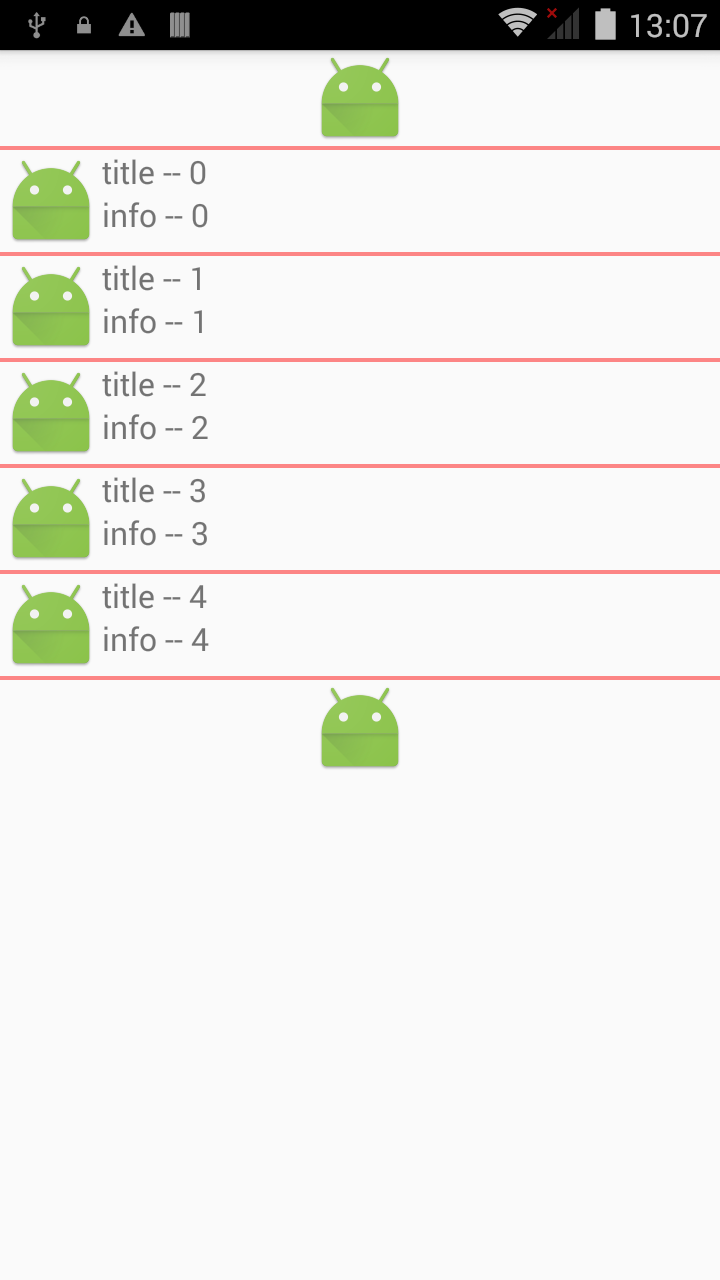
顯示效果:
 Kotlin Android 開發指南:建立專案與環境設定
 Kotlin 是 JetBrains 推出的程式語言,可與 Java 互操作,也越來越常用於 Android
 行動應用支付系列(一):手把手集成支付寶支付
 在行動應用百花齊放的時代,隨著行動支付的盛行,越來越多的 App 都集成了支付功能。以往支付從不是我負責的模塊,近期專案由我
 Android Studio 中的 NDK 編程實操
 如今開發 Android 程序基本都從 Eclipse 轉到了 Android Studio。最近項目有需求要用到
 Android項目實戰:用Fragment與FragmentTabHost搭建底部選單
底部選單的常見需求 許多Android應用會使用底部標籤頁作為主要導覽方式。使用者點擊不同標籤時,內容區顯示對應頁面。過去常使用TabHost,但在Fragment普及後