

編輯:關於 Android 開發
在 Android 開發中,彈出對話框以詢問或引導用戶選擇是常見需求,這類功能統稱為 Android Dialog,AlertDialog 通過建造者模式實現。本例模擬一個「挑媳婦」的單選對話框,與示例二不同的是:這裡提供了「確定」按鈕,用戶在點擊確定之前都可以反悔改選,效果如下圖:
Layout 界面代碼:
<?xml version="1.0" encoding="utf-8"?> <LinearLayout xmlns:android="https://schemas.android.com/apk/res/android" android:orientation="vertical" android:layout_width="match_parent" android:layout_height="match_parent"> <Button android:text="單向選擇" android:layout_width="match_parent" android:layout_height="wrap_content" android:onClick="show3" android:id="@+id/button3" /> </LinearLayout>
Java 功能實現代碼:
public class AlertDialogDemo extends AppCompatActivity { int index=0; @Override protected void onCreate(@Nullable Bundle savedInstanceState) { super.onCreate(savedInstanceState); setContentView(R.layout.alertdialog); } public void show3(View v){ AlertDialog.Builder builder = new AlertDialog.Builder(this); builder.setTitle("挑媳婦兒"); final String[] beautifulGirls = {"芙蓉姐姐","鳳姐","范爺","我自己"}; builder.setSingleChoiceItems(beautifulGirls, 0, new DialogInterface.OnClickListener() { @Override public void onClick(DialogInterface dialog, int which) { index = which; } }); builder.setPositiveButton("確定", new DialogInterface.OnClickListener() { @Override public void onClick(DialogInterface dialog, int which) { Toast.makeText(AlertDialogDemo.this,beautifulGirls[index]+"是你的媳婦了",Toast.LENGTH_SHORT).show(); } }); builder.show(); } }與示例二的關鍵差別在於使用了 setSingleChoiceItems:用戶單選時只更新 index 變量而不立即關閉對話框,直到點擊「確定」按鈕才根據 index 給出反饋。這裡仍有很大優化空間,感興趣的讀者可以自己動手改改。
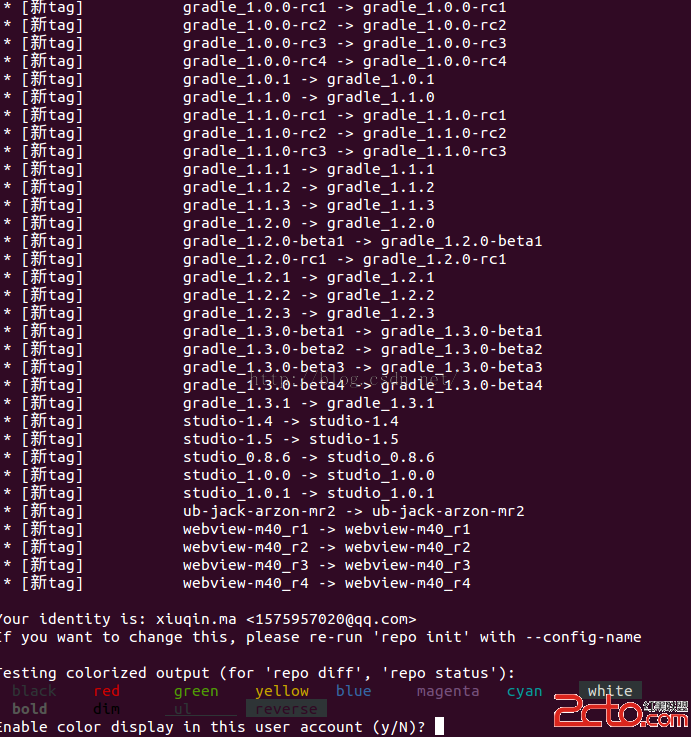 編譯 Android 源碼(四):在 Ubuntu 下下載 Android 源代碼
 下載 Android 源代碼是編譯工作的第一步。本文以清華大學的 AOSP 鏡像為例,
 Android ImageView scaleType 八種屬性詳解
 ImageView 的 scaleType 決定圖片如何在控制項中縮放與顯示。共有 matrix、f
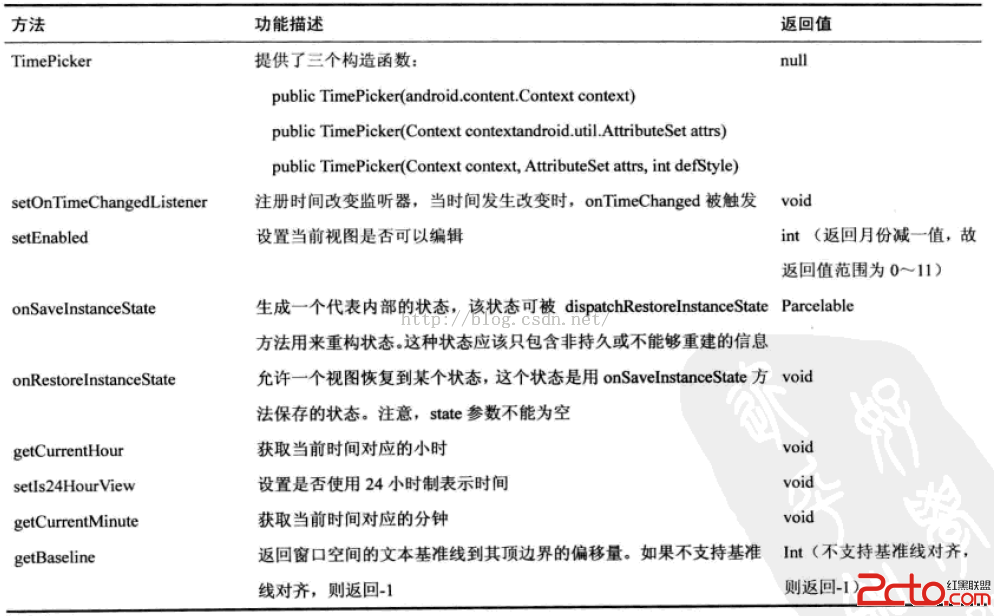 Android 時間選擇器 TimePicker 使用教學
 TimePicker 的類別繼承結構如下:java.lang.Object → android.view.Vi
 Android App Widget 入門:把資訊小工具放上桌面
Widget 是桌面小工具的總稱,而 Android 的 App Widget 則是可放在桌面上的應用程式小元件。它能讓使用者不必開啟主應用,就能快速看到資訊或進行操作。