

編輯:關於 Android 開發
在 Android 開發中,我們常常需要在界面上彈出對話框來詢問用戶或讓其做出選擇,這類功能被稱為 Android Dialog,而 AlertDialog 採用的是建造者(Builder)模式。下面我們模擬一個「選花魁」的普通單選對話框,效果如下圖:
Layout 界面代碼:
<?xml version="1.0" encoding="utf-8"?> <LinearLayout xmlns:android="https://schemas.android.com/apk/res/android" android:orientation="vertical" android:layout_width="match_parent" android:layout_height="match_parent"> <Button android:text="普通選項" android:layout_width="match_parent" android:layout_height="wrap_content" android:onClick="show2" android:id="@+id/button2" /> </LinearLayout>
Java 功能實現代碼:
public class AlertDialogDemo extends AppCompatActivity { @Override protected void onCreate(@Nullable Bundle savedInstanceState) { super.onCreate(savedInstanceState); setContentView(R.layout.alertdialog); } public void show2(View v){ AlertDialog.Builder builder = new AlertDialog.Builder(this); builder.setTitle("選花魁喽"); final String[] beautifulGirls = {"芙蓉姐姐","鳳姐","范爺","我自己"}; builder.setItems(beautifulGirls, new DialogInterface.OnClickListener() { @Override public void onClick(DialogInterface dialog, int which) { Toast.makeText(AlertDialogDemo.this,beautifulGirls[which]+"被選中啦",Toast.LENGTH_SHORT).show(); } }); builder.show(); } }核心思路是:先用 Builder 設置標題,再用 setItems 傳入字符串數組並綁定點擊事件,最後調用 show() 顯示。點擊某項後,即可通過 which 索引獲知用戶的選擇。
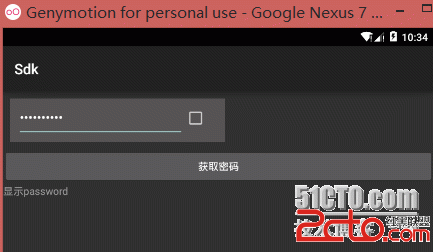 自定義 Android 組件:用組合方式打造可切換明文的密碼輸入框
兩條自定義控件的路,選組合這條比較省力 Android 裡所有控件都繼承自 android.view.View,而 android.view.ViewGroup 是 Vi
 Android 自定義控件(五):用 ViewPager 實現輪播廣告的基礎版本
系列起點 本文開始輪播圖廣告系列,第一步先讓圖片能滑起來。 原文地址:https://www.cnblogs.com/wuyudong/p/5918021.html,轉載
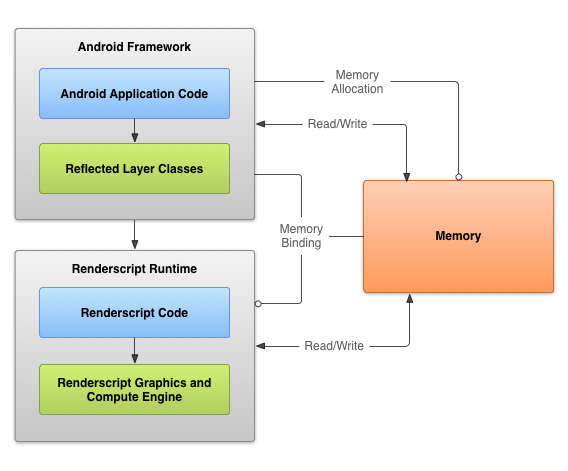 Android 高效計算:RenderScript 入門(一)基本概念與工作流程
 高效計算 —— RenderScript RenderScript 是 Google 在
 把手機變成示波器:AudioRecord 搭配 SurfaceView 實作
先前簡單介紹過 AudioRecord 與 AudioTrack 的用法,這次把它和 SurfaceView 結合,做出一個 Android 版的手機類比訊號示波器。