

編輯:關於 Android 開發
首先在 drawable 文件夾下新建一個 xml 文件 solid_c9c9c9.xml:

<?xml version="1.0" encoding="utf-8"?> <shape xmlns:android="https://schemas.android.com/apk/res/android" android:shape="rectangle"><!--方形--> <stroke android:width="1dp" android:color="@color/color_c9c9c9" /><!--描邊--> <solid android:color="@color/white" /><!--背景--> <corners android:radius="5dp" /><!--圓角--> </shape>
然後在布局文件中直接引用這個 xml 作為背景即可:
<LinearLayout android:layout_width="match_parent" android:layout_height="40dp" android:orientation="horizontal" android:layout_margin="@dimen/padding_15" android:background="@drawable/solid_c9c9c9"> </LinearLayout>
效果圖:

 深入 React Native 通訊機制:Java 與 JavaScript 的訊息佇列解析
React Native 通訊概觀 React Native 並未採用傳統 WebView 的 JsBridge 或 addJavascriptInterface 等通訊
 關於 TCP MSS 的內核設置解析
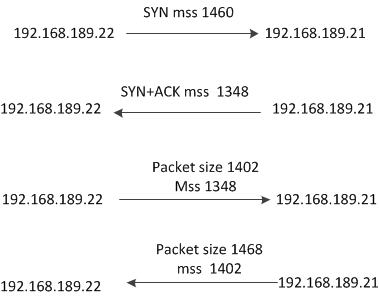
 下面通過一個 MSS 交互的例子來說明內核中的設置過程。在三次握手中,兩個主機各自捎帶了不同的 MSS 值:192.168.189.
 Android Canvas 繪圖之 Shader 圖文全解:五大子類詳解
概述 在用 Android 的 Canvas 繪制各種圖形時,我們可以通過 Paint.setShader(shader) 為畫筆設置 shader,從而畫出色彩繽紛的圖
 Android 時間選擇器 TimePicker 使用教學
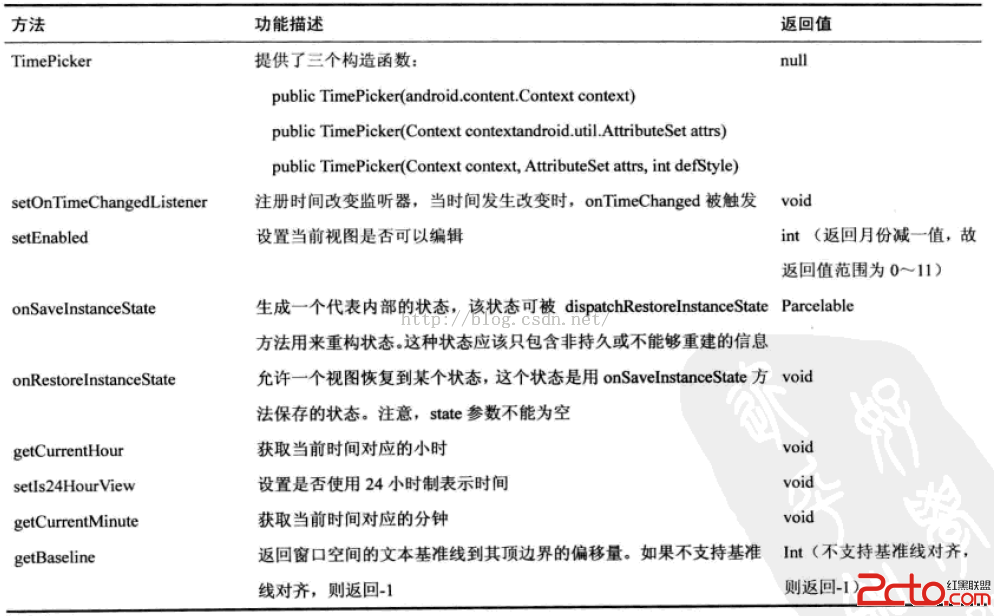
 TimePicker 的類別繼承結構如下:java.lang.Object → android.view.Vi