

編輯:關於 Android 開發
作為開發者,我們需要經常站在用戶角度思考問題。比如在應用商城下載軟件時,用戶點擊下載後會出現下載進度提示頁面。下面我們通過線程休眠的方式模擬下載進度更新(為方便截圖,這裡把進度條對話框設置在屏幕上方):
layout 界面代碼(僅佈置一個按鈕):
<?xml version="1.0" encoding="utf-8"?> <LinearLayout xmlns:android="https://schemas.android.com/apk/res/android" android:orientation="vertical" android:layout_width="match_parent" android:layout_height="match_parent"> <Button android:layout_width="wrap_content" android:layout_height="wrap_content" android:text="下載" android:onClick="begin"/> </LinearLayout>
Java 代碼實現(通過線程模擬下載進度更新):
public class ProgressBarDemo extends AppCompatActivity { @Override protected void onCreate(@Nullable Bundle savedInstanceState) { super.onCreate(savedInstanceState); setContentView(R.layout.progressbar); } public void begin(View v) { final ProgressDialog pd = new ProgressDialog(this); pd.setTitle("請稍等"); pd.setProgressStyle(ProgressDialog.STYLE_HORIZONTAL); pd.setMessage("正在玩命下載中......"); pd.getWindow().setGravity(Gravity.TOP); pd.setMax(100); pd.show(); new Thread(new Runnable() { int initial = 0; @Override public void run() { while(initial<pd.getMax()){ pd.setProgress(initial+=40); try { Thread.sleep(1000); } catch (InterruptedException e) { e.printStackTrace(); } } pd.dismiss(); } }).start(); } }關鍵點在於:先構建並配置水平樣式的 ProgressDialog,然後在一個後台線程裡循環更新進度(這裡每次遞增 40 並 sleep 一秒模擬耗時下載),當進度達到最大值時調用 dismiss() 關閉對話框。
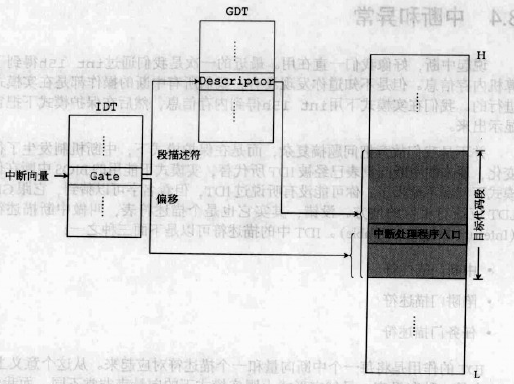 Linux 0.11 系統呼叫機制解析
系統呼叫是使用者程式進入核心空間的重要管道。以 Linux 0.11 而言,write 這類系統呼叫會透過中斷門觸發核心處理流程。本
 Android 顯示 GIF 動畫:用 WebView 載入加載圖
 在 App 啟動或資料加載時,常需要顯示一個等待動畫。若使用 GIF 圖片,傳統 ImageView
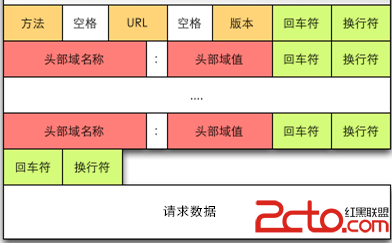 Android 網路編程入門:HTTP 協議原理與請求響應報文
Android 網路編程入門:HTTP 協議原理 行動應用幾乎都會與網路互動。即使已有許多開源庫能簡化請求流程,理解 HTTP 的基本原理,仍是開發者除錯與優化的基礎。
 Android 技巧:啟動屏與新功能左右引導頁的實現
前言 有段時間沒寫博客了。趁着一些內容還新鮮,把工作裡積累的東西整理出來分享,總比爛在肚子裡強。之前有過一個「一週開發一個 App」的計劃,擱置的原因很簡單——執行力不夠